reported at https://support.abp.io/QA/Questions/1126#answer-aacb29ac-c321-fde0-8f2b-39fc7e37b38a
Create new tenant not creating admin user
ABP Framework version: v4.3.0 (Upgraded from 4.2.1) UI type: Angular DB provider: EF Core Tiered (MVC) or Identity Server Separated (Angular): no Exception message and stack trace: No error is thrown. Steps to reproduce the issue: Goto SaaS-->Tenants-->New Tenant Create a new tenant with the admin user and pass entered. Save
It looks like the tenant is created but the admin user is not added. In the database the tenant is added but there is no user. Potentially a problem in ObjectExtensions or TenantAppService?
@scott7106:
The issue is more pervasive than Chris reported. None of the identity components are created for the new tenant. This includes the admin user, the default admin role and the initial permission grants needed for the new admin role.
14 Answer(s)
-
0
A new migration handler class has been added in v4.3.0. Therefore you may have problem with creating new admin user and its related records. To solve this problem; copy the following class into your project's
/aspnet-core/src/Acme.BookStore/Domain/Datafolder. Don't forget to adjust the Acme.BookStore namespacehttps://gist.github.com/ebicoglu/82723d502c3bddcb70b3b77ea567c22e
Markdown supported.Copy, paste, or drag & drop images and files (max 100 MB per file, 100 MB total per post) -
0
Hello Alper,
There is the situation. I have a few days ago pass to 4.3 (without making the migration with compare files method) launch the DBMigrator and see the tenant creation problem in production.
Then I have make the full migration with compare files, restart DBMigrator and still have the problem.
The Handler is in place and the error in the log is from the handler file.
More informations : Tenant creation is OK with new project and with our project but a new database so is something in our database.
Many thanks for your help.
The error log on tenant creation (we transfer link because is too long for the post permission) https://we.tl/t-BLS8bFoK4s
Markdown supported.Copy, paste, or drag & drop images and files (max 100 MB per file, 100 MB total per post) -
1
I checked the log file. The main exception is
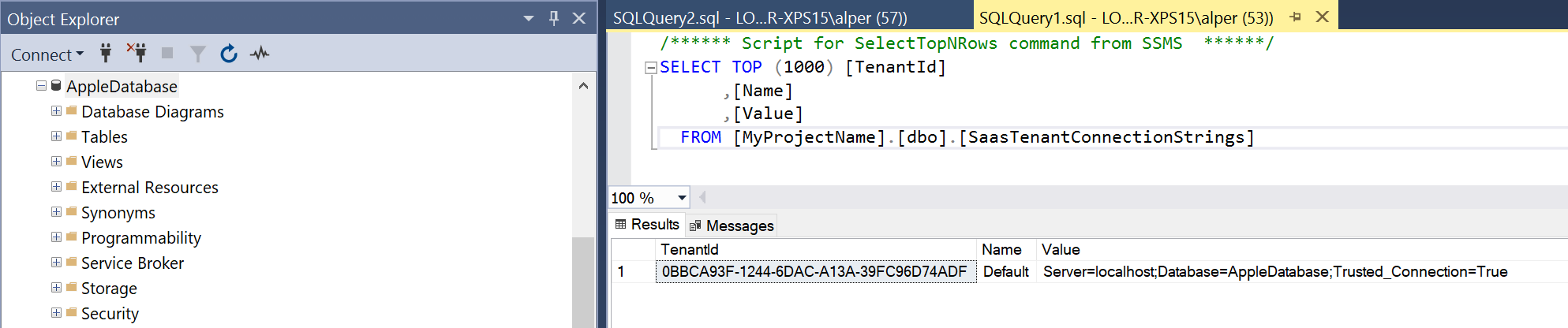
The timeout period elapsed prior to completion of the operation or the server is not respondingfor SQL command. This sounds like ABP cannot reach or find the connection string of the specified tenant. So the problem is at the DB. From v4.3.X the connection strings are stored inSaasTenantConnectionStringstable. So I guess your application doesn't find the connection string for the new tenant and throws server not responding error. Add a connection string like this to yourSaasTenantConnectionStringstable. And let's see if it works.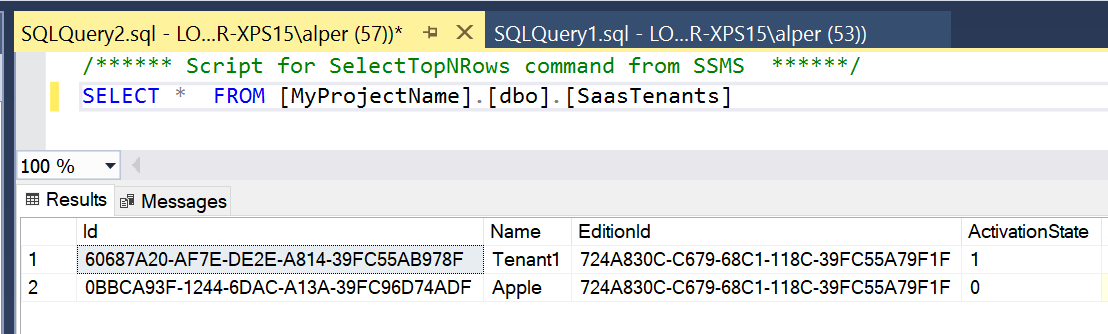
Execution Timeout Expired.  The timeout period elapsed prior to completion of the operation or the server is not responding.
Microsoft.Data.SqlClient.SqlException (0x80131904): Execution Timeout Expired.  The timeout period elapsed prior to completion of the operation or the server is not responding.
 ---> System.ComponentModel.Win32Exception (258): Dépassement du délai d’attente.
   at Microsoft.Data.SqlClient.SqlCommand.<>c.<ExecuteDbDataReaderAsync>b__169_0(Task`1 result)
   at System.Threading.Tasks.ContinuationResultTaskFromResultTask`2.InnerInvoke()
   at System.Threading.ExecutionContext.RunInternal(ExecutionContext executionContext, ContextCallback callback, Object state)
--- End of stack trace from previous location ---
   at System.Threading.Tasks.Task.ExecuteWithThreadLocal(Task& currentTaskSlot, Thread threadPoolThread)
--- End of stack trace from previous location ---
   at Microsoft.EntityFrameworkCore.Storage.RelationalCommand.ExecuteReaderAsync(RelationalCommandParameterObject parameterObject, CancellationToken cancellationToken)
   at Microsoft.EntityFrameworkCore.Storage.RelationalCommand.ExecuteReaderAsync(RelationalCommandParameterObject parameterObject, CancellationToken cancellationToken)
   at Microsoft.EntityFrameworkCore.Query.Internal.SplitQueryingEnumerable`1.AsyncEnumerator.InitializeReaderAsync(DbContext _, Boolean result, CancellationToken cancellationToken)
   at Microsoft.EntityFrameworkCore.SqlServer.Storage.Internal.SqlServerExecutionStrategy.ExecuteAsync[TState,TResult](TState state, Func`4 operation, Func`4 verifySucceeded, CancellationToken cancellationToken)
   at Microsoft.EntityFrameworkCore.Query.Internal.SplitQueryingEnumerable`1.AsyncEnumerator.MoveNextAsync()
   at Microsoft.EntityFrameworkCore.Query.ShapedQueryCompilingExpressionVisitor.SingleOrDefaultAsync[TSource](IAsyncEnumerable`1 asyncEnumerable, CancellationToken cancellationToken)
   at Microsoft.EntityFrameworkCore.Query.ShapedQueryCompilingExpressionVisitor.SingleOrDefaultAsync[TSource](IAsyncEnumerable`1 asyncEnumerable, CancellationToken cancellationToken)
   at Volo.Abp.Domain.Repositories.EntityFrameworkCore.EfCoreRepository`3.FindAsync(TKey id, Boolean includeDetails, CancellationToken cancellationToken)
   at Castle.DynamicProxy.AsyncInterceptorBase.ProceedAsynchronous[TResult](IInvocation invocation, IInvocationProceedInfo proceedInfo)
   at Volo.Abp.Castle.DynamicProxy.CastleAbpMethodInvocationAdapterWithReturnValue`1.ProceedAsync()
   at Volo.Abp.Uow.UnitOfWorkInterceptor.InterceptAsync(IAbpMethodInvocation invocation)
   at Volo.Abp.Castle.DynamicProxy.CastleAsyncAbpInterceptorAdapter`1.InterceptAsync[TResult](IInvocation invocation, IInvocationProceedInfo proceedInfo, Func`3 proceed)
   at Volo.Saas.Tenants.TenantStore.GetCacheItemAsync(Nullable`1 id, String name)
   at Volo.Saas.Tenants.TenantStore.FindAsync(Guid id)
   at Jureez.Data.JureezTenantDatabaseMigrationHandler.MigrateAndSeedForTenantAsync(Guid tenantId, String adminEmail, String adminPassword) in C:\Personnel\Developpement\Jureez\aspnet-core\src\Jureez.Domain\Data\JureezTenantDatabaseMigrationHandler.cs:line 92
ClientConnectionId:c87fd6c1-c77d-4052-9967-8c65aeb3214d
Markdown supported.Copy, paste, or drag & drop images and files (max 100 MB per file, 100 MB total per post) -
0
Thanks Alper to have take time to read the logs.
I don't anderstand when to add a new connection string in my db? I can add it after the tenant creation but it's too late because the user will not be created on the tenant creation and the problem will still remain. I can add it before the tenant creation but I have not the Id at this moment.
Sorry if this a dumb question and i have not anderstand your advised manipulation.
One more information it's that with a completly new db in my existing migrated app when i create a new tenant the user is created with success and the SaasTenantConnectionStrings is empty.
Markdown supported.Copy, paste, or drag & drop images and files (max 100 MB per file, 100 MB total per post) -
0
The issue occurs when trying to create a tenant using Use Shared Database. In this case, I would not expect it to create the tenant connection string record. However, it fails attempting to find the tenant in the TenantStore.
edit: using a new database for the tenant processes successfully and adds the identity information to the new database.
In my use case, we do not use separated databases per tenant. I want to completely disable this function and always use the shared database.
Log Snippet
2021-05-19 12:55:06.128 -04:00 [ERR] Failed executing DbCommand (30,060ms) [Parameters=[@__ef_filter__p_0='?' (DbType = Boolean), @__id_0='?' (DbType = Guid)], CommandType='"Text"', CommandTimeout='30']
...
2021-05-19 12:55:06.147 -04:00 [ERR] An exception occurred while iterating over the results of a query for context type 'Volo.Saas.EntityFrameworkCore.SaasDbContext'.
Microsoft.Data.SqlClient.SqlException (0x80131904): Execution Timeout Expired.  The timeout period elapsed prior to completion of the operation or the server is not responding.
 ---> System.ComponentModel.Win32Exception (258): The wait operation timed out.
   at Microsoft.Data.SqlClient.SqlCommand.<>c.<ExecuteDbDataReaderAsync>b__169_0(Task`1 result)
   at System.Threading.Tasks.ContinuationResultTaskFromResultTask`2.InnerInvoke()
   at System.Threading.ExecutionContext.RunInternal(ExecutionContext executionContext, ContextCallback callback, Object state)
--- End of stack trace from previous location ---
   at System.Threading.Tasks.Task.ExecuteWithThreadLocal(Task& currentTaskSlot, Thread threadPoolThread)
--- End of stack trace from previous location ---
   at Microsoft.EntityFrameworkCore.Storage.RelationalCommand.ExecuteReaderAsync(RelationalCommandParameterObject parameterObject, CancellationToken cancellationToken)
   at Microsoft.EntityFrameworkCore.Storage.RelationalCommand.ExecuteReaderAsync(RelationalCommandParameterObject parameterObject, CancellationToken cancellationToken)
   at Microsoft.EntityFrameworkCore.Query.Internal.SplitQueryingEnumerable`1.AsyncEnumerator.InitializeReaderAsync(DbContext _, Boolean result, CancellationToken cancellationToken)
   at Microsoft.EntityFrameworkCore.SqlServer.Storage.Internal.SqlServerExecutionStrategy.ExecuteAsync[TState,TResult](TState state, Func`4 operation, Func`4 verifySucceeded, CancellationToken cancellationToken)
   at Microsoft.EntityFrameworkCore.Query.Internal.SplitQueryingEnumerable`1.AsyncEnumerator.MoveNextAsync()
ClientConnectionId:d32b8097-20fb-489d-8a01-02a9e35f514a
Error Number:-2,State:0,Class:11
Microsoft.Data.SqlClient.SqlException (0x80131904): Execution Timeout Expired.  The timeout period elapsed prior to completion of the operation or the server is not responding.
 ---> System.ComponentModel.Win32Exception (258): The wait operation timed out.
   at Microsoft.Data.SqlClient.SqlCommand.<>c.<ExecuteDbDataReaderAsync>b__169_0(Task`1 result)
   at System.Threading.Tasks.ContinuationResultTaskFromResultTask`2.InnerInvoke()
   at System.Threading.ExecutionContext.RunInternal(ExecutionContext executionContext, ContextCallback callback, Object state)
--- End of stack trace from previous location ---
   at System.Threading.Tasks.Task.ExecuteWithThreadLocal(Task& currentTaskSlot, Thread threadPoolThread)
--- End of stack trace from previous location ---
   at Microsoft.EntityFrameworkCore.Storage.RelationalCommand.ExecuteReaderAsync(RelationalCommandParameterObject parameterObject, CancellationToken cancellationToken)
   at Microsoft.EntityFrameworkCore.Storage.RelationalCommand.ExecuteReaderAsync(RelationalCommandParameterObject parameterObject, CancellationToken cancellationToken)
   at Microsoft.EntityFrameworkCore.Query.Internal.SplitQueryingEnumerable`1.AsyncEnumerator.InitializeReaderAsync(DbContext _, Boolean result, CancellationToken cancellationToken)
   at Microsoft.EntityFrameworkCore.SqlServer.Storage.Internal.SqlServerExecutionStrategy.ExecuteAsync[TState,TResult](TState state, Func`4 operation, Func`4 verifySucceeded, CancellationToken cancellationToken)
   at Microsoft.EntityFrameworkCore.Query.Internal.SplitQueryingEnumerable`1.AsyncEnumerator.MoveNextAsync()
ClientConnectionId:d32b8097-20fb-489d-8a01-02a9e35f514a
Error Number:-2,State:0,Class:11
2021-05-19 13:04:00.072 -04:00 [ERR] Execution Timeout Expired.  The timeout period elapsed prior to completion of the operation or the server is not responding.
Microsoft.Data.SqlClient.SqlException (0x80131904): Execution Timeout Expired.  The timeout period elapsed prior to completion of the operation or the server is not responding.
 ---> System.ComponentModel.Win32Exception (258): The wait operation timed out.
   at Microsoft.Data.SqlClient.SqlCommand.<>c.<ExecuteDbDataReaderAsync>b__169_0(Task`1 result)
   at System.Threading.Tasks.ContinuationResultTaskFromResultTask`2.InnerInvoke()
   at System.Threading.ExecutionContext.RunInternal(ExecutionContext executionContext, ContextCallback callback, Object state)
--- End of stack trace from previous location ---
   at System.Threading.Tasks.Task.ExecuteWithThreadLocal(Task& currentTaskSlot, Thread threadPoolThread)
--- End of stack trace from previous location ---
   at Microsoft.EntityFrameworkCore.Storage.RelationalCommand.ExecuteReaderAsync(RelationalCommandParameterObject parameterObject, CancellationToken cancellationToken)
   at Microsoft.EntityFrameworkCore.Storage.RelationalCommand.ExecuteReaderAsync(RelationalCommandParameterObject parameterObject, CancellationToken cancellationToken)
   at Microsoft.EntityFrameworkCore.Query.Internal.SplitQueryingEnumerable`1.AsyncEnumerator.InitializeReaderAsync(DbContext _, Boolean result, CancellationToken cancellationToken)
   at Microsoft.EntityFrameworkCore.SqlServer.Storage.Internal.SqlServerExecutionStrategy.ExecuteAsync[TState,TResult](TState state, Func`4 operation, Func`4 verifySucceeded, CancellationToken cancellationToken)
   at Microsoft.EntityFrameworkCore.Query.Internal.SplitQueryingEnumerable`1.AsyncEnumerator.MoveNextAsync()
   at Microsoft.EntityFrameworkCore.Query.ShapedQueryCompilingExpressionVisitor.SingleOrDefaultAsync[TSource](IAsyncEnumerable`1 asyncEnumerable, CancellationToken cancellationToken)
   at Microsoft.EntityFrameworkCore.Query.ShapedQueryCompilingExpressionVisitor.SingleOrDefaultAsync[TSource](IAsyncEnumerable`1 asyncEnumerable, CancellationToken cancellationToken)
   at Volo.Abp.Domain.Repositories.EntityFrameworkCore.EfCoreRepository`3.FindAsync(TKey id, Boolean includeDetails, CancellationToken cancellationToken)
   at Castle.DynamicProxy.AsyncInterceptorBase.ProceedAsynchronous[TResult](IInvocation invocation, IInvocationProceedInfo proceedInfo)
   at Volo.Abp.Castle.DynamicProxy.CastleAbpMethodInvocationAdapterWithReturnValue`1.ProceedAsync()
   at Volo.Abp.Uow.UnitOfWorkInterceptor.InterceptAsync(IAbpMethodInvocation invocation)
   at Volo.Abp.Castle.DynamicProxy.CastleAsyncAbpInterceptorAdapter`1.InterceptAsync[TResult](IInvocation invocation, IInvocationProceedInfo proceedInfo, Func`3 proceed)
   at Volo.Saas.Tenants.TenantStore.GetCacheItemAsync(Nullable`1 id, String name)
   at Volo.Saas.Tenants.TenantStore.FindAsync(Guid id)
   at OtisEd.Zipline.Data.ZiplineTenantDatabaseMigrationHandler.MigrateAndSeedForTenantAsync(Guid tenantId, String adminEmail, String adminPassword) in C:\AppDev\otised\OtisEd.Zipline\aspnet-core\src\OtisEd.Zipline.Domain\Data\ZiplineTenantDatabaseMigrationHandler.cs:line 92
ClientConnectionId:d32b8097-20fb-489d-8a01-02a9e35f514a
Error Number:-2,State:0,Class:11
Markdown supported.Copy, paste, or drag & drop images and files (max 100 MB per file, 100 MB total per post) -
0
Same here we use exclusively one shared database.
Markdown supported.Copy, paste, or drag & drop images and files (max 100 MB per file, 100 MB total per post) -
0
I can do that but you must have the database too. Because it works with a New db. How can we send you our mssql db ? (a Light version that have the problem too)
Markdown supported.Copy, paste, or drag & drop images and files (max 100 MB per file, 100 MB total per post) -
0
sended to info@abp.io
Many thanks for your help.
Markdown supported.Copy, paste, or drag & drop images and files (max 100 MB per file, 100 MB total per post) -
0
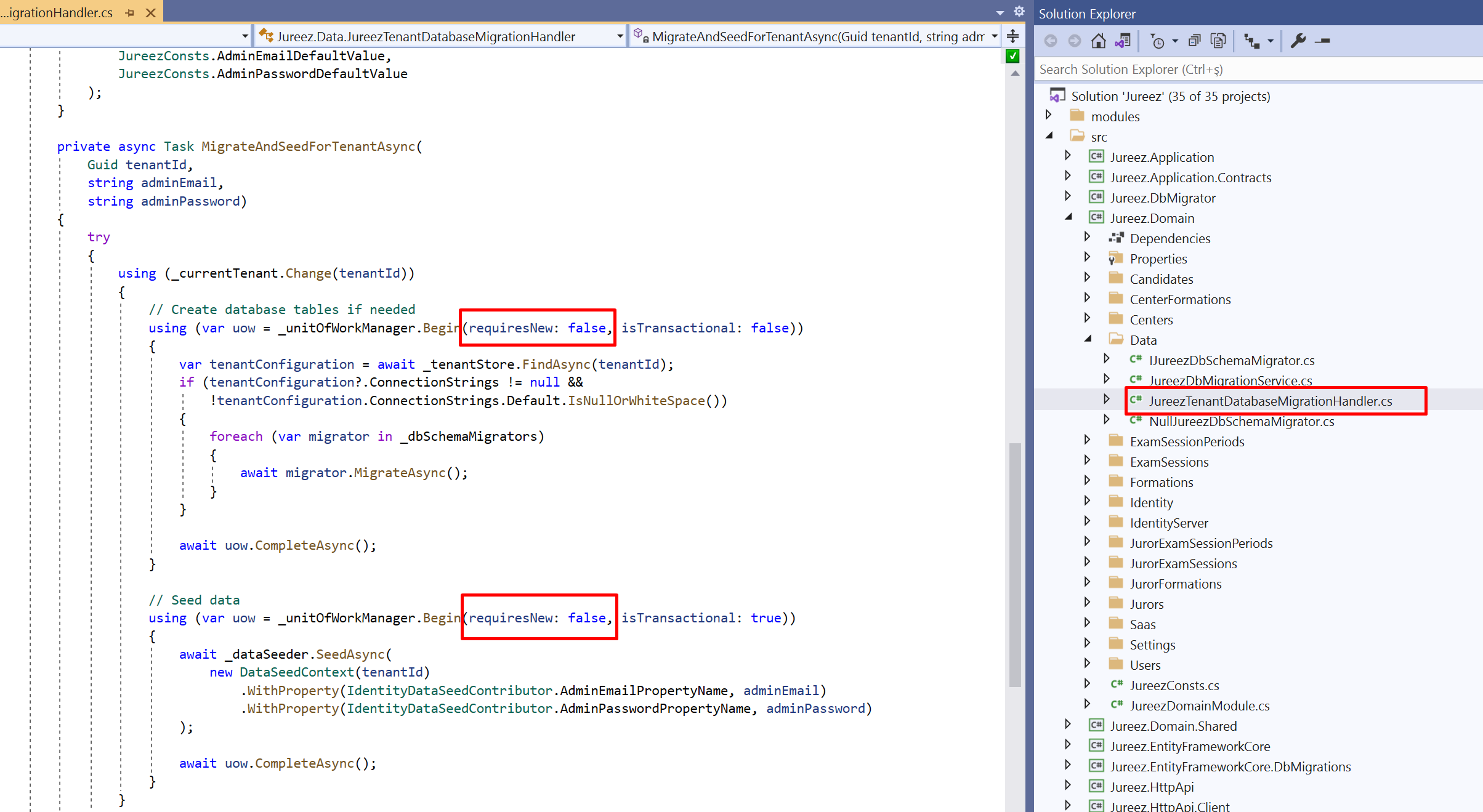
requiresNew (bool): Set true to ignore the surrounding unit of work and start a new UOW with the provided options. Default value is false. If it is false and there is a surrounding UOW, Begin method doesn't actually begin a new UOW, but silently participates to the existing UOW.
https://docs.abp.io/en/abp/4.3/Unit-Of-Work#begin-a-new-unit-of-work
Markdown supported.Copy, paste, or drag & drop images and files (max 100 MB per file, 100 MB total per post) -
0
Hi Alper,
It's ok for us too.
Thanks for your help and the solution.
Markdown supported.Copy, paste, or drag & drop images and files (max 100 MB per file, 100 MB total per post)