- ABP Framework version: v8.2.0
- UI Type: Blazor Server
- Database System: EF Core
- Tiered (for MVC) or Auth Server Separated (for Angular): yes
Hi,
We have integrated Azure AD authentication in our application. However, when we try to logout, it does not logout from Azure AD. Can you please guide us on how to implement logout from external provider in abp?
29 Answer(s)
-
0
Hi,
it is already like this https://support.abp.io/QA/Questions/5244/B2C-user-is-logged-in-as-local-user-on-signup-flow
 Markdown supported.Copy, paste, or drag & drop images and files (max 100 MB per file, 100 MB total per post)
 -
0
Hi,
What we are looking for is to logout from the external provider, by invoking the end session endpoint, and perform a single sign out. We have registered Azure AD as external provider in the auth server using OpenID Connect with dynamic options. So, when we logout we want to redirect to Azure AD logout uri.
Markdown supported.Copy, paste, or drag & drop images and files (max 100 MB per file, 100 MB total per post) -
0
Hi,
After my check, This is the default behavior.
If you want to logout from Azure Id, You need to redirect manually.
For example:
[Dependency(ReplaceServices = true)]
[ExposeServices(typeof(LogoutModel))]
public class MyLoginOutModel : LogoutModel
{
    public override async Task<IActionResult> OnGetAsync()
    {
        if (CurrentUser.IsAuthenticated)
        {
            await IdentitySecurityLogManager.SaveAsync(new IdentitySecurityLogContext
            {
                Identity = IdentitySecurityLogIdentityConsts.Identity,
                Action = IdentitySecurityLogActionConsts.Logout
            });
        }
        //
        await SignInManager.SignOutAsync();
        await HttpContext.SignOutAsync(ConfirmUserModel.ConfirmUserScheme);
        await HttpContext.SignOutAsync(ChangePasswordModel.ChangePasswordScheme);

        // redirect to azure id
        return Redirect("https://login.microsoftonline.com/common/oauth2/v2.0/logout?post_logout_redirect_uri=https://localhost:44382/Account/Login");

    }
}
Markdown supported.Copy, paste, or drag & drop images and files (max 100 MB per file, 100 MB total per post) -
0
Hi,
I tried extending LogoutModel. But it is not getting invoked. I also tried extending the LogoutController and adding the following in GetAsync method. But I'm getting an error.

 Markdown supported.Copy, paste, or drag & drop images and files (max 100 MB per file, 100 MB total per post)
 -
0
Hi,
It works for me
context.Services.AddAuthentication()
    .AddOpenIdConnect("AzureOpenId", "Azure AD OpenId", options =>
    {
        options.Authority = "https://login.microsoftonline.com/" + configuration["AzureAd:TenantId"] + "/v2.0/";
        options.ClientId = configuration["AzureAd:ClientId"];
        options.ResponseType = OpenIdConnectResponseType.CodeIdToken;
        options.CallbackPath = configuration["AzureAd:CallbackPath"];
        options.ClientSecret = configuration["AzureAd:ClientSecret"];
        options.RequireHttpsMetadata = false;
        options.SaveTokens = true;
        options.GetClaimsFromUserInfoEndpoint = true;
        options.Scope.Add("email");
        options.ClaimActions.MapJsonKey(ClaimTypes.NameIdentifier, "sub");
    });
[Dependency(ReplaceServices = true)] [ExposeServices(typeof(LogoutModel))] public class MyLoginOutModel : LogoutModel { public override async Task<IActionResult> OnGetAsync() { if (CurrentUser.IsAuthenticated) { await IdentitySecurityLogManager.SaveAsync(new IdentitySecurityLogContext { Identity = IdentitySecurityLogIdentityConsts.Identity, Action = IdentitySecurityLogActionConsts.Logout }); } // await SignInManager.SignOutAsync(); await HttpContext.SignOutAsync(ConfirmUserModel.ConfirmUserScheme); await HttpContext.SignOutAsync(ChangePasswordModel.ChangePasswordScheme); return SignOut("AzureOpenId"); } }Markdown supported.Copy, paste, or drag & drop images and files (max 100 MB per file, 100 MB total per post) -
0
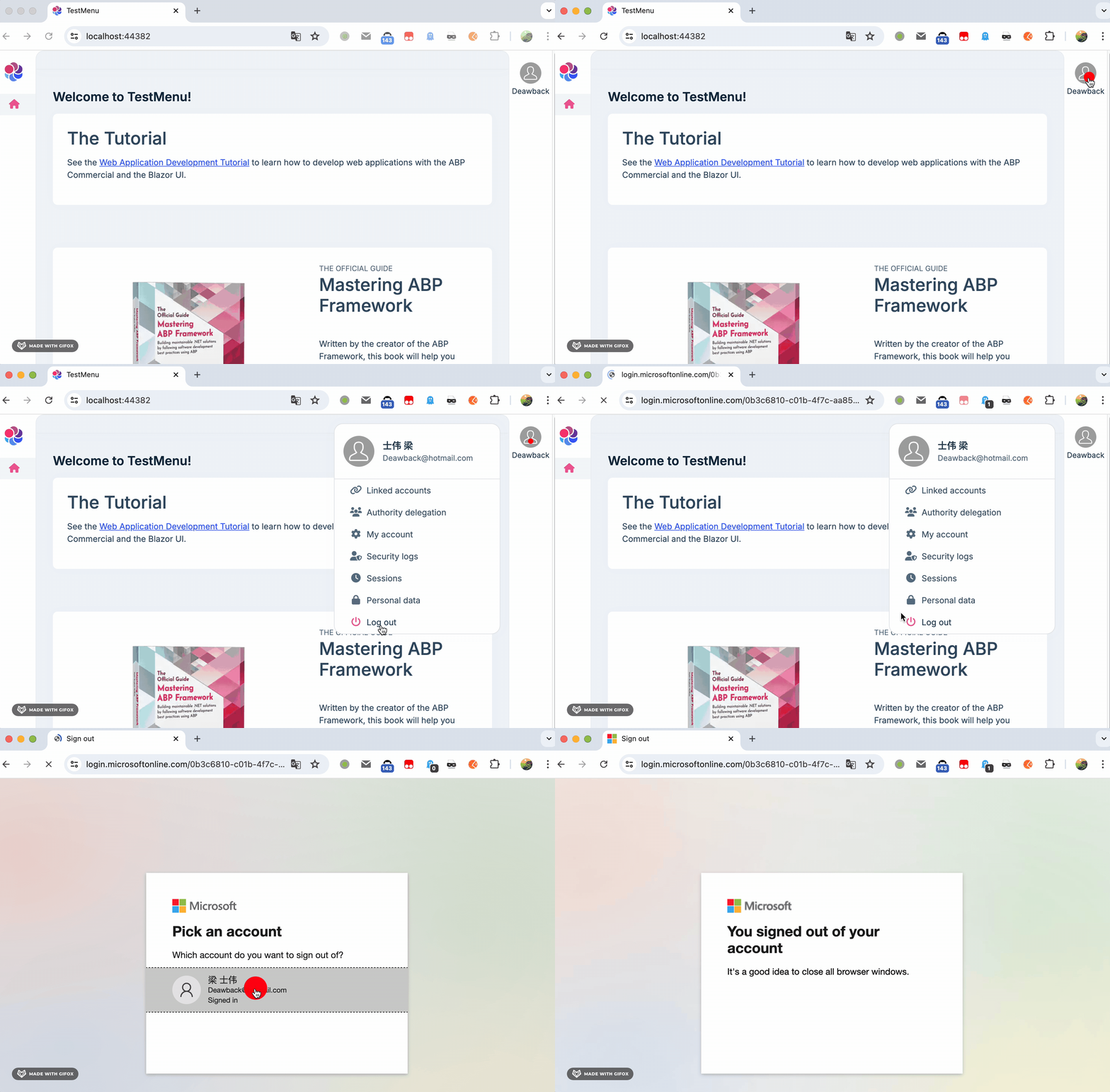 Markdown supported.Copy, paste, or drag & drop images and files (max 100 MB per file, 100 MB total per post)
 -
0
The following is our configuration. Added client credentials as dynamic options, so that each tenant can configure their own credentials.
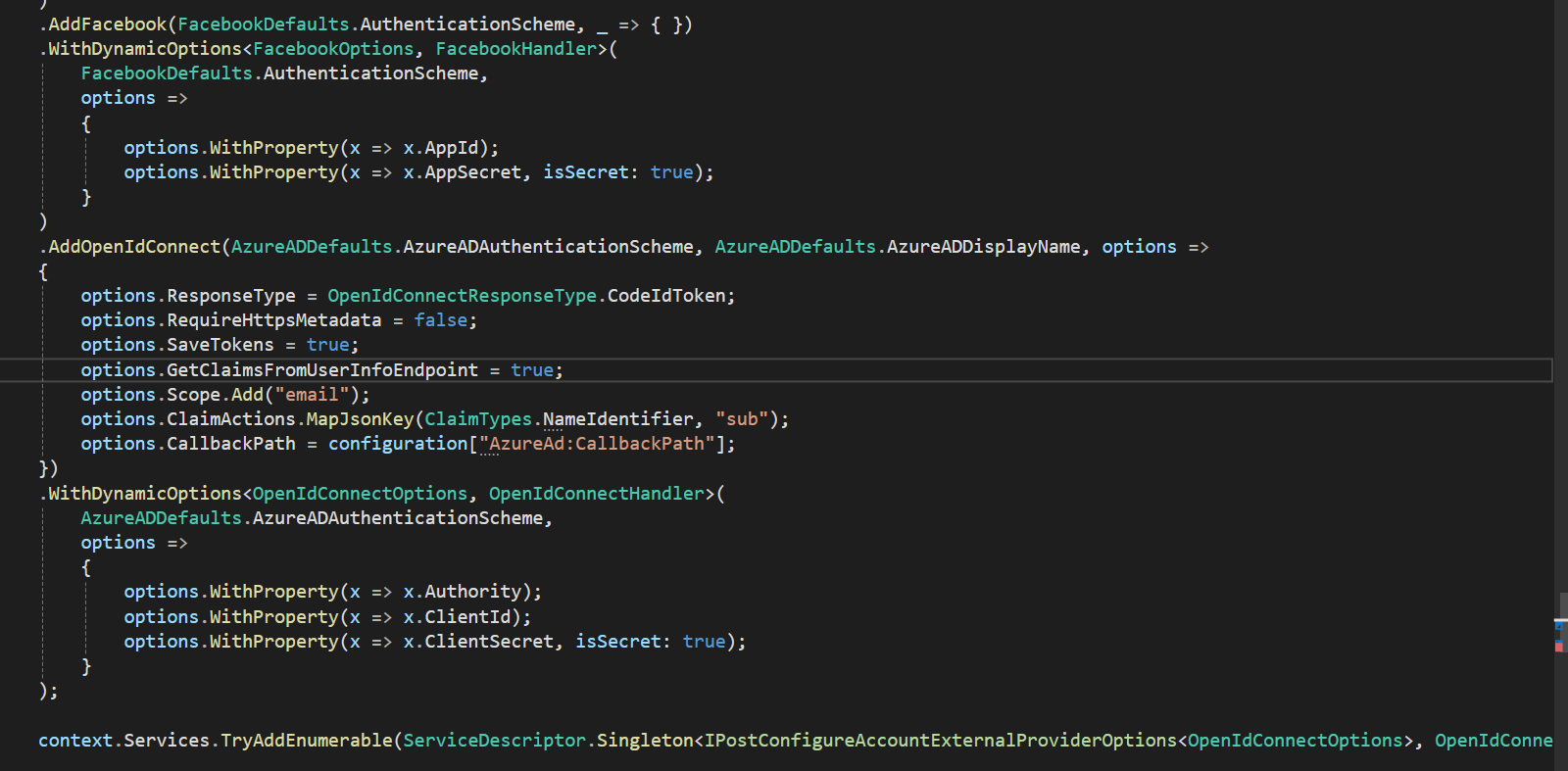
OnGetAsync of logout model is not even getting executed. Is there anything else I have to do to make this work? Is the configuration added in Auth Server in the sample you provided?
Markdown supported.Copy, paste, or drag & drop images and files (max 100 MB per file, 100 MB total per post) -
0
Is the configuration added in Auth Server in the sample you provided?
No, i didn't do any configuration else. that's all
you can share a simple example with me, i will check it.
my email is shiwei.liang@volosoft.com
Markdown supported.Copy, paste, or drag & drop images and files (max 100 MB per file, 100 MB total per post) -
0
Hi,
I have just added the configuration as mentioned in the document.
https://docs.abp.io/en/commercial/latest/modules/account#ipostconfigureaccountexternalprovideroptions
I have also added dynamic options configuration in the identity service. Login is working perfectly. When I checked the AbpAccountAuthenticationRequestHandler I couldn't find any handling for Signout.
Markdown supported.Copy, paste, or drag & drop images and files (max 100 MB per file, 100 MB total per post) -
0
you can share a simple example with me, i will check it.
Markdown supported.Copy, paste, or drag & drop images and files (max 100 MB per file, 100 MB total per post) -
0
Hi,
I can confirm the problem, we will fix it in the next version.
You can try:
public class MyAbpAccountAuthenticationRequestHandler<TOptions, THandler> : IAuthenticationRequestHandler, IAuthenticationSignOutHandler
    where TOptions : RemoteAuthenticationOptions, new()
    where THandler : RemoteAuthenticationHandler<TOptions>
{
    protected readonly THandler InnerHandler;
    protected readonly IOptions<TOptions> OptionsManager;

    public MyAbpAccountAuthenticationRequestHandler(THandler innerHandler, IOptions<TOptions> optionsManager)
    {
        InnerHandler = innerHandler;
        OptionsManager = optionsManager;
    }

    public virtual async Task InitializeAsync(AuthenticationScheme scheme, HttpContext context)
    {
        await InnerHandler.InitializeAsync(scheme, context);
    }

    public virtual async Task<AuthenticateResult> AuthenticateAsync()
    {
        return await InnerHandler.AuthenticateAsync();
    }

    public virtual async Task ChallengeAsync(AuthenticationProperties properties)
    {
        await OptionsManager.SetAsync(InnerHandler.Scheme.Name);
        ObjectHelper.TrySetProperty(InnerHandler, handler => handler.Options, () => OptionsManager.Value);

        await InnerHandler.ChallengeAsync(properties);
    }

    public virtual async Task ForbidAsync(AuthenticationProperties properties)
    {
        await InnerHandler.ForbidAsync(properties);
    }

    public async Task SignOutAsync(AuthenticationProperties properties)
    {
        await OptionsManager.SetAsync(InnerHandler.Scheme.Name);
        ObjectHelper.TrySetProperty(InnerHandler, handler => handler.Options, () => OptionsManager.Value);
        var signOutHandler = InnerHandler as IAuthenticationSignOutHandler;
        if (signOutHandler == null)
        {
            throw new InvalidOperationException($"The authentication handler registered for scheme '{InnerHandler.Scheme}' is '{InnerHandler.GetType().Name}' which cannot be used for SignOutAsync");
        }

        await signOutHandler.SignOutAsync(properties);
    }

    public virtual async Task<bool> HandleRequestAsync()
    {
        if (await InnerHandler.ShouldHandleRequestAsync())
        {
            await OptionsManager.SetAsync(InnerHandler.Scheme.Name);
            ObjectHelper.TrySetProperty(InnerHandler, handler => handler.Options, () => OptionsManager.Value);
        }

        return await InnerHandler.HandleRequestAsync();
    }

    public virtual THandler GetHandler()
    {
        return InnerHandler;
    }
}


public static class AuthenticationBuilderExtensions
{
    public static AuthenticationBuilder AddMyAbpAccountDynamicOptions<TOptions, THandler>(this AuthenticationBuilder authenticationBuilder)
        where TOptions : RemoteAuthenticationOptions, new()
        where THandler : RemoteAuthenticationHandler<TOptions>
    {
        authenticationBuilder.Services.AddScoped(typeof(AccountExternalProviderOptionsManager<TOptions>));

        authenticationBuilder.Services.Replace(ServiceDescriptor.Scoped(typeof(IOptions<TOptions>),
            provider => provider.GetRequiredService<AccountExternalProviderOptionsManager<TOptions>>()));
        authenticationBuilder.Services.Replace(ServiceDescriptor.Scoped(typeof(IOptionsSnapshot<TOptions>),
            provider => provider.GetRequiredService<AccountExternalProviderOptionsManager<TOptions>>()));
        authenticationBuilder.Services.Replace(ServiceDescriptor.Scoped(typeof(IOptionsMonitor<TOptions>),
            provider => provider.GetRequiredService<AccountExternalProviderOptionsManager<TOptions>>()));

        authenticationBuilder.Services.Replace(ServiceDescriptor.Transient<IOptionsFactory<TOptions>, AccountExternalProviderOptionsFactory<TOptions>>());

        var handler = authenticationBuilder.Services.LastOrDefault(x => x.ServiceType == typeof(THandler));
        authenticationBuilder.Services.Replace(new ServiceDescriptor(
            typeof(THandler),
            provider => new MyAbpAccountAuthenticationRequestHandler<TOptions, THandler>(
                (THandler)ActivatorUtilities.CreateInstance(provider, typeof(THandler)),
                provider.GetRequiredService<IOptions<TOptions>>()),
            handler?.Lifetime ?? ServiceLifetime.Transient));

        return authenticationBuilder;
    }
}


context.Services.AddAuthentication()
   .AddOpenIdConnect("AzureAD", "Azure AD", options =>
   {
       options.ResponseType = OpenIdConnectResponseType.CodeIdToken;
       options.RequireHttpsMetadata = false;
       options.SaveTokens = true;
       options.GetClaimsFromUserInfoEndpoint = true;
       options.Scope.Add("email");
       options.ClaimActions.MapJsonKey(ClaimTypes.NameIdentifier, "sub");
       options.CallbackPath = configuration["AzureAd:CallbackPath"];
   })
    .AddMyAbpAccountDynamicOptions<OpenIdConnectOptions, OpenIdConnectHandler>()
    .Services.AddDynamicExternalLoginProviderOptions<OpenIdConnectOptions>("AzureAD",
        options =>
        {
            options.WithProperty(x => x.Authority);
            options.WithProperty(x => x.ClientId);
            options.WithProperty(x => x.ClientSecret, isSecret: true);
        });
[Route("connect/logout")] [ApiExplorerSettings(IgnoreApi = true)] [Dependency(ReplaceServices = true)] [ExposeServices(typeof(LogoutController))] public class MyLogoutController : LogoutController { [HttpGet] public override async Task<IActionResult> GetAsync() { await SignInManager.SignOutAsync(); return SignOut(authenticationSchemes: "AzureAD"); } }Markdown supported.Copy, paste, or drag & drop images and files (max 100 MB per file, 100 MB total per post) -
0
your ticket was refunded
Markdown supported.Copy, paste, or drag & drop images and files (max 100 MB per file, 100 MB total per post) -
0
HI, liangshiwei is this fix also valid for Blazor WASM?
Markdown supported.Copy, paste, or drag & drop images and files (max 100 MB per file, 100 MB total per post) -
0
yes
Markdown supported.Copy, paste, or drag & drop images and files (max 100 MB per file, 100 MB total per post) -
0
You can add the parameters post logout uri manually
Markdown supported.Copy, paste, or drag & drop images and files (max 100 MB per file, 100 MB total per post) -
0
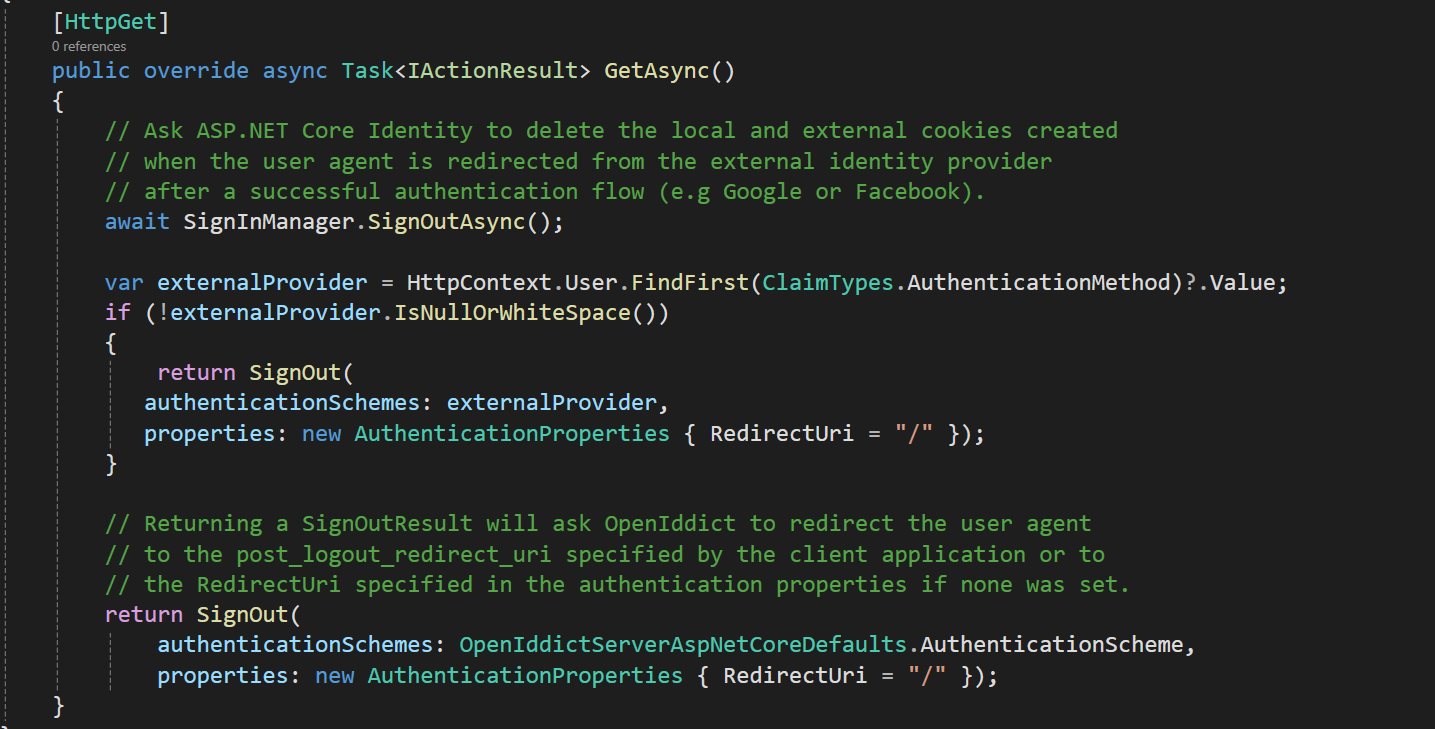
This is my logout controller now. The HttpContext.Request has the post redirect uri of the blazor client application. But it is not invoking the blazor post redirect uri when I login through external provider. Can you please help on how I can implement this?
 Markdown supported.Copy, paste, or drag & drop images and files (max 100 MB per file, 100 MB total per post)
 -
0
get
redirect urifrom HttpContext.Request and add to AuthenticationProperties.RedirectUriMarkdown supported.Copy, paste, or drag & drop images and files (max 100 MB per file, 100 MB total per post) -
0
You can try this ,it works for me:
[Route("connect/logout")]
[ApiExplorerSettings(IgnoreApi = true)]
[Dependency(ReplaceServices = true)]
[ExposeServices(typeof(LogoutController))]
public class MyLogoutController : LogoutController
{
    [HttpGet]
    public override async Task<IActionResult> GetAsync()
    {
        await SignInManager.SignOutAsync();

        return SignOut(authenticationSchemes: "AzureAD" , properties: new AuthenticationProperties()
        {
            RedirectUri = "https://localhost:44314" // client URL
        });
    }
}
Markdown supported.Copy, paste, or drag & drop images and files (max 100 MB per file, 100 MB total per post) -
0
Hi liangshiwei, If instead of "https://localhost:44314" you showed how to retrieve the client URL from settings or configuration it would be a better solution
:-)
Markdown supported.Copy, paste, or drag & drop images and files (max 100 MB per file, 100 MB total per post) -
0
Hi,
You can get the client URL from the HTTP Request.
Markdown supported.Copy, paste, or drag & drop images and files (max 100 MB per file, 100 MB total per post) -
0
Can you update your example with the final code we should use?
Thank you
Markdown supported.Copy, paste, or drag & drop images and files (max 100 MB per file, 100 MB total per post) -
0