Template: microservice
Created ABP Studio Version: 1.0.2
Current ABP Studio Version: 1.2.2
Multi-Tenancy: Yes
UI Framework: mvc
Theme: leptonx
Theme Style: system
Theme Menu Placement: side
Run Install Libs: Yes
Database Provider: ef
Database Management System: sqlserver
Mobile Framework: none
Public Website: No
Social Login: Yes
Include Tests: Yes
Dynamic Localization: Yes
Kubernetes Configuration: Yes
Grafana Dashboard: Yes
Use Local References: No
Optional Modules:
GDPR
TextTemplateManagement
AuditLogging
OpenIddictAdmin
Selected Languages: English, English (United Kingdom), Español
Default Language: English
Create Command: abp new CloverleafCMS -t microservice --ui-framework mvc --database-provider ef --database-management-system sqlserver --theme leptonx --skip-migrator --without-cms-kit --dont-run-bundling -no-file-management -no-language-management
We're using the microservice template and using the auth-server app for authentication. The auth-server application has been slightly modified for custom branding. We are running the authserver and microservices in Azure Kubernetes.
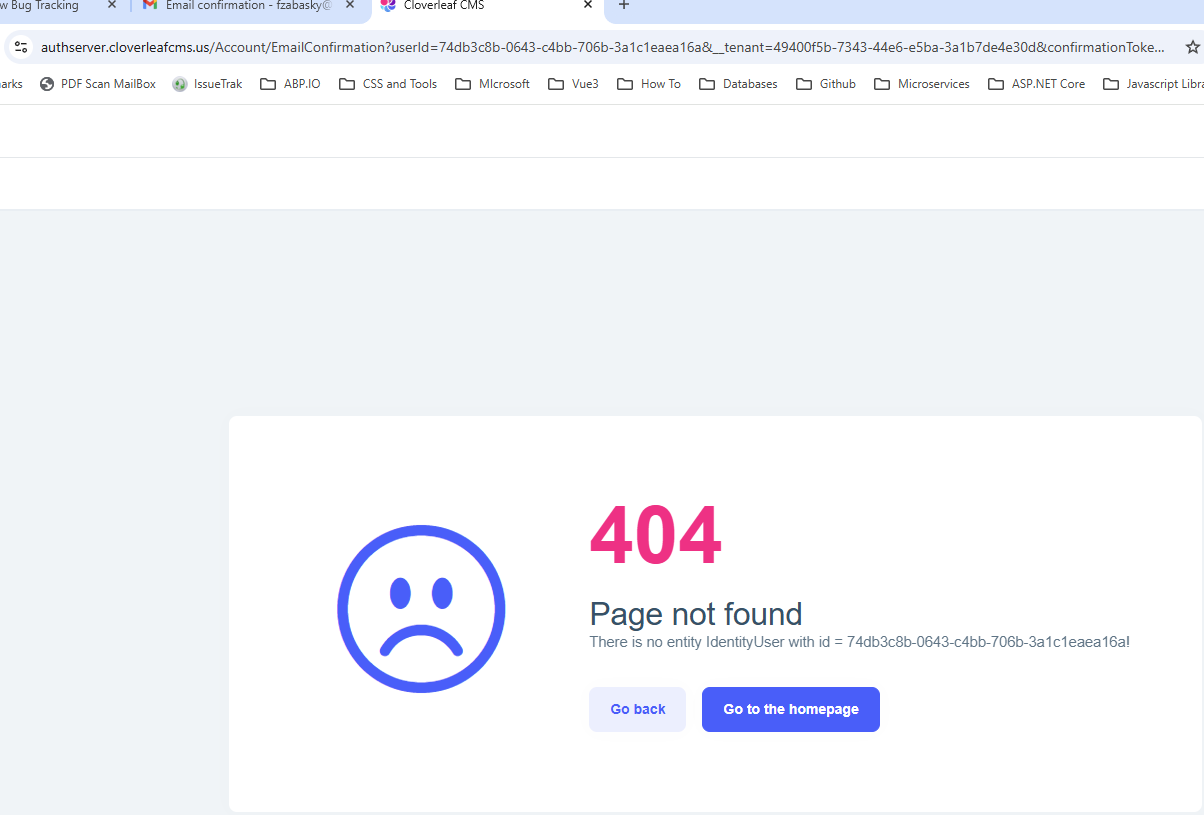
Exception message and full stack trace: The scenerio is we have a multi-tenant app and we are testing the confirm email and reset password processes and are getting the error below when we change to a new tenant. We are deriving the tenant from the url in the form of 'auth.tenantname.cloverleafcms.dev'. Our tenant resolver interrogates the httpContext host and resolves the tenant and sets the context.TenantIdOrName property. We are getting a 404 Page not found (no entity for IdentityUser) error after we register a new user then confirm email'.
After making the suggestions to correct the tenant aware email url that is produced by the email generator, I'm still getting the 404 user not found for identity guid error. Here was the AI bot generated response for ticket #9843. ***The issue you are experiencing is due to the email confirmation and reset password links being generated with the wrong base URL (e.g., https://authserver.cloverleafcms.dev instead of the required tenant-specific subdomain like https://auth.homefree.cloverleafcms.dev). This causes the tenant resolver to fail, resulting in a 404 error because the user cannot be found in the wrong tenant context.
To resolve this, you need to ensure that the URLs generated for email confirmation and password reset are tenant-aware and use the correct subdomain format that your HostTenantResolveContributor expects.***
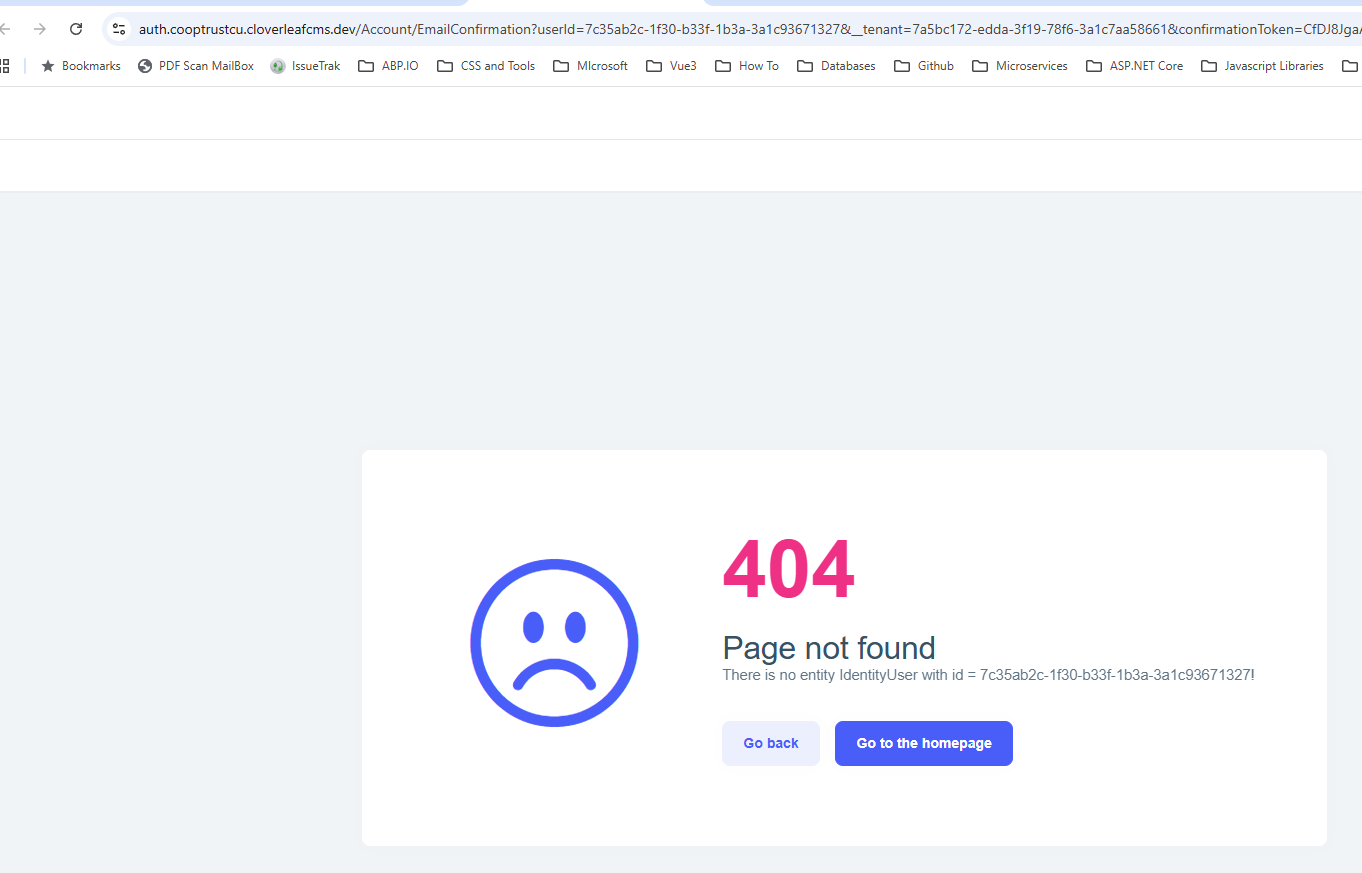
Image of the Kubernetes Authserver pod environment variables for SelfUrl and Authority.
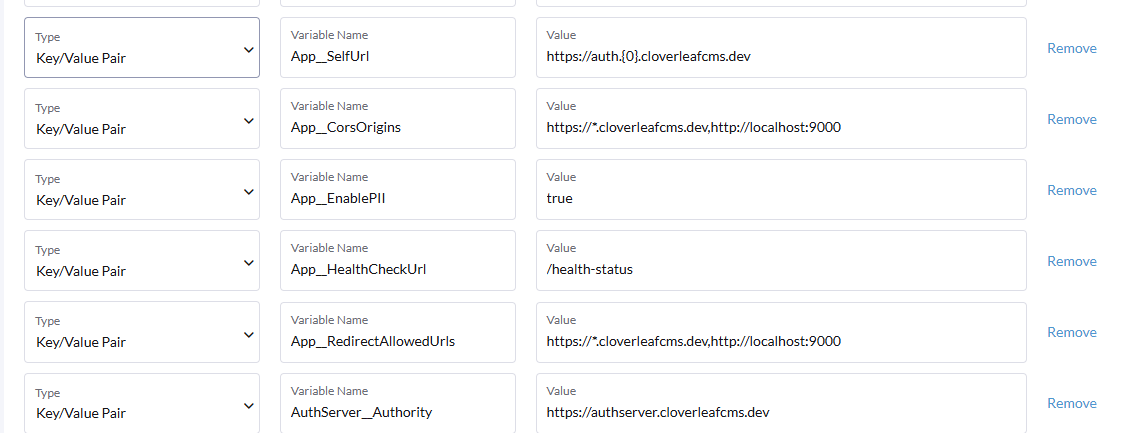 Image of the user in the Identity database to show that it exists under the tenant.
 Image of the tenant 'cooptrustcu' in the SaasTenants table.

I need to find out where or how the 'host' from the httpContext request is still 'authserver.cloverleafcms.dev'. If I change the AuthServer__Authority to 'https://auth.{0}.cloverleafcms.dev' then the authserver throughs an error and will not start because it cannot parse the authority url. Bottom line is I need to get the Email Confirmation and Password Reset process to work before we can go live. Can we get credit for ticket #9843 or reopen it?
Check the docs before asking a question: https://abp.io/docs/latest Check the samples to see the basic tasks: https://abp.io/docs/latest/samples The exact solution to your question may have been answered before, and please first use the search on the homepage.
Provide us with the following info:
🧐 Hint: If you are using the ABP Studio, you can see all the information about your solution from the configuration window, which opens when you right-click on the solution and click on the Solution Configuration button.
I have a microservice project in this solution that is api only --- it has no database. I'm having trouble getting the permissions for this service saved to the administration permissions and permissionGrants tables.
under the /Data folder I have the ClientServicesQueryDataSeeder.cs If I don't have a database for the microservice, do I need to have the following:
if so, how would I configure these without a database?
Here is the code that I've added that doesn't work:
public class ClientServicesQueryDataSeeder : ITransientDependency
{
    private readonly ILogger _logger;
    private readonly IPermissionDataSeeder _permissionDataSeeder;

    public ClientServicesQueryDataSeeder(IPermissionDataSeeder permissionDataSeeder,
        ILogger<ClientServicesQueryDataSeeder> logger)
    {
        _permissionDataSeeder = permissionDataSeeder;
        _logger = logger;
    }

    [UnitOfWork]
    public virtual async Task SeedAsync(Guid? tenantId = null)
    {
        _logger.LogInformation("Starting ClientServicesQuery permission seeding...");

        try
        {
            var permissions = ClientServicesQueryPermissions.GetAll();
            _logger.LogInformation("Found {PermissionCount} permissions to seed: {Permissions}",
                permissions.Length,
                string.Join(", ", permissions));

            // Grant permissions to the "admin" role
            await _permissionDataSeeder.SeedAsync(
                RolePermissionValueProvider.ProviderName,
                "admin",
                permissions,
                tenantId
            );

            _logger.LogInformation("Successfully seeded ClientServicesQuery permissions for admin role");
        }
        catch (Exception ex)
        {
            _logger.LogError(ex, "Failed to seed ClientServicesQuery permissions");
            throw;
        }
    }
}
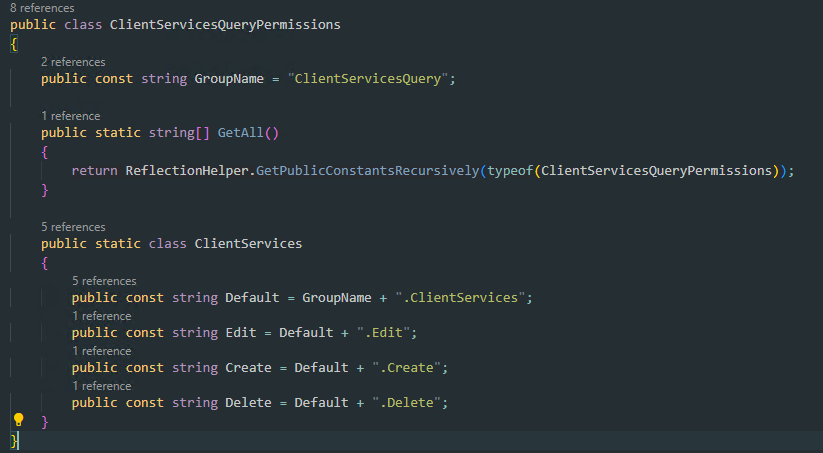
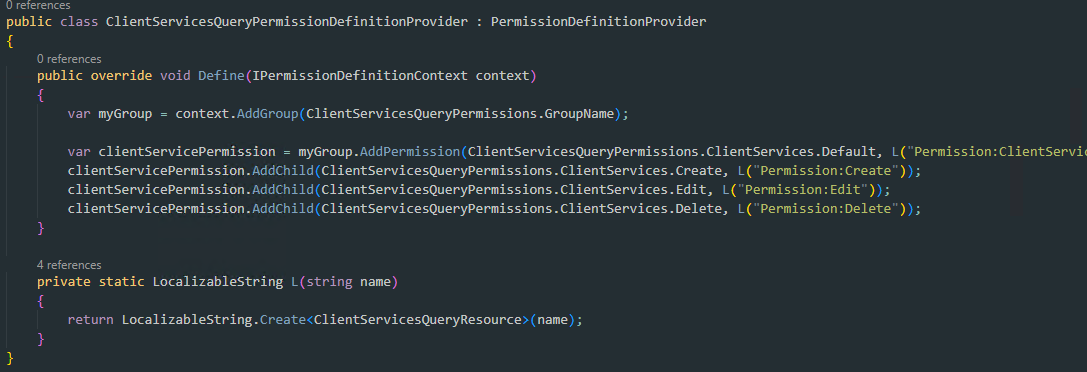
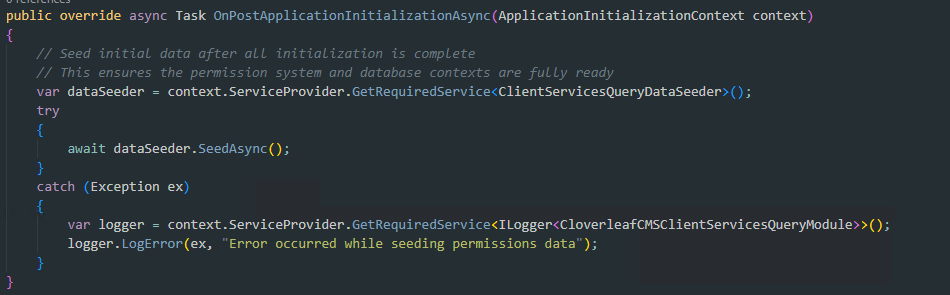
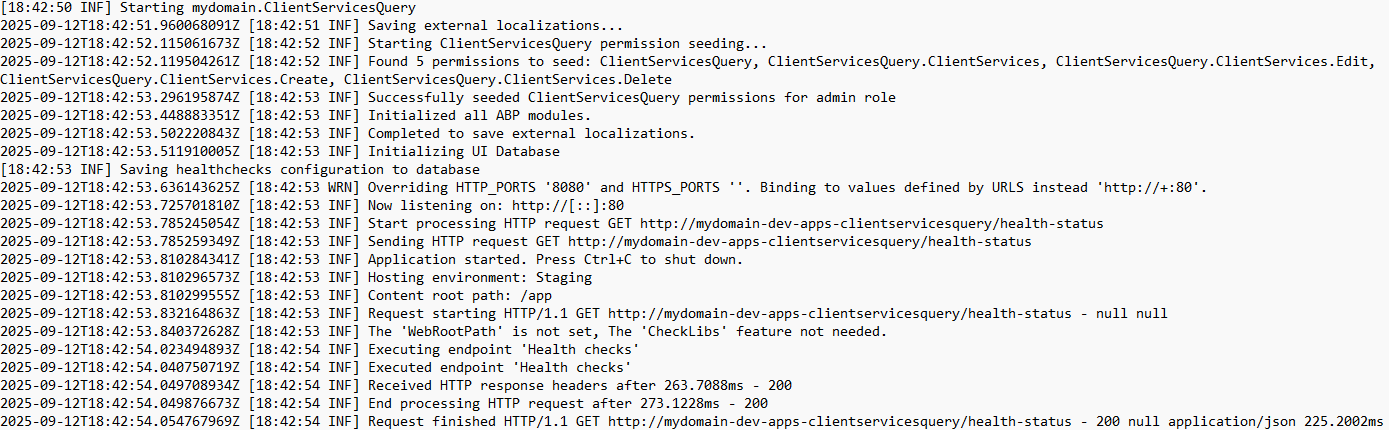
I need guidance on how to get the permission to persist to the administration permissions databases where I do not have a database to migrate in the microservice.
Provide us with the following info:
🧐 Hint: If you are using the ABP Studio, you can see all the information about your solution from the configuration window, which opens when you right-click on the solution and click on the Solution Configuration button.
We're using the microservice template and using the auth-server app for authentication. The auth-server application has been slightly modified for custom branding. We are running the authserver and microservices in Azure Kubernetes.
Here is the 'HostTenantResolveContributor.cs'
public class HostTenantResolveContributor : TenantResolveContributorBase
{
    public override async Task ResolveAsync(ITenantResolveContext context)
    {
        var currentContextAccessor = context.ServiceProvider.GetRequiredService<IHttpContextAccessor>();
        var memberConfigService = context.ServiceProvider.GetRequiredService<IMemberConfigService>();

        if (memberConfigService != null)
        {
#if DEBUG
            currentContextAccessor.HttpContext.Request.Host = new HostString("auth.homefree.cloverleafcms.us"); // Set the host header to a default value for testing purposes
            //currentContextAccessor.HttpContext.Request.Path = new PathString("/Account/Login"); // Set the path to root for testing purposes
#endif
            string? prefix = currentContextAccessor?.HttpContext?.Request?.GetPrefixFromHost();
            Console.WriteLine($"Tenant prefix after GetPrefixFromHost is: {prefix}.");
            if (!string.IsNullOrEmpty(prefix) && prefix != "admin")
            {
                var responseDto = await memberConfigService.GetMemberConfigByUrlPrefixAsync(prefix);

                if (responseDto != null && responseDto.Success)
                {
                    var member = responseDto.MemberConfig;
                    context.TenantIdOrName = member?.Id.ToString();
                    Console.WriteLine($"Member found for prefix: {prefix}");
                    Console.WriteLine($"MemberId: {member?.Id.ToString()}");
                }
                else
                {
                    Console.WriteLine($"Member not found for prefix: {prefix}. See details: {responseDto?.ErrorResponse?.Error?.Message}");
                    context.TenantIdOrName = null;
                }
                return;
            }
            else
            {
                Console.WriteLine("Tenant prefix not found in the host.");
                context.TenantIdOrName = null;
            }
        }
        else
        {
            Console.WriteLine("MemberConfigService is not available.");
            context.TenantIdOrName = null;
        }
    }

    public override string Name => "Host";

}
Here is the GetPrefixFromHost.cs extension
public static class HttpRequestExtensions
{
    public static string? GetPrefixFromHost(this HttpRequest request)
    {
        if (request?.Host.HasValue != true)
        {
            return "invalid";
        }
        string host = request.Host.Host;
        try
        {
            // Check for localhost
            if (host.Contains("localhost"))
                return null;
            if (host.Contains("host.docker.internal"))
                return null;
            // Split the host into parts
            var parts = host.Split('.');

            if (parts.Length < 2)
                return null;

            var first = parts[0];
            var second = parts[1];

            if (second.Equals("admin", StringComparison.OrdinalIgnoreCase))
            {
                Console.WriteLine("Admin subdomain detected, returning null for prefix.");
                return null;
            }

            if (first.Equals("auth", StringComparison.OrdinalIgnoreCase) && parts.Length >= 3)
            {
                // Return the second part as prefix
                Console.WriteLine($"Member subdomain detected, returning {parts[1]} for prefix.");
                return parts[1];
            }

            return "invalid"; // Return "invalid" for other cases
        }
        catch
        {
            // Return "invalid" for invalid URLs
            return "invalid";
        }
    }
}
Check the docs before asking a question: https://abp.io/docs/latest Check the samples to see the basic tasks: https://abp.io/docs/latest/samples The exact solution to your question may have been answered before, and please first use the search on the homepage.
Provide us with the following info:
🧐 Hint: If you are using the ABP Studio, you can see all the information about your solution from the configuration window, which opens when you right-click on the solution and click on the Solution Configuration button.
6/23/2025 8:23:51 PM [Information] "Bearer" was not authenticated. Failure message: "IDX10511: Signature validation failed. Keys tried: 'Microsoft.IdentityModel.Tokens.X509SecurityKey, KeyId: '4C44506B63683FAFB81F426A6A1225833F2BE6A8', InternalId: 'TERQa2NoP6-4H0JqahIlgz8r5qg'. , KeyId: 4C44506B63683FAFB81F426A6A1225833F2BE6A8 '. Number of keys in TokenValidationParameters: '0'. Number of keys in Configuration: '2'. Matched key was in 'Configuration'. kid: '4C44506B63683FAFB81F426A6A1225833F2BE6A8'. Exceptions caught: 'PII of type 'System.Text.StringBuilder' is hidden. For more details, see [https://aka.ms/IdentityModel/PII.]'. token: 'PII of type 'Microsoft.IdentityModel.JsonWebTokens.JsonWebToken' is hidden. For more details, see [https://aka.ms/IdentityModel/PII.]'. See https://aka.ms/IDX10511 for details." 6/23/2025 8:23:51 PM [Information] Authorization failed. "These requirements were not met: PermissionRequirement: ActionItemService.ActionItems" 6/23/2025 8:23:51 PM [Information] AuthenticationScheme: "Bearer" was challenged. 6/23/2025 8:23:51 PM [Information] Request finished "HTTP/1.1" "GET" "http"://"localhost:44379""""/api/actionitem/action-items""?clientId=10BECE0B-086C-F92C-A6D1-3A1AB084E5A2" - 401 0 null 3.5956ms
Once solution is running in AbpStudio then go to Postman and get a token via the TokenService using the host admin id and password.
Create an ActionItem.
Update and ActionItem.
Get the ActionItem.
I can successfully create and update an ActionItem with the host admin credentials but I get the above 401 not authorized when calling the GET endpoint.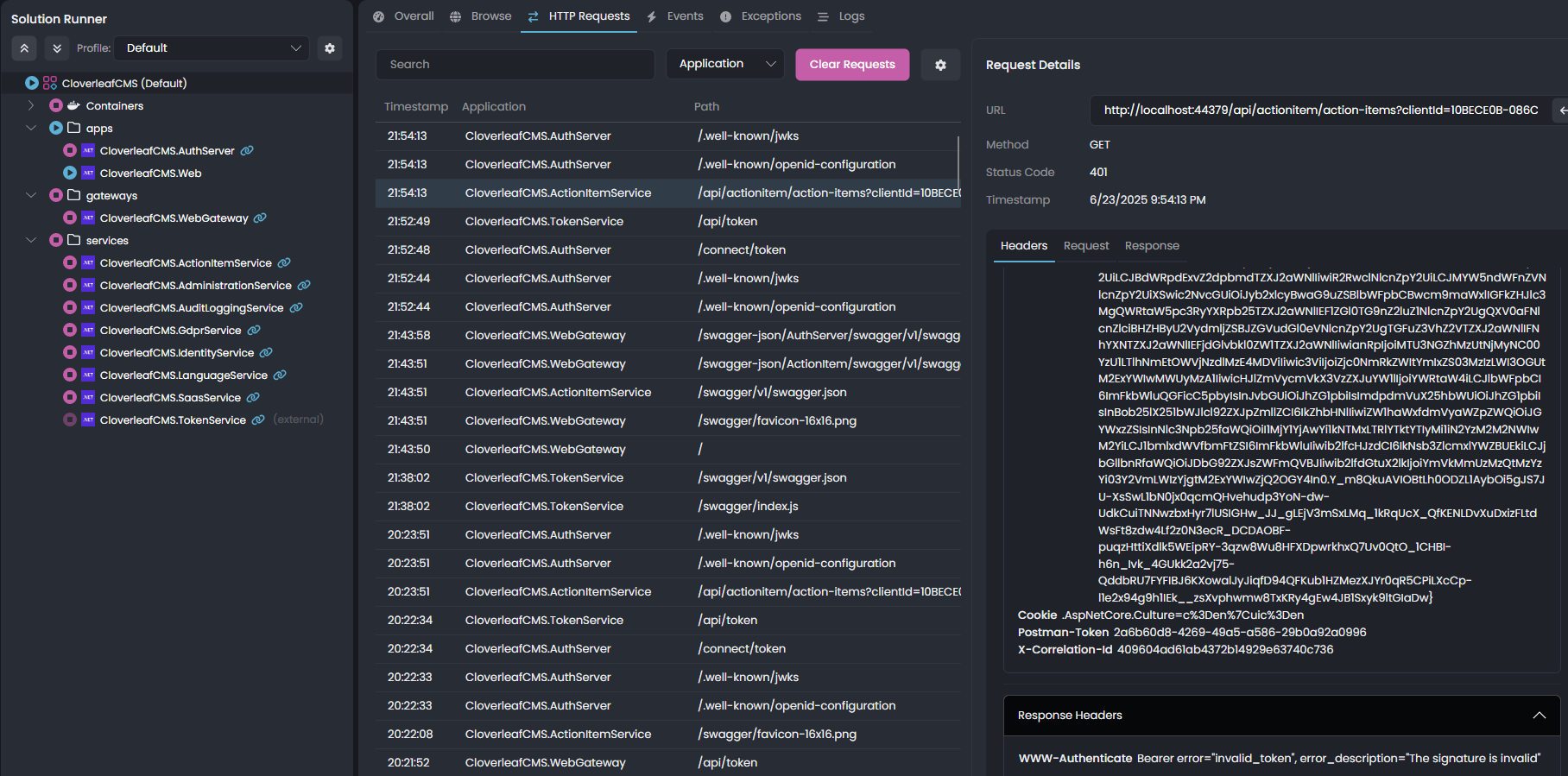
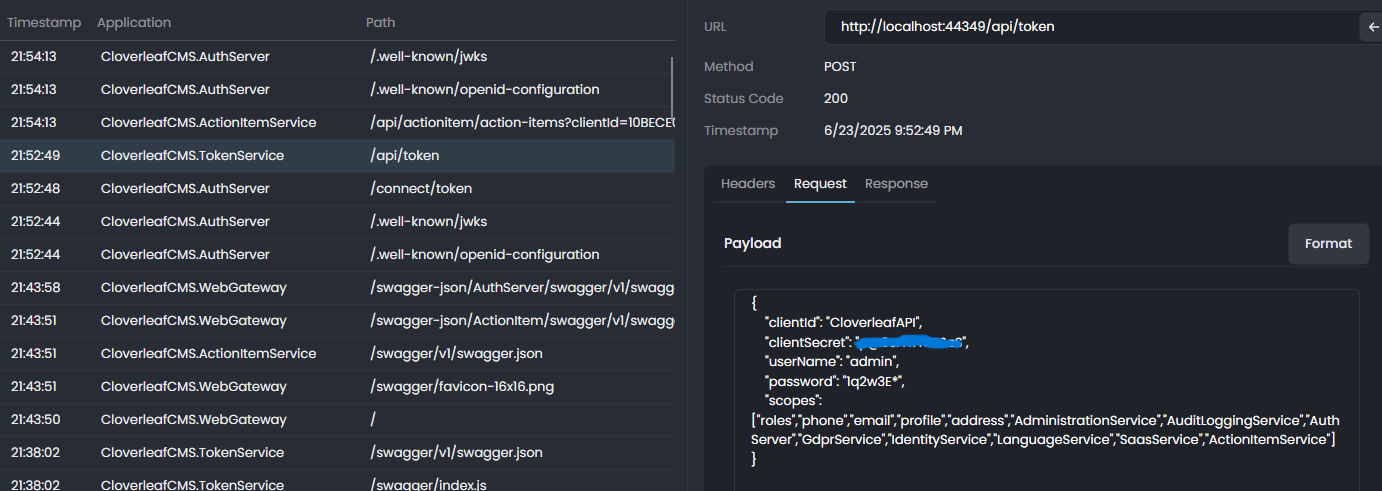

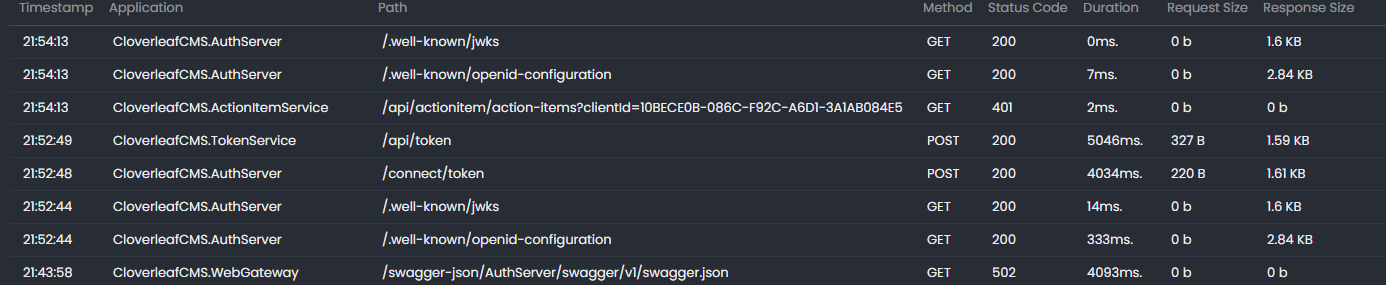
We are experiencing the same delay going thru the AuthServer app login screen. Please investigate and let us know what we can do to speed things up.
I've set the logging attributes to the following in the AuthServer. "Logging": { "LogLevel": { "Default": "Information", "Microsoft": "Warning", "Microsoft.Hosting.Lifetime": "Information", "CprOnAbp.AuthServer": "Trace" } },
In my initial comparison of the log files for the POST localhost and POST AKS, I can see that the following lines indicate where slowness has occurred.
[14:40:29 INF] Request starting HTTP/1.1 POST http://authserver.cloverleafcms.dev/connect/token application/x-[[www-form-urlencoded 478](http://www-form-urlencoded](http://www-form-urlencoded 478](http://www-form-urlencoded) 478) ... [14:40:29 DBG] The event OpenIddict.Server.OpenIddictServerEvents+ValidateTokenRequestContext was successfully processed by OpenIddict.Server.OpenIddictServerHandlers+Exchange+ValidateProofKeyForCodeExchangeParameters. [14:40:33 DBG] The event OpenIddict.Server.OpenIddictServerEvents+ValidateTokenRequestContext was successfully processed by OpenIddict.Server.OpenIddictServerHandlers+Exchange+ValidateScopes. ... [14:40:34 INF] Try to use LDAP for external authentication [14:40:35 WRN] Ldap login feature is not enabled! [14:40:35 INF] Try to use OAUTH for external authentication [14:40:35 WRN] OAuth login feature is not enabled! [14:40:37 DBG] Added 0 entity changes to the current audit log [14:40:37 DBG] Added 0 entity changes to the current audit log [14:40:40 DBG] Added 0 entity changes to the current audit log [14:40:40 DBG] Added 0 entity changes to the current audit log [14:40:40 DBG] Added 0 entity changes to the current audit log [14:40:40 DBG] Added 0 entity changes to the current audit log ... [14:40:40 INF] Executed action Volo.Abp.OpenIddict.Controllers.TokenController.HandleAsync (Volo.Abp.OpenIddict.AspNetCore) in 6301.6679ms [14:40:40 INF] Executed endpoint 'Volo.Abp.OpenIddict.Controllers.TokenController.HandleAsync (Volo.Abp.OpenIddict.AspNetCore)' [14:40:40 DBG] Added 0 entity changes to the current audit log [14:40:40 DBG] Added 0 entity changes to the current audit log [14:40:41 DBG] Added 0 entity changes to the current audit log [14:40:41 DBG] Added 0 entity changes to the current audit log [14:40:41 INF] Request finished HTTP/1.1 POST http://authserver.cloverleafcms.dev/connect/token application/x-[[www-form-urlencoded 478](http://www-form-urlencoded](http://www-form-urlencoded 478](http://www-form-urlencoded) 478) - 200 2417 application/json;charset=UTF-8 12554.8431ms
From Localhost log [09:09:17 INF] Request starting HTTP/1.1 POST https://localhost:44322/connect/token application/x-[www-form-urlencoded 477](http://www-form-urlencoded 477) ... [09:09:17 DBG] The event OpenIddict.Server.OpenIddictServerEvents+ValidateTokenRequestContext was successfully processed by OpenIddict.Server.OpenIddictServerHandlers+Exchange+ValidateProofKeyForCodeExchangeParameters. [09:09:17 DBG] The event OpenIddict.Server.OpenIddictServerEvents+ValidateTokenRequestContext was successfully processed by OpenIddict.Server.OpenIddictServerHandlers+Exchange+ValidateScopeParameter. [09:09:18 DBG] The event OpenIddict.Server.OpenIddictServerEvents+ValidateTokenRequestContext was successfully processed by OpenIddict.Server.OpenIddictServerHandlers+Exchange+ValidateScopes. ... [09:09:18 INF] Try to use LDAP for external authentication [09:09:18 WRN] Ldap login feature is not enabled! [09:09:18 INF] Try to use OAUTH for external authentication [09:09:18 WRN] OAuth login feature is not enabled! [09:09:19 DBG] Added 0 entity changes to the current audit log [09:09:19 DBG] Added 0 entity changes to the current audit log [09:09:19 DBG] Added 0 entity changes to the current audit log ... [09:09:19 INF] Executed action Volo.Abp.OpenIddict.Controllers.TokenController.HandleAsync (Volo.Abp.OpenIddict.AspNetCore) in 1354.6533ms [09:09:19 INF] Executed endpoint 'Volo.Abp.OpenIddict.Controllers.TokenController.HandleAsync (Volo.Abp.OpenIddict.AspNetCore)' [09:09:19 DBG] Added 0 entity changes to the current audit log [09:09:19 DBG] Added 0 entity changes to the current audit log [09:09:20 DBG] Added 0 entity changes to the current audit log [09:09:20 DBG] Added 0 entity changes to the current audit log [09:09:20 INF] Request finished HTTP/1.1 POST https://localhost:44322/connect/token application/x-[www-form-urlencoded 477](http://www-form-urlencoded 477) - 200 2400 application/json;charset=UTF-8 2147.3657ms
To recap... the initial issue we are trying to solve is: See ticket #6452 for background and details of issue.
"We're using the microservice template and using the auth-server app for authentication. The auth-server application has been slightly modified for custom branding. We have a .net API to get a token using the IdentityModel.Client.
When I call the API using Postman that's pointing to the auth-server running on localhost via Tye I'm able to successfully get a token. When I call the API pointing to the auth-server running in Azure Kubernetes I get an invalid username and password error.
The code is the exact same. The database is the same and the credentials are the exact same."
Based on feedback of things to try as suggested in responses to #6452:
Can you try to remove the HostTenantResolveContributer? You can override the HandlePasswordAsync method of TokenController. Output a log to show the current tenant. var tenant = await TenantConfigurationProvider.GetAsync(saveResolveResult: false); https://github.com/abpframework/abp/blob/dev/modules/openiddict/src/Volo.Abp.OpenIddict.AspNetCore/Volo/Abp/OpenIddict/Controllers/TokenController.Password.cs#L78***
I'm getting a duplicate route error and am not quite sure how to get around it to override the HandlePasswordAysnc method of TokenController' as suggested to inspect the Tenant.Name. I cannot change the route of 'connect/token' as it is set by OAuth.
Here is the returned error.
[12:06:20 ERR] An unhandled exception has occurred while executing the request. Microsoft.AspNetCore.Routing.Matching.AmbiguousMatchException: The request matched multiple endpoints. Matches: CprOnAbp.AuthServer.MyTokenController.HandleAsync (CprOnAbp.AuthServer) Volo.Abp.OpenIddict.Controllers.TokenController.HandleAsync (Volo.Abp.OpenIddict.AspNetCore) at Microsoft.AspNetCore.Routing.Matching.DefaultEndpointSelector.ReportAmbiguity(CandidateState[] candidateState) at Microsoft.AspNetCore.Routing.Matching.DefaultEndpointSelector.ProcessFinalCandidates(HttpContext httpContext, CandidateState[] candidateState) at Microsoft.AspNetCore.Routing.Matching.DfaMatcher.MatchAsync(HttpContext httpContext) at Microsoft.AspNetCore.Routing.EndpointRoutingMiddleware.Invoke(HttpContext httpContext) at Microsoft.AspNetCore.StaticFiles.StaticFileMiddleware.Invoke(HttpContext context) at Volo.Abp.AspNetCore.Security.AbpSecurityHeadersMiddleware.InvokeAsync(HttpContext context, RequestDelegate next) at Microsoft.AspNetCore.Builder.UseMiddlewareExtensions.<>c__DisplayClass6_1.<<UseMiddlewareInterface>b__1>d.MoveNext() --- End of stack trace from previous location --- at Volo.Abp.AspNetCore.Tracing.AbpCorrelationIdMiddleware.InvokeAsync(HttpContext context, RequestDelegate next) at Microsoft.AspNetCore.Builder.UseMiddlewareExtensions.<>c__DisplayClass6_1.<<UseMiddlewareInterface>b__1>d.MoveNext() --- End of stack trace from previous location --- at Microsoft.AspNetCore.Localization.RequestLocalizationMiddleware.Invoke(HttpContext context) at Microsoft.AspNetCore.RequestLocalization.AbpRequestLocalizationMiddleware.InvokeAsync(HttpContext context, RequestDelegate next) at Microsoft.AspNetCore.Builder.UseMiddlewareExtensions.<>c__DisplayClass6_1.<<UseMiddlewareInterface>b__1>d.MoveNext() --- End of stack trace from previous location --- at Microsoft.AspNetCore.Diagnostics.DeveloperExceptionPageMiddlewareImpl.Invoke(HttpContext context) [12:06:20 INF] Request finished HTTP/1.1 POST https://localhost:44322/connect/token application/x-[[[[www-form-urlencoded 387](http://www-form-urlencoded](http://www-form-urlencoded](http://www-form-urlencoded](http://www-form-urlencoded 387](http://www-form-urlencoded](http://www-form-urlencoded](http://www-form-urlencoded) 387](http://www-form-urlencoded](http://www-form-urlencoded](http://www-form-urlencoded)) 387](http://www-form-urlencoded) 387) - 500 - text/plain;+charset=utf-8 251.5204ms
Created a TokenController inherited from Volo.Abp.OpenIddict.Controllers.TokenController to override HandlePasswordAsync. Here is the code.
MyTokenController in AuthServer
using System; using System.Threading.Tasks; using Microsoft.AspNetCore.Mvc; using Microsoft.Extensions.DependencyInjection; using Microsoft.Extensions.Options; using OpenIddict.Abstractions; using Volo.Abp.OpenIddict.Controllers; using Volo.Abp.OpenIddict.ExtensionGrantTypes;
namespace CprOnAbp.AuthServer;
[Route("connect/token")] [IgnoreAntiforgeryToken] public class MyTokenController : TokenController {
public MyTokenController()
{
}

[HttpGet, HttpPost, Produces("application/json")]
public override async Task<IActionResult> HandleAsync()
{
    var request = await GetOpenIddictServerRequestAsync(HttpContext);

    if (request.IsPasswordGrantType())
    {
        return await HandlePasswordAsync(request); // Call the overridden HandlePasswordAsync method
    }

    // Add other grant type handling here as needed

    return await base.HandleAsync();
}

// Override the HandlePasswordAsync method
protected override async Task<IActionResult> HandlePasswordAsync(OpenIddictRequest request)
{
    // Your custom implementation goes here
    var tenant = await TenantConfigurationProvider.GetAsync(saveResolveResult: false);
    Console.WriteLine($"Tenant Name: {tenant.Name}");

    // Call the base implementation if needed
    return await base.HandlePasswordAsync(request);
}
}
I've shared our 2 projects that are needed to recreate this issue with Maliming. Auth-Server and oauth-api
Any ideas? Thanks.
Check the docs before asking a question: https://docs.abp.io/en/commercial/latest/ Check the samples to see the basic tasks: https://docs.abp.io/en/commercial/latest/samples/index The exact solution to your question may have been answered before, and please first use the search on the homepage. Provide us with the following info:
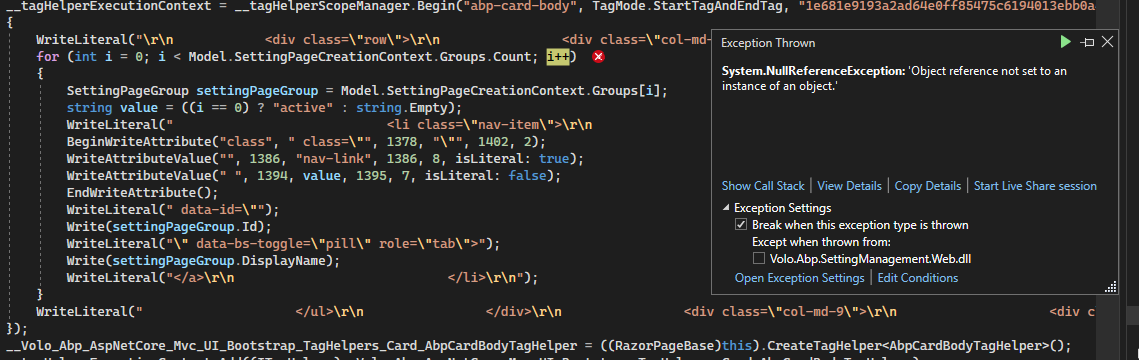
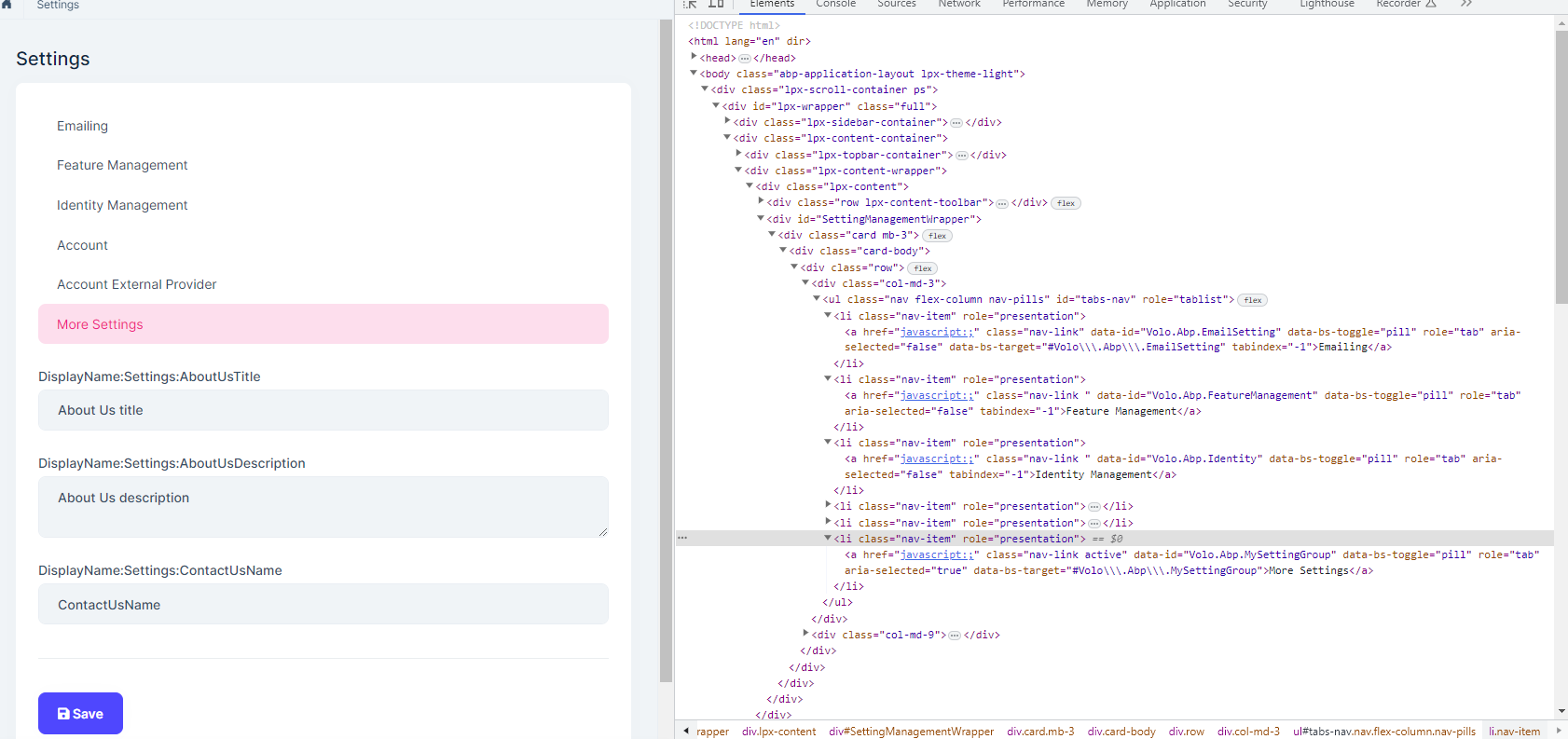
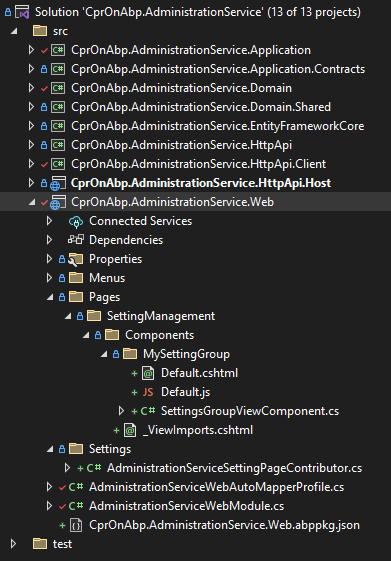
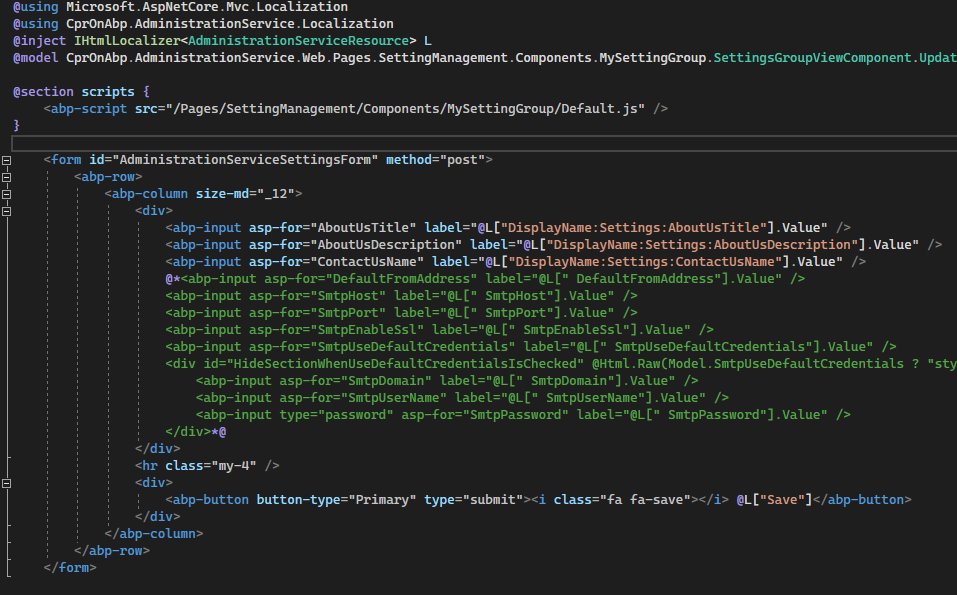
Here is the file structure for the AdministrationService.Web project and the Default.cshtml.
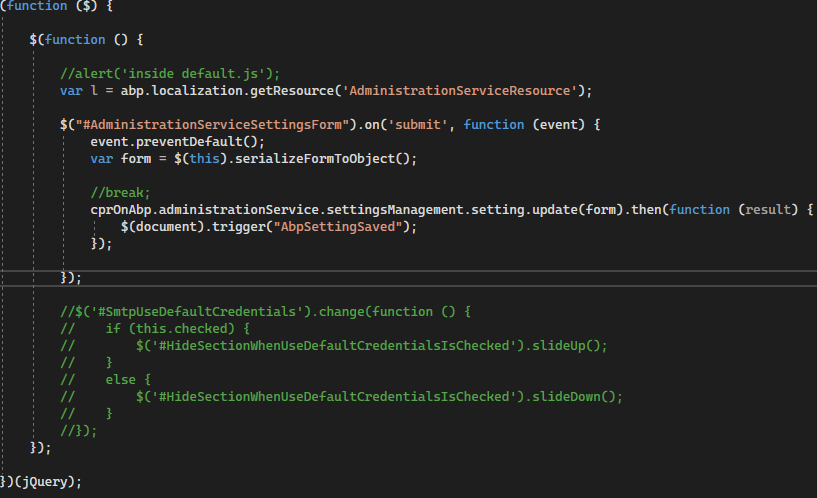
 Default.js
The Web (backend admin) application has been setup with "[DependsOn(... typeof(AdministrationServiceWebModule), typeof(AdministrationServiceHttpApiClientModule), ...)]" --- this is from the microservices template (default behavior).
Can I get some direction on how to proceed to solve this issue (what code I am missing). I cannot find any microservice example that extends the Settings Management module. I did find most of the patterns in the https://github.com/abpframework/abp/tree/dev/modules/setting-management/src/Volo.Abp.SettingManagement.Web project.
Thanks in advance.









