Found this line of code in our AuthServer service. It was added to try to fix the issue with the the 'discovery document' not returning as https. see #9849 https://abp.io/support/questions/9849/Error-retrieving-discovery-document-Endpoint-does-not-use-HTTPS-httpauthservermydomaindevconnectauthorize
// Force HTTPS scheme for AKS/ingress scenarios - must be early in pipeline
if (!env.IsDevelopment())
{
    app.Use((httpContext, next) =>
    {
        httpContext.Request.Scheme = "https";
        // Set the host to the authority from configuration, removing the scheme if present
            httpContext.Request.Host = new      HostString(configuration["AuthServer:Authority"]!.Replace("https://", "").Replace("http://", ""));
        return next();
    });
}
Added this line of code to NOT overwrite the url when the HttpContext.Request is not coming from the 'authserver.domain.dev'.
// Force HTTPS scheme for AKS/ingress scenarios - must be early in pipeline
if (!env.IsDevelopment())
{
    app.Use((httpContext, next) =>
    {
        httpContext.Request.Scheme = "https";
        if (httpContext.Request.Host.HasValue && httpContext.Request.Host.Value.Contains("authserver"))
        {
            // Set the host to the authority from configuration, removing the scheme if present
            httpContext.Request.Host = new HostString(configuration["AuthServer:Authority"]!.Replace("https://", "").Replace("http://", ""));
        }
        return next();
    });
}
This seems to have fixed the case where we are doing the EmailConfirmation and PasswordReset links that have the 'tenant' as part of the uri. I need to test now to see if I can still get a token via our token service as in #9849.
I get this error when I change the AuthServer__Authority to 'https://auth.{0}.cloverleafcms.dev'
[16:27:50 INF] Starting CloverleafCMS.AuthServer
2025-09-25T16:27:51.304356585Z CloverleafCMS.AuthServer terminated unexpectedly!
2025-09-25T16:27:51.312983837Z Volo.Abp.AbpInitializationException: An error occurred during ConfigureServicesAsync phase of the module Volo.Abp.OpenIddict.AbpOpenIddictAspNetCoreModule, Volo.Abp.OpenIddict.AspNetCore, Version=9.2.0.0, Culture=neutral, PublicKeyToken=null. See the inner exception for details.
2025-09-25T16:27:51.313015436Z ---> System.UriFormatException: Invalid URI: The hostname could not be parsed.
2025-09-25T16:27:51.313019508Z at System.Uri.CreateThis(String uri, Boolean dontEscape, UriKind uriKind, UriCreationOptions& creationOptions)
2025-09-25T16:27:51.313023141Z at System.Uri..ctor(String uriString)
2025-09-25T16:27:51.313026845Z at CloverleafCMS.AuthServer.CloverleafCMSAuthServerModule.<>c__DisplayClass3_0.<PreConfigureOpenIddict>b__1(OpenIddictServerBuilder serverBuilder) in D:\CodeRepositories\CloverleafCMS-Microservices-Abp\apps\auth-server\CloverleafCMS.AuthServer\CloverleafCMSAuthServerModule.cs:line 253
2025-09-25T16:27:51.313031158Z at Volo.Abp.Options.PreConfigureActionList1.Configure(TOptions options) 2025-09-25T16:27:51.313034387Z at Microsoft.Extensions.DependencyInjection.ServiceCollectionPreConfigureExtensions.ExecutePreConfiguredActions[TOptions](IServiceCollection services, TOptions options) 2025-09-25T16:27:51.313037294Z at Volo.Abp.OpenIddict.AbpOpenIddictAspNetCoreModule.<>c__DisplayClass1_0.<AddOpenIddictServer>b__0(OpenIddictServerBuilder builder) 2025-09-25T16:27:51.313040180Z at Microsoft.Extensions.DependencyInjection.OpenIddictServerExtensions.AddServer(OpenIddictBuilder builder, Action1 configuration)
2025-09-25T16:27:51.313043087Z at Volo.Abp.OpenIddict.AbpOpenIddictAspNetCoreModule.AddOpenIddictServer(IServiceCollection services)
2025-09-25T16:27:51.313045733Z at Volo.Abp.OpenIddict.AbpOpenIddictAspNetCoreModule.ConfigureServices(ServiceConfigurationContext context)
2025-09
-25T16:27:51.313048583Z at Volo.Abp.Modularity.AbpModule.ConfigureServicesAsync(ServiceConfigurationContext context)
2025-09-25T16:27:51.313051602Z at Volo.Abp.AbpApplicationBase.ConfigureServicesAsync()
2025-09-25T16:27:51.313054693Z --- End of inner exception stack trace ---
2025-09-25T16:27:51.313057457Z at Volo.Abp.AbpApplicationBase.ConfigureServicesAsync()
2025-09-25T16:27:51.313059913Z at Volo.Abp.AbpApplicationFactory.CreateAsync[TStartupModule](IServiceCollection services, Action1 optionsAction) 2025-09-25T16:27:51.313062722Z at Microsoft.Extensions.DependencyInjection.ServiceCollectionApplicationExtensions.AddApplicationAsync[TStartupModule](IServiceCollection services, Action1 optionsAction)
2025-09-25T16:27:51.313065556Z at Microsoft.Extensions.DependencyInjection.WebApplicationBuilderExtensions.AddApplicationAsync[TStartupModule](WebApplicationBuilder builder, Action1 optionsAction) at CloverleafCMS.AuthServer.Program.Main(String[] args) in D:\CodeRepositories\CloverleafCMS-Microservices-Abp\apps\auth-server\CloverleafCMS.AuthServer\Program.cs:line 58 2025-09-25T16:27:51.313136379Z at Volo.Abp.AbpApplicationBase.ConfigureServicesAsync() 2025-09-25T16:27:51.313141099Z at Volo.Abp.AbpApplicationFactory.CreateAsync[TStartupModule](IServiceCollection services, Action1 optionsAction)
2025-09-25T16:27:51.313145918Z at Microsoft.Extensions.DependencyInjection.ServiceCollectionApplicationExtensions.AddApplicationAsync[TStartupModule](IServiceCollection services, Action1 optionsAction) 2025-09-25T16:27:51.313148621Z at Microsoft.Extensions.DependencyInjection.WebApplicationBuilderExtensions.AddApplicationAsync[TStartupModule](WebApplicationBuilder builder, Action1 optionsAction)
2025-09-25T16:27:51.313151609Z at CloverleafCMS.AuthServer.Program.Main(String[] args) in D:\CodeRepositories\CloverleafCMS-Microservices-Abp\apps\auth-server\CloverleafCMS.AuthServer\Program.cs:line 58
I realize the {0} in the uri make it not a FQDN and that is the error - not parsing. So how do I get the correct tenant from the Email Confirmation link?
Here is the generated email confirmation link. It does look like suggested in Step 6 above. https://auth.cooptrustcu.cloverleafcms.dev/Account/EmailConfirmation?userId=7c35ab2c-1f30-b33f-1b3a-3a1c93671327&__tenant=7a5bc172-edda-3f19-78f6-3a1c7aa58661&confirmationToken=CfDJ8JgaA0MlWwBBhj6j207cixmu5y42jSy4ry8ycfDDBf%2BCXXc5yitosQCqt4qxGl1LuArwH0ucsbBbkxMfm1HwybHVP5NvjKRFg2Fl%2BbKwOd8HD7iMGufmXfRvDTvYLEzzRximE00AEz5WL5qCWsrru2b0e92EYxkW0IqkMItTuQSV7tTJpV136o3SOkfeZmY10Su731vOVAUkEFdLohNw58W7mEmLtZxf4Q%2Bc29yAmOciNHIj7nNuAGKmxnT3Y5wfxQ%3D%3D&returnUrl=%2fconnect%2fauthorize%3fclient_id%3dCloverleafCMS%26redirect_uri%3dhttps%253A%252F%252Fcooptrustcu.cloverleafcms.dev%252Fsignin-oidc%26response_type%3dcode%26scope%3daddress%2520email%2520phone%2520profile%2520roles%2520ActionItemService%2520AdministrationService%2520AIService%2520AuditLoggingService%2520AuthServer%2520ClientService%2520ClientServicesQuery%2520CommunicationsTemplateService%2520ContactService%2520DocTemplateService%2520DocumentService%2520EngagementLogService%2520FinancialService%2520GdprService%2520GuardianshipService%2520HousingService%2520HudService%2520IdentityService%2520LanguageService%2520MemberConfigService%2520NoteService%2520SaasService%2520ServicesService%2520SMSService%2520StaffService%2520TokenService%2520WorkshopService%26state%3d057a9c327a884cb4b4986b97b30e279f%26code_challenge%3dq_0a68W7EJ3fcOqZi_qDBr8TdB2rqQVwsdd80-HL1ok%26code_challenge_method%3dS256%26response_mode%3dquery
When I click on the link I get the 404 error because the httpContext host is 'authserver.cloverleafcms.dev' and not from the url which has the correct tenant.
To add to the answer: Do the following to have the api-only (api with no database) permissions and permission grants added. *To ensure your microservice's permissions are persisted to the central Administration database:
Reference your microservice's Application.Contracts project from the AdministrationService. This allows the central service to discover and register your permission definitions.
Rebuild the solution and restart the AdministrationService. This ensures the new permissions are loaded and can be seeded.*
Okay... I got it to work (write the permissions) with my original code. I forgot to uncomment the database config getSection lines in the module class. These were commented out originally because we don't have a database for this microservice.
in the ClientServicesQueryModule.cs
private void ConfigureCustomConnectionStringResolver(ServiceConfigurationContext context)
{
    // Register the custom connection string resolver
    // This will override the default ABP connection string resolver
    context.Services.AddTransient<IConnectionStringResolver, CustomConnectionStringResolver>();

    // Configure database connection options for strongly-typed configuration
    var configuration = context.Services.GetConfiguration();

    // Configure individual database connection options sections if needed
    // This allows for future extensibility with strongly-typed configuration
    context.Services.Configure<DatabaseConnectionOptions>("AdministrationService",
        configuration.GetSection("DatabaseConfig:AdministrationService"));
    // context.Services.Configure<DatabaseConnectionOptions>("IdentityService",
    //     configuration.GetSection("DatabaseConfig:IdentityService"));
    context.Services.Configure<DatabaseConnectionOptions>("AuditLoggingService",
        configuration.GetSection("DatabaseConfig:AuditLoggingService"));
    context.Services.Configure<DatabaseConnectionOptions>("SaasService",
        configuration.GetSection("DatabaseConfig:SaasService"));
    context.Services.Configure<DatabaseConnectionOptions>("LanguageService",
        configuration.GetSection("DatabaseConfig:LanguageService"));
    context.Services.Configure<DatabaseConnectionOptions>("AbpBlobStoring",
        configuration.GetSection("DatabaseConfig:AbpBlobStoring"));
}
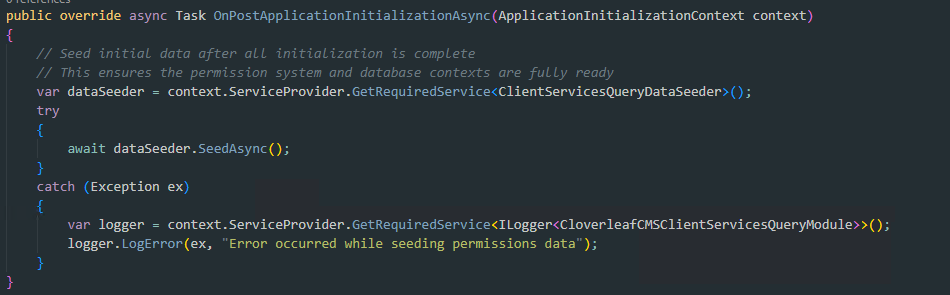
in the Data folder.
public class ClientServicesQueryDataSeeder : ITransientDependency
{
    private readonly ILogger _logger;
    private readonly IPermissionDataSeeder _permissionDataSeeder;

    public ClientServicesQueryDataSeeder(IPermissionDataSeeder permissionDataSeeder,
        ILogger<ClientServicesQueryDataSeeder> logger)
    {
        _permissionDataSeeder = permissionDataSeeder;
        _logger = logger;
    }

    [UnitOfWork]
    public virtual async Task SeedAsync(Guid? tenantId = null)
    {
        _logger.LogInformation("Starting ClientServicesQuery permission seeding...");

        try
        {
            var permissions = ClientServicesQueryPermissions.GetAll();
            _logger.LogInformation("Found {PermissionCount} permissions to seed: {Permissions}",
                permissions.Length,
                string.Join(", ", permissions));

            // Grant permissions to the "admin" role
            await _permissionDataSeeder.SeedAsync(
                RolePermissionValueProvider.ProviderName,
                "admin",
                permissions,
                tenantId
            );

            _logger.LogInformation("Successfully seeded ClientServicesQuery permissions for admin role");
        }
        catch (Exception ex)
        {
            _logger.LogError(ex, "Failed to seed ClientServicesQuery permissions");
            throw;
        }
    }
}
Thanks for the quick response.
This isn't clear... 'add the ClientServicesQueryContractsModule to the DependsOn of the IdentityService or ApplicationService or both'? This means that the Admin or Identity service has to reference the ClientServicesQueryContractsModule project. This tightly couples the to microservices!
Okay... I think we found it. Here is my curl snippet.
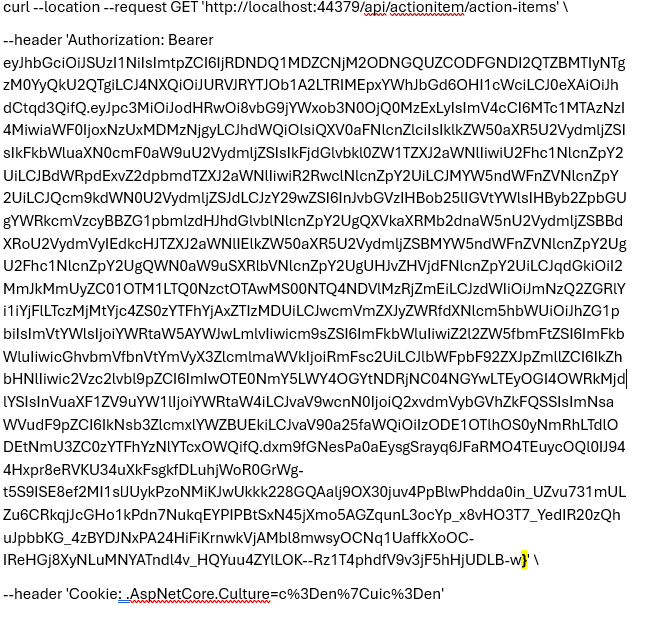
There was an extra '}' at the end of the Bearer Token.
The GET Postman Authorization tab looked like this:
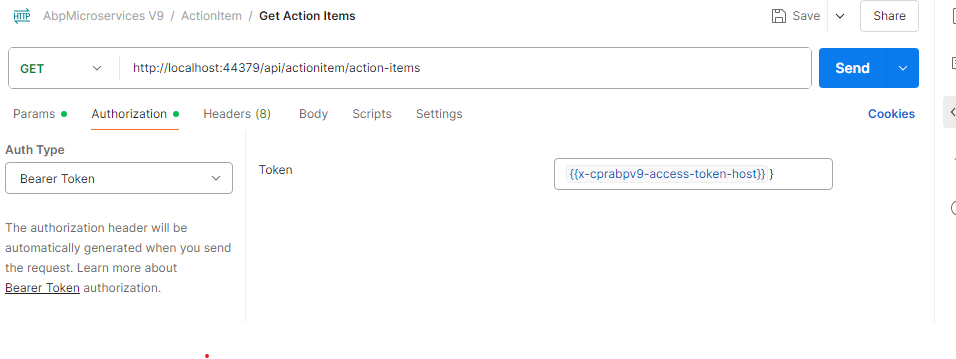
I removed the extra '}" and the GET returned data. Thanks for help.
Project shared... GitHub invite sent.
I have the following version of Abp Studio:
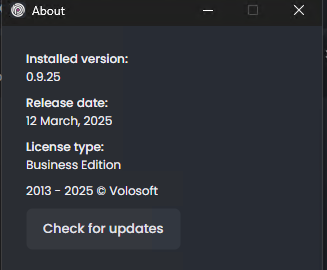
Abp Studio crashes when I open my Abp Solution file. The solution will load and after a few seconds the Abp Studio app will crash.
Here is the error log:
2025-04-22 16:23:49.781 -05:00 [WRN] The process cannot access the file 'C:\Users\xxxxx\source\repos\CloverleafCMS-Microservices-Abp-1.abpstudio\state.json' because it is being used by another process.
System.IO.IOException: The process cannot access the file 'C:\Users\xxxxx\source\repos\CloverleafCMS-Microservices-Abp-1.abpstudio\state.json' because it is being used by another process.
at Microsoft.Win32.SafeHandles.SafeFileHandle.CreateFile(String fullPath, FileMode mode, FileAccess access, FileShare share, FileOptions options)
at Microsoft.Win32.SafeHandles.SafeFileHandle.Open(String fullPath, FileMode mode, FileAccess access, FileShare share, FileOptions options, Int64 preallocationSize, Nullable1 unixCreateMode) at System.IO.File.OpenHandle(String path, FileMode mode, FileAccess access, FileShare share, FileOptions options, Int64 preallocationSize) at System.IO.File.WriteToFileAsync(String path, FileMode mode, ReadOnlyMemory1 contents, Encoding encoding, CancellationToken cancellationToken)
at Volo.Abp.Studio.UI.Solutions.SolutionState.SolutionStateSynchronizer.CilggAsHIm(String )
at Volo.Abp.Studio.UI.Solutions.SolutionState.SolutionStateSynchronizer.<>c__DisplayClass26_0.DDK1Yhg0gnvQQJBxeNZ.MoveNext()
--- End of stack trace from previous location ---
at System.Threading.Tasks.Task.<>c.b__128_0(Object state)
at Avalonia.Threading.SendOrPostCallbackDispatcherOperation.InvokeCore()
at Avalonia.Threading.DispatcherOperation.Execute()
at Avalonia.Threading.Dispatcher.ExecuteJob(DispatcherOperation job)
at Avalonia.Threading.Dispatcher.ExecuteJobsCore(Boolean fromExplicitBackgroundProcessingCallback)
at Avalonia.Threading.Dispatcher.Signaled()
at Avalonia.Win32.Win32Platform.WndProc(IntPtr hWnd, UInt32 msg, IntPtr wParam, IntPtr lParam)
at Avalonia.Win32.Interop.UnmanagedMethods.DispatchMessage(MSG& lpmsg)
at Avalonia.Win32.Win32DispatcherImpl.RunLoop(CancellationToken cancellationToken)
at Avalonia.Threading.DispatcherFrame.Run(IControlledDispatcherImpl impl)
at Avalonia.Threading.Dispatcher.PushFrame(DispatcherFrame frame)
at Avalonia.Threading.Dispatcher.MainLoop(CancellationToken cancellationToken)
at Avalonia.Controls.ApplicationLifetimes.ClassicDesktopStyleApplicationLifetime.Start(String[] args)
at ktmpmYYhNMEr3TNPigT.jGyPv8YNF0HevUNmIxp.rf7YgLwjGG(String[] )
I'm starting the Abp Studio with administrator privileges, but it still trips the following error: The process cannot access the file 'C:\Users\xxxxx\source\repos\CloverleafCMS-Microservices-Abp-1.abpstudio\state.json' because it is being used by another process.
Thanks for the local Kubernetes test. Still I think a test via a deployed application to an Azure Kubernetes service would be a better comparison to our situation. One question still.... do you (Abp.io) have any production clients that are running abpFramework microservices template in an Azure Kubernetes Service? If so, can we find out what there metrics are for obtaining a token?









