I suspect the ABP CLI/Studio has code generation issue.
The application module template do create a dev-app host application for Angular project.
However, in v10.3 the dev-app host application is incomplete.
The issue is reproducible by the follow scripts.
v9.1 script
dotnet tool uninstall -g Volo.Abp.Studio.Cli
dotnet tool install -g Volo.Abp.Studio.Cli --version 0.9.25
dotnet tool list -g Volo.Abp.Studio.Cli

mkdir DddModule910
cd DddModule910

abp new-module DddModule -t module:ddd -u angular
v10.3 script
dotnet tool uninstall -g Volo.Abp.Studio.Cli
dotnet tool install -g Volo.Abp.Studio.Cli --version 2.2.7
dotnet tool list -g Volo.Abp.Studio.Cli

mkdir DddModule103
cd DddModule103

abp new-module DddModule -t module:ddd -u angular
Attached is the comparison result between DddModule910 and DddModule103 folders.
The DddModule103 missing a lot of files (highlighted in grey) including the entry point app.ts.

I am creating a new reusable module using Application Module template and this will be installed to the service in my Microservice Solution.
During development I am using the Single Layer Solution to host all the required modules and the Angular dev-app is configured to use this host application.
This workflow is working in V9.1 but the new dev-app is not working after upgrading to V10.3.
Please advise.
Check the docs before asking a question: https://abp.io/docs/latest Check the samples to see the basic tasks: https://abp.io/docs/latest/samples The exact solution to your question may have been answered before, and please first use the search on the homepage.
Provide us with the following info:
🧐 Hint: If you are using the ABP Studio, you can see all the information about your solution from the configuration window, which opens when you right-click on the solution and click on the Solution Configuration button.
abp new-module DddModule -t module:ddd -u angularyarn startyarn run v1.22.22 error Command "start" not found. info Visit https://yarnpkg.com/en/docs/cli/run for documentation about this command.ng serve dev-appProject target does not exist.
<br>
Check the docs before asking a question: https://abp.io/docs/latest
Check the samples to see the basic tasks: https://abp.io/docs/latest/samples
The exact solution to your question may have been answered before, and please first use the search on the homepage.
Provide us with the following info:
🧐 Hint: If you are using the ABP Studio, you can see all the information about your solution from the configuration window, which opens when you right-click on the solution and click on the Solution Configuration button.
abp new-module TestModule -t module:ddd -u angularThank you for your prompt response.
I raise this ticket because the angular application hits the following error and not able to load successfully due to the missing provideAbpThemeShared() config.

Please advise.
Thank you.
abp new-module Acme.BookStore -t module:ddd -u angularThe following is the generated content for \angular\projects\dev-app\src\app\app.module.ts
import { CoreModule, provideAbpCore, withOptions } from '@abp/ng.core'; import { registerLocale } from '@abp/ng.core/locale'; import { provideAccountConfig } from '@abp/ng.account/config'; import { provideIdentityConfig } from '@abp/ng.identity/config'; import { provideTenantManagementConfig } from '@abp/ng.tenant-management/config'; import { provideThemeBasicConfig, ThemeBasicModule } from '@abp/ng.theme.basic'; import { ThemeSharedModule } from '@abp/ng.theme.shared'; import { provideAbpOAuth } from '@abp/ng.oauth'; import { provideSettingManagementConfig } from '@abp/ng.setting-management/config'; import { provideFeatureManagementConfig } from '@abp/ng.feature-management'; import { NgModule } from '@angular/core'; import { BrowserModule } from '@angular/platform-browser'; import { BrowserAnimationsModule } from '@angular/platform-browser/animations'; import { BookStoreConfigModule } from '@acme/book-store/config'; import { environment } from '../environments/environment'; import { AppRoutingModule } from './app-routing.module'; import { AppComponent } from './app.component'; import { APP_ROUTE_PROVIDER } from './route.provider';
@NgModule({ imports: [ BrowserModule, BrowserAnimationsModule, AppRoutingModule, ThemeSharedModule, CoreModule, BookStoreConfigModule.forRoot(), ThemeBasicModule, ], providers: [ APP_ROUTE_PROVIDER, provideAbpCore( withOptions({ environment, registerLocaleFn: registerLocale(), }) ), provideAbpOAuth(), provideIdentityConfig(), provideAccountConfig(), provideTenantManagementConfig(), provideSettingManagementConfig(), provideThemeBasicConfig(), provideFeatureManagementConfig(), ], declarations: [AppComponent], bootstrap: [AppComponent], }) export class AppModule {}
Any update on this matter?
Hello,
please check similar issue https://github.com/abpframework/abp/issues/5885#issuecomment-1146655546
thanks
I have tried to add --url parameter as mentioned above.
With that only abp and productService modules are being generated and the existing languageManagement, featureManagement and etc are being removed.
Would like to confirm is this the expected behavior for microservice template?
Check the docs before asking a question: https://docs.abp.io/en/commercial/latest/ Check the samples to see the basic tasks: https://docs.abp.io/en/commercial/latest/samples/index The exact solution to your question may have been answered before, and please first use the search on the homepage. Provide us with the following info:
I am regenerating the service proxy for product-service with the following commands and I got an invalid module error.
abp new Acme.BookStore -t microservice-pro -u angular -csf abp generate-proxy -t ng ABP CLI 8.1.1 [Invalid Module] Backend module "app" does not exist in API definition.
Next I tried to add some options based on https://gist.github.com/muhammedaltug/8969dd3ea00e902b034c8a5743165248 but it deleted the existing files, created new files on new location and most of the modules were removed from the generate-proxy.json.
abp generate-proxy -t ng -m productService -u https://localhost:44361 --target product-service ABP CLI 8.1.1 DELETE projects/product-service/src/lib/proxy/product-service DELETE projects/product-service/src/lib/proxy/products/index.ts DELETE projects/product-service/src/lib/proxy/products/models.ts DELETE projects/product-service/src/lib/proxy/products/product-public.service.ts DELETE projects/product-service/src/lib/proxy/products/product.service.ts DELETE projects/product-service/src/lib/proxy/products CREATE projects/product-service/src/lib/proxy/product-service/products/product.service.ts (1901 bytes) CREATE projects/product-service/src/lib/proxy/product-service/products/product-public.service.ts (540 bytes) CREATE projects/product-service/src/lib/proxy/product-service/products/models.ts (609 bytes) CREATE projects/product-service/src/lib/proxy/product-service/products/index.ts (103 bytes) CREATE projects/product-service/src/lib/proxy/product-service/index.ts (61 bytes) UPDATE projects/product-service/src/lib/proxy/generate-proxy.json (117160 bytes) UPDATE projects/product-service/src/lib/proxy/README.md (1000 bytes) UPDATE projects/product-service/src/lib/proxy/index.ts (80 bytes)
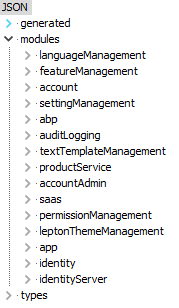
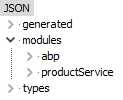 I would like to check whether is this the expected behavior?









