[maliming] said: Hi,
Angular CDK 22 opens
MatDialogin the browser's top layer by default (it uses the native popover API). Elements outside the top layer always stay behind it, soabp-modalcan't get above the dialog with z-index alone, even with10001.You can turn this off in your root providers:
import { OVERLAY_DEFAULT_CONFIG } from '@angular/cdk/overlay';

export const appConfig: ApplicationConfig = {
  providers: [
    // ...your existing providers
    { provide: OVERLAY_DEFAULT_CONFIG, useValue: { usePopover: false } },
  ],
};
This puts all CDK overlays back to normal z-index stacking.
After that, your
windowClass/backdropClassworkaround works. You don't need::ng-deep, just put the CSS in the globalstyles.scss. Use a more specific selector than the rules indark.css. Otherwise the result depends on which file loads last.<abp-modal [(visible)]="openViewDocument" [options]="{ windowClass: 'above-cdk-overlay', backdropClass: 'above-cdk-overlay-backdrop' }" > ... </abp-modal>body ngb-modal-backdrop.modal-backdrop.above-cdk-overlay-backdrop { z-index: 10001 !important; } body ngb-modal-window.modal.above-cdk-overlay { z-index: 10002 !important; }If the delete confirmation comes from ABP's
ConfirmationService, it isn't an ng-bootstrap modal, so these classes don't apply to it. Add this to the global styles as well:body .confirmation { z-index: 10003 !important; }The
[options]input is typed asNgbModalOptionsand is passed toNgbModal.open()as is, socontainerand the other ng-bootstrap options work too: https://abp.io/docs/latest/framework/ui/angular/modal#optionsAbout
abpBody:abp-modalalready used the signalcontentChild('abpBody')in 8.3.0, the same query as in 10.6. Your original markup with two<ng-template *ngIf="..." #abpBody>also renders the right body with ABP 10.6.0 and Angular 22.1, so the empty body comes from something else on that page. Your single#abpBodyversion is fine to keep. If you want us to look into the original one, please share a small project that reproduces it.Thanks
This worked! Thank you!
[AI-Bot] said:
- Issue 1 (z-index / MatDialog overlay):
abp-modalis implemented on top of ng-bootstrap’sNgbModal, which appendsngb-modal-window/ngb-modal-backdroptodocument.body. When your app (or theme) sets.cdk-overlay-container { z-index: 10000 !important; }and ng-bootstrap modal/backdrop stays at a lower z-index (e.g.,9999), the modal will render behind the CDK overlay stack.
Supported ABP-side workaround (no need to fork ABP): passwindowClass/backdropClassvia the[options]input (ABP spreadsoptions()intoNgbModal.open(...)), then override z-index globally.<abp-modal [(visible)]="openViewDocument" [options]="{ windowClass: 'abp-above-cdk', backdropClass: 'abp-above-cdk-backdrop' }" > <ng-template #abpBody>...</ng-template> </abp-modal>Put the CSS in a global stylesheet (recommended), so you don’t need
::ng-deep:ngb-modal-window.abp-above-cdk { z-index: 10001 !important; } ngb-modal-backdrop.abp-above-cdk-backdrop { z-index: 10001 !important; }Notes:
- Using a component-scoped stylesheet forces you into
::ng-deepbecause the modal elements are not inside the component’s DOM tree (they’re appended tobody).- Your current CSS values confirm the root cause: 9999 < 10000, so it will always lose against
.cdk-overlay-container. >- Issue 2 (
contentChild('abpBody')+*ngIfon<ng-template>): In ABP 10.6,abp-modaluses Angular’s signal-basedcontentChild('abpBody'). That query will not reliably find a template reference that is structurally wrapped (like<ng-template *ngIf ... #abpBody>), because*ngIfon an<ng-template>creates an additional outer template layer.
Fix in application code: keep exactly one projected<ng-template #abpBody>and move conditional logic inside it (as you already did):<abp-modal [(visible)]="showModal"> <ng-template #abpBody> <app-edit-form *ngIf="isEditMode"></app-edit-form> <app-view-only *ngIf="!isEditMode"></app-view-only> </ng-template> </abp-modal>This pattern aligns with how ABP’s modal is documented/used (single
#abpBodytemplate projected into the component).
- About your requested ABP changes (what is verifiable from sources):
- From the ABP Angular modal docs, the modal is expected to be used by projecting
#abpHeader/#abpBody/#abpFootertemplates (single templates) into<abp-modal>. Your “two#abpBodytemplates toggled by*ngIf” is not a documented usage pattern, and it becomes fragile with signal-based content queries.- There is no verified, official ABP documentation (in the retrieved sources) that mentions a
zIndexinput,containeroption, or a migration note specifically aboutcontentChild()+*ngIfon<ng-template #abpBody>.Sources (verified)
- https://abp.io/docs/latest/framework/ui/angular/modal
- https://github.com/abpframework/abp/blob/dev/npm/ng-packs/packages/theme-shared/src/lib/components/modal/modal.component.ts
- https://github.com/abpframework/abp/tree/dev/npm/ng-packs/packages/theme-shared
This response was generated by AI. If it didn’t solve your problem, feel free to post a new answer — our support team will jump in to help you soon.
No AI response, please!
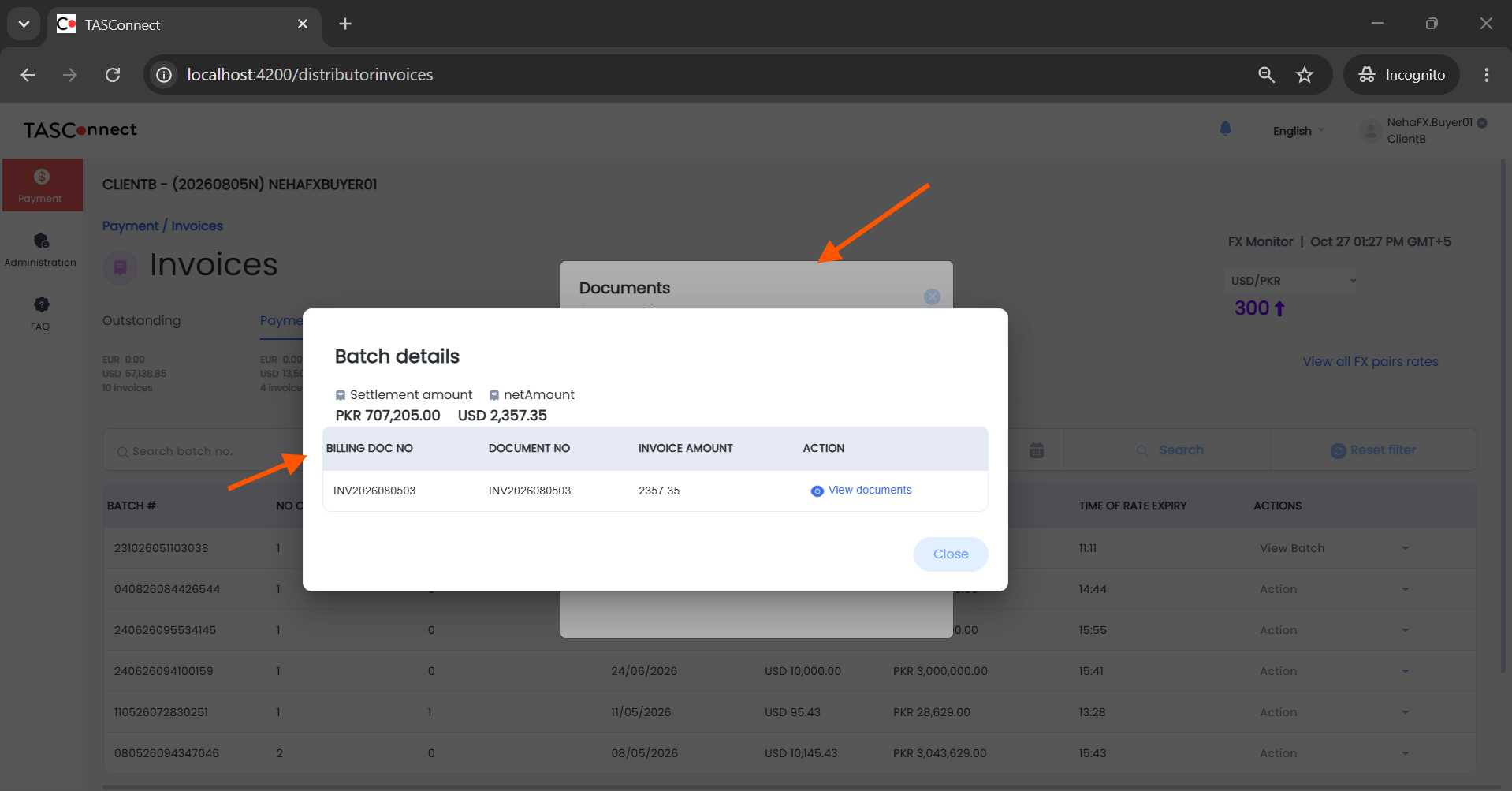
I applied the changes, I still see the abp-modal appears begin the custom pop-up.
you can refer to the screenshot below
abp-modal z-index and contentChild Issues After ABP 10.6 + Angular 22 UpgradeDate: 2026-10-27
Product: ABP Commercial (Angular UI)
ABP Version: 10.6.0
Angular Version: 22.1.4
Affected Package: @abp/ng.theme.shared v10.6.0
Priority: High
Related JIRA Tickets: VL-246XX (Issue 4), VL-246XX
After upgrading from ABP 8.3 + Angular 17 to ABP 10.6 + Angular 22, <abp-modal> exhibits two critical issues when used inside components that are themselves opened as Angular Material (MatDialog) or CDK overlay-based dialogs:
abp-modal (ng-bootstrap modal) renders behind the CDK overlay container, making it invisible/inaccessible to the user.contentChild('abpBody') signal query fails: When <ng-template #abpBody> is conditionally wrapped with *ngIf, ABP 10.6's new signal-based contentChild() query cannot find the template reference, resulting in an empty modal body.These issues did not exist in ABP 8.3 + Angular 17. They are regressions introduced by the ABP 10.6 migration to Angular Signals-based content queries and the interaction between ng-bootstrap's modal z-index and CDK overlay z-index.
TASConnect Litmus is a multi-tenant Supply Chain Finance (SCF) and Trade Finance SaaS platform. The upgrade was a full-stack migration:
| Component | Before | After | |-----------|--------|-------| | Angular | 17.3.12 | 22.1.4 | | ABP Framework (Angular) | 8.3.0 | 10.6.0 | | ABP Framework (.NET) | 8.3.1 | 10.6.0 | | TypeScript | 5.3.0 | 6.0.0 | | .NET | 8.0 | 10.0 | | Angular Material | 17.3.10 | 22.1.4 | | Angular CDK | 17.3.10 | 22.1.4 | | ng-bootstrap | 16.0.0 | 21.0.0 | | ng-zorro-antd | 17.4.1 | 22.0.1 |
740 files modified, ~738 components updated, 50+ DTOs fixed, 17 modules refactored, 272 .csproj files updated on backend.
abp-modal Appears Behind CDK Overlay (Z-index Conflict)When <abp-modal> is used inside a component that is itself opened as a MatDialog (Angular Material dialog), the abp-modal renders behind the MatDialog overlay and is completely inaccessible to the user. The user sees the parent dialog but cannot see or interact with the abp-modal that should appear on top.
MatDialog (CDK overlay-based dialog)<abp-modal> to open (e.g., click "View Documents")abp-modal appears on top of the MatDialogabp-modal appears behind the MatDialog and is inaccessibleThe issue is a z-index conflict between three CSS systems:
The application's global stylesheet (dark.css) sets the CDK overlay container z-index:
/* dark.css, line 1163 */
.cdk-overlay-container {
  z-index: 10000 !important;
  left: 0px !important;
  position: fixed !important;
}
The application's global stylesheet also sets ng-bootstrap modal z-index:
/* dark.css, line 3340-3348 */
ngb-modal-backdrop.modal-backdrop {
  z-index: 9999 !important;
  transition: none !important;
}

ngb-modal-window.modal {
  z-index: 9999 !important;
  transition: none !important;
}
Additionally, NgbModalBackdrop has a hardcoded inline style in its @Component host metadata:
// @ng-bootstrap/ng-bootstrap - NgbModalBackdrop component
@Component({
  selector: 'ngb-modal-backdrop',
  host: {
    '[class]': '"modal-backdrop" + (backdropClass ? " " + backdropClass : "")',
    style: 'z-index: 1055',  // ← Hardcoded inline style
  },
})
| Layer | Element | z-index | Source |
|-------|---------|---------|--------|
| CDK overlay container | .cdk-overlay-container | 10000 !important | dark.css line 1163 |
| ng-bootstrap modal window | ngb-modal-window.modal | 9999 !important | dark.css line 3345 |
| ng-bootstrap modal backdrop | ngb-modal-backdrop.modal-backdrop | 9999 !important | dark.css line 3340 |
| ng-bootstrap backdrop inline | ngb-modal-backdrop | 1055 | Hardcoded host style |
Since 9999 < 10000, the ng-bootstrap modal (used by abp-modal) always renders behind the CDK overlay container (used by MatDialog). This means any abp-modal opened from within a MatDialog is invisible.
In ABP 8.3 + Angular 17, this was not an issue because:
From @abp/ng.theme.shared v10.6.0 (fesm2022 bundle), the ModalComponent.toggle() method:
// @abp/ng.theme.shared - ModalComponent.toggle() (line ~1826) — simplified
this.modalRef = this.modal.open(this.modalContent(), {
    size: 'md', centered: false, keyboard: false, scrollable: true,
    ...this.options(),  // ← Spreads user options to ng-bootstrap
    windowClass: `${this.options().windowClass || ''} ${this.modalIdentifier}`,
});
this.options() is spread into ng-bootstrap's modal.open(). This means windowClass and backdropClass from [options] input pass through to ng-bootstrap. This is the only mechanism to influence the modal's z-index from the consumer side.
abp-modal does not expose any z-index configuration — consumers cannot set z-index through the component API.document.body — outside the component's view encapsulation, making scoped CSS impossible without ::ng-deep.style: 'z-index: 1055' — this cannot be overridden by CSS classes without !important.We pass custom CSS classes via [options] and use ::ng-deep with !important to override z-index:
<!-- alert.component.html -->
<abp-modal
  [options]="{
    size: 'md',
    windowClass: 'above-cdk-overlay',
    backdropClass: 'above-cdk-overlay-backdrop'
  }"
  [(visible)]="openViewDocument"
>
  <!-- modal content -->
</abp-modal>
/* alert.component.scss */
::ng-deep ngb-modal-window.above-cdk-overlay {
    z-index: 10001 !important;
}

::ng-deep ngb-modal-backdrop.above-cdk-overlay-backdrop {
    z-index: 10001 !important;
}
Problems with this workaround:
::ng-deep (deprecated in Angular, may be removed in future versions)!important to override both the stylesheet rule and inline style<abp-modal> that could appear above a CDK overlay[options] passes through to ng-bootstrapzIndex input to ModalComponent that sets z-index on both the modal window and backdrop.container option that allows specifying a container element (ng-bootstrap supports this). If the modal could be appended inside the CDK overlay container, it would inherit the CDK z-index context.windowClass/backdropClass passthrough — this is currently undocumented but is the only workaround available.@angular/cdk. This would eliminate the z-index conflict entirely.contentChild('abpBody') Signal Query Fails with *ngIf on <ng-template>ABP 10.6's ModalComponent uses Angular Signals-based contentChild() queries:
// @abp/ng.theme.shared v10.6.0 - ModalComponent
this.abpBody = contentChild('abpBody', /* ... */);
In ABP 8.3, this was a @ContentChild decorator-based query. The migration to contentChild() signal introduces a breaking behavioral change when *ngIf is used on <ng-template>.
This pattern worked in ABP 8.3 + Angular 17 but breaks in ABP 10.6 + Angular 22:
<!-- BROKEN in ABP 10.6 + Angular 22 -->
<abp-modal [(visible)]="openViewDocument">
  <ng-template *ngIf="!isFxPayModule" #abpBody>
    <app-component-a [IsViewOnly]="true"></app-component-a>
  </ng-template>
  <ng-template *ngIf="isFxPayModule" #abpBody>
    <app-component-b [IsViewOnly]="false"></app-component-b>
  </ng-template>
</abp-modal>
In Angular 22, *ngIf is syntactic sugar for an implicit <ng-template> wrapper. When *ngIf is placed on a <ng-template>, Angular creates a nested template structure:
<!-- What Angular 22 actually creates: -->
<ng-template [ngIf]="!isFxPayModule">
  <ng-template #abpBody>
    <app-component-a></app-component-a>
  </ng-template>
</ng-template>
The #abpBody template reference is now inside an outer *ngIf template. Angular's contentChild() signal query searches the direct content children of the component. Since #abpBody is wrapped inside the *ngIf template, it's no longer a direct content child — contentChild('abpBody') returns undefined.
ABP's ModalComponent template uses:
<!-- ABP ModalComponent template -->
@if (abpBody()) {
  <div id="abp-modal-body" class="modal-body">
    <ng-container *ngTemplateOutlet="abpBody()"></ng-container>
  </div>
}
Since abpBody() is undefined, the @if block evaluates to false, and the modal body is never rendered — the modal opens but appears empty.
Consolidate into a single <ng-template #abpBody> and move the *ngIf to the child components:
<!-- WORKING in ABP 10.6 + Angular 22 -->
<abp-modal [(visible)]="openViewDocument">
  <ng-template #abpBody>
    <app-component-a *ngIf="!isFxPayModule" [IsViewOnly]="true"></app-component-a>
    <app-component-b *ngIf="isFxPayModule" [IsViewOnly]="false"></app-component-b>
  </ng-template>
</abp-modal>
@ContentChild decorator which could find #abpBody even when wrapped in structural directives in some cases, or the pattern was resilient to it.contentChild() signal which has stricter matching behavior for content projection.*ngIf on <ng-template #abpBody> will break.*ngIf to switch between view/edit modes, different user roles, etc.contentChildren() (plural) with a filter, or @ContentChild with { descendants: true } equivalent, to find #abpBody even when wrapped in structural directives.abpBody() returns undefined but the modal is visible — this would help developers diagnose the issue faster.package.json){
"@angular/core": "~22.1.4",
"@angular/material": "~22.1.4",
"@angular/cdk": "~22.1.4",
"@abp/ng.theme.shared": "~10.6.0",
"@abp/ng.core": "~10.6.0",
"@ng-bootstrap/ng-bootstrap": "^21.0.0",
"ng-zorro-antd": "^22.0.1"
}
@abp/ng.theme.shared v10.6.0 bundles its own @ng-bootstrap/ng-bootstrap v20.0.0.
abp-ng.theme.shared.mjs line 1775: contentChild('abpBody') signal queryabp-ng.theme.shared.mjs line 1826: toggle() spreads options() to ng-bootstrapng-bootstrap-ng-bootstrap-modal.mjs line 83: Backdrop style: 'z-index: 1055' hardcodedTested in Chrome 130+ and Edge 130+. Issue is CSS z-index stacking, not browser-specific.
Open a component via this.dialog.open(AlertComponent, { data, width: '80%' }). Inside that MatDialog component:
<abp-modal [(visible)]="openViewDocument">
  <ng-template #abpBody><p>Content here</p></ng-template>
</abp-modal>
Result: abp-modal renders behind the MatDialog overlay — invisible to the user.
<abp-modal [(visible)]="showModal">
  <ng-template *ngIf="isEditMode" #abpBody>
    <app-edit-form></app-edit-form>
  </ng-template>
  <ng-template *ngIf="!isEditMode" #abpBody>
    <app-view-only></app-view-only>
  </ng-template>
</abp-modal>
Result: Modal opens but body is empty — contentChild('abpBody') returns undefined.
| # | Request | Severity |
|---|---------|----------|
| 1 | Document the contentChild breaking change for *ngIf on <ng-template #abpBody> in migration guide | Critical |
| 2 | Add z-index configuration to ModalComponent (e.g., zIndex input or CSS custom property) | High |
| 3 | Document windowClass/backdropClass passthrough via [options] input | High |
| 4 | Add runtime warning when abpBody() signal returns undefined but modal is visible | Medium |
| 5 | Consider CDK overlay for modal rendering instead of ng-bootstrap to avoid z-index conflicts with other CDK-based components | Low (long-term) |
Reported by: TASConnect Platform Team Contact: Pradeep Pradyumna Attachments: Screenshots available from JIRA tickets VL-246XX and VL-246XX
I have shared details over email. Also I have enabled Debug. Post deployment, I will share the fresh logs
[maliming] said: ok : )
Sorry for the delayed response. After including changes as suggested, I still face the same issue.
Do let me know: apart from the identitymodel logs, is there anything else you would like me to share? I could do it over email. Also, let me know if we could connect over a short call I can walk you through the code and changes we have made so far. Thank you!
[maliming] said: TokenValidationParameters
thank you. Yaduraj is on a leave this week and the changes are not yet implemented. I just did and waiting for deployment. I'll update you soon. thank you!
Here are the logs from Identity and Gateway projects:
Identity API:
Gateway API:
On the email, I'm sending you a copy of the Application and Network tab contents.
thanks!
Hi ABP team,
Is it possible that we could get over a short call, as we 're running short of time and we have critical deliveries dependent on this upgrade we did?
We're facing issues logging into the application post ABP IO upgrade. And I see some of your suggestions are helping but itsn;t fast enough for us to do it over support tickets and meet our deadlines.
Just sharing a summary of .NET and Angular upgrades we did here. UPGRADE_COMPLETION_REPORT.md
ANGULAR-22-ABP-10.6-UPGRADE-COMPLETE-SUMMARY.md
Pls review them and let us know when can we connect today? Thanks!
Project: TASConnect Litmus Platform
Period: August 28 - September 1, 2026
PR: #3355
Branch: feature/R26.06_angular22-abp10-upgrade
Successfully upgraded Angular 17.3.12 → 22.0.8 with ABP 8.3 → 10.6 and TypeScript 5.3 → 6.0 for backend .NET 10 compatibility.
Impact:
standalone: falseStatus:
✅ Compilation: Success (0 errors)
⚠️ Warnings: Sass deprecations (non-blocking)
✅ Dev Server: Starts successfully
✅ Runtime: Application loads correctly
| Package | Before | After | |---------|--------|-------| | Angular | 17.3.12 | 22.0.8 | | TypeScript | 5.3.0 | 6.0.0 | | ABP Framework | 8.3.0 | 10.6.0 | | ng-zorro-antd | 17.4.1 | 22.0.1 | | Angular Material | 17.3.10 | 22.1.4 | | ng-bootstrap | 16.0.0 | 17.0.0 (downgraded from 18 for compatibility) |
browserTarget → buildTarget in angular.jsonLOGO_APP_NAME_TOKEN provider (required in ABP 10+)declare keyword to 50+ DTOsexport class MyDto extends PagedDto {
declare sorting: string; // ← Added 'declare'
}
standalone: false to ~738 componentsngx-image-cropper usage (Module → Component)Angular 22 defaults to standalone: true. All NgModule components need standalone: false.
@Component({
  standalone: false,  // ← Required
  selector: 'app-example',
  templateUrl: './example.component.html'
})
Complex expressions in [(value)] no longer supported.
<!-- ❌ Before -->
<mat-select [(value)]="form?.value.field">

<!-- ✅ After -->
<mat-select [formControl]="form?.controls['field']">
Must use declare keyword for inherited properties.
Changed from node to bundler in tsconfig.json.
browserTarget renamed to buildTarget.
Requires explicit LOGO_APP_NAME_TOKEN provider.
Angular 22 requires DatePipe in global providers for lazy-loaded ABP modules.
tsconfig.json:
{
  "compilerOptions": {
    "target": "ES2022",
    "moduleResolution": "bundler",
    "strictPropertyInitialization": false,
    "useDefineForClassFields": false
  }
}
angular.json:
{
  "serve": {
    "options": {
      "buildTarget": "litmus:build"  // Changed from browserTarget
    }
  }
}
app.module.ts:
import { DatePipe } from '@angular/common';

@NgModule({
  providers: [
    DatePipe,  // ← Angular 22 fix for lazy-loaded modules
    // ...
  ]
})
Issue: ABP 10.6 imports non-existent @angular/aria/tabs.
Workaround: Create polyfill in node_modules/@angular/aria/tabs/.
Action: Recreate after every npm install.
Doc: See ABP-ANGULAR-22-POLYFILL-WORKAROUND.md
Issue: Sass @import will be removed in Dart Sass 3.0.
Impact: Non-blocking warnings.
Future: Migrate to @use and @forward syntax.
Affected: lodash, moment, highcharts, crypto-js, uuid.
Impact: Larger bundle size, no functional issues.
Fixed: Using v17 (v18 has afterRender issues).
Pre-Deployment:
Build Configuration:
NODE_OPTIONS=--max-old-space-size=8192ABP Polyfill:
node_modules/@angular/aria/tabs/ polyfillPost-Deployment:
Code Changes:
Build Metrics:
Package Upgrades:
58b41a68 - Initial Angular 22 upgrade3ede8924 - ABP 10.6 upgradefda8ef48 - TypeScript 6.0 DTO fixes2ab9bcda - Complete upgrade with standalone:falsecdc6f407 - DatePipe provider fix ⭐377892a5 - DateFormatPipe provider fix (PR review)33b47d33 - Remove dead @HostListener codeWhat Worked:
Challenges:
Future:
Documentation:
Internal Docs:
ABP-ANGULAR-22-POLYFILL-WORKAROUND.mdANGULAR-22-ABP-10.6-FIX-SUMMARY.mdContact: Pradeep.Pradyumna@tasconnect.com
Status: ✅ Complete
Last Updated: September 2, 2026
NO AI response please. Request you to go through the attached markdown files and respond




