There might be some permission name changes, have executed DbMigrator once in the QA environment database?
It seems it cannot configure entity base properties in DbContext or the extension method of the module.
Can you check AbpModularSolution1DbContext and find OnModelCreating() method in it.
Is there any method that configures your module something like ConfigureTestModule()
    protected override void OnModelCreating(ModelBuilder builder)
    {
        base.OnModelCreating(builder);

        // ...

        builder.ConfigureTestModule(); // 👈
    }
If yes, go to your module solution and find that ConfigureTestModule method and make sure your entity is configured properly and calls .ConfigureByConvention() method in entity builder.
public static void ConfigureTestModule(this ModelBuilder builder)
{
    // ...

    builder.Entity<Hello>(b =>
    {
        b.ToTable(TestModuleConsts.DbTablePrefix + "Books",
            TestModuleConsts.DbSchema);
            // 👇 Make sure this is called.
        b.ConfigureByConvention(); //auto configure for the base class props

    });

    // ...
}
This method configures ExtraPropertyDictionary to be kept as string as json in the databse and that exception will be gone
Hi,
ABP doesn't keep any user language data in the database. They kept at client-side. If you deploy multiple applications in different domains, so they cannot share cookies even they're subdomains of the same domain. (Yes there is some ways to do it but by default it's not shared).
So, it's client-specified feature. If you want to keep this kind of settings (language, theme(dark/light)) in the databse/server-side and sync across all the clients, you may use settings feature of the ABP. Settings feature allows you to define a settings for Application-wide, for a tenant, for a user etc.
https://abp.io/docs/latest/framework/infrastructure/settings
You can define a setting for language, and set it for each users, then use that settting to define user's languages
Hi, https://abp.io/docs/latest/framework/fundamentals/connection-strings#configuring-the-database-structures
You can use different connectionstrings for a specific module. Let say your Reporting module db conext has this attribute:
[ConnectionStringName("Reporting")]
public class ReportingDbContext : AbpDbContext<ReportingDbContext>
// ...
Then you can define this Reporting connectionstring the exactly same for each microservice, so they can use common database only for your specific module.
  "ConnectionStrings": {
    "Default": "Server=(LocalDb)\\MSSQLLocalDB;Database=BookStore;Trusted_Connection=True;TrustServerCertificate=true",
    "Reporting": "Server=(LocalDb)\\MSSQLLocalDB;Database=BookStore_Reporting;Trusted_Connection=True;TrustServerCertificate=true"
  },
We're using MiniExcel library in ABP Suite to export data as excel whenever you generate a code by checking Enable Excel Export option.
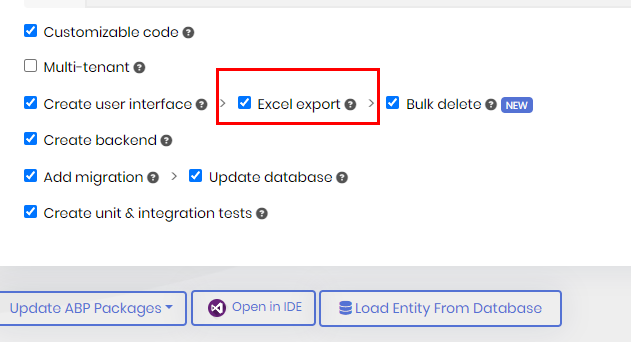
You can use the same library to import too
public async Task ImportAsync(IRemoteStreamContent file)
{
    using var stream = file.GetStream();
    var rows = stream.Query<BookExcelDto>().ToList();

    var bookList = rows.Select(row => new Book(row.Id, row.Title, row.AuthorName)).ToList();

    await _bookRepository.InsertManyAsync(bookList);
}
You can read this article if you want to learn usage of IRemoteStreamContent and upload a file from angular:
https://abp.io/community/articles/how-to-upload-and-download-files-in-the-abp-framework-using-angular-que8cdr8
Hi,
Here is my first findings:
Client Proxies is used for sending request by using AppService interfaces from Application.Contracts project they tehy should be generated in HttpApi.Client project. In case of need, you'll need to reference HttpApi.Client project of the related project.
When you generate them in the application layer, it replaces the original implementation of the interfaces.
Can you send a sample project that reproduces problem to my E-mail address with this issue number?
enis.necipoglu@volosoft.com
Hi,
Have you tried Entity Extension System for that?
https://abp.io/docs/latest/framework/architecture/modularity/extending/module-entity-extensions#create-update-forms
And also this method for singular pull cachces: https://github.com/abpframework/abp/blob/d7e0ee30031eb61a59b0745c8fe81b94d4e859ef/modules/docs/src/Volo.Docs.Application/Volo/Docs/Documents/DocumentAppService.cs#L408
Hi,
I found where it's cached after repository is pulled: https://github.com/abpframework/abp/blob/b54f4bff04181fad94f1f27a0300eda37cfbc9f0/modules/docs/src/Volo.Docs.Admin.Application/Volo/Docs/Admin/Documents/DocumentAdminAppService.cs#L234
Unfortunately it's not a virtual method that you cannot easily override it but you can override the methods that call this method such as PullAsync and PullAllAsync to define caching logic on your own:
[Dependency(ReplaceServices = true)]
[ExposeServices(typeof(IDocumentAdminAppService), typeof(DocumentAdminAppService))]
public class MyDocumentAdminAppService : DocumentAdminAppService
{
    private readonly IProjectRepository _projectRepository;
    private readonly IDocumentRepository _documentRepository;
    private readonly IDocumentSourceFactory _documentStoreFactory;
    private readonly IDistributedCache<DocumentUpdateInfo> _documentUpdateCache;
    private readonly IDistributedCache<List<VersionInfo>> _versionCache;
    private readonly IDistributedCache<LanguageConfig> _languageCache;
    private readonly IDocumentFullSearch _elasticSearchService;

    public MyDocumentAdminAppService(IProjectRepository projectRepository, IDocumentRepository documentRepository, IDocumentSourceFactory documentStoreFactory, IDistributedCache<DocumentUpdateInfo> documentUpdateCache, IDistributedCache<List<VersionInfo>> versionCache, IDistributedCache<LanguageConfig> languageCache, IDocumentFullSearch elasticSearchService) : base(projectRepository, documentRepository, documentStoreFactory, documentUpdateCache, versionCache, languageCache, elasticSearchService)
    {
        this._projectRepository = projectRepository;
        this._documentRepository = documentRepository;
        this._documentStoreFactory = documentStoreFactory;
        this._documentUpdateCache = documentUpdateCache;
        this._versionCache = versionCache;
        this._languageCache = languageCache;
        this._elasticSearchService = elasticSearchService;
    }

    private async Task UpdateDocumentUpdateInfoCache(Document document)
    {
        var cacheKey = $"DocumentUpdateInfo{document.ProjectId}#{document.Name}#{document.LanguageCode}#{document.Version}";
        await _documentUpdateCache.SetAsync(cacheKey, new DocumentUpdateInfo
        {
            Name = document.Name,
            CreationTime = document.CreationTime,
            LastUpdatedTime = document.LastUpdatedTime
        },

        // 👇 Define your cache options here
        new DistributedCacheEntryOptions
        {
            AbsoluteExpirationRelativeToNow = TimeSpan.FromMinutes(30),
            SlidingExpiration = TimeSpan.FromMinutes(10)
        });
    }

    /*
     * ====================
     * OVERRIDE OTHER METHODS WITH ORIGINAL LOGIC BELOW
     * THAT ENSURES THEY CALLS THE METHOD WE WROTE ABOVE
     * ====================
     */

    public override async Task PullAsync(PullDocumentInput input)
    {
        var project = await _projectRepository.GetAsync(input.ProjectId);

        var source = _documentStoreFactory.Create(project.DocumentStoreType);
        var sourceDocument = await source.GetDocumentAsync(project, input.Name, input.LanguageCode, input.Version);

        await _documentRepository.DeleteAsync(sourceDocument.ProjectId, sourceDocument.Name,
            sourceDocument.LanguageCode, sourceDocument.Version);
        await _documentRepository.InsertAsync(sourceDocument, true);
        await UpdateDocumentUpdateInfoCache(sourceDocument);
    }

    public override async Task PullAllAsync(PullAllDocumentInput input)
    {
        var project = await _projectRepository.GetAsync(input.ProjectId);

        var navigationDocument = await GetDocumentAsync(
            project,
            project.NavigationDocumentName,
            input.LanguageCode,
            input.Version
        );

        if (!DocsJsonSerializerHelper.TryDeserialize<NavigationNode>(navigationDocument.Content, out var navigation))
        {
            throw new UserFriendlyException($"Cannot validate navigation file '{project.NavigationDocumentName}' for the project {project.Name}.");
        }

        var leafs = navigation.Items.GetAllNodes(x => x.Items)
            .Where(x => x.IsLeaf && !x.Path.IsNullOrWhiteSpace())
            .ToList();

        var source = _documentStoreFactory.Create(project.DocumentStoreType);

        var documents = new List<Document>();
        foreach (var leaf in leafs)
        {
            if (leaf.Path.StartsWith("http://", StringComparison.OrdinalIgnoreCase) ||
                leaf.Path.StartsWith("https://", StringComparison.OrdinalIgnoreCase) ||
                (leaf.Path.StartsWith("{{") && leaf.Path.EndsWith("}}")))
            {
                continue;
            }

            try
            {
                var sourceDocument = await source.GetDocumentAsync(project, leaf.Path, input.LanguageCode, input.Version);
                documents.Add(sourceDocument);
            }
            catch (Exception e)
            {
                Logger.LogException(e);
            }
        }

        foreach (var document in documents)
        {
            await _documentRepository.DeleteAsync(document.ProjectId, document.Name,
                document.LanguageCode,
                document.Version);

            await _documentRepository.InsertAsync(document, true);
            await UpdateDocumentUpdateInfoCache(document);
        }
    }

    private async Task<Document> GetDocumentAsync(
            Project project,
            string documentName,
            string languageCode,
            string version)
    {
        version = string.IsNullOrWhiteSpace(version) ? project.LatestVersionBranchName : version;
        var source = _documentStoreFactory.Create(project.DocumentStoreType);
        var document = await source.GetDocumentAsync(project, documentName, languageCode, version);
        return document;
    }
}
It seems this module is not easily extended, I'll create an issue to the team to configure / customize it easily









