I had 2 .module.ts files in one folder - moved one and it resolved the issue
ExecaError: Command failed with exit code 1: .suite/schematics/node_modules/.bin/ng g "/Users/Jamie/Repo/Acs/modules/Acs.Cts.SecureMessaging/angular/.suite/schematics/collection.json:entity" --template module-pro --target Acs.Cts.SecureMessaging --source "C:/Users/Jamie/Repo/Acs/modules/Acs.Cts.SecureMessaging/.suite/entities/MessagingAccessDelegation.json"
More than one module matches. Use the '--skip-import' option to skip importing the component into the closest module or use the module option to specify a module. at getFinalError (file:///C:/Users/Jamie/Repo/Acs/modules/Acs.Cts.SecureMessaging/angular/.suite/schematics/node_modules/execa/lib/return/final-error.js:6:9) at makeError (file:///C:/Users/Jamie/Repo/Acs/modules/Acs.Cts.SecureMessaging/angular/.suite/schematics/node_modules/execa/lib/return/result.js:108:16) at getAsyncResult (file:///C:/Users/Jamie/Repo/Acs/modules/Acs.Cts.SecureMessaging/angular/.suite/schematics/node_modules/execa/lib/methods/main-async.js:168:4) at handlePromise (file:///C:/Users/Jamie/Repo/Acs/modules/Acs.Cts.SecureMessaging/angular/.suite/schematics/node_modules/execa/lib/methods/main-async.js:151:17) at async file:///C:/Users/Jamie/Repo/Acs/modules/Acs.Cts.SecureMessaging/angular/.suite/schematics/run-schematics.mjs:13:20 { shortMessage: 'Command failed with exit code 1: .suite/schematics/node_modules/.bin/ng g "/Users/Jamie/Repo/Acs/modules/Acs.Cts.SecureMessaging/angular/.suite/schematics/collection.json:entity" --template module-pro --target Acs.Cts.SecureMessaging --source "C:/Users/Jamie/Repo/Acs/modules/Acs.Cts.SecureMessaging/.suite/entities/MessagingAccessDelegation.json"', command: '.suite/schematics/node_modules/.bin/ng g /Users/Jamie/Repo/Acs/modules/Acs.Cts.SecureMessaging/angular/.suite/schematics/collection.json:entity --template module-pro --target Acs.Cts.SecureMessaging --source C:/Users/Jamie/Repo/Acs/modules/Acs.Cts.SecureMessaging/.suite/entities/MessagingAccessDelegation.json', escapedCommand: '.suite/schematics/node_modules/.bin/ng g "/Users/Jamie/Repo/Acs/modules/Acs.Cts.SecureMessaging/angular/.suite/schematics/collection.json:entity" --template module-pro --target Acs.Cts.SecureMessaging --source "C:/Users/Jamie/Repo/Acs/modules/Acs.Cts.SecureMessaging/.suite/entities/MessagingAccessDelegation.json"', cwd: 'C:\Users\Jamie\Repo\Acs\modules\Acs.Cts.SecureMessaging\angular', durationMs: 3457.2956, failed: true, timedOut: false, isCanceled: false, isGracefullyCanceled: false, isTerminated: false, isMaxBuffer: false, isForcefullyTerminated: false, exitCode: 1, stdout: '', stderr: "\x1B[1m\x1B[31mMore than one module matches. Use the '--skip-import' option to skip importing the component into the closest module or use the module option to specify a module.\x1B[39m\x1B[22m", stdio: [ undefined, '', "\x1B[1m\x1B[31mMore than one module matches. Use the '--skip-import' option to skip importing the component into the closest module or use the module option to specify a module.\x1B[39m\x1B[22m" ], ipcOutput: [], pipedFrom: [] }
Node.js v22.16.0
2025-08-20 10:35:09.875 -07:00 [INF] 2/2 - AngularUiGenerateWithSchematicsCommand completed. | Duration: 4107 ms.
Scaffold an existing or new entity in ABP Suite and nothing is generated - abp suite log error found (see above).
I reinstalled yarn and it works now
Here's my package.json:
{ "version": "0.1.0", "name": "my-app-authserver", "private": true, "dependencies": { "@volo/abp.aspnetcore.mvc.ui.theme.leptonx": "~4.3.1", "@volo/account": "~9.3.1" } }
yarn output:
yarn install v1.22.5
(node:12724) [DEP0040] DeprecationWarning: The punycode module is deprecated. Please use a userland alternative instead.
(Use node --trace-deprecation ... to show where the warning was created)
[1/4] Resolving packages...
[2/4] Fetching packages...
[3/4] Linking dependencies...
warning "@volo/abp.aspnetcore.mvc.ui.theme.leptonx > @volo/abp.aspnetcore.mvc.ui.theme.commercial > @abp/aspnetcore.mvc.ui.theme.shared > @abp/bootstrap > bootstrap@5.3.7" has unmet peer dependency "@popperjs/core@^2.11.8".
[4/4] Building fresh packages...
success Saved lockfile. warning Your current version of Yarn is out of date. The latest version is "1.22.22", while you're on "1.22.5". info To upgrade, download the latest installer at "https://yarnpkg.com/latest.msi". Done in 8.74s.
This project has a stand-alone MVC auth server for logging in, in addition to the angular app.
Another project also has the public website MVC app and the same issue appears there
Provide us with the following info:
When I start the Auth Server, I get an error: "The 'wwwroot/libs' folder does not exist or empty! If your application does not use any client-side libraries, you can disable this check by setting 'AbpMvcLibsOptions.CheckLibs' to 'false'".
I check the path "..AuthServer\wwwroot\libs" and sure enough its empty.
I run abp install-libs again and the folder is still empty: C:\Users\Jamie\Repo\AbpStudio\Acs\modules\Acs.Cts.WorkforceManagement\src\Acs.Cts.WorkforceManagement.AuthServer>abp install-libs [11:45:14 INF] You are running the second generation of the ABP CLI. If you're interested in the legacy CLI, see https://abp.io/new-cli [11:45:15 INF] Found 1 projects. [11:45:15 INF] C:\Users\Jamie\Repo\AbpStudio\Acs\modules\Acs.Cts.WorkforceManagement\src\Acs.Cts.WorkforceManagement.AuthServer [11:45:15 INF] Running Yarn on C:\Users\Jamie\Repo\AbpStudio\Acs\modules\Acs.Cts.WorkforceManagement\src\Acs.Cts.WorkforceManagement.AuthServer ➤ YN0000: ┌ Resolution step ➤ YN0002: │ @abp/bootstrap@npm:9.2.4 doesn't provide @popperjs/core (p97d37), requested by bootstrap ➤ YN0002: │ @abp/jquery-validation@npm:9.2.4 doesn't provide jquery (pcfe0e), requested by jquery-validation ➤ YN0000: │ Some peer dependencies are incorrectly met; run yarn explain peer-requirements <hash> for details, where <hash> is the six-letter p-prefixed code ➤ YN0000: └ Completed ➤ YN0000: ┌ Fetch step ➤ YN0000: └ Completed ➤ YN0000: ┌ Link step ➤ YN0000: └ Completed ➤ YN0000: Done with warnings in 0s 273ms
I tried the following, to no effect:
[maliming] said: hi
Add
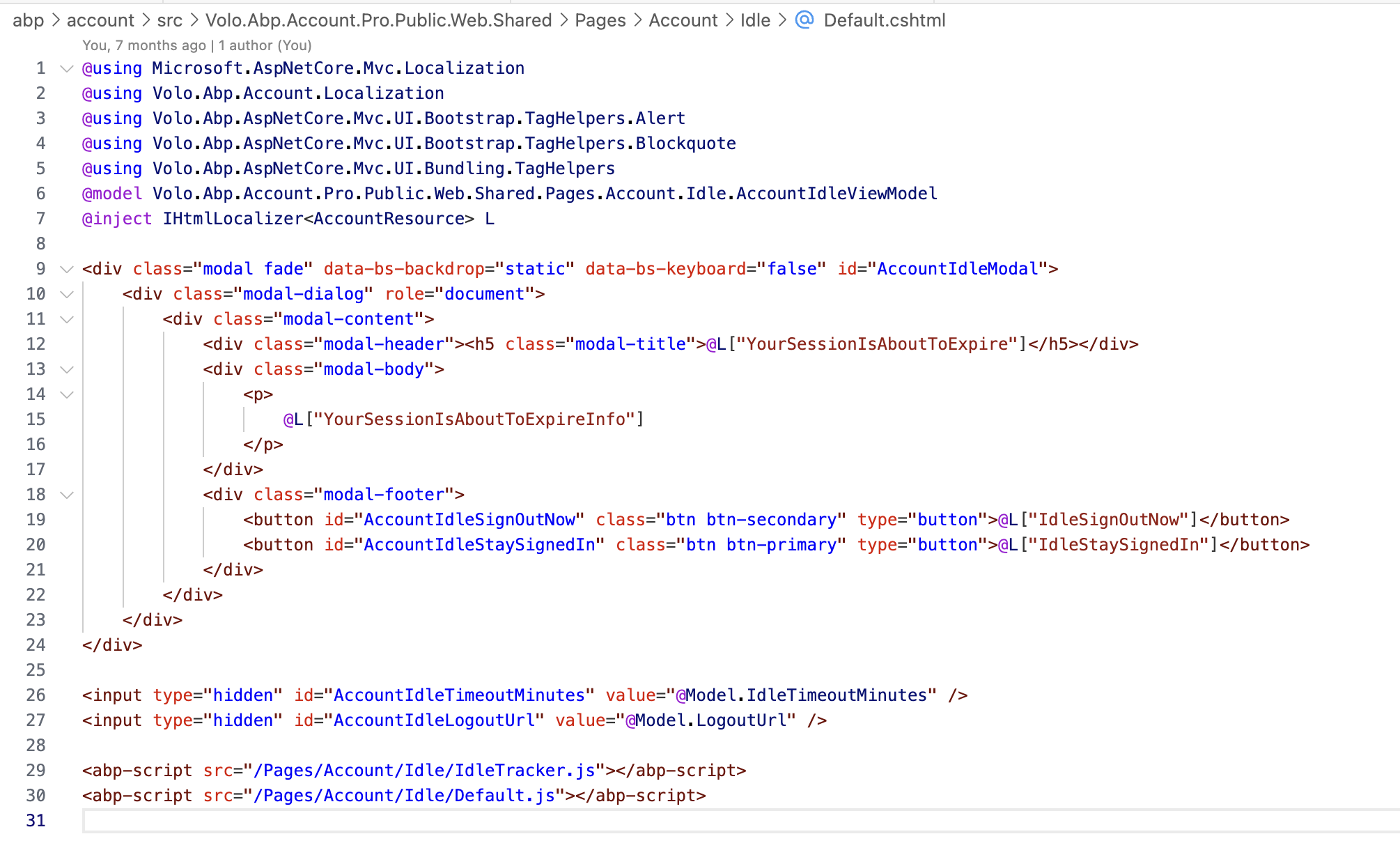
Volo.Abp.Account.Pro.Public.Web.Sharedwill be fine.Can you check your public website page HTML code to see if your page includes
Idlecomponent?
Thanks.
Yes, that's being included and seems to be working.
Also, I have another standalone angular app - it uses the AccountPublicConfigModule but not the AccountAdminConfigModule and the idle timer doesn't work with that app. How do you suggest getting that working? We don't want admin capabilities in this angular app. Would it make more sense for the idle timer to be part of the public module or a shared account module? Or, am I misunderstanding how its implemented?
Thanks
(Please provide your ABP version and other relevant solution information here, as hinted by the template)
Hi
How can we get the idle timer to work in the Web Public App?
I added a reference to the Volo.Abp.Account.Pro.Public.Web.Shared 9.2.0 package and added the module dependency. What else do I need to configure?
Thanks Jamie
Thanks - I was able to download it to a project using
abp add-package @volo/abp.commercial.ng.ui --with-source-code
How do I download the source for this package?
I thought it might be the common commercial source but when I run the get-source, it is not found:
abp-old get-source Volo.Abp.Commercial.Common -o "C:\Users\Jamie\Repo\AbpIO_commercial\modules\Volo.Abp.Commercial.Common" -v 8.3.0
[17:38:53 INF] You are running the second generation of the ABP CLI. If you're interested in the legacy CLI, see https://abp.io/new-cli Checking extensions... [17:38:53 INF] Downloading source code of Volo.Abp.Commercial.Common (Latest) [17:38:53 INF] Output folder: C:\Users\Jamie\Repo\AbpIO_commercial [17:38:53 ERR] Module not found: Volo.Abp.Commercial.Common Volo.Abp.Studio.AbpStudioException: Exception of type 'Volo.Abp.Studio.AbpStudioException' was thrown. at async Task<ModuleInfo> Volo.Abp.Studio.Modules.Remote.StudioModuleInfoProvider.GetAsync(string name) at async Task Volo.Abp.Studio.Cli.Commands.StudioGetSourceCommand.ExecuteAsync (CommandLineArgs commandLineArgs) at async Task Volo.Abp.Studio.Cli.StudioCliService.RunInternalAsync( CommandLineArgs commandLineArgs) at async Task Volo.Abp.Studio.Cli.StudioCliService.RunAsync(string[] args)