probably authentication server address or port is wrong. this one
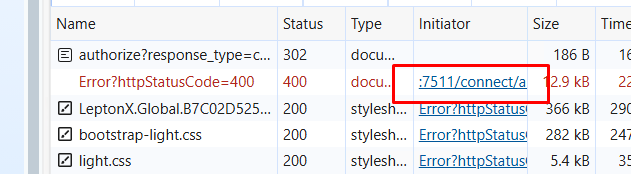
what's your backend logs?
normally this happens when your startup project doesn't have AbpLicenseCode. There's a simple check if you properly include the license code config in your host project. run the following code, when AbpLicenseCode is not empty it'll not throw any exception.
var configuration = Microsoft
            .Extensions
            .DependencyInjection
            .ServiceProviderServiceExtensions
            .GetRequiredService<Microsoft.Extensions.Configuration.IConfiguration>(context.ServiceProvider);

var licenseCode = configuration["AbpLicenseCode"];
Also check this => https://abp.io/support/questions/8633/
In ABP, when you set AbpClockOptions.Kind to DateTimeKind.Utc and configure the Abp.Timing.TimeZone setting, the framework is designed to display times in the user's or application's configured time zone throughout the UI, including logs. But it writes in UTC format to the server.
The correct approach is to use both:
AbpClockOptions.Kind = DateTimeKind.Utc (to ensure all times are stored and handled as UTC)Npgsql.EnableLegacyTimestampBehavior (for PostgreSQL compatibility)If the audit logs page is not converting UTC times to the user's time zone, this can be bug . Other pages, such as the security logs, already use the time zone setting as expected.
You are configuring time zones correctly in your application. No further changes are needed to your settings. The issue is with the audit logs page not applying the time zone conversion, and this should be reported to the ABP team for correction.
Send us related screenshots.
thank you for the feedback
check these solutions: https://abp.io/support/questions/6663/Licensing-problem#answer-3a10afcf-030f-043e-40d2-0a4f708062c8
ABP Studio is automatically installing ABP Suite, which can cause a heuristic virus alert. We'll test the case against different virus apps. But it's a false-positive alert
hi, we reopened the question
We'll release a new version which fixes this issue by Friday, 28 March.
Hi everyone,
We sincerely apologize for the issue caused by the recent release with a 3rd party component. The affected versions are 9.0.7 and 9.1.0, other versions don't have any issue. We understand how frustrating it is, especially when it affects live systems. The ABP project, like other software solutions, includes many 3rd party components, and sometimes there may be problems with them. We contacted our 3rd party vendor and completely fixed the case.
The issue is now resolved, and here's the quick fix:
Run this command on your development computer to clear your local NuGet cache:
dotnet nuget locals all --clear
Uninstall and install ABP Suite again:
abp suite remove
abp suite install
Upgrade Volo.Abp.Studio.* to >=0.9.25 if your project uses it(Packages name start with Volo.Abp.Studio).
Rebuild your ABP solution and publish it again to your live environment
Thank you for your patience, and we truly appreciate the feedback. We're taking extra measures to prevent this in future releases.
– ABP Team









