Hello,
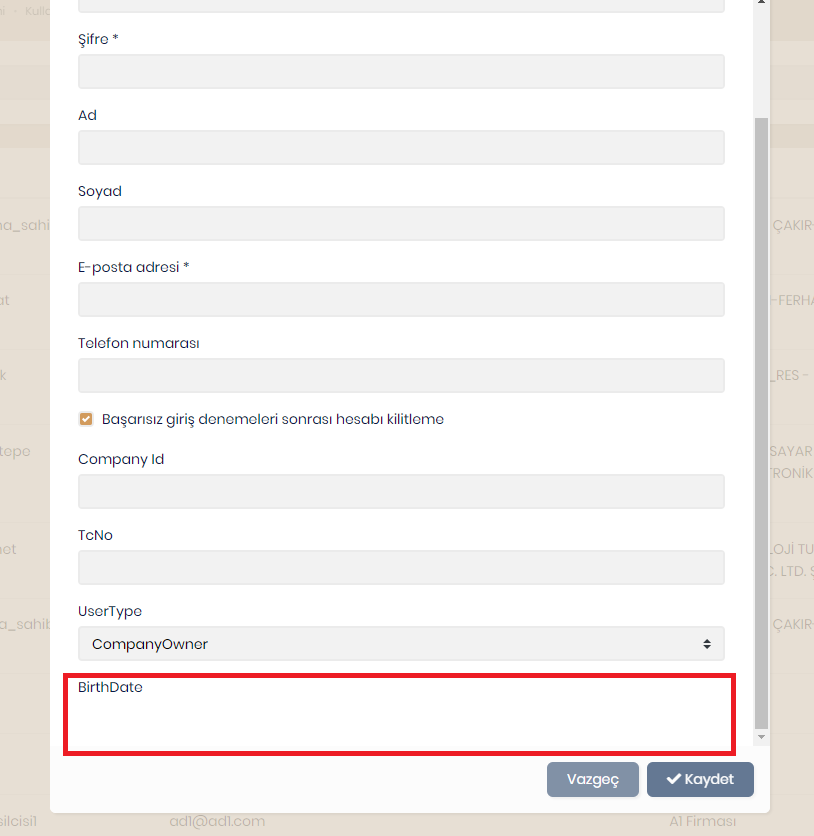
I am trying to add extra fields to IdentityUser with ModuleExtensionConfiguration. I succesfully added a Guid,string and an Enum Type. But the DateTime field I added does not appear on the add user modal. The label of the field is visible but input is not.
        ObjectExtensionManager.Instance.Modules()
             .ConfigureIdentity(identity =>
             {
                 identity.ConfigureUser(user =>
                 {
                     user.AddOrUpdateProperty<Guid>( //property type: string
                         "CompanyId", //property name
                         property =>
                         {
                             //validation rules


                             property.UI.Lookup.Url = "/api/app/my-companies";
                             property.UI.Lookup.DisplayPropertyName = "name";
                             property.UI.Lookup.ValuePropertyName = "id";

                             //...other configurations for this property
                         }
                     );

                     user.AddOrUpdateProperty<string>( //property type: string
                       "TcNo", //property name
                       property =>
                       {
                           property.Validators.Add(context =>
                           {
                               var socialSecurityNumber = context.Value as string;

                               if (!socialSecurityNumber.IsNullOrEmpty() && !ValidateTc(socialSecurityNumber))
                               {
                                   context.ValidationErrors.Add(
                                       new ValidationResult(
                                           "Geçersiz Tc Kimlik: " + socialSecurityNumber,
                                           new[] { "SocialSecurityNumber" }
                                       )
                                   );
                               }
                           });
                       }
                     );

                     user.AddOrUpdateProperty<UserType>("UserType");
                     user.AddOrUpdateProperty<DateTime>("BirthDate");

                 });
             });
user.AddOrUpdateProperty<UserType>("UserType"); user.AddOrUpdateProperty<DateTime>("BirthDate");
Thanks, Can Ercan
Hi
With the new version 4.4.3 when i create a new tenant with seperated db database is created but tables are not created. Only EFMigrationsHistory table is created. In the previous version when tenant is created the same way database is created with tables without a problem. The project is newly created and only 1 entity added from abp suite. I reproduced the problem several times.
When i update database from admin tenant page i got the following error:
2021-10-08 13:46:18.186 +03:00 [ERR] Invalid object name 'AbpUsers'.
Microsoft.Data.SqlClient.SqlException (0x80131904): Invalid object name 'AbpUsers'.
at Microsoft.Data.SqlClient.SqlCommand.<>c.<ExecuteDbDataReaderAsync>b__169_0(Task1 result) at System.Threading.Tasks.ContinuationResultTaskFromResultTask2.InnerInvoke()
at System.Threading.Tasks.Task.<>c.<.cctor>b__277_0(Object obj)
at System.Threading.ExecutionContext.RunInternal(ExecutionContext executionContext, ContextCallback callback, Object state)
--- End of stack trace from previous location ---
at System.Threading.ExecutionContext.RunInternal(ExecutionContext executionContext, ContextCallback callback, Object state)
at System.Threading.Tasks.Task.ExecuteWithThreadLocal(Task& currentTaskSlot, Thread threadPoolThread)
--- End of stack trace from previous location ---
at Microsoft.EntityFrameworkCore.Storage.RelationalCommand.ExecuteReaderAsync(RelationalCommandParameterObject parameterObject, CancellationToken cancellationToken)
at Microsoft.EntityFrameworkCore.Storage.RelationalCommand.ExecuteReaderAsync(RelationalCommandParameterObject parameterObject, CancellationToken cancellationToken)
at Microsoft.EntityFrameworkCore.Query.Internal.SplitQueryingEnumerable1.AsyncEnumerator.InitializeReaderAsync(DbContext _, Boolean result, CancellationToken cancellationToken) at Microsoft.EntityFrameworkCore.SqlServer.Storage.Internal.SqlServerExecutionStrategy.ExecuteAsync[TState,TResult](TState state, Func4 operation, Func4 verifySucceeded, CancellationToken cancellationToken) at Microsoft.EntityFrameworkCore.Query.Internal.SplitQueryingEnumerable1.AsyncEnumerator.MoveNextAsync()
at Microsoft.EntityFrameworkCore.Query.ShapedQueryCompilingExpressionVisitor.SingleOrDefaultAsync[TSource](IAsyncEnumerable1 asyncEnumerable, CancellationToken cancellationToken) at Microsoft.EntityFrameworkCore.Query.ShapedQueryCompilingExpressionVisitor.SingleOrDefaultAsync[TSource](IAsyncEnumerable1 asyncEnumerable, CancellationToken cancellationToken)
at Volo.Abp.Identity.EntityFrameworkCore.EfCoreIdentityUserRepository.FindByNormalizedUserNameAsync(String normalizedUserName, Boolean includeDetails, CancellationToken cancellationToken)
at Castle.DynamicProxy.AsyncInterceptorBase.ProceedAsynchronous[TResult](IInvocation invocation, IInvocationProceedInfo proceedInfo)
at Volo.Abp.Castle.DynamicProxy.CastleAbpMethodInvocationAdapterWithReturnValue1.ProceedAsync() at Volo.Abp.Uow.UnitOfWorkInterceptor.InterceptAsync(IAbpMethodInvocation invocation) at Volo.Abp.Castle.DynamicProxy.CastleAsyncAbpInterceptorAdapter1.InterceptAsync[TResult](IInvocation invocation, IInvocationProceedInfo proceedInfo, Func3 proceed) at Volo.Abp.Identity.IdentityDataSeeder.SeedAsync(String adminEmail, String adminPassword, Nullable1 tenantId)
at Castle.DynamicProxy.AsyncInterceptorBase.ProceedAsynchronous[TResult](IInvocation invocation, IInvocationProceedInfo proceedInfo)
at Volo.Abp.Castle.DynamicProxy.CastleAbpMethodInvocationAdapterWithReturnValue1.ProceedAsync() at Volo.Abp.Uow.UnitOfWorkInterceptor.InterceptAsync(IAbpMethodInvocation invocation) at Volo.Abp.Castle.DynamicProxy.CastleAsyncAbpInterceptorAdapter1.InterceptAsync[TResult](IInvocation invocation, IInvocationProceedInfo proceedInfo, Func3 proceed) at Volo.Abp.Data.DataSeeder.SeedAsync(DataSeedContext context) at Castle.DynamicProxy.AsyncInterceptorBase.ProceedAsynchronous(IInvocation invocation, IInvocationProceedInfo proceedInfo) at Volo.Abp.Castle.DynamicProxy.CastleAbpMethodInvocationAdapter.ProceedAsync() at Volo.Abp.Uow.UnitOfWorkInterceptor.InterceptAsync(IAbpMethodInvocation invocation) at Volo.Abp.Castle.DynamicProxy.CastleAsyncAbpInterceptorAdapter1.InterceptAsync(IInvocation invocation, IInvocationProceedInfo proceedInfo, Func`3 proceed)
at TenantDbTest.Data.TenantDbTestTenantDatabaseMigrationHandler.MigrateAndSeedForTenantAsync(Guid tenantId, String adminEmail, String adminPassword) in E:\abp\TenantDbTest\aspnet-core\src\TenantDbTest.Domain\Data\TenantDbTestTenantDatabaseMigrationHandler.cs:line 115
ClientConnectionId:5045aae6-9a46-4e87-9aa7-7a0e35f4ebaf
Error Number:208,State:1,Class:16
2021-10-08 13:46:18.186 +03:00 [ERR] ---------- Exception Data ----------
HelpLink.ProdName = Microsoft SQL Server
HelpLink.ProdVer = 13.00.4259
HelpLink.EvtSrc = MSSQLServer
HelpLink.EvtID = 208
HelpLink.BaseHelpUrl = http://go.microsoft.com/fwlink
HelpLink.LinkId = 20476
Besides this error there is no other error in the logs.
Thanks, Can Ercan
Hi Problem is solved.
Thanks, Can Ercan
Hi,
When i tried to login from https://merlinvoip.com i didn't get the previous error but when i logged in and then redirected to client app i didn't appear to be logged in and the log shows:
2021-09-21 13:01:15.892 +00:00 [INF] Invoking IdentityServer endpoint: IdentityServer4.Endpoints.TokenEndpoint for /connect/token
2021-09-21 13:01:15.920 +00:00 [INF] {"ClientId":"TestApp2_App","AuthenticationMethod":"NoSecret","Category":"Authentication","Name":"Client Authentication Success","EventType":"Success","Id":1010,"Message":null,"ActivityId":"800001a7-0000-cb00-b63f-84710c7967bb","TimeStamp":"2021-09-21T13:01:15.0000000Z","ProcessId":6384,"LocalIpAddress":"10.11.0.130:443","RemoteIpAddress":"88.243.86.198","$type":"ClientAuthenticationSuccessEvent"}
2021-09-21 13:01:15.995 +00:00 [INF] Token request validation success, {"ClientId":"TestApp2_App","ClientName":"TestApp2_App","GrantType":"authorization_code","Scopes":null,"AuthorizationCode":"****82BB","RefreshToken":"********","UserName":null,"AuthenticationContextReferenceClasses":null,"Tenant":null,"IdP":null,"Raw":{"grant_type":"authorization_code","code":"9A7EC69860CCE8494775D54C5FC01816A1480304478A2AEE49CE7BE5037382BB","redirect_uri":"https://merlinvoip.com","code_verifier":"N3RuWU5BWHFfN2dDfkpuazVaQko4ZnNrMGpzdmJ6UFBtVVRVcnphSWl0MU1j","client_id":"TestApp2_App"},"$type":"TokenRequestValidationLog"}
2021-09-21 13:01:16.152 +00:00 [INF] {"ClientId":"TestApp2_App","ClientName":"TestApp2_App","RedirectUri":null,"Endpoint":"Token","SubjectId":"04a49bf7-0341-52cf-f8c8-39fef527ad38","Scopes":"openid offline_access TestApp2","GrantType":"authorization_code","Tokens":[{"TokenType":"id_token","TokenValue":"****YXBg","$type":"Token"},{"TokenType":"refresh_token","TokenValue":"****DF50","$type":"Token"},{"TokenType":"access_token","TokenValue":"****803Q","$type":"Token"}],"Category":"Token","Name":"Token Issued Success","EventType":"Success","Id":2000,"Message":null,"ActivityId":"800001a7-0000-cb00-b63f-84710c7967bb","TimeStamp":"2021-09-21T13:01:16.0000000Z","ProcessId":6384,"LocalIpAddress":"10.11.0.130:443","RemoteIpAddress":"88.243.86.198","$type":"TokenIssuedSuccessEvent"}
2021-09-21 13:01:16.205 +00:00 [INF] Request finished HTTP/1.1 POST https://pbxticketapi.azurewebsites.net/connect/token application/x-www-form-urlencoded 233 - 200 - application/json;+charset=UTF-8 386.8135ms
2021-09-21 13:01:16.283 +00:00 [INF] Request starting HTTP/1.1 OPTIONS https://pbxticketapi.azurewebsites.net/api/abp/application-configuration - -
2021-09-21 13:01:16.283 +00:00 [INF] CORS policy execution successful.
2021-09-21 13:01:16.283 +00:00 [INF] Request finished HTTP/1.1 OPTIONS https://pbxticketapi.azurewebsites.net/api/abp/application-configuration - - - 204 - - 0.5517ms
2021-09-21 13:01:16.363 +00:00 [INF] Request starting HTTP/1.1 GET https://pbxticketapi.azurewebsites.net/api/abp/application-configuration - -
2021-09-21 13:01:16.363 +00:00 [INF] CORS policy execution successful.
2021-09-21 13:01:16.402 +00:00 [INF] Failed to validate the token.
Microsoft.IdentityModel.Tokens.SecurityTokenInvalidIssuerException: IDX10205: Issuer validation failed. Issuer: 'System.String'. Did not match: validationParameters.ValidIssuer: 'System.String' or validationParameters.ValidIssuers: 'System.String'.
   at Microsoft.IdentityModel.Tokens.Validators.ValidateIssuer(String issuer, SecurityToken securityToken, TokenValidationParameters validationParameters)
   at System.IdentityModel.Tokens.Jwt.JwtSecurityTokenHandler.ValidateIssuer(String issuer, JwtSecurityToken jwtToken, TokenValidationParameters validationParameters)
   at System.IdentityModel.Tokens.Jwt.JwtSecurityTokenHandler.ValidateTokenPayload(JwtSecurityToken jwtToken, TokenValidationParameters validationParameters)
   at System.IdentityModel.Tokens.Jwt.JwtSecurityTokenHandler.ValidateToken(String token, TokenValidationParameters validationParameters, SecurityToken& validatedToken)
   at Microsoft.AspNetCore.Authentication.JwtBearer.JwtBearerHandler.HandleAuthenticateAsync()
One thing I noticed is identity server uses the https://pbxticketapi.azurewebsites.net url.I used to use this url but i changed it.
"App": {
  "SelfUrl": "https://api.merlinvoip.com",
  "AngularUrl": "https://{{tenantName}}.merlinvoip.com",
  "CorsOrigins": "https://merlinvoip.com,https://*.merlinvoip.com"
}
"AuthServer": {
  "Authority": "https://api.merlinvoip.com",
  "RequireHttpsMetadata": "false",
  "SwaggerClientId": "TestApp2_Swagger",
  "SwaggerClientSecret": "1q2w3e*"
},

Angular environment variables:
oAuthConfig: {
  issuer: 'http://{0}.api.merlinvoip.com',
  redirectUri: baseUrl,
  clientId: 'TestApp2_App',
  responseType: 'code',
  scope: 'offline_access TestApp2',
  requireHttps: false
},
apis: {
  default: {
    url: 'http://{0}.api.merlinvoip.com',
    rootNamespace: 'TestApp2',
  },
},
These are my settings but system still uses the old url for identity server. I cleared cookies and caches and restarted both apps but still the old url is used. Is it in the database somewhere?
Thanks, Can Ercan
Hmm ok, I couldn't find it in the sample project so i removed it. Sample project code:
"App": {
    "SelfUrl": "https://api.getabp.net:44301",
    "CorsOrigins": "https://*.ng.getabp.net:4200,https://ng.getabp.net:4200/"
  }
Configure<AppUrlOptions>(options =>
{
   options.Applications["MVC"].RootUrl = configuration["App:SelfUrl"];
   options.Applications["Angular"].RootUrl = configuration["App:ClientUrl"];
   options.Applications["Angular"].Urls[AccountUrlNames.PasswordReset] = "account/reset-password";
   });
Should i put https://merlinvoip.com or https://*.merlinvoip.com
I remember trying with https://*.merlinvoip.com and getting invalid uri error from IdentityServer.
Configure<AppUrlOptions>(options => { options.Applications["MVC"].RootUrl = configuration["App:SelfUrl"]; options.Applications["Angular"].RootUrl = configuration["App:AngularUrl"]; options.Applications["Angular"].Urls[AccountUrlNames.PasswordReset] = "account/reset-password"; options.Applications["Angular"].Urls[AccountUrlNames.EmailConfirmation] = "account/email-confirmation"; );
Hi,
I updated the HttpApiHostModule according to the sample app link you provided like below:
    context.Services.AddAbpStrictRedirectUriValidator();
    context.Services.AddAbpClientConfigurationValidator();
    context.Services.AddAbpWildcardSubdomainCorsPolicyService();
    Configure<AbpTenantResolveOptions>(options =>
    {
        options.AddDomainTenantResolver("{0}.api.merlinvoip.com");
    });
My appsettings.json file:
{
"App": {
  "SelfUrl": "https://api.merlinvoip.com",
  "CorsOrigins": "https://merlinvoip.com,https://*.merlinvoip.com"
},
"Redis": {
  "Configuration": "127.0.0.1"
},
"ConnectionStrings": {
  "Default": ""
},
"AuthServer": {
  "Authority": "https://api.merlinvoip.com",
  "RequireHttpsMetadata": "false",
  "SwaggerClientId": "TestApp2_Swagger",
  "SwaggerClientSecret": "1q2w3e*"
},
"StringEncryption": {
  "DefaultPassPhrase": "rL1OCmPHd9IOQZ7w"
},
"Settings": {
  "Volo.Abp.LeptonTheme.Style": "Style6",
  "Volo.Abp.LeptonTheme.Layout.MenuPlacement": "Left",
  "Volo.Abp.LeptonTheme.Layout.MenuStatus": "AlwaysOpened",
  "Volo.Abp.LeptonTheme.Layout.Boxed": "False"
}
}

**DbMigrator appsettings.json:**
{
"ConnectionStrings": {
  "Default": ""
},
"IdentityServer": {
  "Clients": {
    "TestApp2_App": {
      "ClientId": "TestApp2_App",
      "ClientSecret": "1q2w3e*",
      "RootUrl": "https://{0}.merlinvoip.com"
    },

    "TestApp2_Swagger": {
      "ClientId": "TestApp2_Swagger",
      "RootUrl": "https://api.merlinvoip.com"
    }
  }
}
}
**My angular client environment variables:**

const baseUrl = 'https://{0}.merlinvoip.com';
export const environment = {
production: true,
application: {
  baseUrl,
  name: 'TestApp2',
},
oAuthConfig: {
  issuer: 'https://api.merlinvoip.com',
  redirectUri: baseUrl,
  clientId: 'TestApp2_App',
  responseType: 'code',
  scope: 'offline_access TestApp2',
  requireHttps: true
},
apis: {
  default: {
    url: 'https://api.merlinvoip.com',
    rootNamespace: 'TestApp2',
  },
},
} as Environment;
In the database:
IdentityServerClientCorsOrigins table:
33764f2e-a4b3-ba64-06d1-39fef527bc9e	https://{0}.merlinvoip.com
2f3968f2-6d8f-70fc-b233-39fef527bd61	   https://api.merlinvoip.com
IdentityServerClientRedirectUris table:
33764f2e-a4b3-ba64-06d1-39fef527bc9e	https://{0}.merlinvoip.com
2f3968f2-6d8f-70fc-b233-39fef527bd61	   https://api.merlinvoip.com
When i go to the url https://merlinvoip.com and click login i get 500 server error.
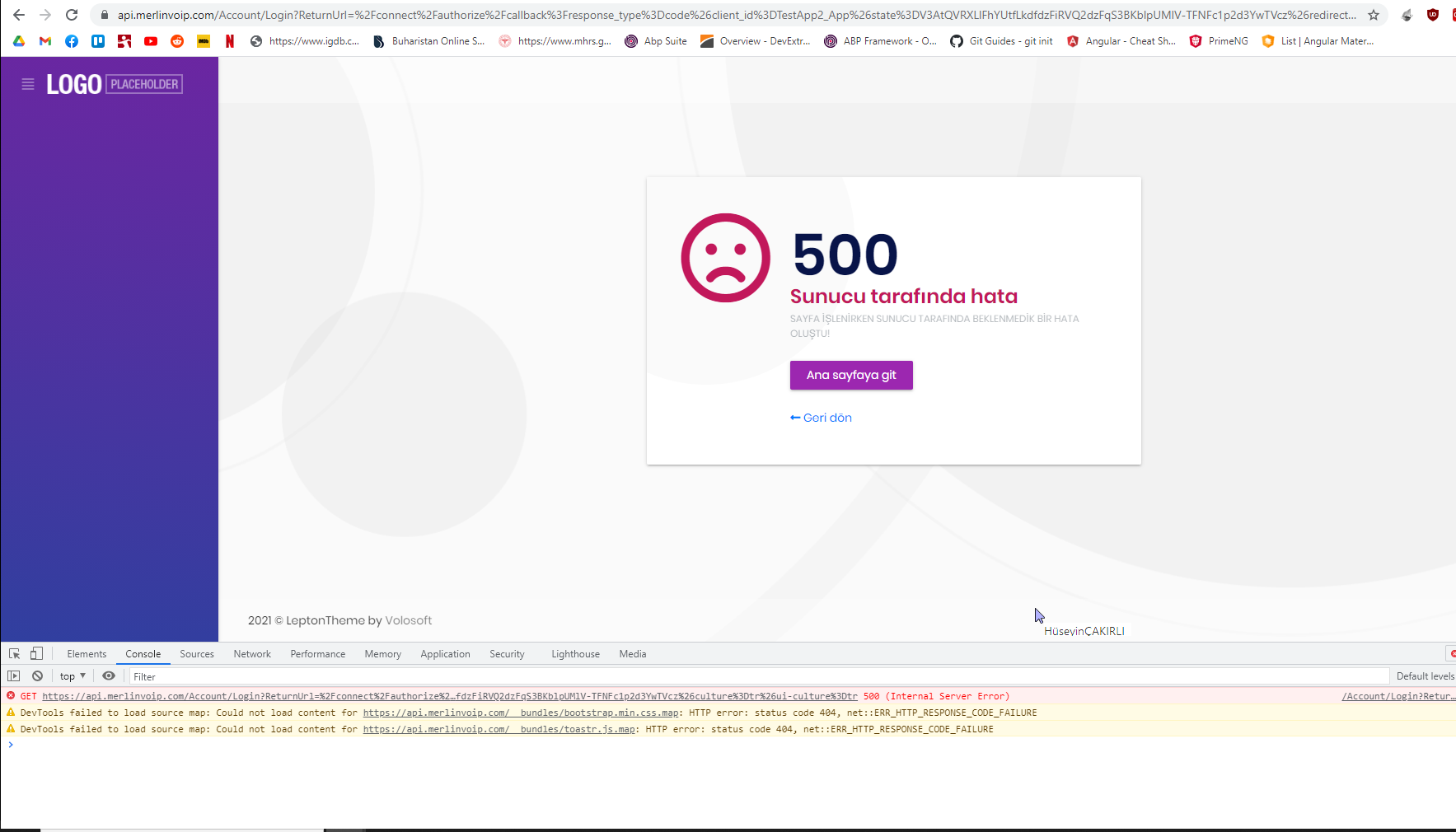
The log shows :
2021-09-20 11:02:05.450 +00:00 [INF] Request starting HTTP/1.1 GET https://api.merlinvoip.com/Account/Login?ReturnUrl=%2Fconnect%2Fauthorize%2Fcallback%3Fresponse_type%3Dcode%26client_id%3DTestApp2_App%26state%3DV3AtQVRXLlFhYUtfLkdfdzFiRVQ2dzFqS3BKblpUMlV-TFNFc1p2d3YwTVcz%26redirect_uri%3Dhttps%253A%252F%252Fmerlinvoip.com%26scope%3Dopenid%2520offline_access%2520TestApp2%26code_challenge%3DzbaeuulWht0iscH43qvlt3Y0VRgkLQlcOwbnOH2wW9o%26code_challenge_method%3DS256%26nonce%3DV3AtQVRXLlFhYUtfLkdfdzFiRVQ2dzFqS3BKblpUMlV-TFNFc1p2d3YwTVcz%26culture%3Dtr%26ui-culture%3Dtr - -
2021-09-20 11:02:05.615 +00:00 [INF] Executing endpoint '/Account/Login'
2021-09-20 11:02:05.616 +00:00 [INF] Route matched with {page = "/Account/Login", action = "", controller = "", area = ""}. Executing page /Account/Login
2021-09-20 11:02:05.616 +00:00 [INF] Skipping the execution of current filter as its not the most effective filter implementing the policy Microsoft.AspNetCore.Mvc.ViewFeatures.IAntiforgeryPolicy
2021-09-20 11:02:05.627 +00:00 [INF] Executed page /Account/Login in 10.8974ms
2021-09-20 11:02:05.627 +00:00 [INF] Executed endpoint '/Account/Login'
2021-09-20 11:02:05.718 +00:00 [ERR] An unhandled exception has occurred while executing the request.
Autofac.Core.DependencyResolutionException: An exception was thrown while activating Volo.Abp.Account.Web.Pages.Account.IdentityServerSupportedLoginModel -> Volo.Abp.Account.AccountAppService -> Volo.Abp.Account.Emailing.AccountEmailer -> Volo.Abp.UI.Navigation.Urls.AppUrlProvider.
---> Autofac.Core.DependencyResolutionException: An exception was thrown while invoking the constructor 'Void .ctor(Microsoft.Extensions.Options.IOptions`1[Volo.Abp.UI.Navigation.Urls.AppUrlOptions], Volo.Abp.MultiTenancy.ICurrentTenant, Volo.Abp.MultiTenancy.ITenantStore)' on type 'AppUrlProvider'.
---> System.NullReferenceException: Object reference not set to an instance of an object.
at TestApp2.TestApp2HttpApiHostModule.<>c__DisplayClass2_0.<ConfigureUrls>b__0(AppUrlOptions options) in E:\abp\TestApp2\aspnet-core\src\TestApp2.HttpApi.Host\TestApp2HttpApiHostModule.cs:line 103
at Microsoft.Extensions.Options.ConfigureNamedOptions`1.Configure(String name, TOptions options)
at Microsoft.Extensions.Options.OptionsFactory`1.Create(String name)
at Microsoft.Extensions.Options.OptionsManager`1.<>c__DisplayClass5_0.<Get>b__0()
at System.Lazy`1.ViaFactory(LazyThreadSafetyMode mode)
--- End of stack trace from previous location ---
at System.Lazy`1.CreateValue()
at Microsoft.Extensions.Options.OptionsCache`1.GetOrAdd(String name, Func`1 createOptions)
at Microsoft.Extensions.Options.OptionsManager`1.Get(String name)
at Microsoft.Extensions.Options.OptionsManager`1.get_Value()
at lambda_method945(Closure , Object[] )
at Autofac.Core.Activators.Reflection.BoundConstructor.Instantiate()
--- End of inner exception stack trace ---
at Autofac.Core.Activators.Reflection.BoundConstructor.Instantiate()
at Autofac.Core.Activators.Reflection.ReflectionActivator.ActivateInstance(IComponentContext context, IEnumerable`1 parameters)
at Autofac.Core.Activators.Reflection.ReflectionActivator.<ConfigurePipeline>b__11_0(ResolveRequestContext ctxt, Action`1 next)
at Autofac.Core.Resolving.Middleware.DelegateMiddleware.Execute(ResolveRequestContext context, Action`1 next)
at Autofac.Core.Resolving.Pipeline.ResolvePipelineBuilder.<>c__DisplayClass14_0.<BuildPipeline>b__1(ResolveRequestContext ctxt)
at Autofac.Core.Resolving.Middleware.DisposalTrackingMiddleware.Execute(ResolveRequestContext context, Action`1 next)
at Autofac.Core.Resolving.Pipeline.ResolvePipelineBuilder.<>c__DisplayClass14_0.<BuildPipeline>b__1(ResolveRequestContext ctxt)
at Autofac.Builder.RegistrationBuilder`3.<>c__DisplayClass41_0.<PropertiesAutowired>b__0(ResolveRequestContext ctxt, Action`1 next)
at Autofac.Core.Resolving.Middleware.DelegateMiddleware.Execute(ResolveRequestContext context, Action`1 next)
at Autofac.Core.Resolving.Pipeline.ResolvePipelineBuilder.<>c__DisplayClass14_0.<BuildPipeline>b__1(ResolveRequestContext ctxt)
at Autofac.Core.Resolving.Middleware.ActivatorErrorHandlingMiddleware.Execute(ResolveRequestContext context, Action`1 next)
--- End of inner exception stack trace ---
at Autofac.Core.Resolving.Middleware.ActivatorErrorHandlingMiddleware.Execute(ResolveRequestContext context, Action`1 next)
at Autofac.Core.Resolving.Pipeline.ResolvePipelineBuilder.<>c__DisplayClass14_0.<BuildPipeline>b__1(ResolveRequestContext ctxt)
at Autofac.Core.Pipeline.ResolvePipeline.Invoke(ResolveRequestContext ctxt)
at Autofac.Core.Resolving.Middleware.RegistrationPipelineInvokeMiddleware.Execute(ResolveRequestContext context, Action`1 next)
at Autofac.Core.Resolving.Pipeline.ResolvePipelineBuilder.<>c__DisplayClass14_0.<BuildPipeline>b__1(ResolveRequestContext ctxt)
at Autofac.Core.Resolving.Middleware.SharingMiddleware.Execute(ResolveRequestContext context, Action`1 next)
at Autofac.Core.Resolving.Pipeline.ResolvePipelineBuilder.<>c__DisplayClass14_0.<BuildPipeline>b__1(ResolveRequestContext ctxt)
at Autofac.Core.Resolving.Middleware.ScopeSelectionMiddleware.Execute(ResolveRequestContext context, Action`1 next)
at Autofac.Core.Resolving.Pipeline.ResolvePipelineBuilder.<>c__DisplayClass14_0.<BuildPipeline>b__1(ResolveRequestContext ctxt)
at Autofac.Core.Resolving.Middleware.CircularDependencyDetectorMiddleware.Execute(ResolveRequestContext context, Action`1 next)
at Autofac.Core.Resolving.Pipeline.ResolvePipelineBuilder.<>c__DisplayClass14_0.<BuildPipeline>b__1(ResolveRequestContext ctxt)
at Autofac.Core.Pipeline.ResolvePipeline.Invoke(ResolveRequestContext ctxt)
at Autofac.Core.Resolving.ResolveOperation.GetOrCreateInstance(ISharingLifetimeScope currentOperationScope, ResolveRequest request)
at Autofac.Core.Resolving.ResolveOperation.ExecuteOperation(ResolveRequest request)
at Autofac.Core.Lifetime.LifetimeScope.ResolveComponent(ResolveRequest request)
at Autofac.ResolutionExtensions.TryResolveService(IComponentContext context, Service service, IEnumerable`1 parameters, Object& instance)
at Autofac.ResolutionExtensions.ResolveService(IComponentContext context, Service service, IEnumerable`1 parameters)
at Autofac.Extensions.DependencyInjection.AutofacServiceProvider.GetRequiredService(Type serviceType)
at Microsoft.Extensions.DependencyInjection.ServiceProviderServiceExtensions.GetRequiredService(IServiceProvider provider, Type serviceType)
at Volo.Abp.AspNetCore.Mvc.UI.RazorPages.ServiceBasedPageModelActivatorProvider.<>c__DisplayClass0_0.<CreateActivator>b__0(PageContext context)
at Microsoft.AspNetCore.Mvc.RazorPages.Infrastructure.DefaultPageModelFactoryProvider.<>c__DisplayClass3_0.<CreateModelFactory>b__0(PageContext pageContext)
at Microsoft.AspNetCore.Mvc.RazorPages.Infrastructure.PageActionInvoker.CreateInstance()
at Microsoft.AspNetCore.Mvc.RazorPages.Infrastructure.PageActionInvoker.Next(State& next, Scope& scope, Object& state, Boolean& isCompleted)
at Microsoft.AspNetCore.Mvc.RazorPages.Infrastructure.PageActionInvoker.InvokeInnerFilterAsync()
at Microsoft.AspNetCore.Mvc.Infrastructure.ResourceInvoker.<InvokeNextExceptionFilterAsync>g__Awaited|25_0(ResourceInvoker invoker, Task lastTask, State next, Scope scope, Object state, Boolean isCompleted)
at Microsoft.AspNetCore.Mvc.Infrastructure.ResourceInvoker.Rethrow(ExceptionContextSealed context)
at Microsoft.AspNetCore.Mvc.Infrastructure.ResourceInvoker.Next(State& next, Scope& scope, Object& state, Boolean& isCompleted)
at Microsoft.AspNetCore.Mvc.Infrastructure.ResourceInvoker.InvokeNextResourceFilter()
--- End of stack trace from previous location ---
at Microsoft.AspNetCore.Mvc.Infrastructure.ResourceInvoker.Rethrow(ResourceExecutedContextSealed context)
at Microsoft.AspNetCore.Mvc.Infrastructure.ResourceInvoker.Next(State& next, Scope& scope, Object& state, Boolean& isCompleted)
at Microsoft.AspNetCore.Mvc.Infrastructure.ResourceInvoker.InvokeFilterPipelineAsync()
--- End of stack trace from previous location ---
at Microsoft.AspNetCore.Mvc.Infrastructure.ResourceInvoker.<InvokeAsync>g__Logged|17_1(ResourceInvoker invoker)
at Microsoft.AspNetCore.Routing.EndpointMiddleware.<Invoke>g__AwaitRequestTask|6_0(Endpoint endpoint, Task requestTask, ILogger logger)
at Volo.Abp.AspNetCore.Serilog.AbpSerilogMiddleware.InvokeAsync(HttpContext context, RequestDelegate next)
at Microsoft.AspNetCore.Builder.UseMiddlewareExtensions.<>c__DisplayClass6_1.<<UseMiddlewareInterface>b__1>d.MoveNext()
--- End of stack trace from previous location ---
at Volo.Abp.AspNetCore.Auditing.AbpAuditingMiddleware.InvokeAsync(HttpContext context, RequestDelegate next)
at Volo.Abp.AspNetCore.Auditing.AbpAuditingMiddleware.InvokeAsync(HttpContext context, RequestDelegate next)
at Microsoft.AspNetCore.Builder.UseMiddlewareExtensions.<>c__DisplayClass6_1.<<UseMiddlewareInterface>b__1>d.MoveNext()
--- End of stack trace from previous location ---
at Swashbuckle.AspNetCore.SwaggerUI.SwaggerUIMiddleware.Invoke(HttpContext httpContext)
at Swashbuckle.AspNetCore.Swagger.SwaggerMiddleware.Invoke(HttpContext httpContext, ISwaggerProvider swaggerProvider)
at Microsoft.AspNetCore.Authorization.AuthorizationMiddleware.Invoke(HttpContext context)
at IdentityServer4.Hosting.IdentityServerMiddleware.Invoke(HttpContext context, IEndpointRouter router, IUserSession session, IEventService events, IBackChannelLogoutService backChannelLogoutService)
at IdentityServer4.Hosting.MutualTlsEndpointMiddleware.Invoke(HttpContext context, IAuthenticationSchemeProvider schemes)
at Microsoft.AspNetCore.Authentication.AuthenticationMiddleware.Invoke(HttpContext context)
at IdentityServer4.Hosting.BaseUrlMiddleware.Invoke(HttpContext context)
at Volo.Abp.AspNetCore.Uow.AbpUnitOfWorkMiddleware.InvokeAsync(HttpContext context, RequestDelegate next)
at Microsoft.AspNetCore.Builder.UseMiddlewareExtensions.<>c__DisplayClass6_1.<<UseMiddlewareInterface>b__1>d.MoveNext()
--- End of stack trace from previous location ---
at Volo.Abp.AspNetCore.ExceptionHandling.AbpExceptionHandlingMiddleware.InvokeAsync(HttpContext context, RequestDelegate next)
at Volo.Abp.AspNetCore.ExceptionHandling.AbpExceptionHandlingMiddleware.InvokeAsync(HttpContext context, RequestDelegate next)
at Microsoft.AspNetCore.Builder.UseMiddlewareExtensions.<>c__DisplayClass6_1.<<UseMiddlewareInterface>b__1>d.MoveNext()
--- End of stack trace from previous location ---
at Volo.Abp.AspNetCore.MultiTenancy.MultiTenancyMiddleware.InvokeAsync(HttpContext context, RequestDelegate next)
at Microsoft.AspNetCore.Builder.UseMiddlewareExtensions.<>c__DisplayClass6_1.<<UseMiddlewareInterface>b__1>d.MoveNext()
--- End of stack trace from previous location ---
at Microsoft.AspNetCore.Builder.ApplicationBuilderAbpJwtTokenMiddlewareExtension.<>c__DisplayClass0_0.<<UseJwtTokenMiddleware>b__0>d.MoveNext()
--- End of stack trace from previous location ---
at Microsoft.AspNetCore.Authentication.AuthenticationMiddleware.Invoke(HttpContext context)
at Microsoft.AspNetCore.Diagnostics.ExceptionHandlerMiddleware.<Invoke>g__Awaited|6_0(ExceptionHandlerMiddleware middleware, HttpContext context, Task task)
We tried countless variations of this setup to make it work but failed.
Thanks, Can Ercan
https://community.abp.io/articles/patch-for-chrome-login-issue-identityserver4-samesite-cookie-problem-weypwp3n
The solution is resolved by following this link.
I am trying to implement multitenancy. My app.settings and angular environment variables are like below
{ "App": { "SelfUrl": "https://pbxticketapi.azurewebsites.net", "AngularUrl": "https://merlinvoip.com", "CorsOrigins": "https://merlinvoip.com,https://.merlinvoip.com,https://dva.merlinvoip.com,https://pbxticketclient.azurewebsites.net", "RedirectAllowedUrls": "https://merlinvoip.com,https://.merlinvoip.com,https://dva.merlinvoip.com,https://pbxticketclient.azurewebsites.net" }, "Redis": { "Configuration": "127.0.0.1" }, "ConnectionStrings": { "Default": ";" }, "AuthServer": { "Authority": "https://pbxticketapi.azurewebsites.net", "RequireHttpsMetadata": "false", "SwaggerClientId": "TestApp2_Swagger", "SwaggerClientSecret": "1q2w3e*" }, "StringEncryption": { "DefaultPassPhrase": "rL1OCmPHd9IOQZ7w" }, "Settings": { "Volo.Abp.LeptonTheme.Style": "Style6", "Volo.Abp.LeptonTheme.Layout.MenuPlacement": "Left", "Volo.Abp.LeptonTheme.Layout.MenuStatus": "AlwaysOpened", "Volo.Abp.LeptonTheme.Layout.Boxed": "False" } }
import { Environment } from '@abp/ng.core';
const baseUrl = 'https://{0}.merlinvoip.com';
export const environment = { production: true, application: { baseUrl, name: 'TestApp2', }, oAuthConfig: { issuer: 'https://pbxticketapi.azurewebsites.net', redirectUri: baseUrl, clientId: 'TestApp2_App', responseType: 'code', scope: 'offline_access TestApp2', requireHttps: false }, apis: { default: { url: 'https://pbxticketapi.azurewebsites.net', rootNamespace: 'TestApp2', }, }, } as Environment;
I put the code
Configure<AbpTenantResolveOptions>(options => { options.AddDomainTenantResolver("{0}.merlinvoip.com"); });
to HttpApiHostModule/ConfigureServices
When i try to login with a subdomain like https://dva.merlinvoip.com when cliecked to login i get 500 error code. When i looked at the logs i found error:
Invalid client configuration for client TestApp2_App: AllowedCorsOrigins contains invalid origin: https://*.merlinvoip.com
I tried changing the IdentityServerClientCorsOrigins table value to https://{0}.merlinvoip.com it didn't work either. Only way i can make it work is changing the value to https://merlinvoip.com and login as host admin but then i can't resolve tenant with subdomain that way. And i can't login with subdomain because i get redirect uri error when i click login that way.
I must be able to user both https://merlinvoip.com as an host admin and https://dva.merlinvoip.com as a tenant. I have a tenant created in the database as dva.
How should i set the values to IdentityServerClientCorsOrigins and IdentityServerClientRedirectUris tables in the database?
Thanks, Can Ercan
Thanks. Problem solved.


 Limited Time Offer!
