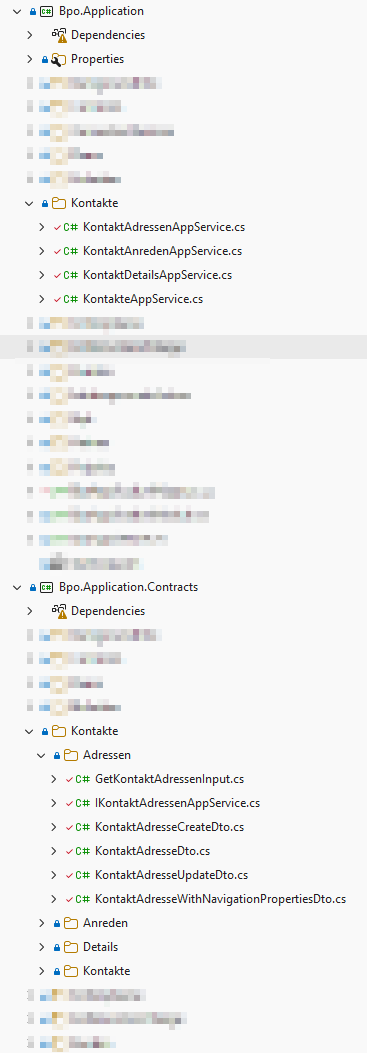
Yes, exactly – it doesn’t make sense for *.Application, *.Domain.Shared, *.EntityFrameworkCore and *.HttpApi, as only one class is generated in each of those. We didn’t want to create a subfolder for a single file either.
Thank you for discussing this.
Thanks for pointing out how to generate it via PowerShell. That’s just what I needed.
Here I found my post for the feature request: https://abp.io/support/questions/8803/ABP-Suite-feature-request--2025#answer-3a20f070-f3b8-a78e-2794-b2edbaa436b7
I was aware of grouping by namespace, but in our case it is not really desirable. We would like to have certain entities within the same namespace. We only organise the files into further subfolders within the *.Domain and *.Application.Contracts projects. We do not do this in the other projects, as there is only one class per entity there.
By the way: Is it possible to generate all (or several) entities at once? For example, via the CLI
Doing this manually via the UI is quite tedious when there are a lot of entities: select an entity -> Generate -> click OK -> select the next entity from the drop-down menu -> Generate, and so on.
Ah, I know what the problem is. Sorry, that’s my ‘mistake’.
We’ve moved some of the classes into subfolders, as we need a more detailed folder structure (with so many entities and only one folder per entity, it gets very confusing). And it’s precisely these entities that are affected, which is obviously understandable, as ABP Suite recognises these entities as new.
My script moves them back to the correct location, and of course my changes are then overwritten (Git diff).
I’ve already suggested in another support query that we should have more control over the folder structure. I hope this feature will be implemented soon; it would be very helpful. Because with more than 30 entities (and we’ll eventually have more than 200), we need to be able to organise them more clearly.
Hi, thank you for fixing the seeder issue soon. And I can understand that you still have your own styling rules.
*.Extended.cs files:We have enabled ‘Customisable Code’ for all entities. That isn’t the problem. I have now regenerated all the entities and investigated which files are being overwritten in each case. The list won’t be complete, as I’m definitely not having custom code in all the classes. But a few examples should probably be enough to help you get to the bottom of the problem:
I*AppService.Extended.csI*Repository.Extended.cs*.Extended.cs*Manager.Extended.csWe have a number of master entities. The entities affected by the problem have NavigationProperties to other master entities.
I’ll test the latest version once the final release of 10.7 is out.
I’d like to report another issue with the generated tests straight away.
We have various DataSeedContributors that we need to delete or comment out after generation:
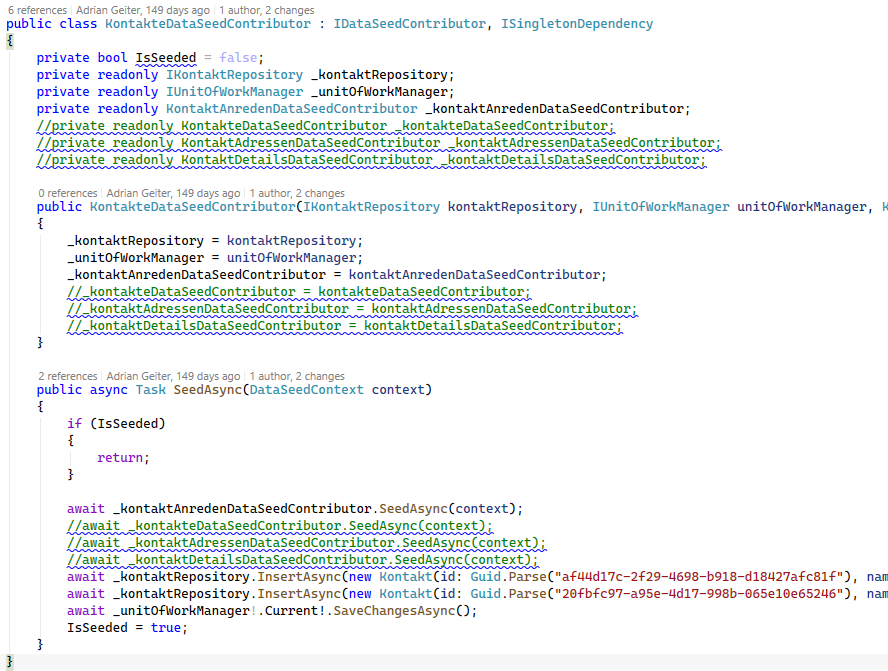
The reason for this is a circular dependency between Kontakt and KontaktDetail, KontaktAdresse and a reference to itself (Kontakt → Kontakt). This is because these entities have references in both directions.
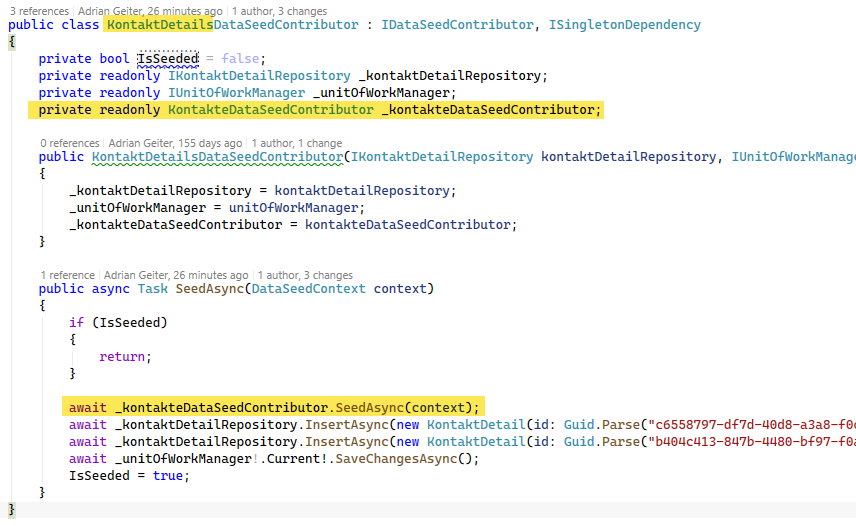
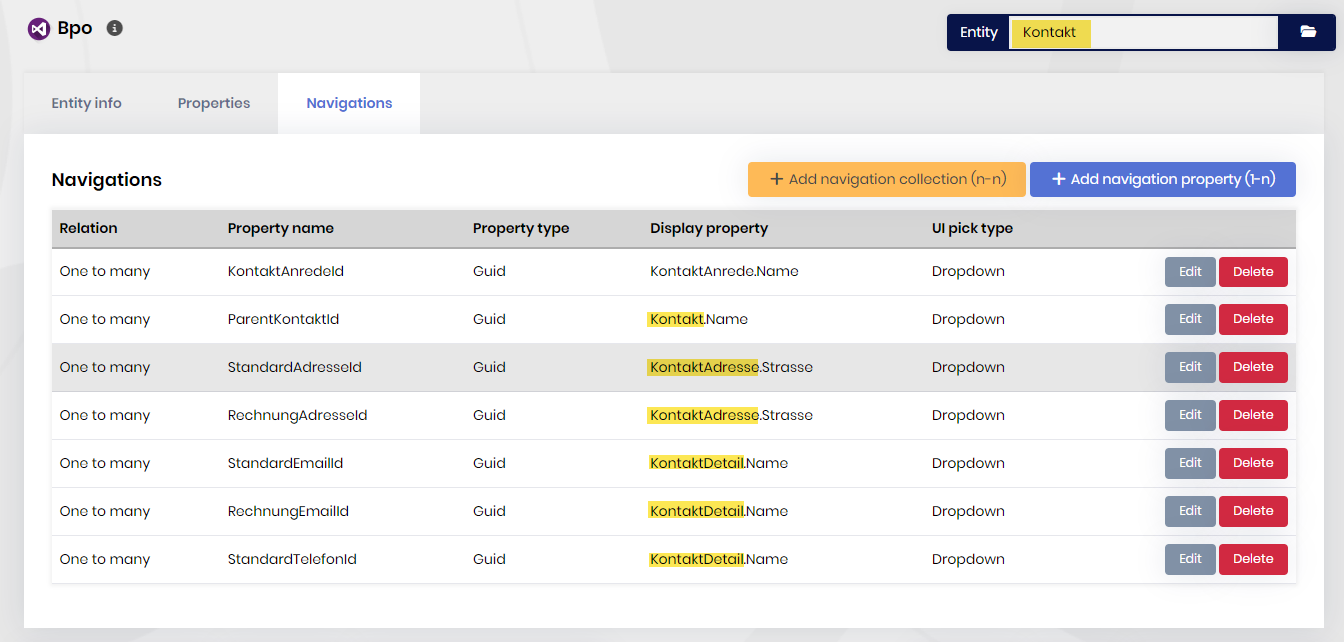
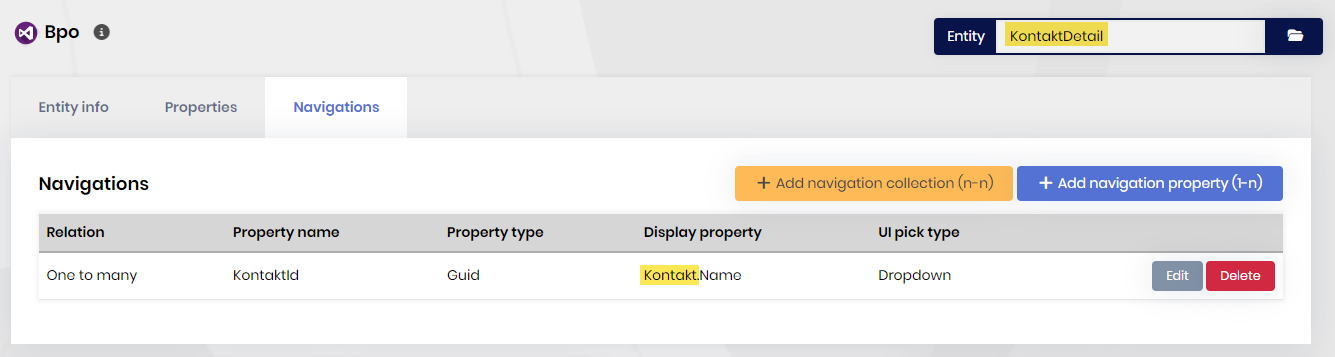
The following is the error message that appears when running the tests:
Message:
   Volo.Abp.AbpInitializationException : An error occurred during the initialize Volo.Abp.Modularity.OnApplicationInitializationModuleLifecycleContributor phase of the module Bpo.BpoTestBaseModule, Bpo.TestBase, Version=1.0.0.0, Culture=neutral, PublicKeyToken=null: An exception was thrown while activating Bpo.Kontakte.KontaktAdressenDataSeedContributor -> Bpo.Kontakte.KontakteDataSeedContributor.. See the inner exception for details.
   ---- System.InvalidOperationException : An exception was thrown while activating Bpo.Kontakte.KontaktAdressenDataSeedContributor -> Bpo.Kontakte.KontakteDataSeedContributor.
   -------- Autofac.Core.DependencyResolutionException : An exception was thrown while activating Bpo.Kontakte.KontaktAdressenDataSeedContributor -> Bpo.Kontakte.KontakteDataSeedContributor.
   ------------ Autofac.Core.DependencyResolutionException : Circular component dependency detected: Bpo.Kontakte.KontaktAdressenDataSeedContributor -> Bpo.Kontakte.KontakteDataSeedContributor -> Bpo.Kontakte.KontakteDataSeedContributor.
I have now defined all the warnings in the .editorconfig file that I’ve encountered and that I’d like to suppress or ignore. Many of them were caused by the generated code.
Why not take a look at the warnings and optimise the code generated by ABP Suite wherever possible?
[*.cs]
# StyleCop.Analyzers: report violations as warnings (not errors).
dotnet_analyzer_diagnostic.category-StyleCop.CSharp.severity = warning

# Sorting of usings (Remove and Sort Usings / dotnet format): System.* first, matching SA1208/SA1210.
dotnet_sort_system_directives_first = true


####################################################
# General suppression of certain warnings.         #
####################################################

# Report unused usings as a warning.
dotnet_diagnostic.IDE0005.severity = warning

# File headers are not used in this project.
dotnet_diagnostic.SA1633.severity = none
dotnet_diagnostic.SA1634.severity = none
dotnet_diagnostic.SA1635.severity = none
dotnet_diagnostic.SA1636.severity = none
dotnet_diagnostic.SA1637.severity = none
dotnet_diagnostic.SA1638.severity = none
dotnet_diagnostic.SA1639.severity = none
dotnet_diagnostic.SA1640.severity = none
dotnet_diagnostic.SA1641.severity = none

# XML documentation is not mandatory (see NoWarn CS1591 in common.props).
dotnet_diagnostic.SA0001.severity = none
dotnet_diagnostic.SA1600.severity = none
dotnet_diagnostic.SA1601.severity = none
dotnet_diagnostic.SA1602.severity = none
dotnet_diagnostic.SA1603.severity = none
dotnet_diagnostic.SA1604.severity = none
dotnet_diagnostic.SA1605.severity = none
dotnet_diagnostic.SA1606.severity = none
dotnet_diagnostic.SA1607.severity = none
dotnet_diagnostic.SA1608.severity = none
dotnet_diagnostic.SA1609.severity = none
dotnet_diagnostic.SA1610.severity = none
dotnet_diagnostic.SA1611.severity = none
dotnet_diagnostic.SA1612.severity = none
dotnet_diagnostic.SA1613.severity = none
dotnet_diagnostic.SA1614.severity = none
dotnet_diagnostic.SA1615.severity = none
dotnet_diagnostic.SA1616.severity = none
dotnet_diagnostic.SA1617.severity = none
dotnet_diagnostic.SA1618.severity = none
dotnet_diagnostic.SA1619.severity = none
dotnet_diagnostic.SA1620.severity = none
dotnet_diagnostic.SA1621.severity = none
dotnet_diagnostic.SA1622.severity = none
dotnet_diagnostic.SA1623.severity = none
dotnet_diagnostic.SA1624.severity = none
dotnet_diagnostic.SA1625.severity = none
dotnet_diagnostic.SA1626.severity = none
dotnet_diagnostic.SA1627.severity = none
dotnet_diagnostic.SA1628.severity = none
dotnet_diagnostic.SA1629.severity = none
dotnet_diagnostic.SA1642.severity = none

# The "this." prefix is not used in this project.
dotnet_diagnostic.SA1101.severity = none

# Private fields are prefixed with "_" (this mainly applies to generated code as well).
dotnet_diagnostic.SA1309.severity = none

# "using" directives usually go before the namespace, not inside it.
dotnet_diagnostic.SA1200.severity = none

# File name != first type name: conflicts with the *.Extended.cs pattern and with multiple types per file.
dotnet_diagnostic.SA1649.severity = none

# Element ordering (access modifiers / static / readonly / fields, constructors, methods, ...):
# does not match the order in which ABP Suite arranges the members of generated classes.
dotnet_diagnostic.SA1201.severity = none
dotnet_diagnostic.SA1202.severity = none
dotnet_diagnostic.SA1204.severity = none
dotnet_diagnostic.SA1214.severity = none

# Blank lines around comments/braces (before/after a comment, after a closing brace):
# generated code does not follow this spacing.
dotnet_diagnostic.SA1512.severity = none
dotnet_diagnostic.SA1513.severity = none
dotnet_diagnostic.SA1515.severity = none

# Do not show a message when the simplified collection initialization is not used.
dotnet_diagnostic.IDE0028.severity = none

# Namespaces deliberately do not always match the folder structure.
dotnet_diagnostic.IDE0130.severity = none

# The primary constructor (constructor parameters in parentheses after the type name) is not used in this project.
dotnet_diagnostic.IDE0290.severity = none

# Simplified collection initialization is only applied partially.
dotnet_diagnostic.IDE0305.severity = none


###########################################################################################################
# Targeted suppression of warnings for individual files (those generated by ABP Suite).                   #
###########################################################################################################

# Nullable warnings in the Suite-generated base repositories (EfCore*Repository.cs, not *.Extended.cs):
# GetWithNavigationPropertiesAsync ends in FirstOrDefault() and ApplyFilter uses WhereIf(...) with Contains(name),
# which the flow analysis does not recognize.
[**/EfCore*Repository.cs]
dotnet_diagnostic.CS8601.severity = none
dotnet_diagnostic.CS8602.severity = none
dotnet_diagnostic.CS8603.severity = none
dotnet_diagnostic.CS8604.severity = none

# Entities in Bpo.Domain: the protected constructor of the Suite-generated base classes (for EF Core)
# does not initialize non-nullable properties.
[**/Bpo.Domain/**/*.cs]
dotnet_diagnostic.CS8618.severity = none

# Generated LookupDtoBase<TKey>: Id is not initialized (base file, not editable).
[**/Bpo.Application.Contracts/Shared/LookupDto.cs]
dotnet_diagnostic.CS8618.severity = none

# Suite-generated tests: "result.ShouldNotBe(null)" does not inform the flow analysis, and result is accessed afterwards.
[**/Bpo.Application.Tests/**/*ApplicationTests.cs]
dotnet_diagnostic.CS8602.severity = none

# Trailing comma is not always set in multi-line initializers (in generated code).
[{**/EfCore*Repository.cs,**/Bpo.Application.Tests/**/*ApplicationTests.cs}]
dotnet_diagnostic.SA1413.severity = none

# Field should actually be "private" instead of "protected" (in generated code).
[{**/Bpo.Application/**/*AppService.cs,**/Bpo.Domain/**/*Manager.cs}]
dotnet_diagnostic.SA1401.severity = none

# Comment without a space after "//": among other things this hits the marker "//<suite-custom-code-autogenerated>",
# which ABP Suite recognizes only in this exact form (no space) - an autofix would break this marker.
[**/*.Extended.cs]
dotnet_diagnostic.SA1005.severity = none

# Allow unnecessary parentheses in generated code, e.g. "ApplyFilter((await GetQueryableAsync()), ...)".
[**/EfCore*Repository.cs]
dotnet_diagnostic.SA1119.severity = none

# Constructor initializer on its own line: generated constructors have ": base(...)" inline.
[{**/EfCore*Repository.cs,**/*.Extended.cs}]
dotnet_diagnostic.SA1128.severity = none

# Multiple types per file: ABP Suite deliberately bundles related types in one file
# (e.g. GetXxxPagedListInput + GetXxxListInput).
[**/Bpo.Application.Contracts/**/*Input.*cs]
dotnet_diagnostic.SA1402.severity = none

# Generic constraints on their own line: generated code writes "where T : ..." inline.
[**/Bpo.Application.Tests/**/*ApplicationTests.cs]
dotnet_diagnostic.SA1127.severity = none

# Blank line between elements: generated code does not follow this (e.g. compact property/mapper lists).
[{**/Bpo.Application.Contracts/**/*.cs,**/Bpo.Domain/**/I*Repository.cs,**/Bpo.Domain/**/*WithNavigationProperties.cs}]
dotnet_diagnostic.SA1516.severity = none

# Field name starts with an upper-case letter: Suite-generated DataSeedContributors declare "private bool IsSeeded = false;".
[**/Bpo.Domain.Tests/**/*DataSeedContributor.cs]
dotnet_diagnostic.SA1306.severity = none
dotnet_diagnostic.IDE1006.severity = none
(At least in version 10.4.1) Extended files were overwritten in the backend. We do not generate Angular code, so I am referring specifically to the backend. I will regenerate the code soon (and may even do an ABP update first) and will get back to you with more specific results.
Thank you very much.
I already have a script that I run after generation, which corrects any unwanted changes. I can then add dotnet format style at the end of that.
One slightly annoying issue that I now fix automatically is that the extended files are sometimes overwritten. That’s exactly what we don’t want. Are you already aware of this bug, or do you need more information about it?
Another tedious issue is that new test data is generated every single time during the tests. I discard these changes each time as well. The tests don’t work correctly in some cases anyway; as soon as you have seeds for certain data, the counts from GetCountAsync and GetListAsync in the generated tests are no longer correct.
Hi,
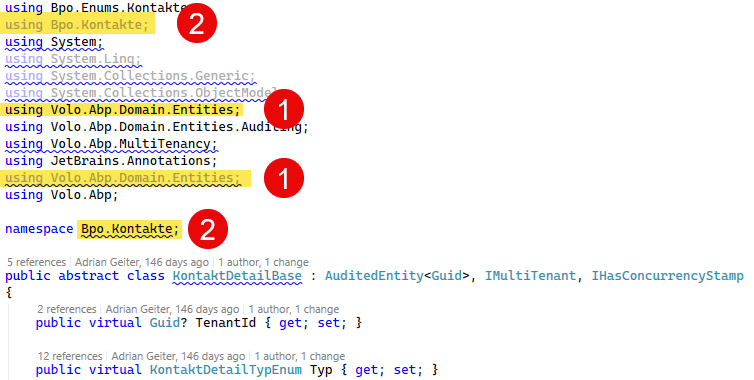
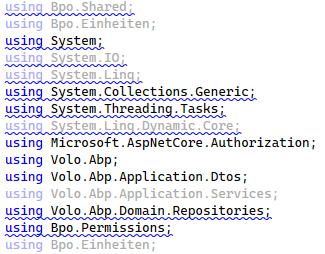
in the classes generated by the ABP Suite, I’ve encountered various warnings, mainly relating to the using statements, which I’d really rather not have to suppress. Ideally, I’d like this to be generated correctly from the outset. At the moment, I have several thousand warnings in the generated code… which is rather unpleasant.
Could you please implement a fix for the following issues?
using statements that are sorted incorrectly (the standard sorting would probably be system namespaces first, followed by alphabetical order).using statement is added anew each time for certain classes. (So please also test multiple generation)Perhaps it would be possible to run “Remove and sort usings” (Ctrl + R, Ctrl + G) at the end for each generated class? I’m currently doing this across the whole solution, but it’s obviously tedious to have to repeat this every time after generation.
I'm using ABP Studio 3.06.
Here are some examples:
CS0105: The using directive for 'Bpo.Kontakte' appeared previously in this namespace
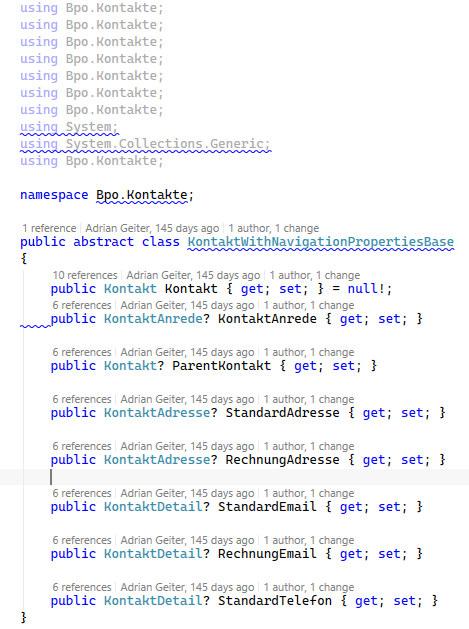
SA1208: Using directive for 'System' should appear before directive for 'Bpo.Npk'
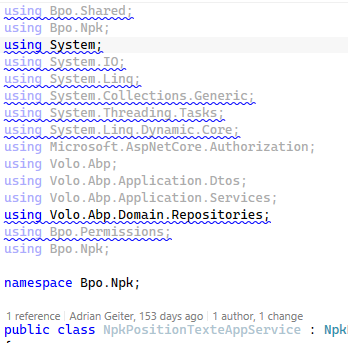
SA1210: Using directives should be ordered alphabetically by the namespaces
Miscellaneous: