On Azure, certificates can be uploaded and exposed to Azure App Service applications using the special WEBSITE_LOAD_CERTIFICATES flag. For more information, visit Use a TLS/SSL certificate in your code in Azure App Service.
Unfortunately, this is not possible if the AppService is running in the App Service plan "Free". And "Load User Profile" is not applicable in this mode either. That's why I wanted to read the certificates when they are simply in wwwroot.
Is there any other way to run the ABP app on Azure in App Service plan "Free"? I don't want to spend a lot of money for my test sites yet.
I have the same error message with my deployment on Azure.
First the certificate was not in the correct directory and I got the error message: System.IO.FileNotFoundException: Signing certificate couldn't found: C:\home\site\wwwroot\authserver-signing-certificate.pfx
Then I copied it to the root directory of the Blazor project and so it was found, but then the error message came: System.Security.Cryptography.CryptographicException: The system cannot find the file specified.
The error happens here:
new X509Certificate2(file, passPhrase);
Can it be that it has to do with some missing permissions?
I don't think "Load User Profile" solves the real problem, but is just a workaround to get around the whole certificate thing. Because with this flag set, it also works with the development certificates (i.e. without the pfx files).
I have the problem that when I refresh (F5) the page of my Blazor Server App, the stylesheets are loaded much too late, resulting in ugly effects (see screencast here).
I recently upgraded to version 7.1.0 and feel that this problem was not so extreme before.
You can see in the following image that the CSS files are loaded after about 1 second.
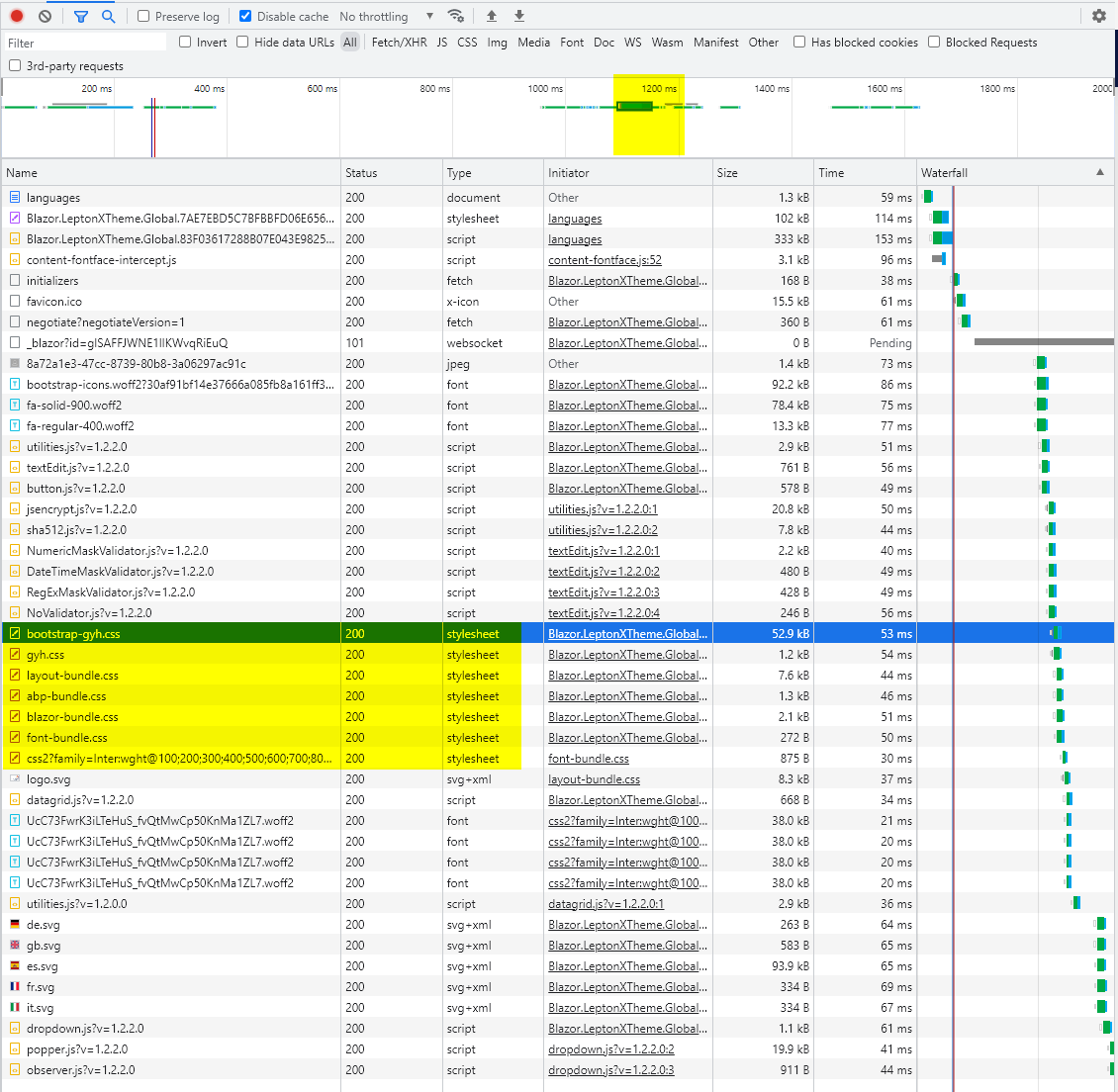
I have now tried to combine all these files into one bundle.
// Blazor UI
options.StyleBundles.Configure(
    BlazorLeptonXThemeBundles.Styles.Global,
    bundle =>
    {
        bundle.AddFiles("/global-styles.css");
        bundle.AddFiles("/blazor-global-styles.css");
        bundle.AddFiles("/_content/Volo.Abp.AspNetCore.Components.Web.LeptonXTheme/top-menu/css/bootstrap-gyh.css");
        bundle.AddFiles("/_content/Volo.Abp.AspNetCore.Components.Web.LeptonXTheme/top-menu/css/gyh.css");
        bundle.AddFiles("/_content/Volo.Abp.AspNetCore.Components.Web.LeptonXTheme/top-menu/css/layout-bundle.css");
        bundle.AddFiles("/_content/Volo.Abp.AspNetCore.Components.Web.LeptonXTheme/top-menu/css/abp-bundle.css");
        bundle.AddFiles("/_content/Volo.Abp.AspNetCore.Components.Web.LeptonXTheme/top-menu/css/blazor-bundle.css");
        //You can remove the following line if you don't use Blazor CSS isolation for components
        bundle.AddFiles("/GetYourHouse.Blazor.styles.css");
    }
);
This seems to solve the problem, but now the files are loaded twice. First in the global bundle and then again separately as CSS files.
How should I do this correctly?
Thanks, Adrian
can you give concrete examples on this?
Example of what would have been useful to me: Step by step instructions for a deployment to Azure. Including the correct setup of OpenIddict etc. Just in a way that you can run the WebApp (in my case with Blazor) securely afterwards. Also what is necessary to store the appsettings / connection strings securely (e.g. with environment variables).
My application is still in the test environment, but I have not yet managed to configure OpenIddict so that it works correctly. For example, I had to set "WEBSITE_LOAD_USER_PROFILE" to true to work around the problem, etc.
Since I don't have that much experience with OpenIddict and Azure yet, I have to gather all the necessary info in the forum.
Please do not close before giving an answer to the open question.
Hi @liangshiwei, thanks for the help with the menu. Your code works. Will you do the same for the official version?
the breadcrumbs and the buttons at the top disappear. But that's another story... I will check it.
Have you found out anything about this yet?
I get the same message... am blocked in continuing to work because the build does not work.
did you try the advanced search?
Yes, thank you for pointing that out. That works correctly, in my opinion setting "All these words" as default would be better than "Any of these words".
The search here in the Support Center could be improved. For example, when searching for an error message, it now searches for every single word by default. Or if I search for something that should contain several words, I have to do it with +. This is sometimes uncomfortable or forgotten.
Hi liangshiwei,
It's simple: use your default project template for Blazor. Open the page Administration -> Text Templates
If you now edit a text template, a new page will open. In the side menu "Text Templates" remains active and you can only return to the overview with the button "Return To Templates". But not via the menu.
If you choose the layout with the TopMenu, however, this is possible exactly as we would like. You click on "Text Templates" in the menu again and get to the overview.
There is also a small unwanted side effect with the TopMenu. If you are on an overview page (e.g. "Users") and click on "Users" in the menu again, the breadcrumbs and the buttons at the top disappear. But that's another story...




