But if you want to keep using http, you should apply AddSameSiteCookiePolicy to all your websites.
I already applied this one for Web project, and I've just applied for AuthServer project, but still get the error:
public override void ConfigureServices(ServiceConfigurationContext context)
{
    var hostingEnvironment = context.Services.GetHostingEnvironment();
    var configuration = context.Services.GetConfiguration();

    if (!Convert.ToBoolean(configuration["App:DisablePII"]))
    {
        Microsoft.IdentityModel.Logging.IdentityModelEventSource.ShowPII = true;
    }

    if (!Convert.ToBoolean(configuration["AuthServer:RequireHttpsMetadata"]))//false in appsettings.json
    {
        Configure<OpenIddictServerAspNetCoreOptions>(options =>
        {
            options.DisableTransportSecurityRequirement = true;// Already had from old version
        });
    }

    context.Services.AddSameSiteCookiePolicy(); // just added this line
    ...
  }
And as I said above, everything's still OK before upgrading
No, I am using OpenIdDict, but I already applied that solution and it worked fine before upgrading
Hi,
Changing to https is taking time, is there any way to use http. Everything's still OK before upgrading.
[web_bd1ce1f9-2]: [18:00:24 INF] Request starting HTTP/1.1 GET http://mzh.mhibs.web:7004/Account/Login - null null
[web_bd1ce1f9-2]: [18:00:24 INF] Executing endpoint 'MZH.MHIBS.Web.Controllers.AccountController.Login (MZH.MHIBS.Web)'
[web_bd1ce1f9-2]: [18:00:24 INF] Route matched with {action = "Login", controller = "Account", area = "", page = ""}. Executing controller action with signature Microsoft.AspNetCore.Mvc.ActionResult Login(System.String, System.String) on controller MZH.MHIBS.Web.Controllers.AccountController (MZH.MHIBS.Web).
[web_bd1ce1f9-2]: [18:00:24 INF] Executing action method MZH.MHIBS.Web.Controllers.AccountController.Login (MZH.MHIBS.Web) - Validation state: Valid
[web_bd1ce1f9-2]: [18:00:24 INF] Executed action method MZH.MHIBS.Web.Controllers.AccountController.Login (MZH.MHIBS.Web), returned result Microsoft.AspNetCore.Mvc.ChallengeResult in 0.037ms.
[web_bd1ce1f9-2]: [18:00:24 INF] Executing ChallengeResult with authentication schemes (["oidc"]).
[web_bd1ce1f9-2]: [18:00:24 INF] AuthenticationScheme: oidc was challenged.
[web_bd1ce1f9-2]: [18:00:24 INF] Executed action MZH.MHIBS.Web.Controllers.AccountController.Login (MZH.MHIBS.Web) in 4.7096ms
[web_bd1ce1f9-2]: [18:00:24 INF] Executed endpoint 'MZH.MHIBS.Web.Controllers.AccountController.Login (MZH.MHIBS.Web)'
[web_bd1ce1f9-2]: [18:00:24 INF] Request finished HTTP/1.1 GET http://mzh.mhibs.web:7004/Account/Login - 302 0 null 5.572ms
[web_bd1ce1f9-2]: [18:00:25 INF] Request starting HTTP/1.1 POST http://mzh.mhibs.web:7004/signin-oidc - application/x-www-form-urlencoded 1586
[web_bd1ce1f9-2]: [18:00:25 WRN] '.AspNetCore.Correlation.zwwe_Ao2xW7750a7k0U1t8rW5pCQMvknu6aP7K0j1kw' cookie not found.
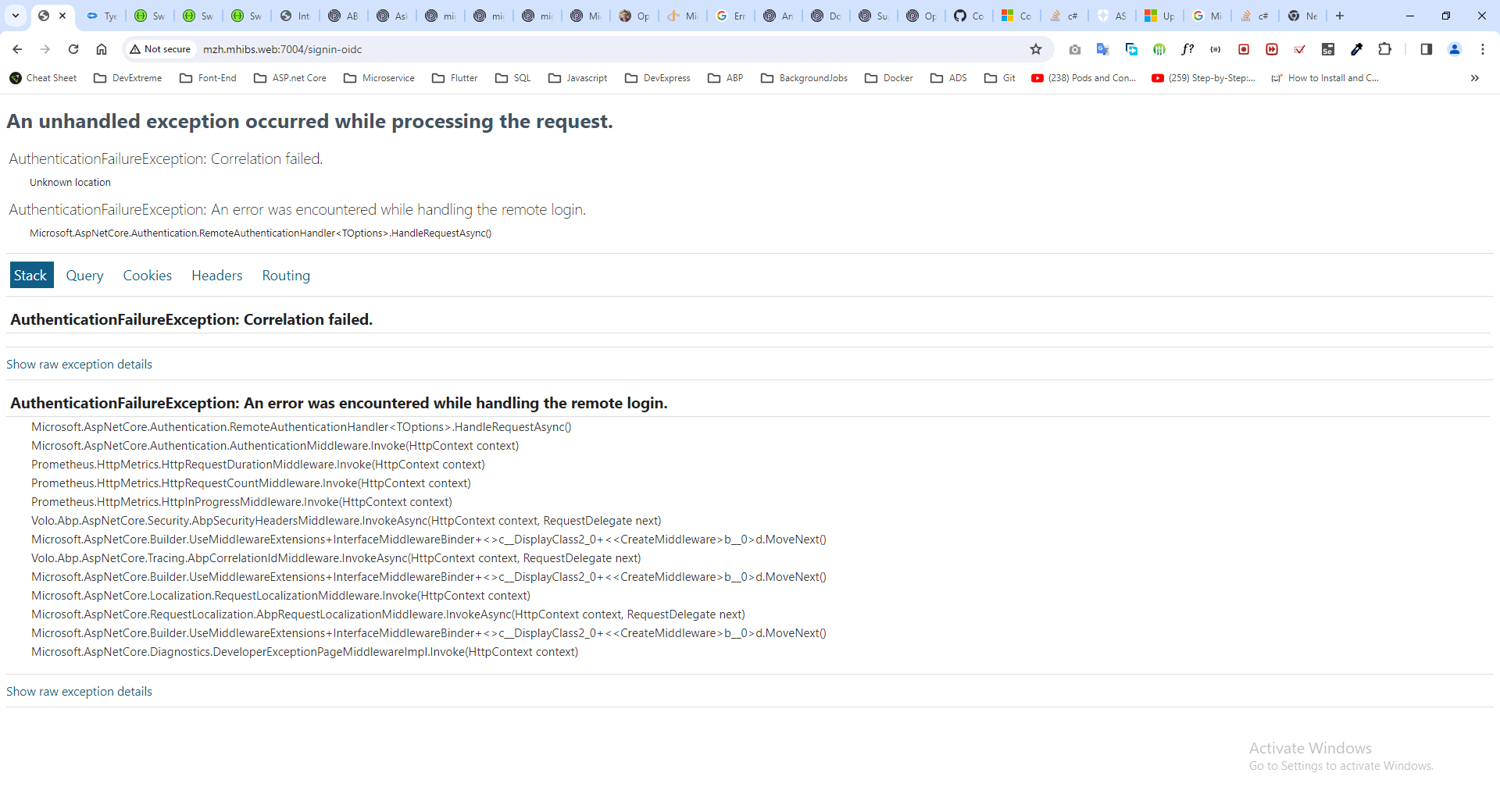
[web_bd1ce1f9-2]: [18:00:25 INF] Error from RemoteAuthentication: Correlation failed..
[web_bd1ce1f9-2]: [18:00:25 ERR] An unhandled exception has occurred while executing the request.
[web_bd1ce1f9-2]: Microsoft.AspNetCore.Authentication.AuthenticationFailureException: An error was encountered while handling the remote login.
[web_bd1ce1f9-2]: ---> Microsoft.AspNetCore.Authentication.AuthenticationFailureException: Correlation failed.
[web_bd1ce1f9-2]: --- End of inner exception stack trace ---
[web_bd1ce1f9-2]: at Microsoft.AspNetCore.Authentication.RemoteAuthenticationHandler`1.HandleRequestAsync()
[web_bd1ce1f9-2]: at Microsoft.AspNetCore.Authentication.AuthenticationMiddleware.Invoke(HttpContext context)
[web_bd1ce1f9-2]: at Prometheus.HttpMetrics.HttpRequestDurationMiddleware.Invoke(HttpContext context)
[web_bd1ce1f9-2]: at Prometheus.HttpMetrics.HttpRequestCountMiddleware.Invoke(HttpContext context)
[web_bd1ce1f9-2]: at Prometheus.HttpMetrics.HttpInProgressMiddleware.Invoke(HttpContext context)
[web_bd1ce1f9-2]: at Volo.Abp.AspNetCore.Security.AbpSecurityHeadersMiddleware.InvokeAsync(HttpContext context, RequestDelegate next)
[web_bd1ce1f9-2]: at Microsoft.AspNetCore.Builder.UseMiddlewareExtensions.InterfaceMiddlewareBinder.<>c__DisplayClass2_0.<<CreateMiddleware>b__0>d.MoveNext()
[web_bd1ce1f9-2]: --- End of stack trace from previous location ---
[web_bd1ce1f9-2]: at Volo.Abp.AspNetCore.Tracing.AbpCorrelationIdMiddleware.InvokeAsync(HttpContext context, RequestDelegate next)
[web_bd1ce1f9-2]: at Microsoft.AspNetCore.Builder.UseMiddlewareExtensions.InterfaceMiddlewareBinder.<>c__DisplayClass2_0.<<CreateMiddleware>b__0>d.MoveNext()
[web_bd1ce1f9-2]: --- End of stack trace from previous location ---
[web_bd1ce1f9-2]: at Microsoft.AspNetCore.Localization.RequestLocalizationMiddleware.Invoke(HttpContext context)
[web_bd1ce1f9-2]: at Microsoft.AspNetCore.RequestLocalization.AbpRequestLocalizationMiddleware.InvokeAsync(HttpContext context, RequestDelegate next)
[web_bd1ce1f9-2]: at Microsoft.AspNetCore.Builder.UseMiddlewareExtensions.InterfaceMiddlewareBinder.<>c__DisplayClass2_0.<<CreateMiddleware>b__0>d.MoveNext()
[web_bd1ce1f9-2]: --- End of stack trace from previous location ---
[web_bd1ce1f9-2]: at Microsoft.AspNetCore.Diagnostics.DeveloperExceptionPageMiddlewareImpl.Invoke(HttpContext context)
[web_bd1ce1f9-2]: [18:00:25 INF] Request finished HTTP/1.1 POST http://mzh.mhibs.web:7004/signin-oidc - 500 null text/html; charset=utf-8 5.2675ms
Currently, I would like to call app services from my old .net 4.8 winform app. Is it possible? I tried, but got this error:
Severity	Code	Description	Project	File	Line	Suppression State
Error	CS1705	Assembly 'MZH.MHIBS.SftpGatewayService.HttpApi.Client' with identity 'MZH.MHIBS.SftpGatewayService.HttpApi.Client, Version=1.0.0.0, Culture=neutral, PublicKeyToken=null' uses 'System.Runtime, Version=7.0.0.0, Culture=neutral, PublicKeyToken=b03f5f7f11d50a3a' which has a higher version than referenced assembly 'System.Runtime' with identity 'System.Runtime, Version=4.1.2.0, Culture=neutral, PublicKeyToken=b03f5f7f11d50a3a'	AbpClient	E:\SourceCode\AbpClient\AbpClient\CSC	1	Active
Is there any to call like that? If not, pls tell me how to call authorized app services with HttpClient? Thank you.
Hi,
Just call RefreshManyAsync above to refresh or other method?
Hi, So that means there is no way to refresh the cache immediately, right?
Hi,
Can I use RefreshManyAsync method of IDistributedCache<PermissionGrantCacheItem> to refresh the cache whenever I change permissions?
I don't understand why RemoveManyAsync not work when deploying on K8s?
Hi,
Removing distributed cache with above method call when deploying on K8s does not affect immediately. The cache is refreshed after 5 minutes (I guess). Is there anything I have to do? How to remove old cache immediately after changing permissions?









