Hi,
You can check the sample : https://github.com/abpframework/abp-samples/tree/master/EmailSendDemo
Create them manually : )
HI,
You are right, It's a problem with the pro template.
for now, try put the Register.cshtml file in the Pages\Account folder of your .HttpApi.Host
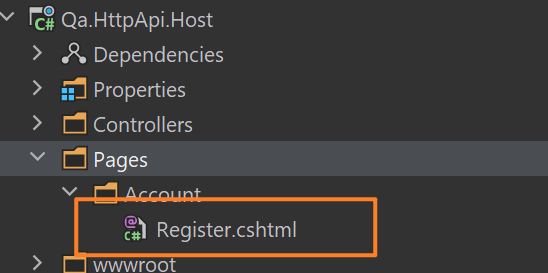
Register.cshtml:
@page
@using Microsoft.AspNetCore.Mvc.Localization
@using Volo.Abp.Account.Localization
@using Volo.Abp.Account.Public.Web.Security.Recaptcha
@using Volo.Abp.Account.Security.Recaptcha
@using Volo.Abp.Account.Settings
@using Volo.Abp.Settings
@model Volo.Abp.Account.Public.Web.Pages.Account.RegisterModel
@inject IHtmlLocalizer<AccountResource> L
@inject Volo.Abp.AspNetCore.Mvc.UI.Layout.IPageLayout PageLayout
@inject ISettingProvider SettingProvider
@{
    PageLayout.Content.Title = L["Register"].Value;
    var reCaptchaVersion = await SettingProvider.GetAsync<int>(AccountSettingNames.Captcha.Version);
}

@section scripts
{
    @if (Model.UseCaptcha)
    {
        if (reCaptchaVersion == 3)
        {
            <recaptcha-script-v3/>
            <recaptcha-script-v3-js action="register" callback="(function(){$('#@RecaptchaValidatorBase.RecaptchaResponseKey').val(token)})"/>
        }
        else
        {
            <recaptcha-script-v2/>
        }
    }
}

<div class="account-module-form">
    <form method="post">

        @if (Model.UseCaptcha)
        {
            <input type="hidden" name="@RecaptchaValidatorBase.RecaptchaResponseKey" id="@RecaptchaValidatorBase.RecaptchaResponseKey"/>
        }

        @if (!Model.IsExternalLogin)
        {
            <abp-input asp-for="Input.UserName" auto-focus="true"/>
        }

        <abp-input asp-for="Input.EmailAddress"/>

        @if (!Model.IsExternalLogin)
        {
            <abp-input asp-for="Input.Password"/>
        }

        @if (reCaptchaVersion == 2)
        {
            <recaptcha-div-v2 callback="(function(){$('#@RecaptchaValidatorBase.RecaptchaResponseKey').val(token)})" />
        }

        <abp-button button-type="Primary" size="Block" type="submit" class="mt-2 mb-3">@L["Register"]</abp-button>
        @L["AlreadyRegistered"] <a href="@Url.Page("./Login", new {returnUrl = Model.ReturnUrl, returnUrlHash = Model.ReturnUrlHash})">@L["Login"]</a>
    </form>
</div>
Hi,
I will check it out
Can I check it remotely? shiwei.liang@volosoft.com
Hi
Put the Default.cshtml file in your Themes\Lepton\Layouts\Public folder and change it what you need.
Hi
Try remote typeof(BlobStoringDatabaseDomainModule) and Volo.Abp.BlobStoring.Database.* package.
Hi,
Yes you need to call the setResult manualy.
I think it could be easier:
parent.js
var addPageApi  = {};
addPageApi.selectedValues = null;
addPageApi.modal = null;

$(function(){
    addPageApi.modal = new abp......
})
childPage.js
$(function(){
   addPageApi.modal.onClose(function(){
        addPageApi.selectedValues = .....;
   })
})
Try:
The web.public does not create API dynamic proxy. if you want to use API dynamic proxy. you can try:
Configure<AbpAspNetCoreMvcOptions>(options =>
{
    options.ConventionalControllers.Create(typeof(MyProjectNameApplicationModule).Assembly);
});
Recommend you create a sparate application service layer for the web.public like : Application.Public
CreateContainerIfNotExists (bool): Default value is false, If a container does not exist in azure, AzureBlobProvider will try to create it.
Set CreateContainerIfNotExists value to true otherwise you need to pre-create the BLOB container in Azure yourself









