Thanks. I will check it.
hi
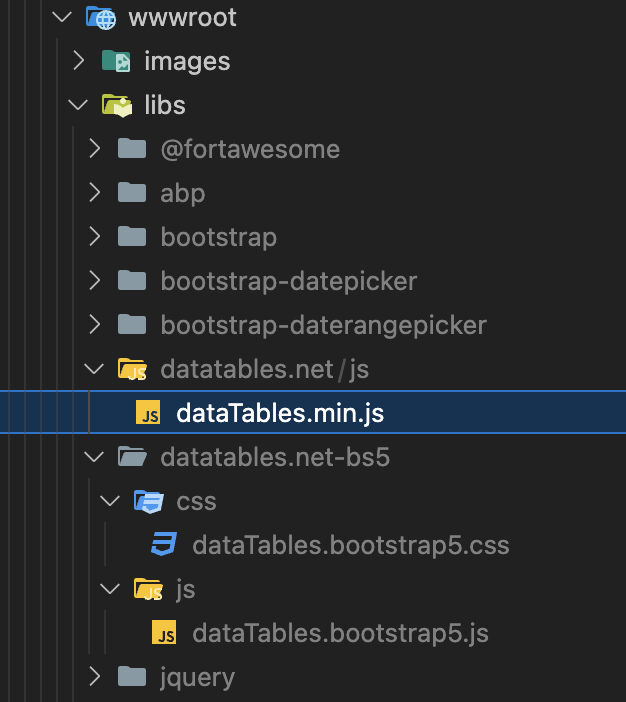
Can you try to add /libs/datatables.net/js/dataTables.min.js file?
https://we.tl/t-2XaEpWwcz7
If still not working, Can you share a test project?
liming.ma@volosoft.com
Thanks
This is weird, we keep using pfx files generated this way
This is my pfx file, and I verified the password(00000000-0000-0000-0000-000000000000).
You can move it to C:\inetpub\wwwroot\PayosGate\PayosGateApi
https://we.tl/t-VCNULyhjCy
> openssl pkcs12 -in openiddict.pfx -noout
Enter Import Password: 00000000-0000-0000-0000-000000000000
If still not working, you can use a different certificate for encryption/signing
https://github.com/abpframework/abp/issues/13507#issuecomment-1202035746
This error is related to NET 9 SDK.
You can use a specific SDK version in a folder to install the abp suite.
> dotnet --list-sdks
8.0.401 [/usr/local/share/dotnet/sdk]
9.0.100-rc.2.24474.11 [/usr/local/share/dotnet/sdk]

> cd TestFolder
TestFolder > dotnet new globaljson --sdk-version 8.0.401

TestFolder > dotnet --version
8.0.401

TestFolder > abp suite
Update:
Please use latest official NET 9 SDK to solve this issue,
hi
Can you try to remove all files from C:\inetpub\wwwroot\PayosGate\PayosGateApi and re-publish the website to IIS again?
and regenerate the pfx by dotnet dev-certs https -v -ep openiddict.pfx -p 00000000-0000-0000-0000-000000000000
Make sure the 00000000-0000-0000-0000-000000000000 password in the code is applied.
Thanks. I will check the error logs. Please wait.
hi
Can you join zoom(with zoom client) and share your screen?
I will check your IIS.
https://us05web.zoom.us/j/87104048130?pwd=iIWFM5XvS1bWC3G5Xq85W0bNqmW60n.1
hi
liming.ma@volosoft.com
ok,