devpayoff:
I used: builder.SetAccessTokenLifetime(TimeSpan.FromMinutes(20)); for making the token expire after 20 minutes.

In angular i subscribed to the token refresh expiration event so when the token expire a modal appear this.oAuthService.events .pipe(filter(event => event.type === 'token_refresh_error')) .subscribe(() => { this.modalVisible = true; });

Problem is that when a token expire abp redirect me to login page. How can i remove/override that abp behavior?
hi
Which page source code and js files do you need?
Your question credit has been refunded.
hi
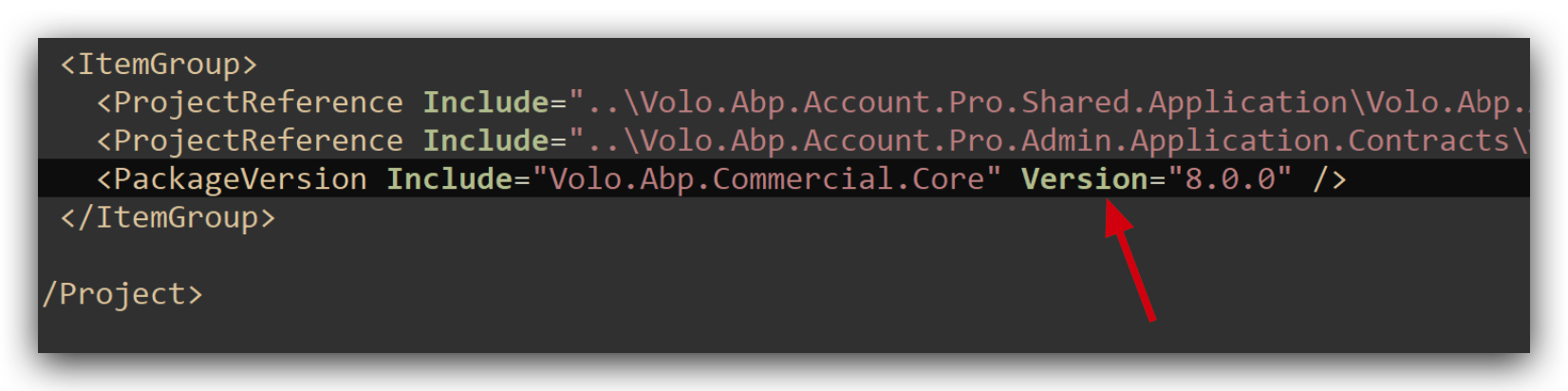
We fixed this in 8.0.1
You can use VersionOverride to replace the Version.
https://github.com/abpframework/abp/pull/18566
hi
There is an angular method to clear the login state.
https://github.com/abpframework/abp/blob/dev/npm/ng-packs/packages/oauth/src/lib/utils/clear-o-auth-storage.ts#L4
hi
When I try it on my local, everything works fine but it does not work for the docker containers.
Is the running environment of your docker application Development?
If so, please Configure the DataProtection to use same keys.
private void ConfigureDataProtection(
    ServiceConfigurationContext context,
    IConfiguration configuration,
    IWebHostEnvironment hostingEnvironment)
{
    var dataProtectionBuilder = context.Services.AddDataProtection().SetApplicationName("MyProjectName");
    //if (!hostingEnvironment.IsDevelopment())
    var redis = ConnectionMultiplexer.Connect(configuration["Redis:Configuration"]!);
    dataProtectionBuilder.PersistKeysToStackExchangeRedis(redis, "MyProjectName-Protection-Keys");
}
hi
Can you share the full logs? liming.ma@volosoft.com
Have you tested this case in a new microservice template project?
I think there is a problem when publishing the website by Visual Studio. You can use dotnet publish command to publish the website.
we had same situation before
https://support.abp.io/QA/Questions/5722/Publish-Project-in-IIS-server#answer-3a0d80cd-b66d-4f76-dbab-f2f22073415e
hi
I think your website DLL misses the Index page.
Please download the Zoom windows client then join the meeting and share your screen.
https://us05web.zoom.us/j/88030041562?pwd=XRNVw8UAaPM1znlutacTWIa7VTUCdK.1









