Hey, thanks for the detailed logs — super helpful.
So we dug into the diagnostic output and your source code, and here's where we landed:
The Bearer token is definitely reaching the API tier (825 chars every time), but the API is treating every request as anonymous. We checked your HttpApiHostModule and noticed you've disabled dynamic claims:
options.IsDynamicClaimsEnabled = false;
options.DynamicContributors.Clear();
So IdentitySessionDynamicClaimsPrincipalContributor isn't even in the picture. The problem is happening earlier — the JwtBearer handler itself is failing to validate the token. When that happens, HttpContext.User stays anonymous, and you get empty GrantedPolicies on every cache-miss request.
Your API uses AddAbpJwtBearer with Authority from config and Audience = "CabMD". Your AuthServer sets the issuer via serverBuilder.SetIssuer(configuration["AuthServer:Authority"]). ABP calls DisableAccessTokenEncryption() unconditionally — we checked your entire codebase, nothing re-enables it — so the token should be a plain JWT. But 100% of validations are failing, and we can't tell why from the source code alone because both sides read AuthServer:Authority from their own config, and the production values come from Azure env vars (not in appsettings).
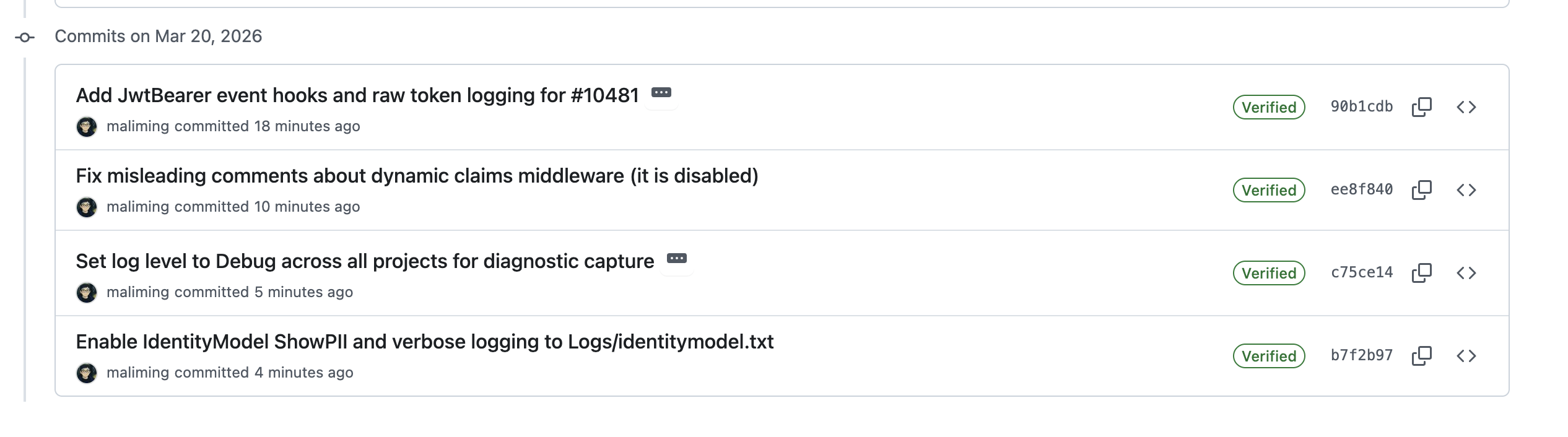
We've pushed a bunch of updates to the PR:
New diagnostic hooks — we added a DiagnosticJwtBearerPostConfigure that taps directly into the JwtBearer handler events. After deploying, look for these in your API logs:
ABP_DIAG: JwtBearer OnAuthenticationFailed — this is the big one. It'll show the exact exception (signature key not found? issuer mismatch? audience mismatch?), plus the JWT's decoded issuer, audience, expiry, the configured Authority, and the raw token itself.ABP_DIAG: JwtBearer OnTokenValidated SUCCESS — if you see this, validation is actually working and we need to look elsewhere.ABP_DIAG: JwtBearer OnMessageReceived — confirms the handler is receiving the token and whether it's actually a JWT.IdentityModel verbose logging — we enabled ShowPII = true and EventLevel.Verbose in Program.cs. This writes the full JWT validation pipeline to Logs/identitymodel.txt in the API host's working directory — every step of key lookup, signature check, issuer/audience validation, with nothing masked.
Log levels bumped to Debug — across HttpApi.Host, Web, and AuthServer, both dev and production configs. Serilog MinimumLevel and Microsoft.AspNetCore.Authentication are both set to Debug now.
Could you pull the latest, deploy, and then share the following after reproducing the issue?
Logs/identitymodel.txt from the API hostThe identitymodel.txt alone should tell us exactly what's going wrong with the JWT validation. The full logs from all projects might also reveal something we haven't thought of yet.
hi
Can you share the logs.txt files for all of your apps?
We need check the backend logs.
Debug Logs: https://abp.io/support/questions/8622/How-to-enable-Debug-logs-for-troubleshoot-problems
And you can refer to this article: https://abp.io/community/articles/Common%20Errors%20in%20JWT%20Bearer%20Authentication-4u3wrbs5#gsc.tab=0
Thanks.
Thank you for reporting this.
Blazorise 2.x is not supported in ABP 10.1.x. The Pro Blazor packages in 10.1.x were compiled against Blazorise 1.8.x, so upgrading Blazorise independently to 2.0.x will cause the runtime type load exceptions you are seeing (TextEdit was renamed to TextInput in Blazorise 2.0, among other breaking changes).
Blazorise 2.0 support is included in ABP 10.2, which is currently at RC stage. Please upgrade to ABP 10.2 once it is officially released to use Blazorise 2.0.
In the meantime, please downgrade Blazorise back to 1.8.x when using ABP 10.1.x.
Thanks.
Yes, you can override the dialog. I'm sharing the full source code of the TenantManagement Blazor component below so you can customize it. Please send an email to liming.ma@volosoft.com
Here are the steps to override it in your Blazor project:
1. Create a single Razor file in your Blazor project
Create MyTenantManagement.razor (e.g., under Pages/Saas/Host/). Use @inherits TenantManagement to inherit the base class — no .razor.cs file is needed since all the logic is inherited from the parent class.
@page "/saas/host/tenants"
@using Volo.Saas.Host.Blazor.Pages.Saas.Host
@inherits TenantManagement

@* Copy the full content from the original TenantManagement.razor here,
   then modify the impersonation modal section as needed. *@
2. Modify the modal section
Remove or modify the username <Field> in the impersonation modal:
@if (Options.Value.EnableTenantImpersonation)
{
    <Modal @ref="TenantImpersonationModal" Closing="ClosingModal" Size="ModalSize.Large" Centered="true">
        <ModalContent>
            <form method="post" action="Account/ImpersonateTenant" id="ImpersonationForm">
                <ModalHeader>
                    <ModalTitle>@L["LoginWithThisTenant"] - @CurrentImpersonationTenantName</ModalTitle>
                    <CloseButton Clicked="CloseTenantImpersonationModal" />
                </ModalHeader>
                <ModalBody>
                    <input type="hidden" name="TenantId" id="ImpersonationTenantId">
                    @* Username input removed - server side will determine the target user *@
                </ModalBody>
                <ModalFooter>
                    <Button Color="Color.Primary" Outline Clicked="CloseTenantImpersonationModal">@L["Cancel"]</Button>
                    <Button Color="Color.Primary" Clicked="@ImpersonationTenantAsync"> @L["Login"]</Button>
                </ModalFooter>
            </form>
        </ModalContent>
    </Modal>
}
3. Server-side enforcement
Remember to also override the server-side ImpersonationExtensionGrant (as described in the previous answer) to handle the empty username and apply your custom logic. Otherwise, the server will fall back to the default admin username.
hi
The issue is caused by a breaking change in ABP v10. IdentityUserAppService sets ObjectMapperContext = typeof(AbpIdentityApplicationModule), which forces the inherited ObjectMapper to use Mapperly (the new default in v10). Your AutoMapper profile is not visible in that context.
Here are two ways to fix it:
Inject AutoMapper's IMapper directly into your service and use it instead of the inherited ObjectMapper:
public class MyIdentityUserAppService : IdentityUserAppService
{
    private readonly IMapper _mapper;

    public MyIdentityUserAppService(
        IdentityUserManager userManager,
        IIdentityUserRepository userRepository,
        IIdentityRoleRepository roleRepository,
        IOptions<IdentityOptions> identityOptions,
        IPermissionChecker permissionChecker,
        IMapper mapper
    ) : base(userManager, userRepository, roleRepository, identityOptions, permissionChecker)
    {
        _mapper = mapper;
    }

    public LookupDto<Guid> GetDummy(IdentityUser user)
    {
        return _mapper.Map<LookupDto<Guid>>(user);
    }
}
Your existing AutoMapper profile (CreateMap<IdentityUser, LookupDto<Guid>>) works as-is. No other changes needed.
Create a Mapperly mapper class. ABP will automatically discover and register it:
public class IdentityUserToLookupDtoMapper : MapperBase<IdentityUser, LookupDto<Guid>>
{
    public override LookupDto<Guid> Map(IdentityUser source)
    {
        return new LookupDto<Guid>
        {
            Id = source.Id,
            DisplayName = $"{source.Name} {source.Surname} ({source.UserName})"
        };
    }
}
Then remove the CreateMap<IdentityUser, LookupDto<Guid>>() entry from your AutoMapper profile.
For more details, see: https://abp.io/docs/latest/framework/infrastructure/object-to-object-mapping#mapperly-integration
Thanks.
hi
Can you create a private GitHub repository and upload your project?
Invite https://github.com/maliming, and I will check and fix it.
Thanks.
hi
non-containerized deployments, but both are failing with various errors during startup.
Could you share the error messages you encountered?
https://abp.io/docs/latest/deployment
Thanks.
hi
Structure: Non-tiered, layered architecture.
Can you share a screenshot of your project structure?
Thanks.
ok, you can add abp.io and all its subdomains *.abp.io.




