So I tested this out on a straight project from scratch.
In Abp Suite I created an entity with a name property called 'Card', I then created another Entity called 'Bank' and again gave it the property of name. I set up Bank as a navigation property of Card. This works all good. I can create some Bank types, and then when i create a Card I have the banks in a drop down selector.
However, If i create a new entity which is a child of Card (something like CardVariant), and then try to view the Card page it blows up on mapping with navigation property.
Same thing If go the other way around, Create a Card, and a CardVariant child and its all good, it shows the page with the sub entity drop down in the table. But then if you add the Bank as a navigation property it blows up on mapping again.
Here is my solution config
Exception System.NullReferenceException HResult=0x80004003 Message=Object reference not set to an instance of an object. Source=PropTest.Application StackTrace: at PropTest.MainWithNavigationPropertiesToMainWithNavigationPropertiesDtoMapper.MapToListOfChildOfMainDto(ICollection`1 source) in C:\Dev\Code\Temp\PropTest\src\PropTest.Application\obj\Debug\net10.0\Riok.Mapperly\Riok.Mapperly.MapperGenerator\MainWithNavigationPropertiesToMainWithNavigationPropertiesDtoMapper.g.cs:line 89
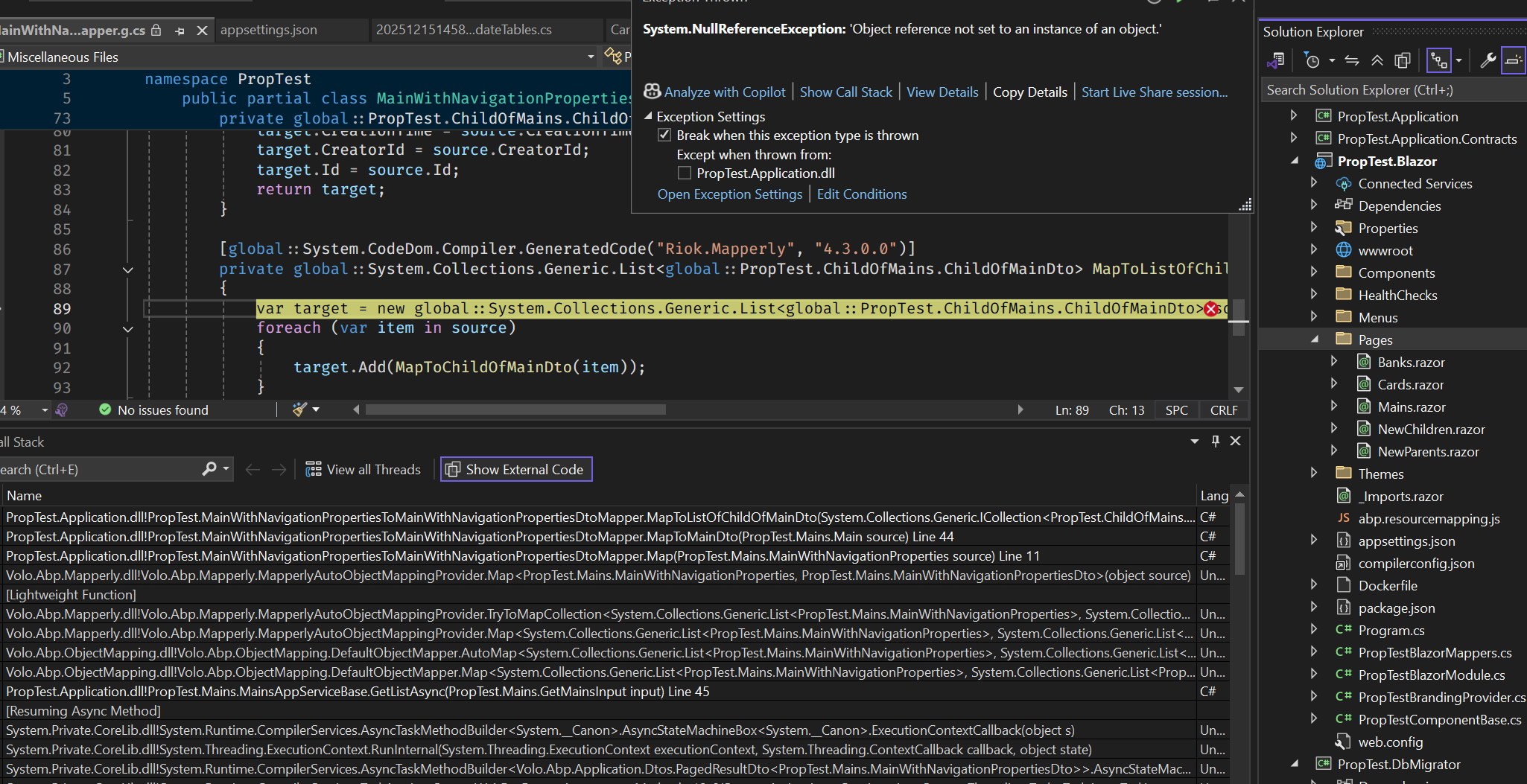
Im finding the documentation to be really lacking in a lot of areas which is a shame. Something as simple as showing/hiding things seems to either be missing or impossible to find.
I want to use the boxed layout, and the light style. Ive managed to force the light style like this, but I cant see any options to force boxed layout. I dont need it to be selectable in the app. not do i need any of the options drop down menus or the breadcrumb area but I seem to be forced to use them or have to figure out how to override templates. Surely there should just be an option to hide the bread crumb, or fix the layout?
private void ConfigureTheme()
 {
     Configure<LeptonXThemeOptions>(options =>
     {
         options.DefaultStyle = LeptonXStyleNames.Light;
         options.Styles.Remove(LeptonXStyleNames.Dark);
         options.Styles.Remove(LeptonXStyleNames.System);
         options.Styles.Remove(LeptonXStyleNames.Dim);
     });

     Configure<LeptonXThemeMvcOptions>(options =>
     {
         options.ApplicationLayout = LeptonXMvcLayouts.TopMenu;
     });

     Configure<LeptonXThemeBlazorOptions>(options =>
     {
         options.Layout = LeptonXBlazorLayouts.TopMenu;

     });
 }
Recently been getting the message along the bottom of my application saying I was using the free version, so went through the docs and found how to get the key from them. However there is no guidance on how to actually register it, I've tried the following 2 ways to register in my Blazor Server project but after cleaning and rebuilding I'm still getting the message saying I'm using the free version?

private void ConfigureBlazorise(ServiceConfigurationContext context)
{

    // tried adding this way
    context.Services
        .AddBlazorise(options =>
        {
            options.Immediate = true;
            options.ProductToken = "<token here>";
        })
        .AddBootstrap5Providers()
        .AddFontAwesomeIcons();

    // Also tried this
    Configure<BlazoriseOptions>(options =>
    {
        options.ProductToken = "<token here>";
        options.Immediate = true;
    });
}
Fairly straight forward, the DB migrator runs fine if I remove all the hangfire related code (the depends on and initialization bits). But if I add them back in I get the following
InvalidOperationException: Current JobStorage instance has not been initialized yet. You must set it before using Hangfire Client or Server API. For .NET Core applications please call the IServiceCollection.AddHangfire extension method from Hangfire.NetCore or Hangfire.AspNetCore package depending on your application type when configuring the services and ensure service-based APIs are used instead of static ones, like IBackgroundJobClient instead of BackgroundJob and IRecurringJobManager instead of RecurringJob.
Ive configured hangfire to use a seperate DB in case that was the issue but it didnt help. And hangfire is setup as standard with the SqlServer package.
I dont want to have to effectivly uninstall hangfire everytime I need to update the db (which is a lot during developement)









