






Hello,
We deploy our api host application into IIS we reach it with virtual directory(subdirectory) inside a web project. When we reach https://localhost/apihost it should show swagger ui we did some changes like below. But everytime we got theme error ? Could you help , thank you.
app.UseSwagger();
        app.UseAbpSwaggerUI(options =>
        {
            options.SwaggerEndpoint("/apihost/swagger/v1/swagger.json", "NMM API");
            options.RoutePrefix = "apihost";
            var configuration = context.GetConfiguration();
            options.OAuthClientId(configuration["AuthServer:SwaggerClientId"]);
            options.OAuthClientSecret(configuration["AuthServer:SwaggerClientSecret"]);
        });
- ABP Framework version: v4.2.2
- UI type:MVC
- DB provider: EF Core
- Tiered (MVC) or Identity Server Separated (Angular): yes / no
- Exception message and stack trace:
- Steps to reproduce the issue:
- 2021-04-22 09:26:29.351 +00:00 [ERR] Connection ID "16933534600523678116", Request ID "800001a5-0000-eb00-b63f-84710c7967bb": An unhandled exception was thrown by the application.
Volo.Abp.AbpException: No theme registered! Use AbpThemingOptions to register themes.
at Volo.Abp.AspNetCore.Mvc.UI.Theming.DefaultThemeSelector.GetCurrentThemeInfo()
at Volo.Abp.AspNetCore.Mvc.UI.Theming.DefaultThemeManager.GetCurrentTheme()
at Volo.Abp.AspNetCore.Mvc.UI.Theming.DefaultThemeManager.get_CurrentTheme()
at AspNetCore.Views__ViewStart.ExecuteAsync()
at Microsoft.AspNetCore.Mvc.Razor.RazorView.RenderPageCoreAsync(IRazorPage page, ViewContext context)
at Microsoft.AspNetCore.Mvc.Razor.RazorView.RenderViewStartsAsync(ViewContext context)
at Microsoft.AspNetCore.Mvc.Razor.RazorView.RenderPageAsync(IRazorPage page, ViewContext context, Boolean invokeViewStarts)
at Microsoft.AspNetCore.Mvc.Razor.RazorView.RenderAsync(ViewContext context)
at Microsoft.AspNetCore.Mvc.ViewFeatures.ViewExecutor.ExecuteAsync(ViewContext viewContext, String contentType, Nullable
1 statusCode) at Microsoft.AspNetCore.Mvc.ViewFeatures.ViewExecutor.ExecuteAsync(ViewContext viewContext, String contentType, Nullable1 statusCode) at Microsoft.AspNetCore.Mvc.ViewFeatures.ViewExecutor.ExecuteAsync(ActionContext actionContext, IView view, ViewDataDictionary viewData, ITempDataDictionary tempData, String contentType, Nullable`1 statusCode) at Microsoft.AspNetCore.Mvc.ViewFeatures.ViewResultExecutor.ExecuteAsync(ActionContext context, ViewResult result) at Microsoft.AspNetCore.Mvc.ViewResult.ExecuteResultAsync(ActionContext context) at Microsoft.AspNetCore.Mvc.Infrastructure.ResourceInvoker.
11 Answer(s)
-
0
Hello, Yes it works in different ports without subdirectory. I read this link related with this issue but it doesn't solve . Maybe it could be a hint for you : https://github.com/abpframework/abp/issues/6627
Markdown supported.Copy, paste, or drag & drop images and files (max 100 MB per file, 100 MB total per post) -
0
Hello, Steps like this :
- I use api host with swagger endpoint normally from template.
- I publish to IIS
- I use subdirectory so I naturally have a route prefix for swagger ui.
- Normally swagger ui works with default settings but when we add route preffix and change swagger endpoint theme error came.
- By the way api call can be done but just swagger ui not working because of interesting theme error ??
There is nothing really special. Thank you.
Markdown supported.Copy, paste, or drag & drop images and files (max 100 MB per file, 100 MB total per post) -
0
Hello, After zoom meeting now we can see the swagger endpoint and swagger json but still when we make get request to /api/abp/api-definition endpoint there is no answer and after a lot of time of waiting it gives same error ?
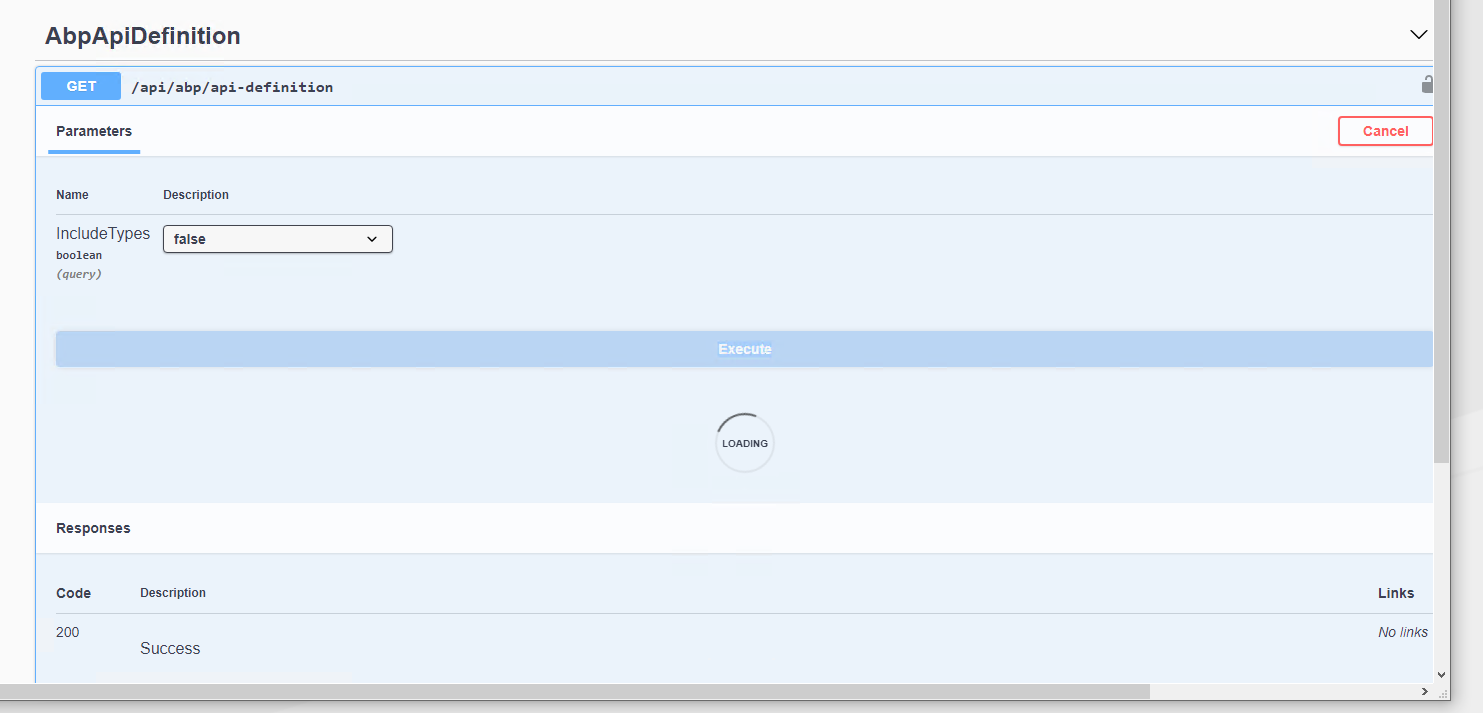
Could you help ? Thank you .
Markdown supported.Copy, paste, or drag & drop images and files (max 100 MB per file, 100 MB total per post) -
0
hi
It seems the
Swashbuckle.AspNetCoredo some change for IIS virtual directory, Can you try to upgrade and re-try?https://github.com/domaindrivendev/Swashbuckle.AspNetCore/issues/1953 https://github.com/domaindrivendev/Swashbuckle.AspNetCore/issues/1392#issuecomment-697348303
Markdown supported.Copy, paste, or drag & drop images and files (max 100 MB per file, 100 MB total per post) -
0
Hello, Okey I can try but we have already use Volo.Abp.Swashbuckle library so we didn't need to install or upgrade Swashbuckle.AspNetCore and here I'm sharing the versions which we are using
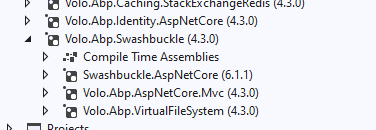 So you are offering to use Swashbuckle.AspNetCore package itself not to use Volo.Abp.Swashbuckle package, right ?Markdown supported.Copy, paste, or drag & drop images and files (max 100 MB per file, 100 MB total per post)
 -
0
So you are using the
latest 4.3.0 versionof abp instead ofv4.2.2?You can also add this in your project.
<PackageReference Include="Swashbuckle.AspNetCore" Version="6.1.4" />Markdown supported.Copy, paste, or drag & drop images and files (max 100 MB per file, 100 MB total per post) -
0
This question has been automatically marked as stale because it has not had recent activity.
Markdown supported.Copy, paste, or drag & drop images and files (max 100 MB per file, 100 MB total per post)



