- ABP Framework version: v5.2.1
- UI type: MVC /
- DB provider: EF Core / Mssql
- Tiered (MVC) or Identity Server Separated (Angular): yes
- Exception message and stack trace:
- Steps to reproduce the issue:"
I created an Abp web project. And I added a test module. I created the entities in the module. I have completed dbcontext configurations in my main project. I was able to reach my page where I can perform crud operations in the module over the web.
But
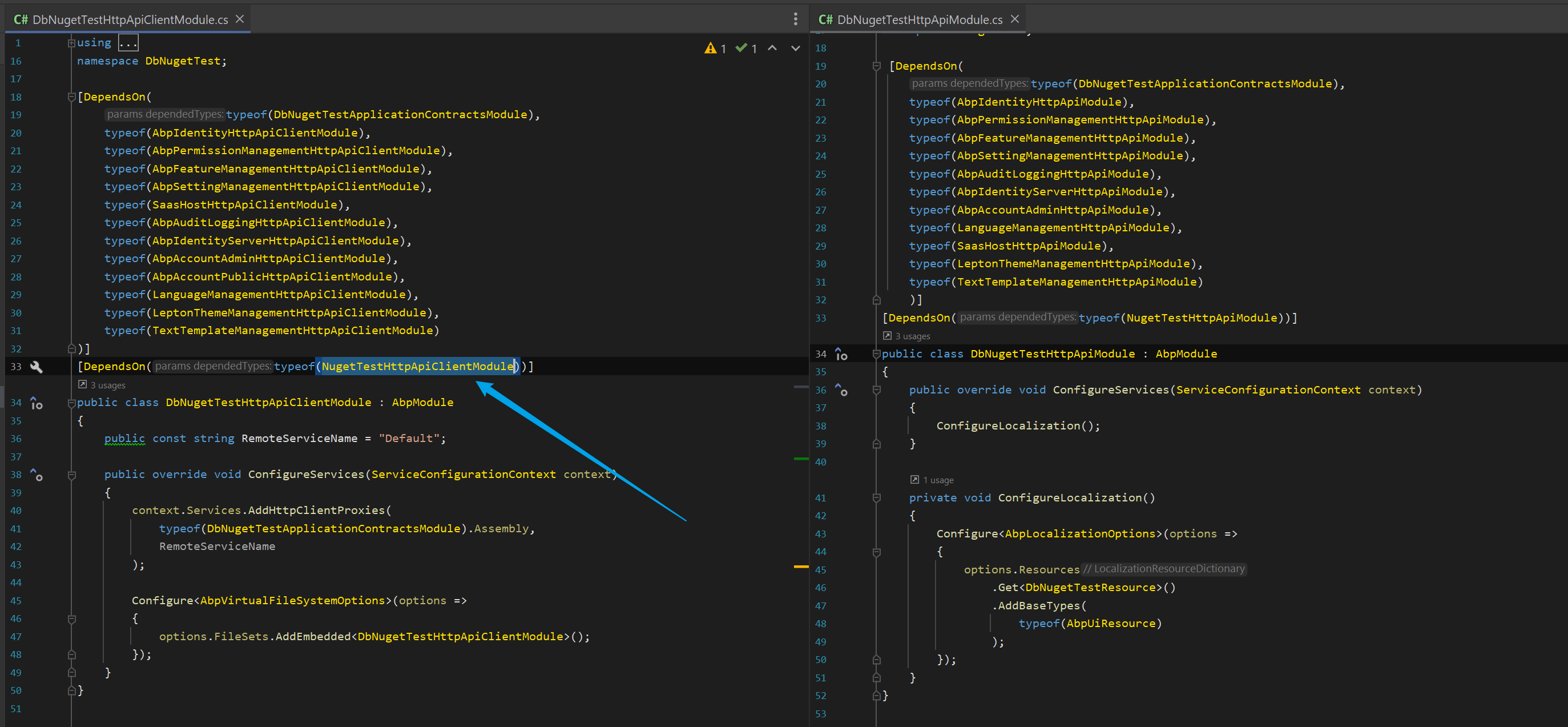
I made the module a nuget package as a separate dll. I added it to another web project and followed the same configuration paths. I also added the relevant dependencies from the module to the .....module.cs classes in the layers.
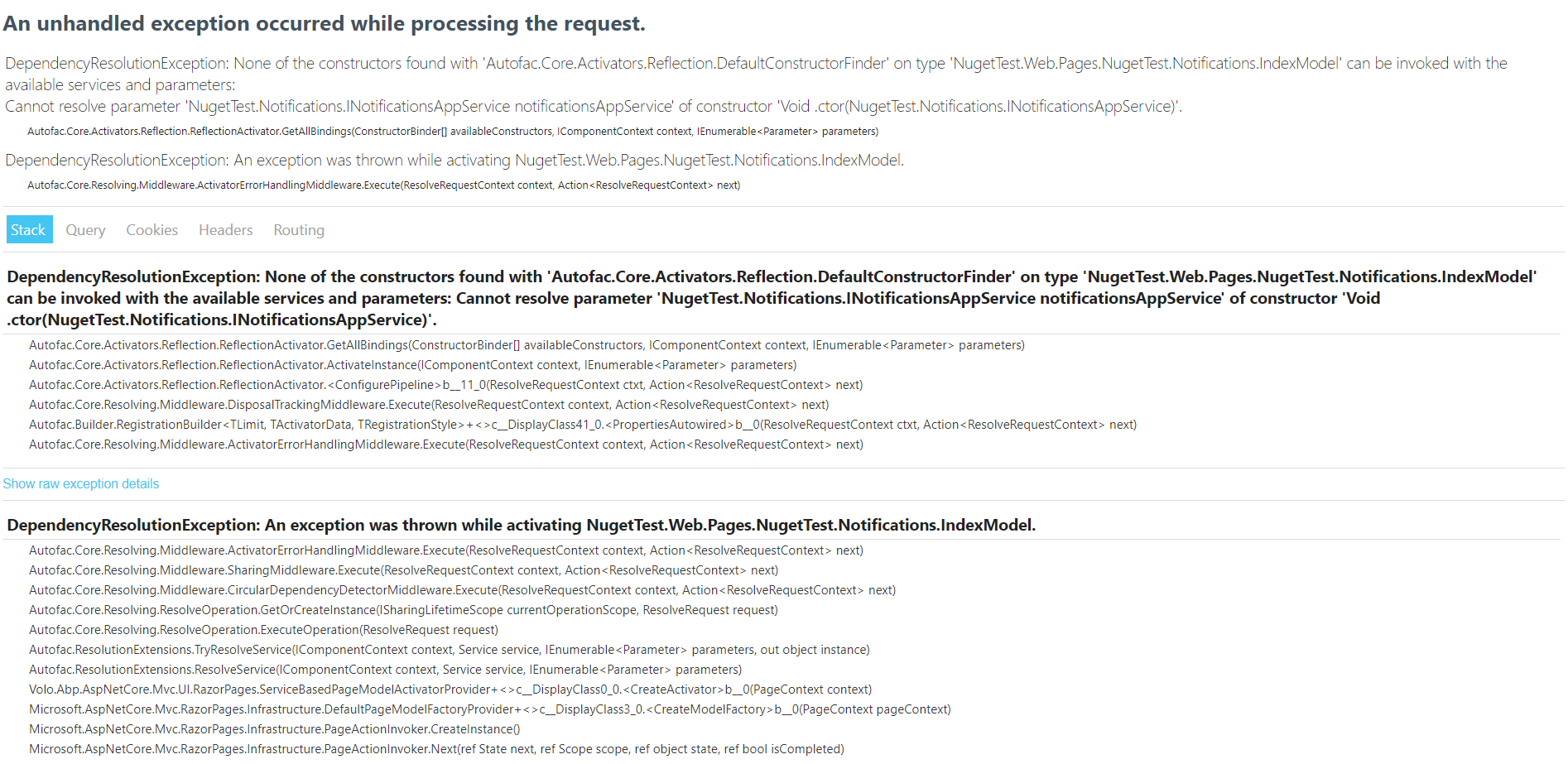
When I open my web project, I can perform my permissions on the module page. I can also open plain html page for module without entity but I am getting the following error on the index.cshtml page where the crud processes are.
14 Answer(s)
-
0
Thank you for your answer.
I added [DependsOn(typeof(NugetTestApplicationModule))] in ApplicationModule.cs. I get the error even though I have added the dependencies in all layers
Markdown supported.Copy, paste, or drag & drop images and files (max 100 MB per file, 100 MB total per post) -
0
using System; using System.Threading.Tasks; using Volo.Abp.Application.Dtos; using Volo.Abp.Application.Services;
namespace NugetTest.Notifications { public interface INotificationsAppService : IApplicationService { Task<PagedResultDto<NotificationDto>> GetListAsync(GetNotificationsInput input);
    Task<NotificationDto> GetAsync(Guid id);

    Task DeleteAsync(Guid id);

    Task<NotificationDto> CreateAsync(NotificationCreateDto input);

    Task<NotificationDto> UpdateAsync(Guid id, NotificationUpdateDto input);
}
}
using System; using System.Linq; using System.Collections.Generic; using System.Threading.Tasks; using System.Linq.Dynamic.Core; using Microsoft.AspNetCore.Authorization; using Volo.Abp; using Volo.Abp.Application.Dtos; using Volo.Abp.Application.Services; using Volo.Abp.Domain.Repositories; using NugetTest.Permissions; using NugetTest.Notifications;
namespace NugetTest.Notifications {
[Authorize(NugetTestPermissions.Notifications.Default)]
public class NotificationsAppService : ApplicationService, INotificationsAppService
{
    private readonly INotificationRepository _notificationRepository;
    private readonly NotificationManager _notificationManager;

    public NotificationsAppService(INotificationRepository notificationRepository, NotificationManager notificationManager)
    {
        _notificationRepository = notificationRepository;
        _notificationManager = notificationManager;
    }

    public virtual async Task<PagedResultDto<NotificationDto>> GetListAsync(GetNotificationsInput input)
    {
        var totalCount = await _notificationRepository.GetCountAsync(input.FilterText, input.Name);
        var items = await _notificationRepository.GetListAsync(input.FilterText, input.Name, input.Sorting, input.MaxResultCount, input.SkipCount);

        return new PagedResultDto<NotificationDto>
        {
            TotalCount = totalCount,
            Items = ObjectMapper.Map<List<Notification>, List<NotificationDto>>(items)
        };
    }

    public virtual async Task<NotificationDto> GetAsync(Guid id)
    {
        return ObjectMapper.Map<Notification, NotificationDto>(await _notificationRepository.GetAsync(id));
    }

    [Authorize(NugetTestPermissions.Notifications.Delete)]
    public virtual async Task DeleteAsync(Guid id)
    {
        await _notificationRepository.DeleteAsync(id);
    }

    [Authorize(NugetTestPermissions.Notifications.Create)]
    public virtual async Task<NotificationDto> CreateAsync(NotificationCreateDto input)
    {

        var notification = await _notificationManager.CreateAsync(
        input.Name
        );

        return ObjectMapper.Map<Notification, NotificationDto>(notification);
    }

    [Authorize(NugetTestPermissions.Notifications.Edit)]
    public virtual async Task<NotificationDto> UpdateAsync(Guid id, NotificationUpdateDto input)
    {

        var notification = await _notificationManager.UpdateAsync(
        id,
        input.Name
        );

        return ObjectMapper.Map<Notification, NotificationDto>(notification);
    }
}
}
Markdown supported.Copy, paste, or drag & drop images and files (max 100 MB per file, 100 MB total per post) -
0
I sent the sample project to your e-mail address.
Markdown supported.Copy, paste, or drag & drop images and files (max 100 MB per file, 100 MB total per post) -
0
I created a project and added a module to the project. I added an entity (Notification) to the module I added to the project through the suite. I have completed dbcontext configurations in my main project.
When I give add, delete, update permissions for Notification in my main project, I perform these operations on the Notification page.
But,
I converted the module I added to the nuget package.
I created a new application project.
I added the module as a nuget package to the layers in this project. I created its dependencies and dbcontext configurations. I ran my project. I can give the add, delete, update permissions for the module. I can open the empty index.html page without an entity. But when I want to open the page where I will perform the crud operations for the entity, I get this error.
Markdown supported.Copy, paste, or drag & drop images and files (max 100 MB per file, 100 MB total per post) -
0
I actually wrote it in the info file. You need to run the DbNugetTest project
Markdown supported.Copy, paste, or drag & drop images and files (max 100 MB per file, 100 MB total per post) -
0
thank you for your answer.
Markdown supported.Copy, paste, or drag & drop images and files (max 100 MB per file, 100 MB total per post)