






- ABP Framework version: v8.2.0
- UI Type: Angular
- Database System: EF Core SQL Server
- Tiered (for MVC) or Auth Server Separated (for Angular): yes/no
- Exception message and full stack trace:
- Steps to reproduce the issue:
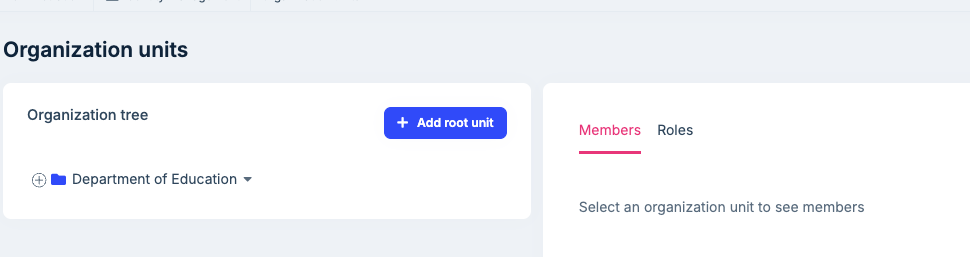
Under Administration | Organization Units have a existing Organization Add a couple of Root Units Delete 1 of those Root Units All of the Root Units added are deleted
We are not using MutliTenant. I can see the Root Units in the DB and they are all soft deleted the call to the backend shows just one guid
Request URL: https://localhost:44326/api/identity/organization-units?id=21b23e64-f077-728f-ef0e-3a169f4cf11b Request Method DELETE
Is this by design? If yes can we override this behavior?



22 Answer(s)
-
0
hi
id=21b23e64-f077-728f-ef0e-3a169f4cf11b
Can you check if the id is the id of
TestA?Yes it is the id and the other id's that were soft deleted are unique
Markdown supported.Copy, paste, or drag & drop images and files (max 100 MB per file, 100 MB total per post) -
0
hi
I tried to reproduce this problem in https://demo.abp.io/index.html, but I can't reproduce it.
Can you test this in a new template project. if you can reproduce please share the test project with me. I will check it. Thanks.
Markdown supported.Copy, paste, or drag & drop images and files (max 100 MB per file, 100 MB total per post) -
0
maliming,
If i try and create a new solution it does not replicate. if i go to another one of our web apps w/o organizations it doesn't replicate. we have 2 sites with Organization Units, and both show the issue.
if we profile the database we see the following (below). These queries is what we see that are deleting A root unit. does this help, we are thinking something in the abp code is generating these updates to soft delete the root units. does this help??
exec sp_executesql N'SET NOCOUNT ON;
UPDATE [AbpOrganizationUnits] SET [ConcurrencyStamp] = @p0, [DeleterId] = @p1, [DeletionTime] = @p2, [EntityVersion] = @p3, [IsDeleted] = @p4, [LastModificationTime] = @p5, [LastModifierId] = @p6
OUTPUT 1
WHERE [Id] = @p7 AND [ConcurrencyStamp] = @p8;
UPDATE [AbpOrganizationUnits] SET [ConcurrencyStamp] = @p9, [DeleterId] = @p10, [DeletionTime] = @p11, [EntityVersion] = @p12, [IsDeleted] = @p13, [LastModificationTime] = @p14, [LastModifierId] = @p15
OUTPUT 1
WHERE [Id] = @p16 AND [ConcurrencyStamp] = @p17;
',N'@p7 uniqueidentifier,@p0 nvarchar(40),@p8 nvarchar(40),@p1 uniqueidentifier,@p2 datetime2(7),@p3 int,@p4 bit,@p5 datetime2(7),@p6 uniqueidentifier,@p16 uniqueidentifier,@p9 nvarchar(40),@p17 nvarchar(40),@p10 uniqueidentifier,@p11 datetime2(7),@p12 int,@p13 bit,@p14 datetime2(7),@p15 uniqueidentifier',@p7='2DD45B3F-FC4C-F749-710C-3A16AABE55AD',@p0=N'6998127558414af1ba91d23d7eae1efb',@p8=N'5982a4fcdced4c46b96f30f825e4be3c',@p1='5C9DCA98-2173-FD84-F648-3A13DD86C3AA',@p2='2024-12-05 14:45:07.8682894',@p3=1,@p4=1,@p5='2024-12-0514:45:07.8745836',@p6='5C9DCA98-2173-FD84-F648-3A13DD86C3AA',@p16='84635BED-107A-2839-4C7B-3A16AABE6877',@p9=N'7801f92d8df747819280d309958c8f4c',@p17=N'182ea7d4d3734024873fa2f58f37c7d2',@p10='5C9DCA98-2173-FD84-F648-3A13DD86C3AA',@p11='2024-12-05 14:45:07.8736023',@p12=1,@p13=1,@p14='2024-12-05 14:45:07.8745117',@p15='5C9DCA98-2173-FD84-F648-3A13DD86C3AA'

UPDATE [AbpOrganizationUnits] SET [ConcurrencyStamp] = @p0, [DeleterId] = @p1, [DeletionTime] = @p2, [EntityVersion] = @p3, [IsDeleted] = @p4, [LastModificationTime] = @p5, [LastModifierId] = @p6
OUTPUT 1
WHERE [Id] = @p7 AND [ConcurrencyStamp] = @p8

UPDATE [AbpOrganizationUnits] SET [ConcurrencyStamp] = @p9, [DeleterId] = @p10, [DeletionTime] = @p11, [EntityVersion] = @p12, [IsDeleted] = @p13, [LastModificationTime] = @p14, [LastModifierId] = @p15
OUTPUT 1
WHERE [Id] = @p16 AND [ConcurrencyStamp] = @p17
Markdown supported.Copy, paste, or drag & drop images and files (max 100 MB per file, 100 MB total per post) -
0
hi
It would be best if you could provide the code and steps to resolve this problem.
The SQL query is generated by code. I have to check the source code.
liming.ma@volosoft.com
Thanks.
Markdown supported.Copy, paste, or drag & drop images and files (max 100 MB per file, 100 MB total per post) -
0
Ok, will email you the github address and some sample data
Markdown supported.Copy, paste, or drag & drop images and files (max 100 MB per file, 100 MB total per post) -
0
sent you a video in your email, file would not attach
essentially i just created 2 root nodes with nothing underneath them, and then deleted one of them
Markdown supported.Copy, paste, or drag & drop images and files (max 100 MB per file, 100 MB total per post) -
0
hi
Please do this:
- enable the debug logs for Microsoft and EF Core and output the logs to a
logs.txtfile.
"Logging": { "MinimalLevel": "Information", "EnableConsole": true, "EnableDebug": true, "EnableLocal": true, "Overrides": { "Abp": "Debug", "Elastic": "Warning", "Hangfire": "Warning", "HealthChecks": "Warning", "IdentityServer4": "Warning", "Microsoft": "Debug", "Microsoft.EntityFrameworkCore": "Debug", "OpenIddict": "Warning", "System.Net.Http.HttpClient": "Warning", "Volo": "Information" } },- remove all
ou - add two root
ou - try to remove one and see the result.
if you still have a problem, Please share your
logs.txtwith liming.ma@volosoft.comThanks.
Markdown supported.Copy, paste, or drag & drop images and files (max 100 MB per file, 100 MB total per post) - enable the debug logs for Microsoft and EF Core and output the logs to a
-
0
I
- deleted all org units using the app, they were soft deleted
- i added 2 root nodes
- i deleted 1 root node and only 1 was deleted
But when we have org units and then add the 2 root nodes (w/out children), all toot nodes w/out children are removed.
In the video i sent you, it has org units already, then i added the root nodes. this is the only way we can reproduce it
Markdown supported.Copy, paste, or drag & drop images and files (max 100 MB per file, 100 MB total per post) -
0
hi
Can you share the debug logs(https://abp.io/support/questions/8428/All-Organization-Root-Units-deleted-when-deleting-just-one-unit#answer-3a16c0bc-bdcf-b99b-78e3-ad1a6afd5a74) of these steps?
I will check the SQL statement from your logs.
Thanks.
Markdown supported.Copy, paste, or drag & drop images and files (max 100 MB per file, 100 MB total per post) -
0
Attached are the logs. the file is a zip file, i had to rename it so i could attach it. so just rename to .zip and expand
 Markdown supported.Copy, paste, or drag & drop images and files (max 100 MB per file, 100 MB total per post)
 -
0
hi
I have found the problem,Your code is wrong.
The code must have five lengths.
But your code is only three.
I had updated the
code, and everything works.UPDATE AbpOrganizationUnits SET Code = '00' + Code WHERE Code LIKE '001%';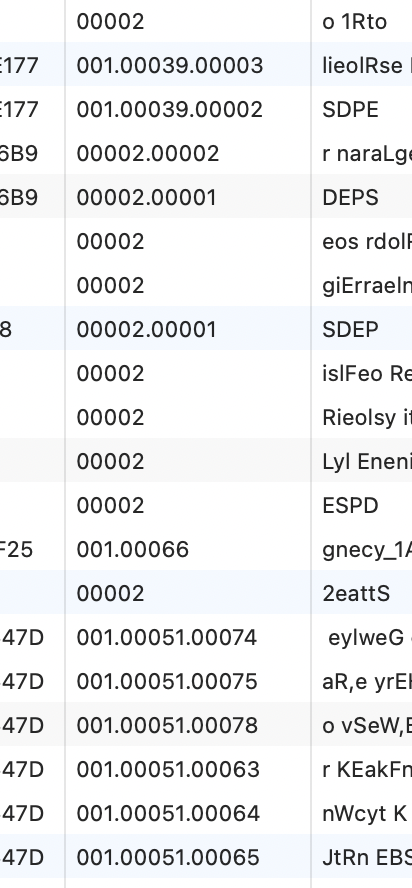 Markdown supported.Copy, paste, or drag & drop images and files (max 100 MB per file, 100 MB total per post)
 -
0
I will get back to you tomorrow, hopefully to close this ticket. Your solution works
Markdown supported.Copy, paste, or drag & drop images and files (max 100 MB per file, 100 MB total per post) -
0
yes
Markdown supported.Copy, paste, or drag & drop images and files (max 100 MB per file, 100 MB total per post)


