- ABP Framework version: v8.3.0
- UI Type: Angular
- Database System: EF Core (SQL Server)
- Tiered (for MVC) or Auth Server Separated (for Angular): yes
- Exception message and full stack trace:
- Steps to reproduce the issue:
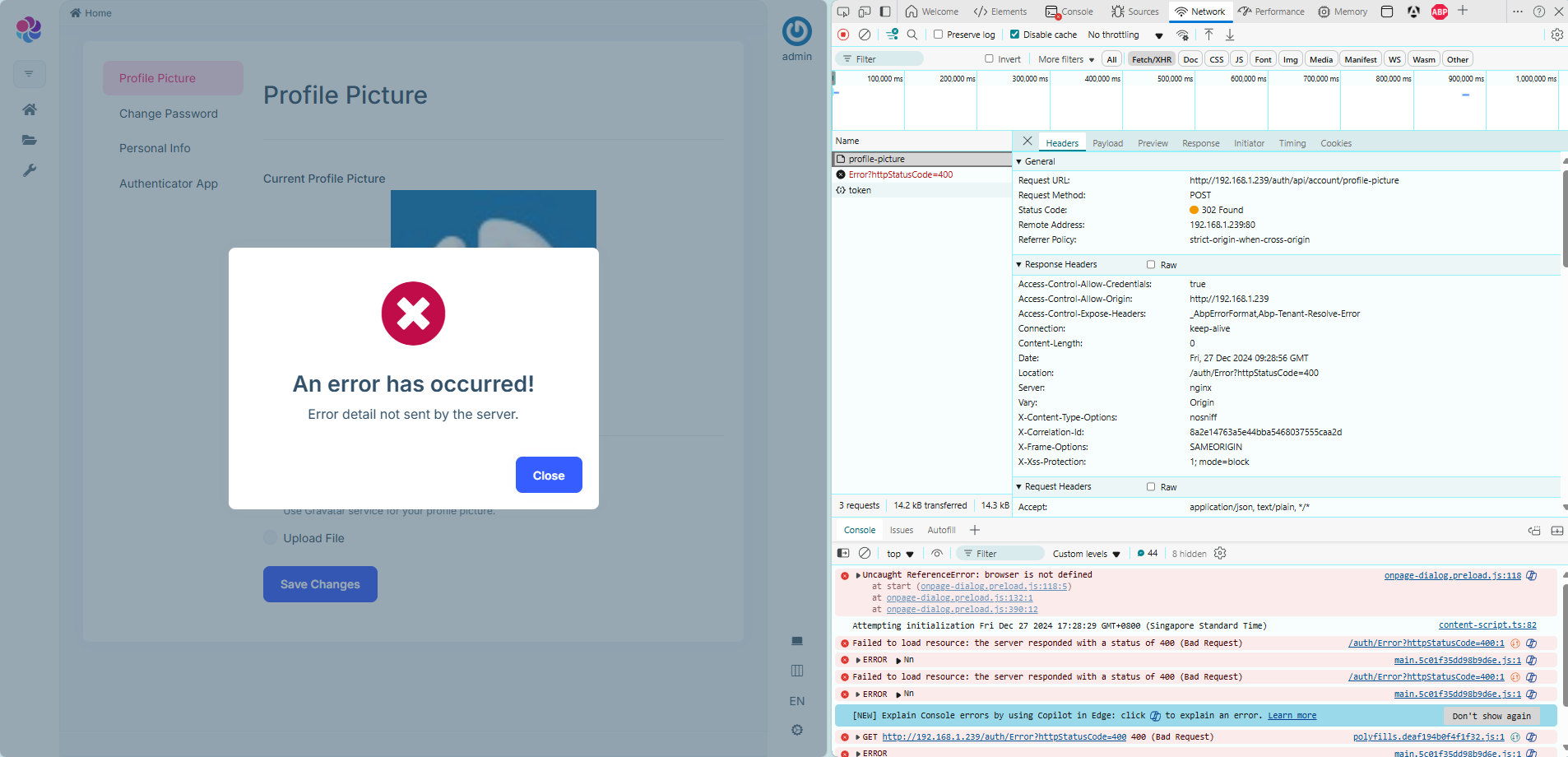
I want to deploy the application through one site , the other interfaces work fine except for it: Authorization service deployed under the path /auth/. Main application deployed under the root path /. From the application, I make a request to update the profile picture by calling:
POST /auth/api/account/profile-picture
However, the response is a 302 redirect pointing to:
/auth/Error?httpStatusCode=400
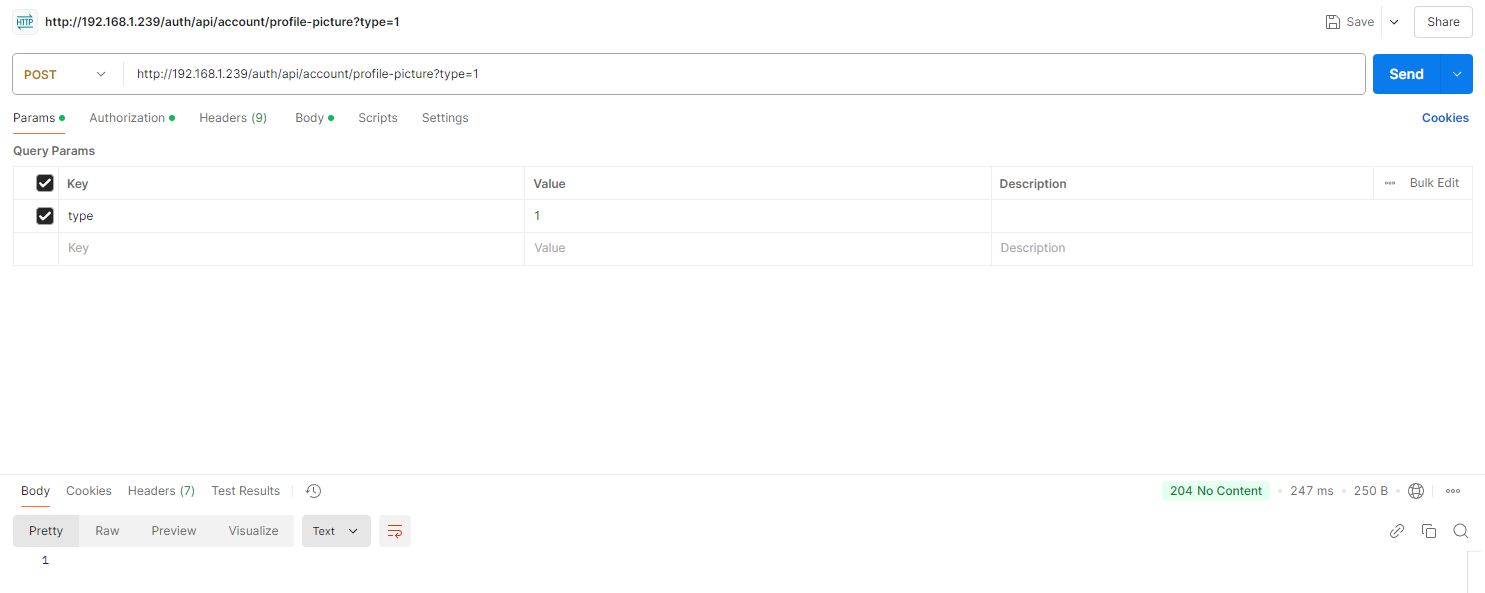
On the other hand, when I send the same request (same URL, same HTTP method, same payload) using Postman, it returns a 204 (No Content) response, which indicates success.
I can't find the problem at the moment. Help me.
9 Answer(s)
-
0
hi
Please share the debug logs(
.MinimumLevel.Debug()) for the requests.Thanks.
public class Program
{
    public async static Task<int> Main(string[] args)
    {
        Log.Logger = new LoggerConfiguration()
            .MinimumLevel.Debug()
            .MinimumLevel.Override("Microsoft.EntityFrameworkCore", LogEventLevel.Warning)
            .Enrich.FromLogContext()
            .WriteTo.Async(c => c.File("Logs/logs.txt"))
            .WriteTo.Async(c => c.Console())
            .CreateLogger();
Markdown supported.Copy, paste, or drag & drop images and files (max 100 MB per file, 100 MB total per post) -
0
hi
Please share the debug logs(
.MinimumLevel.Debug()) for the requests.Thanks.
public class Program
{
    public async static Task<int> Main(string[] args)
    {
        Log.Logger = new LoggerConfiguration()
            .MinimumLevel.Debug()
            .MinimumLevel.Override("Microsoft.EntityFrameworkCore", LogEventLevel.Warning)
            .Enrich.FromLogContext()
            .WriteTo.Async(c => c.File("Logs/logs.txt"))
            .WriteTo.Async(c => c.Console())
            .CreateLogger();
Good morning, here are the logs for the period of this request, is this the part that is causing this?
[11:29:59 WRN] The required antiforgery request token was not provided in either form field "__RequestVerificationToken" or header value "RequestVerificationToken".full log:
[11:29:50 INF] Request finished HTTP/1.1 GET http://192.168.1.239:80/auth/.well-known/jwks - 200 1652 application/json;charset=UTF-8 2.8174ms
[11:29:50 INF] Request starting HTTP/1.1 GET http://192.168.1.239:80/auth/api/account/profile-picture/8802c5ae-6fcc-5f23-271a-3a1719632b44 - null null
[11:29:50 INF] Executing endpoint 'Volo.Abp.Account.AccountController.GetProfilePictureAsync (Volo.Abp.Account.Pro.Public.HttpApi)'
[11:29:50 INF] Route matched with {area = "account", action = "GetProfilePicture", controller = "Account", page = ""}. Executing controller action with signature System.Threading.Tasks.Task`1[Volo.Abp.Account.ProfilePictureSourceDto] GetProfilePictureAsync(System.Guid) on controller Volo.Abp.Account.AccountController (Volo.Abp.Account.Pro.Public.HttpApi).
[11:29:50 INF] Start processing HTTP request GET https://secure.gravatar.com/avatar/56fb3546cf8d231c99b0950abacfad5e
[11:29:50 INF] Sending HTTP request GET https://secure.gravatar.com/avatar/56fb3546cf8d231c99b0950abacfad5e
[11:29:50 INF] Received HTTP response headers after 4.7029ms - 200
[11:29:50 INF] End processing HTTP request after 4.8299ms - 200
[11:29:50 INF] Executing ObjectResult, writing value of type 'Volo.Abp.Account.ProfilePictureSourceDto'.
[11:29:50 INF] Executed action Volo.Abp.Account.AccountController.GetProfilePictureAsync (Volo.Abp.Account.Pro.Public.HttpApi) in 18.7215ms
[11:29:50 INF] Executed endpoint 'Volo.Abp.Account.AccountController.GetProfilePictureAsync (Volo.Abp.Account.Pro.Public.HttpApi)'
[11:29:50 INF] Request finished HTTP/1.1 GET http://192.168.1.239:80/auth/api/account/profile-picture/8802c5ae-6fcc-5f23-271a-3a1719632b44 - 200 null application/json; charset=utf-8 41.1873ms
[11:29:50 INF] Request starting HTTP/1.1 GET http://192.168.1.239:80/auth/api/account/my-profile - null null
[11:29:50 INF] Executing endpoint 'Volo.Abp.Account.ProfileController.GetAsync (Volo.Abp.Account.Pro.Public.HttpApi)'
[11:29:50 INF] Route matched with {area = "account", controller = "Profile", action = "Get", page = ""}. Executing controller action with signature System.Threading.Tasks.Task`1[Volo.Abp.Account.ProfileDto] GetAsync() on controller Volo.Abp.Account.ProfileController (Volo.Abp.Account.Pro.Public.HttpApi).
[11:29:50 INF] Executing ObjectResult, writing value of type 'Volo.Abp.Account.ProfileDto'.
[11:29:50 INF] Executed action Volo.Abp.Account.ProfileController.GetAsync (Volo.Abp.Account.Pro.Public.HttpApi) in 8.9724ms
[11:29:50 INF] Executed endpoint 'Volo.Abp.Account.ProfileController.GetAsync (Volo.Abp.Account.Pro.Public.HttpApi)'
[11:29:50 INF] Request finished HTTP/1.1 GET http://192.168.1.239:80/auth/api/account/my-profile - 200 null application/json; charset=utf-8 41.0819ms
[11:29:50 INF] Request starting HTTP/1.1 GET http://192.168.1.239:80/auth/api/account/my-profile/can-enable-two-factor - null null
[11:29:50 INF] Executing endpoint 'Volo.Abp.Account.ProfileController.CanEnableTwoFactorAsync (Volo.Abp.Account.Pro.Public.HttpApi)'
[11:29:50 INF] Route matched with {area = "account", controller = "Profile", action = "CanEnableTwoFactor", page = ""}. Executing controller action with signature System.Threading.Tasks.Task`1[System.Boolean] CanEnableTwoFactorAsync() on controller Volo.Abp.Account.ProfileController (Volo.Abp.Account.Pro.Public.HttpApi).
[11:29:50 INF] Executing ObjectResult, writing value of type 'System.Boolean'.
[11:29:50 INF] Executed action Volo.Abp.Account.ProfileController.CanEnableTwoFactorAsync (Volo.Abp.Account.Pro.Public.HttpApi) in 11.7547ms
[11:29:50 INF] Executed endpoint 'Volo.Abp.Account.ProfileController.CanEnableTwoFactorAsync (Volo.Abp.Account.Pro.Public.HttpApi)'
[11:29:50 INF] Request finished HTTP/1.1 GET http://192.168.1.239:80/auth/api/account/my-profile/can-enable-two-factor - 200 null application/json; charset=utf-8 35.0054ms
[11:29:50 INF] Request starting HTTP/1.1 GET http://192.168.1.239:80/auth/api/account/profile-picture/8802c5ae-6fcc-5f23-271a-3a1719632b44 - null null
[11:29:50 INF] Executing endpoint 'Volo.Abp.Account.AccountController.GetProfilePictureAsync (Volo.Abp.Account.Pro.Public.HttpApi)'
[11:29:50 INF] Route matched with {area = "account", action = "GetProfilePicture", controller = "Account", page = ""}. Executing controller action with signature System.Threading.Tasks.Task`1[Volo.Abp.Account.ProfilePictureSourceDto] GetProfilePictureAsync(System.Guid) on controller Volo.Abp.Account.AccountController (Volo.Abp.Account.Pro.Public.HttpApi).
[11:29:50 INF] Start processing HTTP request GET https://secure.gravatar.com/avatar/56fb3546cf8d231c99b0950abacfad5e
[11:29:50 INF] Sending HTTP request GET https://secure.gravatar.com/avatar/56fb3546cf8d231c99b0950abacfad5e
[11:29:50 INF] Received HTTP response headers after 4.4121ms - 200
[11:29:50 INF] End processing HTTP request after 4.5253ms - 200
[11:29:50 INF] Executing ObjectResult, writing value of type 'Volo.Abp.Account.ProfilePictureSourceDto'.
[11:29:50 INF] Executed action Volo.Abp.Account.AccountController.GetProfilePictureAsync (Volo.Abp.Account.Pro.Public.HttpApi) in 21.338ms
[11:29:50 INF] Executed endpoint 'Volo.Abp.Account.AccountController.GetProfilePictureAsync (Volo.Abp.Account.Pro.Public.HttpApi)'
[11:29:50 INF] Request finished HTTP/1.1 GET http://192.168.1.239:80/auth/api/account/profile-picture/8802c5ae-6fcc-5f23-271a-3a1719632b44 - 200 null application/json; charset=utf-8 41.3687ms
[11:29:59 INF] Request starting HTTP/1.1 POST http://192.168.1.239:80/auth/api/account/profile-picture - multipart/form-data; boundary=----WebKitFormBoundarySPuhuxdBktccjLff 136
[11:29:59 INF] CORS policy execution successful.
[11:29:59 INF] Executing endpoint 'Volo.Abp.Account.AccountController.SetProfilePictureAsync (Volo.Abp.Account.Pro.Public.HttpApi)'
[11:29:59 INF] Route matched with {area = "account", action = "SetProfilePicture", controller = "Account", page = ""}. Executing controller action with signature System.Threading.Tasks.Task SetProfilePictureAsync(Volo.Abp.Account.ProfilePictureInput) on controller Volo.Abp.Account.AccountController (Volo.Abp.Account.Pro.Public.HttpApi).
[11:29:59 WRN] The required antiforgery request token was not provided in either form field "__RequestVerificationToken" or header value "RequestVerificationToken".
[11:29:59 INF] Authorization failed for the request at filter 'Volo.Abp.AspNetCore.Mvc.AntiForgery.AbpAutoValidateAntiforgeryTokenAuthorizationFilter'.
[11:29:59 INF] Executing StatusCodeResult, setting HTTP status code 400
[11:29:59 INF] Executed action Volo.Abp.Account.AccountController.SetProfilePictureAsync (Volo.Abp.Account.Pro.Public.HttpApi) in 0.4786ms
[11:29:59 INF] Executed endpoint 'Volo.Abp.Account.AccountController.SetProfilePictureAsync (Volo.Abp.Account.Pro.Public.HttpApi)'
[11:29:59 INF] Request finished HTTP/1.1 POST http://192.168.1.239:80/auth/api/account/profile-picture - 302 0 null 22.3374ms
[11:29:59 INF] Request starting HTTP/1.1 GET http://192.168.1.239:80/auth/Error?httpStatusCode=400 - null null
[11:29:59 INF] Executing endpoint 'Volo.Abp.AspNetCore.Mvc.UI.Theme.Shared.Controllers.ErrorController.Index (Volo.Abp.AspNetCore.Mvc.UI.Theme.Shared)'
[11:29:59 INF] Route matched with {action = "Index", controller = "Error", area = "", page = ""}. Executing controller action with signature System.Threading.Tasks.Task`1[Microsoft.AspNetCore.Mvc.IActionResult] Index(Int32) on controller Volo.Abp.AspNetCore.Mvc.UI.Theme.Shared.Controllers.ErrorController (Volo.Abp.AspNetCore.Mvc.UI.Theme.Shared).
[11:29:59 INF] Executing ViewResult, running view ~/Views/Error/Default.cshtml.
[11:29:59 WRN] The cookie 'XSRF-TOKEN' has set 'SameSite=None' and must also set 'Secure'.
[11:29:59 INF] Executed ViewResult - view ~/Views/Error/Default.cshtml executed in 9.2988ms.
[11:29:59 INF] Executed action Volo.Abp.AspNetCore.Mvc.UI.Theme.Shared.Controllers.ErrorController.Index (Volo.Abp.AspNetCore.Mvc.UI.Theme.Shared) in 12.636ms
[11:29:59 INF] Executed endpoint 'Volo.Abp.AspNetCore.Mvc.UI.Theme.Shared.Controllers.ErrorController.Index (Volo.Abp.AspNetCore.Mvc.UI.Theme.Shared)'
[11:29:59 INF] Request finished HTTP/1.1 GET http://192.168.1.239:80/auth/Error?httpStatusCode=400 - 400 null text/html; charset=utf-8 29.6397ms
Markdown supported.Copy, paste, or drag & drop images and files (max 100 MB per file, 100 MB total per post) -
0
hi
The required antiforgery request token was not provided in either form field "__RequestVerificationToken" or header value "RequestVerificationToken".
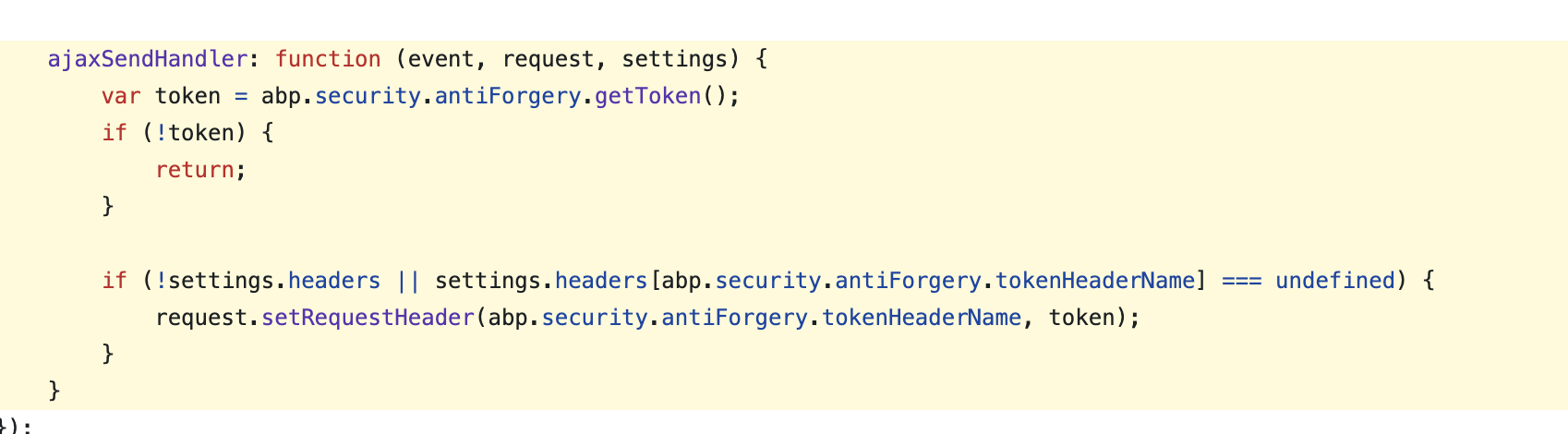
abp.ajaxwill setRequestVerificationTokento request header, it value read from cookies(XSRF-TOKEN).https://github.com/abpframework/abp/blob/dev/npm/packs/jquery/src/abp.jquery.js#L254-L263
Is your api call has set this
header?Thanks.
Markdown supported.Copy, paste, or drag & drop images and files (max 100 MB per file, 100 MB total per post) -
0
I think it's already set up because I'm using the angular template
POST /auth/api/account/profile-picture HTTP/1.1 Accept: application/json, text/plain, */* Accept-Encoding: gzip, deflate Accept-Language: en Authorization: Bearer eyJhbGciOiJSUzI1NiIsImtpZCI6IjM4MDFDRTUxN0E2RDk0RDdGREI2MjA2NEM1MDY5Nzc4MUFCM0FBMDYiLCJ4NXQiOiJPQUhPVVhwdGxOZjl0aUJreFFhWGVCcXpxZ1kiLCJ0eXAiOiJhdCtqd3QifQ.eyJpc3MiOiJodHRwOi8vMTkyLjE2OC4xLjIzOS9hdXRoIiwiZXhwIjoxNzM1NTMyOTg0LCJpYXQiOjE3MzU1MjkzODQsImF1ZCI6IlVuaWZpZWQiLCJzY29wZSI6Im9mZmxpbmVfYWNjZXNzIG9wZW5pZCBwcm9maWxlIGVtYWlsIHBob25lIFVuaWZpZWQiLCJqdGkiOiIwNjMwZjhkZi02YzI1LTQ5MDktODE1NC03YWU5MGY0OWQ0ZjUiLCJzdWIiOiI4ODAyYzVhZS02ZmNjLTVmMjMtMjcxYS0zYTE3MTk2MzJiNDQiLCJzZXNzaW9uX2lkIjoiN2IwYTYzYWUtODk0YS00MGNlLTk2ZDQtYWI1MDI4NjNiY2M0IiwidW5pcXVlX25hbWUiOiJhZG1pbiIsIm9pX3Byc3QiOiJVbmlmaWVkX0FwcCIsIm9pX2F1X2lkIjoiYmVmMjg0YjktMWM4Ny1mNTRjLTQ0ZGQtM2ExNzE5OWVkZTUwIiwicHJlZmVycmVkX3VzZXJuYW1lIjoiYWRtaW4iLCJnaXZlbl9uYW1lIjoiYWRtaW4iLCJyb2xlIjoiYWRtaW4iLCJlbWFpbCI6ImFkbWluQGhrLmNvbSIsImVtYWlsX3ZlcmlmaWVkIjoiRmFsc2UiLCJwaG9uZV9udW1iZXJfdmVyaWZpZWQiOiJGYWxzZSIsImNsaWVudF9pZCI6IlVuaWZpZWRfQXBwIiwib2lfdGtuX2lkIjoiMWE3OGRhODYtYzdjNC0xMDM2LWMwYTAtM2ExNzI3YzlhMmQ0In0.ACvv3DieHjORlLo_6qXLwMant-Dj5-TujgBjo0b7ES1rCC0AwHrUg9imbXhK3JUYXD7oWRnQ3cb7oMaLl3Y9QFY16qt1VRyxQs4kADIi65SQ1zPW-ENTV_oyuPLXoz4TF8MSai3TUVn-7GwzUCJAn7zY_Xa3GL5jMSMIX_RSmx7VdEcJVHTlwDgdFxYl3RU3LCJmDkf_sQPk7ProGfh5E61MXP0E9n9OK17STE5c8dSR8GV__CaUcTrBcebwzk0zRem-G7Ad-qc3aUyKg00rUz86APTO3qF3MBEsWOQ9EQoeXo14SnxMMsEJQXnbvY12cNDU1ip1xZRQL8Y9G2p8LQ Cache-Control: no-cache Connection: keep-alive Content-Length: 136 Content-Type: multipart/form-data; boundary=----WebKitFormBoundarySPuhuxdBktccjLff Cookie: .AspNetCore.Antiforgery.rWqVC0Yg1m8=CfDJ8F6VyteeqP1DvSGYmwyKzXHCsxX-sRnmSILKN4j4tpxsSPwjORZ7HlTIvwaN-K86vcM_sD-_1kz_oIKhTnaOX_3mPB7rhdyTOKUpYU0XZlMG05f8G-uf5IJFRu-ShivrlmenHFudwm5IjA15QwoSEfs; .AspNetCore.Identity.Application=CfDJ8F6VyteeqP1DvSGYmwyKzXGzn7NEGL40tohVe29OADmYSDI8uNZ3x7EgKSQPLBIjotk2UJiPVfno5MID0SlVFZgh_h-85_SGiZzru6aewiRglgyR2OtDXkxFNazJBv1ALTE027h5znZ4IM8kFht4eglfG75Jsr2v9M_05HCeFm2NzE0WKEAyAAO1QZYVTFpPAMxvl-FcUHKO4SyOTX_ts7yha9_lBcdvv6NhpAlALwfmDfMtno2vNbgchRjBDJ8qs5itPoUhUjnKZehf60oKSZxMa_DEkT3Smy60J1LNgNEL6OLTwgfnuSC3r7rVvbSI6QUUntzBZcdimzWyTlA_ZND1g24kfgDolPhqbxK11OINAvWStVaELUffRkTEJBHZ5YXokieIjQeyswIadk1zBc58SN-3nqEmeVerutlXtUFvxqgHK3dqxdisTphTfxTIjCpthgdCrdEMdWgtykq1oKksKEPEthXhtw3ok5hk-F3yS8dHhJVGrADY_jBCI6ILyqsCGIO98Joj-hBAMoxlBmoM2UhnBgOLjN94rcXizS71stpzy2E_xfEZmpu7-ib_Yrn4hUi4dlgPfu8QlToiM0KHIOLhennoCQmTnrOl2yMC8wiQ6R27KWTd7tFs-mxx-U7HdTlCJ-3FXIBANmXeNyNEGFeYM76dUYII9VCs5Hep_rNZJpF7GTzmX1g4_oq1VXrGha6VXcGgaRVCFB1DRxDO-5Bhy6j21LddN3LjumWrYA7qe-7ydoptGMYIH8lVIkiZa-UX1mbEN1JDt8NRVTM440DUqPBC9yRFCG2t4ZLKieyRNxU5PvMt1xoIV8B_E5fEr8ATGPrrNVwQ0kHfAG4; _pk_id.1.199d=16e65ccb13ca5ba8.1735287782.; lpx_loaded-css=light; .AspNet.Consent=true; _pk_ses.1.199d=1; portainer_api_key=eyJhbGciOiJIUzI1NiIsInR5cCI6IkpXVCJ9.eyJpZCI6MSwidXNlcm5hbWUiOiJhZG1pbiIsInJvbGUiOjEsInNjb3BlIjoiZGVmYXVsdCIsImZvcmNlQ2hhbmdlUGFzc3dvcmQiOmZhbHNlLCJleHAiOjE3MzU1NTgxNDUsImp0aSI6IjIyZTUxYzNkLTczMjgtNDEzOC05YzBmLTA0MWUzN2E1YTI5MSIsImlhdCI6MTczNTUyOTM0NX0.2UTKRplGvsnK8g2ZqVlitJcLykuOFXb8yxSWZREPtzM; _gorilla_csrf=MTczNTUyOTM0NXxJa2xVU1VwU1dFdFZPVGhKWjNOck0zbzRTMU50VTJKb1VXNXhiRVYzZUZSaVIxa3lhbVJsYVZSWk1tTTlJZ289fOZxehdIvJeSENG3By-2HBVYI_raN_QvTMjLFjiyzPkA; .AspNetCore.Culture=c%3Den%7Cuic%3Den Host: 192.168.1.239 Origin: http://192.168.1.239 Pragma: no-cache Referer: http://192.168.1.239/account/manage User-Agent: Mozilla/5.0 (Windows NT 10.0; Win64; x64) AppleWebKit/537.36 (KHTML, like Gecko) Chrome/132.0.0.0 Safari/537.36 Edg/132.0.0.0 X-Requested-With: XMLHttpRequest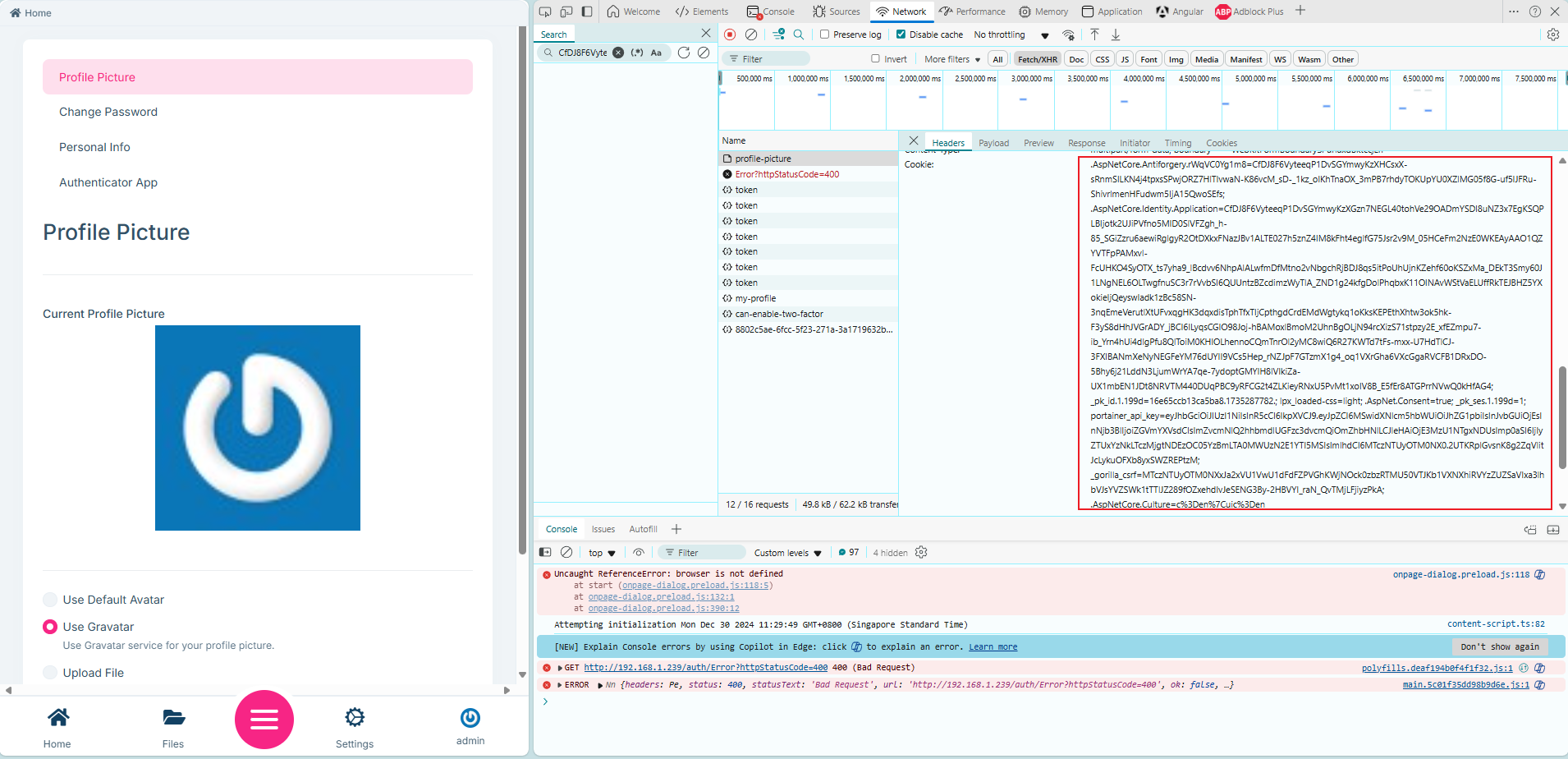 Markdown supported.Copy, paste, or drag & drop images and files (max 100 MB per file, 100 MB total per post)
 -
0
hi
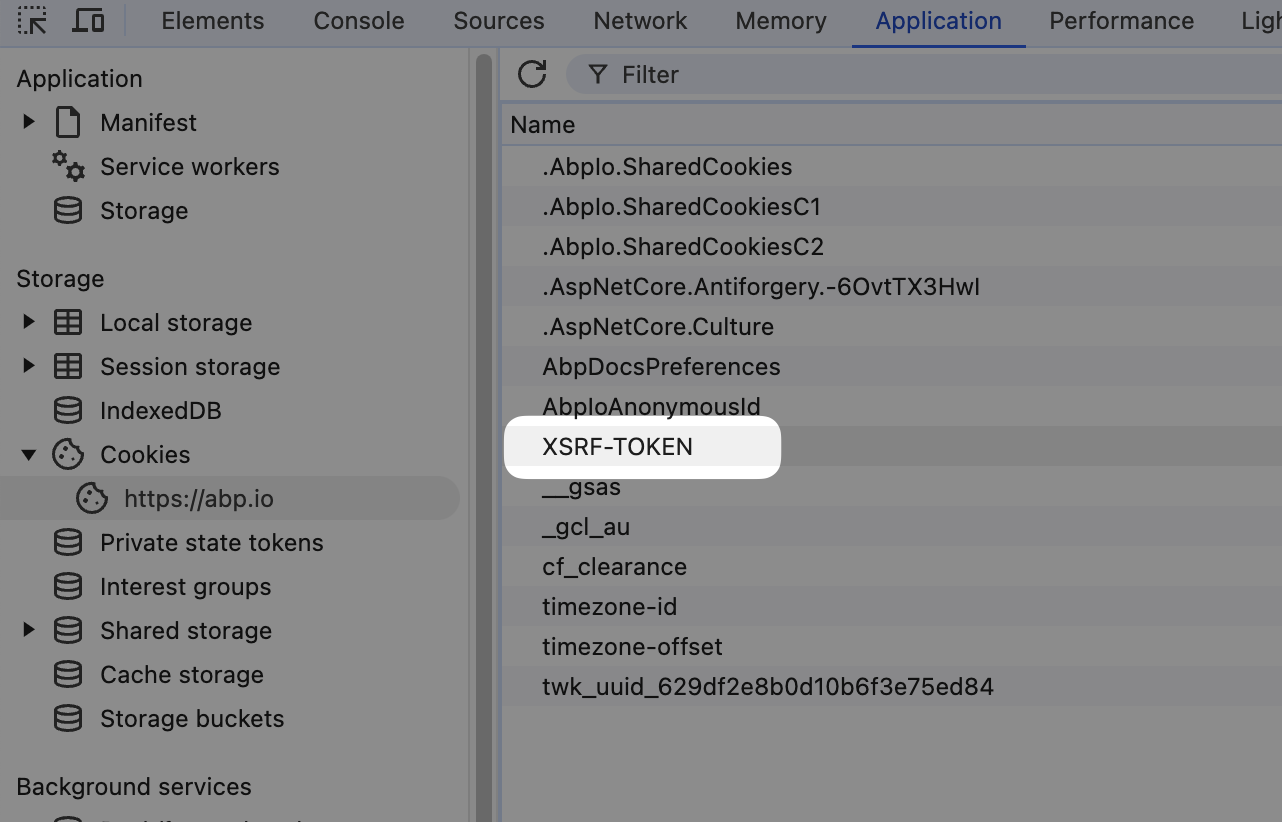
POST /auth/api/account/profile-picture HTTP/1.1
RequestVerificationToken: abcdefg

Cookie: XSRF-TOKEN=abcdefg
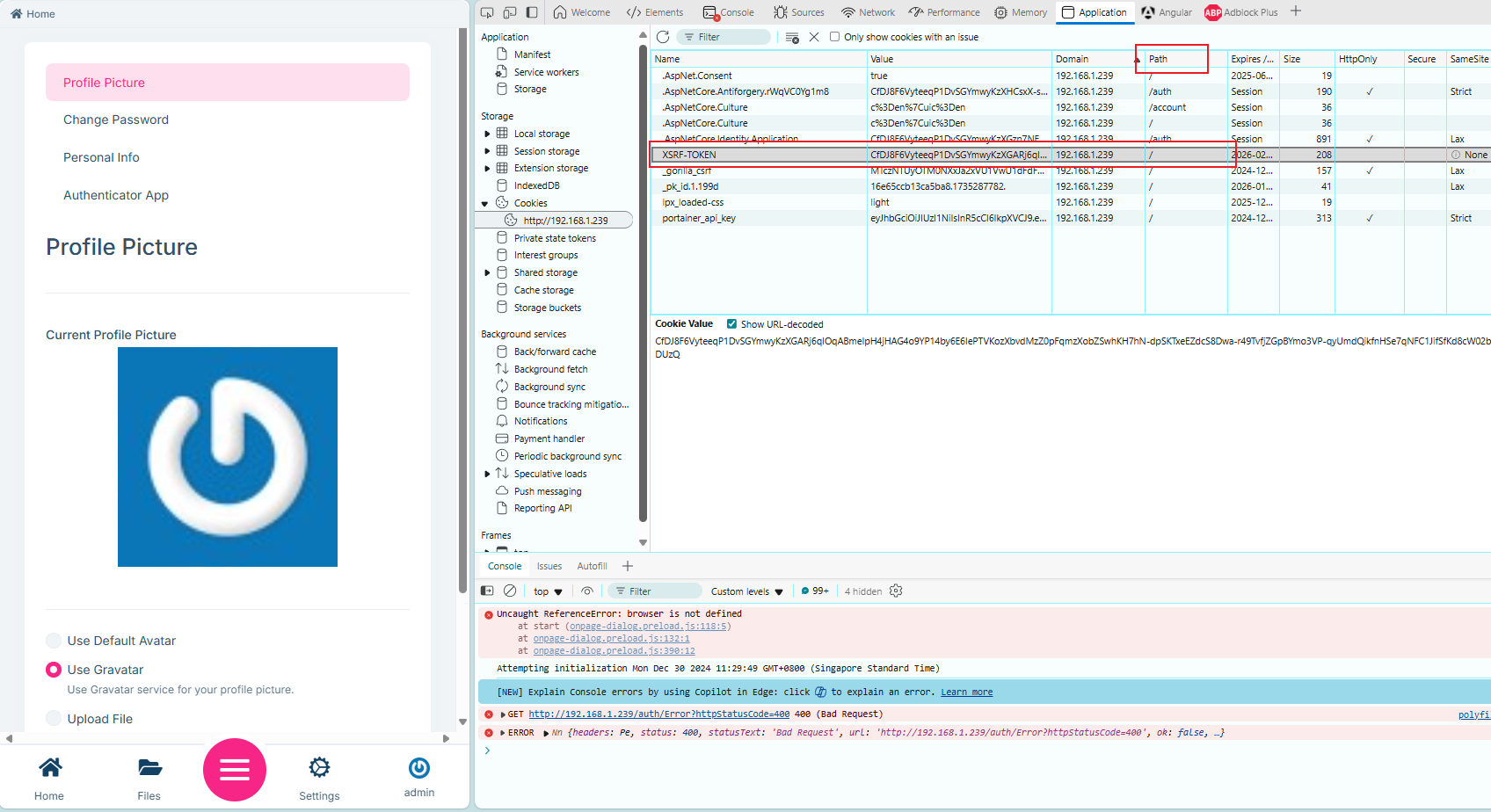
You can check your cookies. There should be an
XSRF-TOKENcookie.The angular team has fixed a problem with
XSRFsee https://github.com/abpframework/abp/pull/21595
 Markdown supported.Copy, paste, or drag & drop images and files (max 100 MB per file, 100 MB total per post)