






Database: EF Core (PostgreSQL)
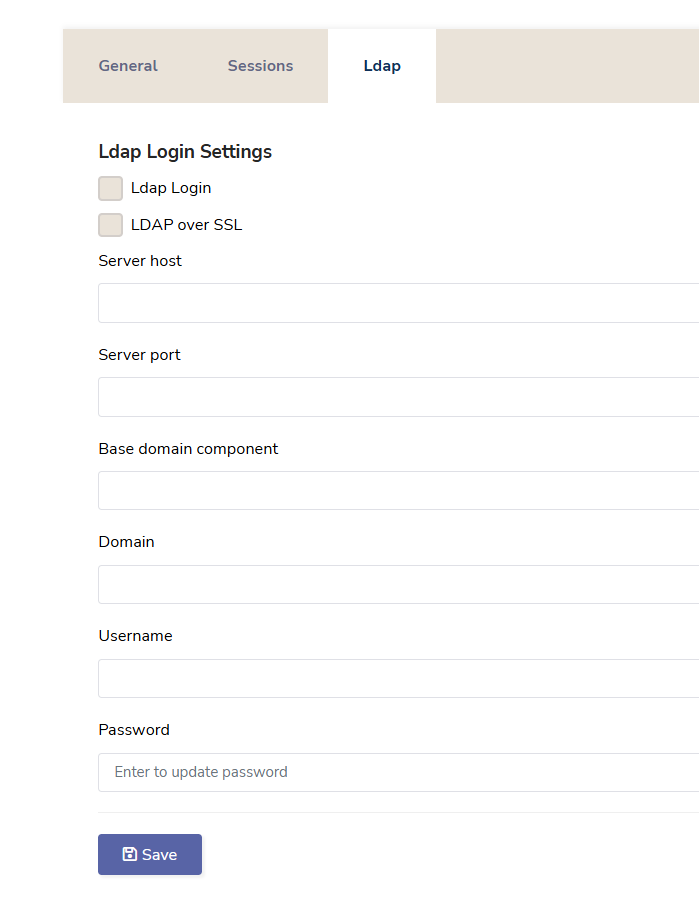
I want to modify the Ldap page under Identity Management. I need to change the localizations and add an additional input. Aside from that, first checkbox is for "enableLdapLogin" and second one is "enableLdaps" which only works when the first one is checked. This is confusing on user side, so I would like to change it as well.
9 Answer(s)
-
0
hi
You can override the localization text from the Identity module. https://abp.io/community/articles/how-to-override-localization-strings-of-depending-modules-ba1oy03l
Markdown supported.Copy, paste, or drag & drop images and files (max 100 MB per file, 100 MB total per post) -
0
Thanks for the localization part. My actual question is how can I modify this page?
For example I would like to make every input invisible unless the first checkbox ("Ldap Login") is checked or add an extra input field.
Markdown supported.Copy, paste, or drag & drop images and files (max 100 MB per file, 100 MB total per post) -
0
hi
You can override the
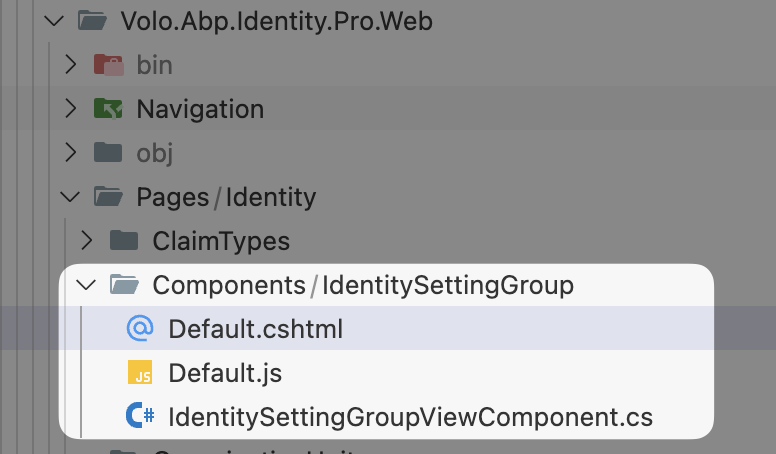
IdentitySettingGroupViewComponentand return a new Identity Settings page.Volo.Abp.Identity.Web.Pages.Identity.Components.IdentitySettingGroup.IdentitySettingGroupViewComponentIf you can get the source code of Identity.Pro module, the component is located at:
Thanks.
Markdown supported.Copy, paste, or drag & drop images and files (max 100 MB per file, 100 MB total per post) -
0
I have access to the Identity.Pro module, but just to clarify, I am using Angular on my project. Is this answer applicable for Angular or would you recommend a different solution?
Markdown supported.Copy, paste, or drag & drop images and files (max 100 MB per file, 100 MB total per post) -
0
Hello,
You may obtain the source code via ABP Suite, as outlined in the official documentation:
https://abp.io/docs/latest/suite/source-code
If your work involves configuration or settings, the Setting Management module may also be of interest.
Alternatively, to access the source code and replace the current
identitypackage integration for customization purposes, you may execute the following command:abp add-package @volo/abp.ng.identity --with-source-codeYou need to run this command within your Angular project directory. This will include the package along with its source code in your project. Once added, you can refer to the
IdentitySettingsComponentfor any necessary modifications.If you need any further assistance, please do not hesitate to reach out.
Markdown supported.Copy, paste, or drag & drop images and files (max 100 MB per file, 100 MB total per post) -
0
Adding the whole identity package to my code doesn’t seem ideal. I only want to modify the LDAP tab. Is there a way to modify just that tab?
Markdown supported.Copy, paste, or drag & drop images and files (max 100 MB per file, 100 MB total per post) -
0
Unfortunately, you cannot modify the specific tab in this way. However, I can suggest you two other ways to consider:
// ...
import { SettingTabsService } from '@abp/ng.setting-management/config';

@Component({
  selector: 'app-root',
  template: `
    <abp-loader-bar></abp-loader-bar>
    <abp-dynamic-layout></abp-dynamic-layout>
    <abp-gdpr-cookie-consent></abp-gdpr-cookie-consent>
  `,
})
export class AppComponent {

  private settingTabs = inject(SettingTabsService);

  constructor() {
    // 1. You can consider adding a new tab
    // this.settingTabs.add([
    //   {
    //     name: 'MySettings',
    //     order: 1,
    //     component: MySettings,
    //   },
    // ]);

    // 2. Or patch an existing tab
    this.settingTabs.patch('AbpIdentity::Menu:IdentityManagement', {
      name: 'MySettings',
      order: 1,
      component: MySettings,
    });
  }
}
Markdown supported.Copy, paste, or drag & drop images and files (max 100 MB per file, 100 MB total per post) -
0
Thank you for the response. We have decided to go with the second solution
Markdown supported.Copy, paste, or drag & drop images and files (max 100 MB per file, 100 MB total per post)



