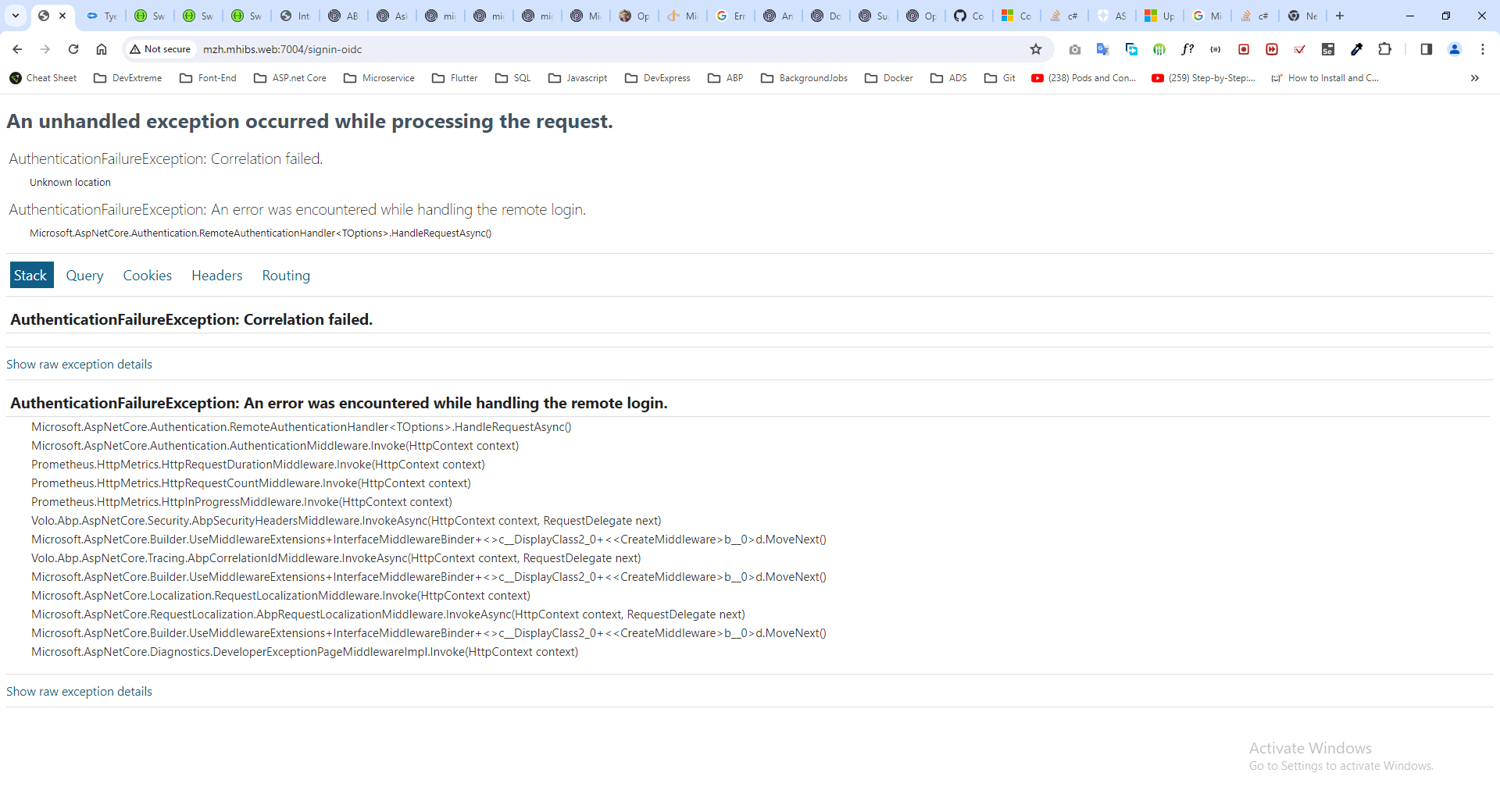
[web_bd1ce1f9-2]: [18:00:24 INF] Request starting HTTP/1.1 GET http://mzh.mhibs.web:7004/Account/Login - null null
[web_bd1ce1f9-2]: [18:00:24 INF] Executing endpoint 'MZH.MHIBS.Web.Controllers.AccountController.Login (MZH.MHIBS.Web)'
[web_bd1ce1f9-2]: [18:00:24 INF] Route matched with {action = "Login", controller = "Account", area = "", page = ""}. Executing controller action with signature Microsoft.AspNetCore.Mvc.ActionResult Login(System.String, System.String) on controller MZH.MHIBS.Web.Controllers.AccountController (MZH.MHIBS.Web).
[web_bd1ce1f9-2]: [18:00:24 INF] Executing action method MZH.MHIBS.Web.Controllers.AccountController.Login (MZH.MHIBS.Web) - Validation state: Valid
[web_bd1ce1f9-2]: [18:00:24 INF] Executed action method MZH.MHIBS.Web.Controllers.AccountController.Login (MZH.MHIBS.Web), returned result Microsoft.AspNetCore.Mvc.ChallengeResult in 0.037ms.
[web_bd1ce1f9-2]: [18:00:24 INF] Executing ChallengeResult with authentication schemes (["oidc"]).
[web_bd1ce1f9-2]: [18:00:24 INF] AuthenticationScheme: oidc was challenged.
[web_bd1ce1f9-2]: [18:00:24 INF] Executed action MZH.MHIBS.Web.Controllers.AccountController.Login (MZH.MHIBS.Web) in 4.7096ms
[web_bd1ce1f9-2]: [18:00:24 INF] Executed endpoint 'MZH.MHIBS.Web.Controllers.AccountController.Login (MZH.MHIBS.Web)'
[web_bd1ce1f9-2]: [18:00:24 INF] Request finished HTTP/1.1 GET http://mzh.mhibs.web:7004/Account/Login - 302 0 null 5.572ms
[web_bd1ce1f9-2]: [18:00:25 INF] Request starting HTTP/1.1 POST http://mzh.mhibs.web:7004/signin-oidc - application/x-www-form-urlencoded 1586
[web_bd1ce1f9-2]: [18:00:25 WRN] '.AspNetCore.Correlation.zwwe_Ao2xW7750a7k0U1t8rW5pCQMvknu6aP7K0j1kw' cookie not found.
[web_bd1ce1f9-2]: [18:00:25 INF] Error from RemoteAuthentication: Correlation failed..
[web_bd1ce1f9-2]: [18:00:25 ERR] An unhandled exception has occurred while executing the request.
[web_bd1ce1f9-2]: Microsoft.AspNetCore.Authentication.AuthenticationFailureException: An error was encountered while handling the remote login.
[web_bd1ce1f9-2]: ---> Microsoft.AspNetCore.Authentication.AuthenticationFailureException: Correlation failed.
[web_bd1ce1f9-2]: --- End of inner exception stack trace ---
[web_bd1ce1f9-2]: at Microsoft.AspNetCore.Authentication.RemoteAuthenticationHandler`1.HandleRequestAsync()
[web_bd1ce1f9-2]: at Microsoft.AspNetCore.Authentication.AuthenticationMiddleware.Invoke(HttpContext context)
[web_bd1ce1f9-2]: at Prometheus.HttpMetrics.HttpRequestDurationMiddleware.Invoke(HttpContext context)
[web_bd1ce1f9-2]: at Prometheus.HttpMetrics.HttpRequestCountMiddleware.Invoke(HttpContext context)
[web_bd1ce1f9-2]: at Prometheus.HttpMetrics.HttpInProgressMiddleware.Invoke(HttpContext context)
[web_bd1ce1f9-2]: at Volo.Abp.AspNetCore.Security.AbpSecurityHeadersMiddleware.InvokeAsync(HttpContext context, RequestDelegate next)
[web_bd1ce1f9-2]: at Microsoft.AspNetCore.Builder.UseMiddlewareExtensions.InterfaceMiddlewareBinder.<>c__DisplayClass2_0.<<CreateMiddleware>b__0>d.MoveNext()
[web_bd1ce1f9-2]: --- End of stack trace from previous location ---
[web_bd1ce1f9-2]: at Volo.Abp.AspNetCore.Tracing.AbpCorrelationIdMiddleware.InvokeAsync(HttpContext context, RequestDelegate next)
[web_bd1ce1f9-2]: at Microsoft.AspNetCore.Builder.UseMiddlewareExtensions.InterfaceMiddlewareBinder.<>c__DisplayClass2_0.<<CreateMiddleware>b__0>d.MoveNext()
[web_bd1ce1f9-2]: --- End of stack trace from previous location ---
[web_bd1ce1f9-2]: at Microsoft.AspNetCore.Localization.RequestLocalizationMiddleware.Invoke(HttpContext context)
[web_bd1ce1f9-2]: at Microsoft.AspNetCore.RequestLocalization.AbpRequestLocalizationMiddleware.InvokeAsync(HttpContext context, RequestDelegate next)
[web_bd1ce1f9-2]: at Microsoft.AspNetCore.Builder.UseMiddlewareExtensions.InterfaceMiddlewareBinder.<>c__DisplayClass2_0.<<CreateMiddleware>b__0>d.MoveNext()
[web_bd1ce1f9-2]: --- End of stack trace from previous location ---
[web_bd1ce1f9-2]: at Microsoft.AspNetCore.Diagnostics.DeveloperExceptionPageMiddlewareImpl.Invoke(HttpContext context)
[web_bd1ce1f9-2]: [18:00:25 INF] Request finished HTTP/1.1 POST http://mzh.mhibs.web:7004/signin-oidc - 500 null text/html; charset=utf-8 5.2675ms
Currently, I would like to call app services from my old .net 4.8 winform app. Is it possible? I tried, but got this error:
Severity	Code	Description	Project	File	Line	Suppression State
Error	CS1705	Assembly 'MZH.MHIBS.SftpGatewayService.HttpApi.Client' with identity 'MZH.MHIBS.SftpGatewayService.HttpApi.Client, Version=1.0.0.0, Culture=neutral, PublicKeyToken=null' uses 'System.Runtime, Version=7.0.0.0, Culture=neutral, PublicKeyToken=b03f5f7f11d50a3a' which has a higher version than referenced assembly 'System.Runtime' with identity 'System.Runtime, Version=4.1.2.0, Culture=neutral, PublicKeyToken=b03f5f7f11d50a3a'	AbpClient	E:\SourceCode\AbpClient\AbpClient\CSC	1	Active
Is there any to call like that? If not, pls tell me how to call authorized app services with HttpClient? Thank you.
Check the docs before asking a question: https://docs.abp.io/en/commercial/latest/ Check the samples to see the basic tasks: https://docs.abp.io/en/commercial/latest/samples/index The exact solution to your question may have been answered before, and please first use the search on the homepage. Provide us with the following info:
DefaultConnectionStringResolver and MultiTenantConnectionStringResolver but please show me detail steps to do that including where I should write that code. Thank you so much. On K8s
Issue 2: Login with tenant and Login in with this user not work when deploying on K8s (but work normally when running docker compose on local machine) I follow this article: https://docs.abp.io/en/commercial/latest/modules/account/impersonation to enable impersonation feature, but it can only work on local machine.
Issue 3: Authority delegation can't save TenantId (other infor is OK) when running docker compose on local machine without any error logs
I login with a specific tenant and user. I clicked on Authority delegation menu under User menu but nothing happened. I had to go to My account page, and clicked again on Authority delegation menu under User menu. Here, that menu worked and showed Authority delegation popup. I inputted required infor an clicked Save but TenantId couldn't be saved.

I don't know what I missed. Pls help to check. Thank you.
context.Services.ConfigureApplicationCookie(options =>
        {
            options.ExpireTimeSpan = TimeSpan.FromDays(1);
        });
        context.Services.Configure<SecurityStampValidatorOptions>(options =>
        {
            options.ValidationInterval = TimeSpan.FromDays(1);
        });
Steps to reproduce the issue: I'm using Quartz background worker to call an authorized app service method with above error. Here's appsettings.json:
"RemoteServices": {
    "MyService": {
      "BaseUrl": "http://myservice.httpapi.host:7005/",
      "UseCurrentAccessToken": "false"
    }
  },
  "IdentityClients": {
    "Default": {
      "GrantType": "client_credentials",
      "ClientId": "BackgroundWorker.DockerHttp",
      "ClientSecret": "1q2w3e*",
      "Authority": "http://authserver:7000",
      "Scope": "MyService"
    }
  }
[DependsOn(
    typeof(AbpAutofacModule),
    typeof(AbpBackgroundWorkersQuartzModule),
	typeof(AbpHttpClientIdentityModelWebModule),
	typeof(AbpIdentityHttpApiClientModule),
	...
)]
public class BackgroundWorkerModule : AbpModule
{
    public override Task OnApplicationInitializationAsync(ApplicationInitializationContext context)
    {
        var logger = context.ServiceProvider.GetRequiredService<ILogger<BackgroundWorkerModule>>();
        var configuration = context.ServiceProvider.GetRequiredService<IConfiguration>();
        logger.LogInformation($"MySettingName => {configuration["MySettingName"]}");

        var hostEnvironment = context.ServiceProvider.GetRequiredService<IHostEnvironment>();
        logger.LogInformation($"EnvironmentName => {hostEnvironment.EnvironmentName}");

        return Task.CompletedTask;
    }
}
OpenIdDictDataSeeder.cs
//Background Worker
await CreateApplicationAsync(
	name: "BackgroundWorker.DockerHttp",
	type: OpenIddictConstants.ClientTypes.Confidential,
	consentType: OpenIddictConstants.ConsentTypes.Implicit,
	displayName: "Background Worker",
	secret: "1q2w3e*",
	grantTypes: new List<string>
	{
		OpenIddictConstants.GrantTypes.ClientCredentials
	},

	scopes: commonScopes.Union(new[] { "MyService" }).ToList(),
	permissions: new List<string> { MyServicePermissions.TransactionReports.Default, MyServicePermissions.TransactionReports.GenerateFile }
);
How can I fix it? Thank you.
    version: '3.4'

services:
mydomain.authserver:
environment:
\- ASPNETCORE\_ENVIRONMENT=Development
\- ASPNETCORE\_URLS=https://\+:7000
\- ASPNETCORE\_Kestrel\_\_Certificates\_\_Default\_\_Path=/https/mydomain\.authserver\.pfx
\- ASPNETCORE\_Kestrel\_\_Certificates\_\_Default\_\_Password=
ports:
\- "7000:7000"
volumes:
\- \~/\.aspnet/https:/https:ro
\- $\{APPDATA\}/Microsoft/UserSecrets:/root/\.microsoft/usersecrets:ro

mydomain.web:
environment:
\- ASPNETCORE\_ENVIRONMENT=Development
\- ASPNETCORE\_URLS=https://\+:7004
\- ASPNETCORE\_Kestrel\_\_Certificates\_\_Default\_\_Path=/https/mydomain\.web\.pfx
\- ASPNETCORE\_Kestrel\_\_Certificates\_\_Default\_\_Password=
ports:
\- "7004:7004"
volumes:
\- \~/\.aspnet/https:/https:ro
\- $\{APPDATA\}/Microsoft/UserSecrets:/root/\.microsoft/usersecrets:ro

mydomain.webgateway:
environment:
\- ASPNETCORE\_ENVIRONMENT=Development
\- ASPNETCORE\_URLS=https://\+:7500
\- ASPNETCORE\_Kestrel\_\_Certificates\_\_Default\_\_Path=/https/mydomain\.webgateway\.pfx
\- ASPNETCORE\_Kestrel\_\_Certificates\_\_Default\_\_Password=
ports:
\- "7500:7500"
volumes:
\- \~/\.aspnet/https:/https:ro
\- $\{APPDATA\}/Microsoft/UserSecrets:/root/\.microsoft/usersecrets:ro
appsettings.json for Web project
{
"App": {
"SelfUrl": "[https://mydomain.web:7004"](https://mydomain.web:7004%22)
},
"AuthServer": {
"Authority": "[https://mydomain.authserver:7000"](https://mydomain.authserver:7000%22),
"RequireHttpsMetadata": "true",
"ClientId": "Web.Docker",
"ClientSecret": "1q2w3e\*",
"IsOnK8s": "false",
"MetaAddress": "[https://mydomain.authserver:7000"](https://mydomain.authserver:7000%22)
},
"Logging": {
"LogLevel": {
"Default": "Information",
"Microsoft": "Warning",
"Microsoft.Hosting.Lifetime": "Information"
}
},
"AllowedHosts": "\*",
"RemoteServices": {
"Default": {
"BaseUrl": "https:/mydomain.webgateway:7500"
}
}
}
I tried to add above pfx files to Trusted Root on my machine and the guide here: https://ubuntu.com/server/docs/security-trust-store but it didn't work. Pls help









