hi
IdentityUser class is not in your application, it comes from the Identity module as you know. So, you can not directly change its source code to add a navigation collection (unless you include Identity modules's source code into your solution).
See https://abp.io/support/questions/2954/Unable-To-Define-Many-To-Many-IdentityUser-Relationship#answer-315c2908-13b3-3dd2-b0cc-3a03ba043eb3
hi
Can you share the code to reproduce?
If you can share a template project, that would be best.
Thanks.
liming.ma@volosoft.com
hi
You can use Alerts.Warning(L["Message"]);.
try
{
   //...
}
catch (Exception ex)
{
    // Handle exceptions from base login or tenant context switching
    System.Diagnostics.Debug.WriteLine($"Login Processing Error: {ex.Message}");
    ModelState.AddModelError("", "An unexpected error occurred during login. Please try again.");

    Alerts.Warning(L["Message"]);

    return Page();
}
hi portx-dev nacho
Thanks. Please try to update the Nuget package in all csprojfiles manually.
We will fix this issue,
hi
The input SaasTenantConnectionStringsDto will be normalizer.
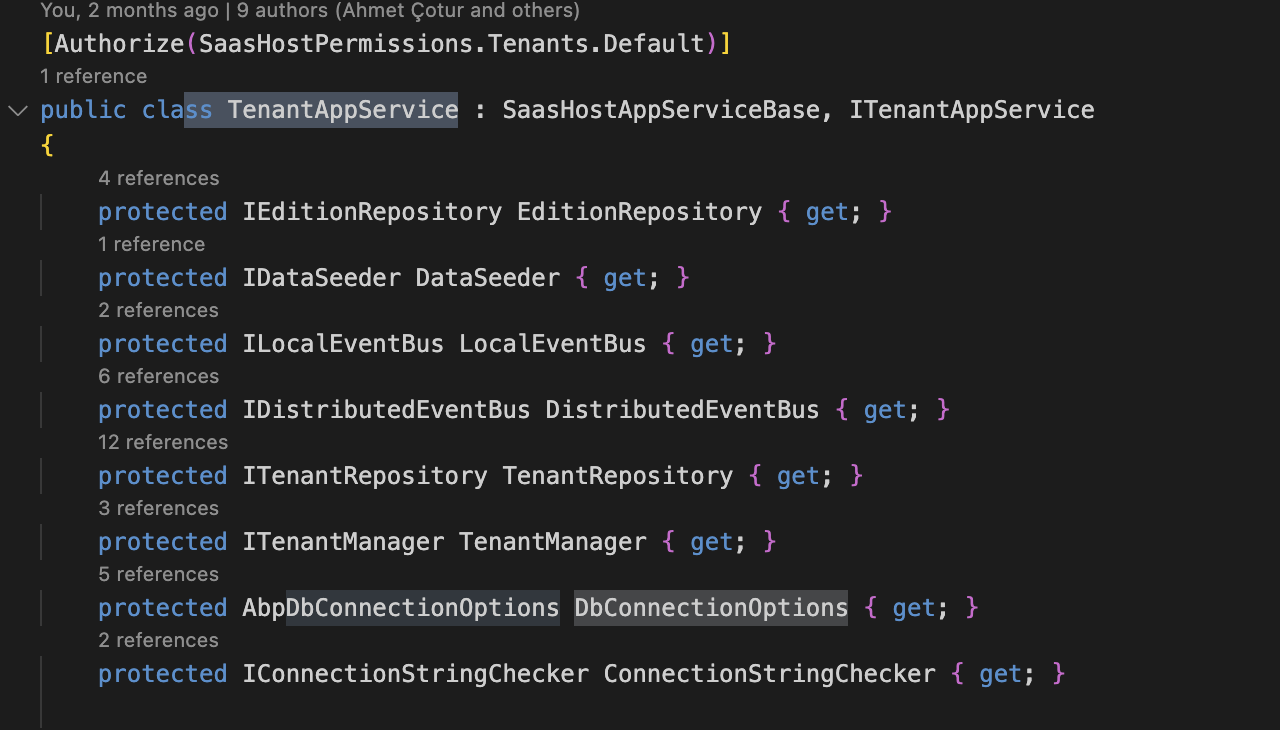
prote
public virtual async Task UpdateConnectionStringsAsync(Guid id, SaasTenantConnectionStringsDto input)
{
    input = await NormalizedConnectionStringsAsync(input);
}

cted virtual async Task<SaasTenantConnectionStringsDto> NormalizedConnectionStringsAsync(SaasTenantConnectionStringsDto input)
{
    if (!await SettingProvider.IsTrueAsync(SaasSettingNames.EnableTenantBasedConnectionStringManagement))
    {
        return new SaasTenantConnectionStringsDto();
    }

    if (input == null)
    {
        input = new SaasTenantConnectionStringsDto();
    }
    else if (!input.Databases.IsNullOrEmpty())
    {
        input.Databases = input.Databases
            .Where(x => DbConnectionOptions.Databases.Any(d => d.Key == x.DatabaseName && d.Value.IsUsedByTenants))
            .Where(x => !x.ConnectionString.IsNullOrWhiteSpace())
            .GroupBy(x => x.DatabaseName)
            .Select(x => x.First())
            .ToList();
    }

    return input;
}
hi
Can you try to add the database name in appsettings.json file?
Or add it to Databases property of the AbpDbConnectionOptions class.
https://abp.io/docs/latest/framework/fundamentals/connection-strings?_redirected=B8ABF606AA1BDF5C629883DF1061649A#configuring-the-database-structures
hi
Can you share the logs.txt?
liming.ma@volosoft.com
hi
We will check it. Our team is on holiday and may not be able to reply until Wednesday.
Thanks.
Can you try to configure the IgnoredNavigationEntitySelectors in 9.1.1
Configure<AbpEntityChangeOptions>(options =>
{
    options.IgnoredNavigationEntitySelectors.Add("DisableOpenIddictApplication", type => type == typeof(OpenIddictApplication) || type = typeof(OpenIddictToken));
});
hi
Can you share full logs.txt file with liming.ma@volosoft.com
we tested using it but the error persisted.
Can you also share the debug logs for 9.1.1? https://abp.io/support/questions/8622/How-to-enable-Debug-logs-for-troubleshoot-problems
Thanks. Your ticket has been refunded.









