Hi, the error message ("The resource you are looking for has been removed, had its name changed, or is temporarily unavailable") is a generic HTTP 404. This indicates that the impersonation URL is not being correctly resolved in the Azure environment (or might be related to authentication scheme).
Please check this answer in the related thread and see if it works for you: https://abp.io/support/questions/3123/log-in-with-this-user#answer-00f04485-9a77-0674-9de8-3a044df9643a
I'm trying to implement hangfire but as soon as I put Queue attribute, my job is not executing,
pls help me to understand if any other step is required, I'm following https://abp.io/docs/latest/framework/infrastructure/background-jobs/hangfire
Hi, did you configure a storage for Hangfire as follows in your module class?:
      context.Services.AddHangfire(config =>
      {
          config.UseSqlServerStorage(configuration.GetConnectionString("Default"));
      });
Also, if you followed the Manual Installation process, then ensure your application has the related DependOn attribute with the hangfiremodule:
[DependsOn(typeof(AbpBackgroundJobsHangfireModule))]
Hi, in your TestBase project, can you please check there is a configuration as below (in the module class):
        Configure<AbpBackgroundJobOptions>(options =>
        {
            options.IsJobExecutionEnabled = false;
        });
Hi, here are the answers to your questions:
Do we need to follow the step-by-step migration process—i.e., upgrading from 5.x to 6.0, then 6.0 to 7.0, then 7.0 to 8.0, and finally to 9.1—or is it possible to upgrade directly from 5.x to 9.1?
Yes, we recommend following a step-by-step migration process. This approach helps you upgrade your project more efficiently and minimizes the risk of build errors.
You can refer to our Migration Guides and make the related alignments for each version.
Custom Module Changes: Given our modifications in the Payment, Account, and Identity modules, are there any best practices or tips you would recommend for transferring our custom changes to the new version’s modules?
Once you've customized and overridden a module’s services, we unfortunately cannot offer automation to synchronize those changes during the upgrade. The best approach is to carefully follow our migration guides. These guides highlight the updates made in the related module classes, including modified method signatures and other important changes.
After completing the migration, if you encounter any issues, you can always download the source code of the affected module in the target version to compare and adjust your implementation accordingly.
Any advice or documentation pointers on handling these aspects during the upgrade would be greatly appreciated.
To automatically update ABP packages, you can either use the abp update --version <version> command or ABP Studio to update your solution from directly from a desktop application.
Best Regards.
Did you try with the impersonation? I believe error is related with unitofwork. According to error it can not find the entity, i believe it is related with tenantid is null while you are trying to get the value. But of course i am not so sure.
Yes, I’ve tested that. I tried both with an admin user and a newly created user, as well as by creating a new tenant and using tenant impersonation. All attempts resulted in the same outcome — I couldn’t reproduce the issue.
Then, I stopped the RabbitMQ container and clicked the prepare data button again. This time, an exception was thrown, but it wasn’t a NotFoundException. Instead, it was a BrokerUnreachableException, indicating a failure to connect to RabbitMQ.
I was thinking if it is sth related with my environment. I deleted also the volume of rabbitmq with the image and spin it up again, it is behaving the same.
This does seem environment-specific, since both I and our QA team tested it in different environments and were unable to reproduce the issue.
Can you confirm that you tested and requested the gdpr data with an impersonation with one of tenant's users?
Yes, I confirmed this as well — I tested the GDPR data request using tenant impersonation with a tenant user, and still couldn’t reproduce the issue.
If possible, could you try it in a fresh environment or check if your colleagues are experiencing the same issue?
Hello EngincanV, It is little weird that it does not behave the same. I use docker images for rabbitmq, postgresql and redis cache. I have shared the solution and sent an email with the link so that you can download the sample project.
Hi, do you get the BrokerUnreachableException exception in the background? Is there any log related to that?
Because I was only able to reproduce the problem after making the RabbitMQ server unreachable by stopping the RabbitMQ container. Otherwise, it's working as expected:
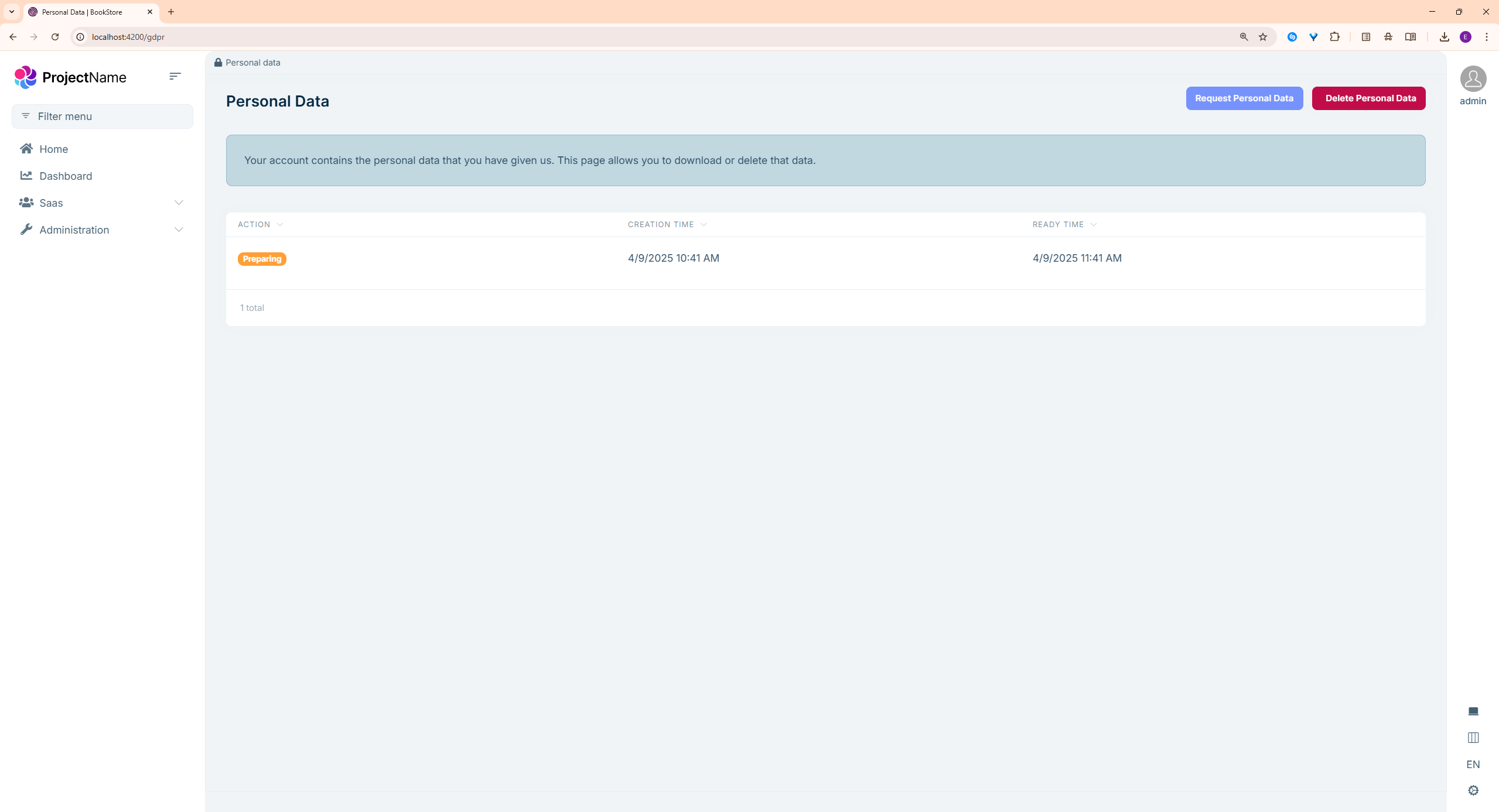
Hello!
Another bug with Suite. When creating a child entity, if the Entity property has a min and max value, the {MasterEntityName}Consts class does not create the min and max values. Also, in the {EntityName}AppService class, the {EntityName}CreateDto and {EntityName}UpdateDto are missing the Annotations attributes.
However, the validation part of the UI declaration references the conditions.
Br
Laszlo
Thanks for reporting the problem. I'll create an internal issue for your finding.
Regards.
Hello EngincanV, It is little weird that it does not behave the same. I use docker images for rabbitmq, postgresql and redis cache. I have shared the solution and sent an email with the link so that you can download the sample project.
Thanks, I got your email and will check your solution asap.
Hello EngincanV, Is there any progress on this one? I think the bot closed the thread again.
Hi, sorry for the late response. Indeed the support bot closed this thread multiple times.
Both I and our QA team tried to reproduce the problem with your exact steps, but unfortunately, we are unable to reproduce it.
So, if you can share your solution via email (to support@abp.io with the ticket number), then our QA team can test it using your own solution. Please let me know if you can share your solution or not.
Hi, the package Volo.Abp.Users.Abstractions is not in our NuGet Server, instead, it's an open-source package and stored in the nuget.org (https://www.nuget.org/packages/Volo.Abp.Users.Abstractions/9.2.0-rc.1). Therefore, it's normal to get this error message because this is how NuGet package system works, it tries to get the related packages from the defined package-sources (checks the relevant packages in all package sources with a fallback mechanism).
So, in your case, probably there is a problem between these two:
1-) You might be not logged in through ABP CLI: This might be the reason, because it gives a 403 error. To check it you can run the abp login-info command in your terminal and ensure you are logged in or not:
abp login-info
with this command, you should be able to see the logged-in user details, including your OrganizationName:
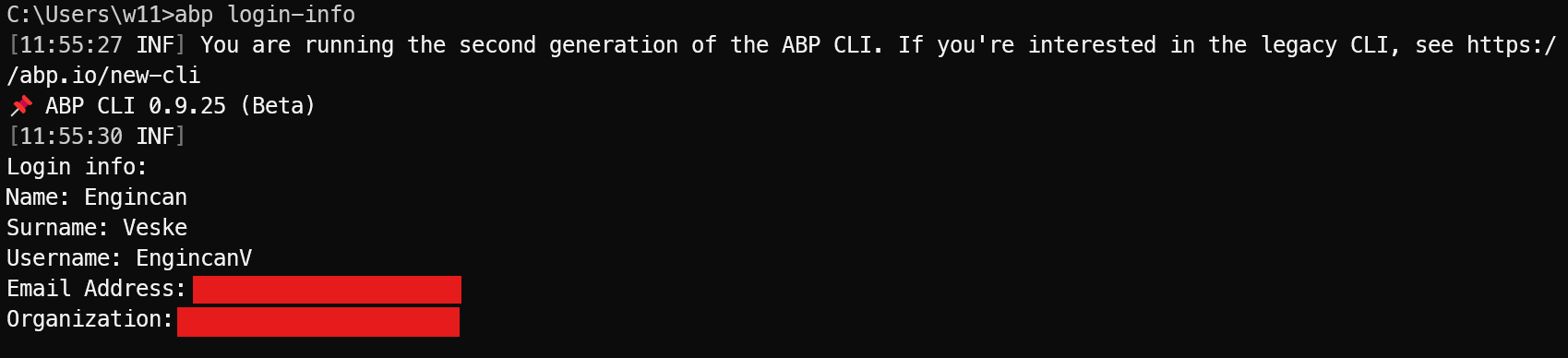
If you don't see the relevant information, then it means that you are not logged in via ABP CLI and should log in with the following command:
abp login <username> -p <password> -o <organization-name>
2-) Wrong packageSourceMapping in NuGet.config file: This might also be the reason and it would be better to check the NuGet.config file in your solution, especially you can check your api-key and packageSourceMapping section (if it exists)
After you checked these two solutions, if you are still unable to fix the problem, then please let me know.
Regards.









