Hi, you can configure the entity history selector to conditionally log for a specific entity. Please check https://abp.io/docs/latest/framework/infrastructure/audit-logging#entity-history-selectors
Regards.
Ohh that my bad, i have attached a wrong screenshot , I have changed the password for testing,incase that works.
I confirm the password was myPassw@rd when tried to run the applications
Okay. Then I don't see any reason why it's not working (as you can see from my previous answers, I have tried to create a new microservice template, and I'm unable to reproduce it for now). Can you share the container logs for the sql-server image?
for the #2, after we enable it, the recaptcha was not stable, I checked the code and found that the recaptcha google js code is on the bottom, this could cause issues if users take action immediately before the js code is loaded, can you tell me how we can move the js code to the head tag?
            <script src="https://www.google.com/recaptcha/api.js?hl=en&render=99999"></script>
            <script>grecaptcha.ready(function(){ grecaptcha.reExecute = function(callback){grecaptcha.execute
To fix this on your side, you should override the Volo.Abp.Account.Pro.Public.Web/Pages/Account /Login.cshtml (to override it create a Account folder and Index.cshtml file in it, then download the source-code for Account.Pro module and copy-paste the related page as the content and change the relevant part - please note that when you do that in the next releases you will not get updates for this page) and move the related script from the scripts section to the styles section:

Btw, do you have any suggestions for me to reproduce these problems? Because, I have tested in an already published application and could not reproduce it.
Hi, if you have an existing microservice application and are using Ocelot, you can follow the Migrating API Gateway from Ocelot to YARP.
Actually, even if you are not migrating from Ocelot to YARP, you can still read this documentation to see the migration steps.
By the way, ABP's new microservice solution uses YARP as its default API gateway (https://abp.io/docs/latest/solution-templates/microservice/api-gateways#yarp-reverse-proxy). So, you can create a new microservice solution and see the integration points for an example.
Regards.
Hello, Negative, the issue is at the moment of generating migration it includes in the up code a table that was already in previous migration up code. The issue is not at the moment of applying migration as far as I can see.
Hi, by any chance, can you share your application via email (to support@abp.io with the ticket number), so I can better assist you.
Regards.
Hi Engin Can, Yes, I found the foreign key error, there is no problem at the moment. We need to get used to the new test framework structure, we would love for you to explain in detail why such a change was made with a blog post or a live broadcast. Because we are trying very hard to write test codes. For example, finding the foreign key error can be very difficult. Finally, when the entity is created, the EfCore[Entity]DomainTests class is not created, I had to create this class myself. I would be happy if an issue record is opened for this. Thank you for your support.
Thanks. @maliming created an article to explain why we made such a change. You can read from https://abp.io/community/articles/the-new-unit-test-structure-in-abp-application-4vvvp2oy
Regards.
Hi Engin Can, I had to create EfCoreAbcDomainTests class for my Entity. Abp Studio should automatically generate this class for each entity. When I run it I get the following error. I get the same error for SampleDomainTest:
---- Microsoft.EntityFrameworkCore.DbUpdateException : An error occurred while saving the entity changes. See the inner exception for details.
-------- Microsoft.Data.Sqlite.SqliteException : SQLite Error 19: 'FOREIGN KEY constraint failed'.
Hi, it seems this is related to your own test case. If you share the complete steps, I can better assist you (also please share the test file). You can take the pre-defined sample tests for reference.
Hi, I made the following changes but I still get another error
protected->publicpublic abstract class SampleDomainTests : AbcDomainTestBase where TStartupModule : IAbpModule->
public class SampleDomainTests : AbcDomainTestBase<AbcDomainTestModule>But this time I get this error:---- Autofac.Core.DependencyResolutionException : An exception was thrown while activating Volo.Abp.PermissionManagement.PermissionDataSeedContributor -> Volo.Abp.Authorization.Permissions.PermissionDefinitionManager -> Volo.Abp.PermissionManagement.DynamicPermissionDefinitionStore. -------- Autofac.Core.DependencyResolutionException : None of the constructors found on type 'Volo.Abp.PermissionManagement.DynamicPermissionDefinitionStore' can be invoked with the available services and parameters: Cannot resolve parameter 'Volo.Abp.PermissionManagement.IPermissionGroupDefinitionRecordRepository permissionGroupRepository' of constructor 'Void .ctor(Volo.Abp.PermissionManagement.IPermissionGroupDefinitionRecordRepository, Volo.Abp.PermissionManagement.IPermissionDefinitionRecordRepository, Volo.Abp.PermissionManagement.IPermissionDefinitionSerializer, Volo.Abp.PermissionManagement.IDynamicPermissionDefinitionStoreInMemoryCache, Microsoft.Extensions.Caching.Distributed.IDistributedCache, Microsoft.Extensions.Options.IOptions`1[Volo.Abp.Caching.AbpDistributedCacheOptions], Microsoft.Extensions.Options.IOptions`1[Volo.Abp.PermissionManagement.PermissionManagementOptions], Volo.Abp.DistributedLocking.IAbpDistributedLock)'.```
Hi, you don't need to make a change in the existing test projects (so, please revert your changes). With our new testing infrastructure, your tests will be shown in the Test Explorer (under the *.EntityFrameworkCore.Tests projects - within relevant sub-folders) as follows:
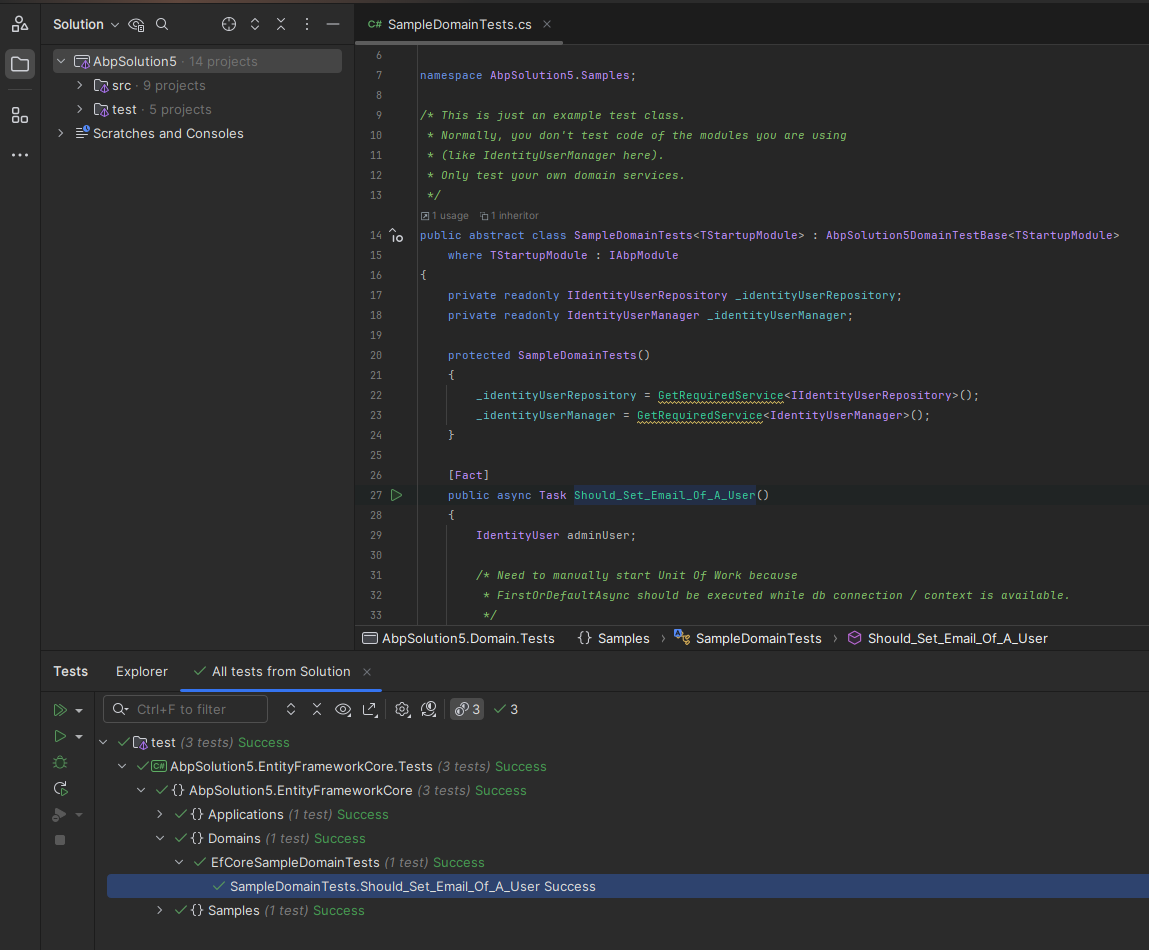
We categorized tests with a folder-based approach, which gives you easier management.
This the error that im getting with services and similar to authserver as well.
SqlException has been thrown. The operation will be tried 2 times more. Exception: Login failed for user 'sa'.. Stack Trace: at Microsoft.Data.SqlClient.TdsParser.ThrowExceptionAndWarning(TdsParserStateObject stateObj, Boolean callerHasConnectionLock, Boolean asyncClose) at Microsoft.Data.SqlClient.TdsParser.TryRun(RunBehavior runBehavior, SqlCommand cmdHandler, SqlDataReader dataStream, BulkCopySimpleResultSet bulkCopyHandler, TdsParserStateObject stateObj, Boolean& dataReady) at Microsoft.Data.SqlClient.TdsParser.Run(RunBehavior runBehavior, SqlCommand cmdHandler, SqlDataReader dataStream, BulkCopySimpleResultSet bulkCopyHandler, TdsParserStateObject stateObj) at Microsoft.Data.SqlClient.SqlInternalConnectionTds.CompleteLogin(Boolean enlistOK) at Microsoft.Data.SqlClient.SqlInternalConnectionTds.LoginNoFailover(ServerInfo serverInfo, String newPassword, SecureString newSecurePassword, Boolean redirectedUserInstance, SqlConnectionString connectionOptions, SqlCredential credential, TimeoutTimer timeout) at Microsoft.Data.SqlClient.SqlInternalConnectionTds.OpenLoginEnlist(TimeoutTimer timeout, SqlConnectionString connectionOptions, SqlCredential credential, String newPassword, SecureString newSecurePassword, Boolean redirectedUserInstance) at Microsoft.Data.SqlClient.SqlInternalConnectionTds..ctor(DbConnectionPoolIdentity identity, SqlConnectionString connectionOptions, SqlCredential credential, Object providerInfo, String newPassword, SecureString newSecurePassword, Boolean redirectedUserInstance, SqlConnectionString userConnectionOptions, SessionData reconnectSessionData, Boolean applyTransientFaultHandling, String accessToken, DbConnectionPool pool) at Microsoft.Data.SqlClient.SqlConnectionFactory.CreateConnection(DbConnectionOptions options, DbConnectionPoolKey poolKey, Object poolGroupProviderInfo, DbConnectionPool pool, DbConnection owningConnection, DbConnectionOptions userOptions) at Microsoft.Data.ProviderBase.DbConnectionPool.CreateObject(DbConnection owningObject, DbConnectionOptions userOptions, DbConnectionInternal oldConnection) at Microsoft.Data.ProviderBase.DbConnectionPool.UserCreateRequest(DbConnection owningObject, DbConnectionOptions userOptions, DbConnectionInternal oldConnection) at Microsoft.Data.ProviderBase.DbConnectionPool.TryGetConnection(DbConnection owningObject, UInt32 waitForMultipleObjectsTimeout, Boolean allowCreate, Boolean onlyOneCheckConnection, DbConnectionOptions userOptions, DbConnectionInternal& connection) at Microsoft.Data.ProviderBase.DbConnectionPool.WaitForPendingOpen() --- End of stack trace from previous location -
I have tried connecting to sql server running in docker from ssms host machine localhost,1434 -

Hi, you said that you are using the default password coming from the ABP Studio templates, however, the default password is myPassw@rd. It seems that you changed the default password (or using an already running sql-server container). Can you confirm?

If you changed the password, please don't forget to change it in the services' appsettings.json files:

Hi,
I'm not looking for this to be added as a feature request - I need to implement this functionality **now ** in my current project. Could you please provide guidance on how to implement role-based filtering for the user list with these specific requirements?For non-admin users:
- Filter out users with admin roles from the list
- Restrict view/management to non-admin users only
For admin users:
- Maintain full visibility of all users
- Keep all existing management capabilities
Thank you
Hi, sure. For that purpose, you should extend application services and interface implementations (https://abp.io/docs/latest/framework/architecture/modularity/extending/customizing-application-modules-overriding-services).
For example, you should extend the IdentityUserAppService and override some of its methods, such as GetListAsync method and check if the current-user has an admin role or not and then call the relevant repository method (of course you should also create a new repository method for that purpose - maybe you can use custom Data-Filtering):
[Dependency(ReplaceServices = true)]
[ExposeServices(typeof(IIdentityUserAppService))]
public class MyIdentityUserAppService : IIdentityUserAppService, ITransientDependency
{
    //...

    public override async Task<PagedResultDto<IdentityUserDto>> GetListAsync(GetIdentityUsersInput input)
    {
        if(!CurrentUser.IsInRole("admin"))
        {
            //call new repository method which filters to not show the 'admin' users
        }

        //keep the existing behaviour
        return await base.GetListAsync(input);
    }
}









