After login url looks like this. I removed some characters from those long values like state. If this helps anything. https://localhost:44369/Account/Register?isExternalLogin=True&externalLoginAuthSchema=AzureOpenId&returnUrl=%2Fconnect%2Fauthorize%3Fresponse_type%3Dcode%26client_id%3DSCM_App%26state%3DQmRYxUmlDVEhQ;%25252Fdashboard%26redirect_uri%3Dhttp%253A%252F%252Flocalhost%253A4200%252F%26scope%3Dopenid%2520offline_access%2520SCM%26code_challenge%3D4vcFgDJfIZgrYbPec%26code_challenge_method%3DS256%26nonce%3DQmRKTG9UYxUmlDVEhQ%26culture%3Dfi-FI%26ui-culture%3Dfi-FI%26returnUrl%3D%252Fdashboard
Forget to give you my ConfigureServices code. It is quite same as you suggested and what there was earlier.
context.Services.AddOptions()
.ConfigureOptions<AzureEntraIdTenantOptionsProvider>();
var authenticationBuilder = context.Services.AddAuthentication();
authenticationBuilder.AddOpenIdConnect("AzureOpenId", "Azure AD", options =>
{
    options.Authority = "https://login.microsoftonline.com/" + configuration["AzureAd:TenantId"] + "/v2.0/";
    options.ClientId = configuration["AzureAd:ClientId"];
    options.ResponseType = OpenIdConnectResponseType.CodeIdToken;
    options.CallbackPath = configuration["AzureAd:CallbackPath"];
    options.ClientSecret = configuration["AzureAd:ClientSecret"];
    options.RequireHttpsMetadata = false;
    options.SaveTokens = true;
    options.GetClaimsFromUserInfoEndpoint = true;
    options.Scope.Add("email");

    options.ClaimActions.MapJsonKey(ClaimTypes.NameIdentifier, "sub");
});
And here is out provider. We assumed that currentTenant is set here so our global ef filter should work here and tenantId parameter is added to query automaticly.
public class AzureEntraIdTenantOptionsProvider : IConfigureOptions<OpenIdConnectOptions>, ITransientDependency
	{
		private readonly IServiceProvider _serviceProvider;


		public AzureEntraIdTenantOptionsProvider(IServiceProvider serviceProvider)
		{
			_serviceProvider = serviceProvider;
		}

		public void Configure(OpenIdConnectOptions options)
		{
			ISaasTenantIdentityProviderSettingsRepository saasTenantIdentityProviderSettingsService = _serviceProvider.GetRequiredService<ISaasTenantIdentityProviderSettingsRepository>();
			var azureAdSettings = saasTenantIdentityProviderSettingsService.GetIdentityProviderSettings(IdentityProviderType.ENTRA_ID).Result;
			var deserializedSettings = azureAdSettings?.Setting != null
				? JsonConvert.DeserializeObject<AzureEntraIdSetting>(azureAdSettings?.Setting)
				: null;

			if (azureAdSettings != null && deserializedSettings.IsEnabled)
			{
				options.ClientId = deserializedSettings.ClientId;
				options.ClientSecret = deserializedSettings.ClientSecret;
				options.Authority = $"https://login.microsoftonline.com/{deserializedSettings.AzureTenantId}/v2.0";
				options.ResponseType = OpenIdConnectResponseType.CodeIdToken;
				options.SaveTokens = true;
				options.GetClaimsFromUserInfoEndpoint = true;
				options.CallbackPath = "/signin-azure";
				options.RequireHttpsMetadata = false;
				options.Scope.Add("email");
				options.ClaimActions.MapJsonKey(ClaimTypes.NameIdentifier, "sub");
			}
			else
			{
				// Or configure default behavior
				throw new UserFriendlyException("Azure Ad is not configured for you");
			}
		}
	}
Hello, I'm collegue of LW and started to implement this feature. Now I have several problems for which I need your help. First problem is about AzureEntraIdTenantOptionsProvider. I managed to implement it and when debuging I noticed that it goes to constructor of provider but never goes to Configure method so authserver is not even trying to get dynamic OpenIdConnectOptions from provider and uses what was in appsettings.json.
Other problem is when trying to use Azure AD button. I managed to configure Entra Id login settings to our appsetting.json from where AddOpenIdConnect is getting default settings. And it redirects to microsoft site and after awile it goes back to register page as seen below. Is this normal routine when using external identity provider? How can I get Register button enable if it is required to get external login to work.
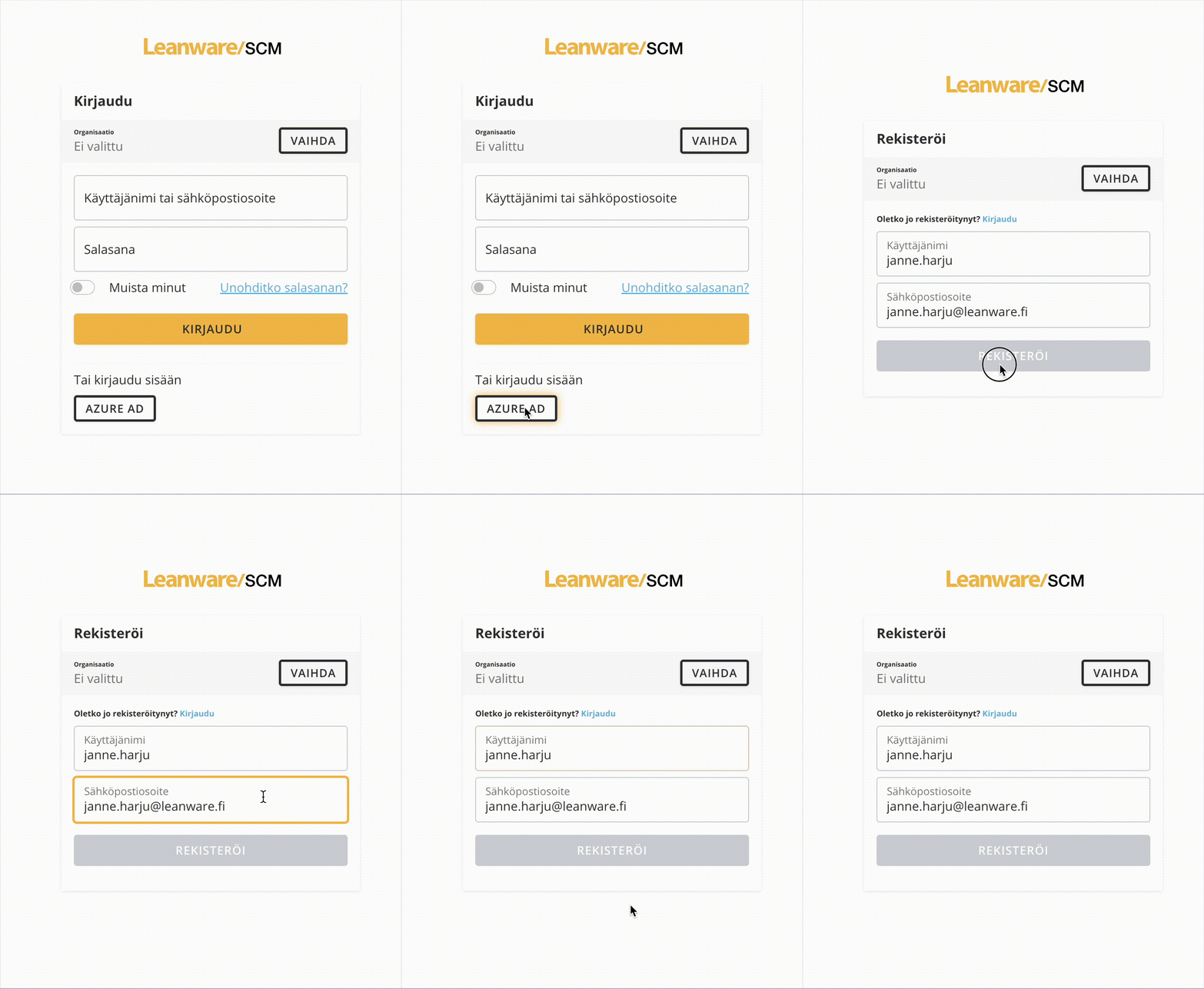
And last notice is that I only get login to work this much when I se this setting to None. It doesn't feel right thing to do. But is there any other way?
options.MinimumSameSitePolicy = Microsoft.AspNetCore.Http.SameSiteMode.None;
Collegue found that these were needed although we were not doing over module joins. [ReplaceDbContext(typeof(IForecastingDbContext))] and
modelBuilder.ConfigureForecasting();
So after all it was same problem as others have. I didn't just remember that our background process manager has own db context.
1 logger) at Microsoft.EntityFrameworkCore.Infrastructure.ModelValidator.Validate(IModel model, IDiagnosticsLogger1 logger)
at Microsoft.EntityFrameworkCore.Infrastructure.RelationalModelValidator.Validate(IModel model, IDiagnosticsLogger1 logger) at Microsoft.EntityFrameworkCore.SqlServer.Infrastructure.Internal.SqlServerModelValidator.Validate(IModel model, IDiagnosticsLogger1 logger)
at Microsoft.EntityFrameworkCore.Infrastructure.ModelRuntimeInitializer.Initialize(IModel model, Boolean designTime, IDiagnosticsLogger1 validationLogger) at Microsoft.EntityFrameworkCore.Infrastructure.ModelSource.GetModel(DbContext context, ModelCreationDependencies modelCreationDependencies, Boolean designTime) at Microsoft.EntityFrameworkCore.Internal.DbContextServices.CreateModel(Boolean designTime) at Microsoft.EntityFrameworkCore.Internal.DbContextServices.get_Model() at Microsoft.EntityFrameworkCore.Infrastructure.EntityFrameworkServicesBuilder.<>c.<TryAddCoreServices>b__8_4(IServiceProvider p) at ResolveService(ILEmitResolverBuilderRuntimeContext, ServiceProviderEngineScope) at ResolveService(ILEmitResolverBuilderRuntimeContext, ServiceProviderEngineScope) at ResolveService(ILEmitResolverBuilderRuntimeContext, ServiceProviderEngineScope) at ResolveService(ILEmitResolverBuilderRuntimeContext, ServiceProviderEngineScope) at Microsoft.Extensions.DependencyInjection.ServiceProviderServiceExtensions.GetRequiredService(IServiceProvider provider, Type serviceType) at Microsoft.Extensions.DependencyInjection.ServiceProviderServiceExtensions.GetRequiredService[T](IServiceProvider provider) at Microsoft.EntityFrameworkCore.DbContext.get_ChangeTracker() at Volo.Abp.EntityFrameworkCore.AbpDbContext1.Initialize(AbpEfCoreDbContextInitializationContext initializationContext)
at Volo.Abp.Uow.EntityFrameworkCore.UnitOfWorkDbContextProvider1.CreateDbContextAsync(IUnitOfWork unitOfWork, String connectionStringName, String connectionString) at Volo.Abp.Uow.EntityFrameworkCore.UnitOfWorkDbContextProvider1.GetDbContextAsync()
at Volo.Abp.Domain.Repositories.EntityFrameworkCore.EfCoreRepository2.GetDbSetAsync() at Castle.DynamicProxy.AsyncInterceptorBase.ProceedAsynchronous[TResult](IInvocation invocation, IInvocationProceedInfo proceedInfo) at Volo.Abp.Castle.DynamicProxy.CastleAbpMethodInvocationAdapterWithReturnValue1.ProceedAsync()
at Volo.Abp.Uow.UnitOfWorkInterceptor.InterceptAsync(IAbpMethodInvocation invocation)
at Volo.Abp.Castle.Dyn2025-01-16 13:12:43.260 +02:00 [INF] Loaded ABP modules:_mLOutputStorageService.ConnectToOutputStorage();
string currentTenantName = _currentTenant.Name!;
IList<BaselineDemandForecast> baselineDemandForecasts = await _mLOutputStorageService.DownloadForecastDataAsync(currentTenantName);
//remove all old forecasts from same run and insert new ones
var newRunIdFromDownloadedData = baselineDemandForecasts[0]?.RunId;
var query = await _baselineDemandForecastRepository.GetQueryableAsync();
var oldForecasts = query.Where(x => x.RunId == newRunIdFromDownloadedData);
await _baselineDemandForecastRepository.DeleteFromQueryAsync(oldForecasts);
foreach (var item in baselineDemandForecasts)
{
item.TenantId = _currentTenant.Id;
}
await _sqlBulkOperationsBaselineDemandForecastRepository.BulkInsert(baselineDemandForecasts);
and spesific line is:
var query = await _baselineDemandForecastRepository.GetQueryableAsync();
Weird thing is that I haven't touched this part of code.
I have some changes is in some Repositories.
Here is original code from there.
public EfCoreCalculatedSeasonalityProfileRepository(IDbContextProvider<ForecastingDbContext> dbContextProvider)
and we changed to use interface like this:
public EfCoreCalculatedSeasonalityProfileRepository(IDbContextProvider<IForecastingDbContext> dbContextProvider)
but changes were into different repositories than what I'm using where probelm seems to be.
I found that in some other your customers have same kind of issues that they were missing module dependeces but I didn't found samekind of deficiencies in our code.
Here is definiton of that entity:
public class BaselineDemandForecast : Entity<Guid>, IMultiTenant
And here is builder configuration:
public class BaselineDemandForecastModelCreatingExtensions : IModuleEntityTypeConfiguration<BaselineDemandForecast>
{
    public bool IsApplicationDbContext { get; set; }
    public bool IsSqlite { get; set; }

    public void Configure(EntityTypeBuilder<BaselineDemandForecast> builder)
    {
        builder.ToTable(ForecastingDbProperties.DbTablePrefix + "BaselineDemandForecasts", ForecastingDbProperties.DbSchema);
        builder.ConfigureByConvention();
        builder.ConfigureByConventionSCM(IsSqlite);
        //here is ton of field definitions.
    }
}
Now I made test what is running this part of code. I only mock MLOutputStorageService to give me spesific list of items. And no exception.
Any idea what could be creating this issue?
I will continue with solution I have with configurations. I will continue to listen this thread if you decide something.
No. My goal is to get verification link to work. Currently I need to add MVC settings to get it working even verification mail send is done via Angular front. In angular front there is (In your code)logic which check if responseType is code then use MVC and otherwise use Angular settings. I was guided to override that part of code to always use Angular settings. It seems to me to be little overkill. So maybe I just add those MVC settings for email verification which are mentioned eralier in this issue.
options.Applications["MVC"].Urls[AccountUrlNames.EmailConfirmation] =
	"account/email-confirmation";
Default value is MVC style link which is not working for Angular front. Initial problem was that there was no domain part in link. that was solved by adding:
options.Applications["MVC"].RootUrl = configuration["App:SelfUrl"];
So after all for me it seems that my initial fix to add those settings to MVC side is easiest way. Maybe not most correct way but it works. Replacing that much of code instead seems overkill. Is our setup somehow wrong or weird or why we have this problem? Or is it actually problem in your code and you will fix it on later versions? Is the problem with using angular and having separate Auth server? Does this combo make that problem?
About thre replacement mechanic. I found this guide but what should be key for PersonalSettingsEmailComponent? https://abp.io/docs/latest/framework/ui/angular/component-replacement#how-to-replace-a-component
Yep that works. thanks. I will now test how it works in our test environment.









