I have created the repo and invited you.
AddAbpOpenIdConnect with tenant specific identifiers and updated the login button to redirect based on the tenant. It selects the correct scheme, but first it complains about not being able to protect the state. Some googling determines that this is because the callback paths are all the same. So I updated those as well, however now the server is rejecting the URL becauseThe response was successfully returned as a plain-text document: {
"error": "invalid_request",
"error_description": "The specified 'redirect_uri' is not valid for this client application.",
"error_uri": "https://documentation.openiddict.com/errors/ID2043",
"culture": "en",
"ui-culture": "en"
}.
Here is the relevant url
https://sefdemo-api.localhost:44392/connect/authorize?client_id=TOG_Blazor_sefdemo.localhost&redirect_uri=https%3A%2F%2Fsefdemo.localhost%3A44346%2Fauthentication%2Flogin-callback-test&response_type=code&scope=openid%20profile%20roles%20email%20phone%20TOG&code_challenge=A0ICrKQp24UZCHIA5cvNdbngRM3_oDsDCXUDB9XyrQ0&code_challenge_method=S256&response_mode=form_post&nonce=639023934276655883.OWY1OGYxZjEtYWM5MS00NGQxLTg5MWItMTI4MDRmODZkZDE4MDVhODNhMDYtM2I4Yi00MjczLThmOTctNzM5ZjhhZTcwYzE4&state=CfDJ8JJBz11WLB9Do83s_QYJ8pa9Sa2Fct1CkwfNhrCGMgIetC3QVxV_j8g7iMFmqgJsgB20I3xDEJrkjPDS8tAmMspsJ6p01NbvNzAtRYcXCqb_0iCg7gpe11E4mVnH0QsD4Oszs3ri5lv7IvFHLh8TA6JjO_vCk6t5sgjJY0TPkCQ7XUJgoc-xDiAUpi9aEmQz_rHV3wv1lqVHJqXu93mSjfQ5UdD1xe-KzTU7Qs_s8kJ9aV6WCZM9G48ziMrHeqllRTSa_mZHVa783DJmPDtLo-OOn17jtxZA3uhn2VsUjTCN5W1EcJ-yrPfXXyl9N3kKChIOasQrPrca7rlbtUF7SnEjlWNWHfKIOj8o9v2_pWf4tFW4VLu4VRrpsQ_eE2ZhXfsDJJw2eeYnrDLlnTWw_iXN90Nnl4cDrjozbPc3C_pg&x-client-SKU=ID_NET10_0&x-client-ver=8.14.0.0
And here are the values for this client_id in the OpenIdConnectApplications tables
b633bf6a-6a55-5d25-0eaa-3a1bb1ebe100,TOG_Blazor_sefdemo.localhost,,implicit,Blazor Application (Test),,"[""ept:end_session"",""gt:authorization_code"",""rst:code"",""ept:authorization"",""ept:token"",""ept:revocation"",""ept:introspection"",""scp:address"",""scp:email"",""scp:phone"",""scp:profile"",""scp:roles"",""scp:TOG""]","""[https://sefdemo.localhost:44346/authentication/logout-callback-test""]",,"""[https://sefdemo.localhost:44346/authentication/login-callback-test""]",,public,https://sefdemo.localhost:44346,/images/clients/blazor.svg,{},af1a27245e36434283b4d3d86e1b52ae,2025-08-12 12:25:53.8442911,,2025-12-26 16:43:26.9281946,,false,,,,,,
Followup errors:
ctx.Options.ClientId causes authentication for clients to fail with the errorThe response was successfully returned as a JSON document: {
"error": "invalid_grant",
"error_description": "The specified authorization code cannot be used by this client application.",
"error_uri": "https://documentation.openiddict.com/errors/ID2069"
}.
None of these solutions work. I have verified that the url based tenant resolution is working correctly and that the tenant host tables have correct per tenant values. Wildcard tenant domain resolution cannot work because the tenant domains share no common substring. The issue that I am having is 2 things.
Using ctx.Options.ClientId to set the tenant client id also changes all future logins to use the tenant specific client id. I am having to calculate this manually because the Blazor web server does not have database access. If I don't set client id and authority directly on the options, then the authentication process fails.
I have a custom controller which CANNOT be descended from ApplicationService or AbpController because it is a 3rd party controller with a required base class and it require authorization. Therefore, I cannot generate a proxy for it, but I am using YARP to forward the request with the auth token provided by the system to the tenant-specific url and it is not being accepted by the end service. Resulting in a 401 or 302 code. This is the same token used by the proxies, so I know it is valid. It sometimes gives an Invalid_issuer error, but I am registering a custom issue validator which works for the app services but is never called by the custom controller.
This does not work for us since each of the tenant URLs are entirely unique and do not share any base domain. Also, it does not set the per tenant client id as it should.
We have a situation where the authentication is not working properly for multiple tenants. We have several tenants hosted on a single instance and each tenant has their own unique domain. These domains are used to determine the tenant, tenant host, and database connections. We are not using the tenant cookie resolver. So here is ultimately the question, what is the recommended way to have each tenant's auth use their configured client id and tenant specific url for all transactions? The OAuth server is currently embedded in our API and all the domains point to it.
1.<>c__DisplayClass53_3.<<BuildRenderTree>b__18>d[[Volo.Abp.Identity.IdentityUserDto, Volo.Abp.Identity.Pro.Application.Contracts, Version=10.0.0.0, Culture=neutral, PublicKeyToken=null]].MoveNext() --- End of stack trace from previous location --- at Microsoft.AspNetCore.Components.ComponentBase.CallStateHasChangedOnAsyncCompletion(Task task) at Volo.Abp.BlazoriseUI.Components.EntityAction1.<ActionClickedAsync>d__53[[Volo.Abp.Identity.IdentityUserDto, Volo.Abp.Identity.Pro.Application.Contracts, Version=10.0.0.0, Culture=neutral, PublicKeyToken=null]].MoveNext()
at Microsoft.AspNetCore.Components.ComponentBase.CallStateHasChangedOnAsyncCompletion(Task task)
at Blazorise.DropdownItem.ClickHandler()
at Microsoft.AspNetCore.Components.ComponentBase.CallStateHasChangedOnAsyncCompletion(Task task)
at Microsoft.AspNetCore.Components.RenderTree.Renderer.GetErrorHandledTask(Task taskToHandle, ComponentState owningComponentState)SessionsModal is null and ViewDetailsModal is null.I built out a new template with the affected service classes and I was able to reproduce the issue of the controller methods not generating with a multipart/form data input option. However, I was able to fix it by adding this to the module startup config.
Configure<AbpAspNetCoreMvcOptions>(options => { options.ConventionalControllers.FormBodyBindingIgnoredTypes.Add(typeof(CreateFileInputWithStream)); });
I have a Blazor Web App which exposes this app service method defined in the base class.
public virtual async Task<TAttachmentDto> CreateAsync(Guid attachmentTypeId, TEntityKey entityId,
            CreateFileInputWithStream inputWithStream, bool replaceByAttachmentType = false, bool autoSave = false)
        {
            await CheckPolicyAsync(CreatePolicyName);

            var attachmentType = await AttachmentTypeRepository.GetAsync(attachmentTypeId);

            if (attachmentType == null)
            {
                throw new UserFriendlyException(L["InvalidAttachmentType"]);
            }

            await CheckSize(inputWithStream.File.ContentLength ?? 0, attachmentType);
            await CheckFileExtension(inputWithStream.Name, entityId, attachmentType);

            var fileDescriptor = await AttachmentManager.CreateAsync(inputWithStream.Name,
                inputWithStream.File.ContentType, inputWithStream.File, attachmentTypeId, entityId,
                inputWithStream.ExtraProperties, overrideExisting: true, replaceByAttachmentType, autoSave);
            return ObjectMapper.Map<TAttachment, TAttachmentDto>(fileDescriptor);
        }
This is the app service declaration. The base class where the method exists is AttachmentAppService
OrganizationAttachmentAppService :
        AttachmentAppService<OrganizationAttachmentType, OrganizationAttachment, OrganizationAttachmentBlobContainer,
            AttachmentDto>, IOrganizationAttachmentAppService
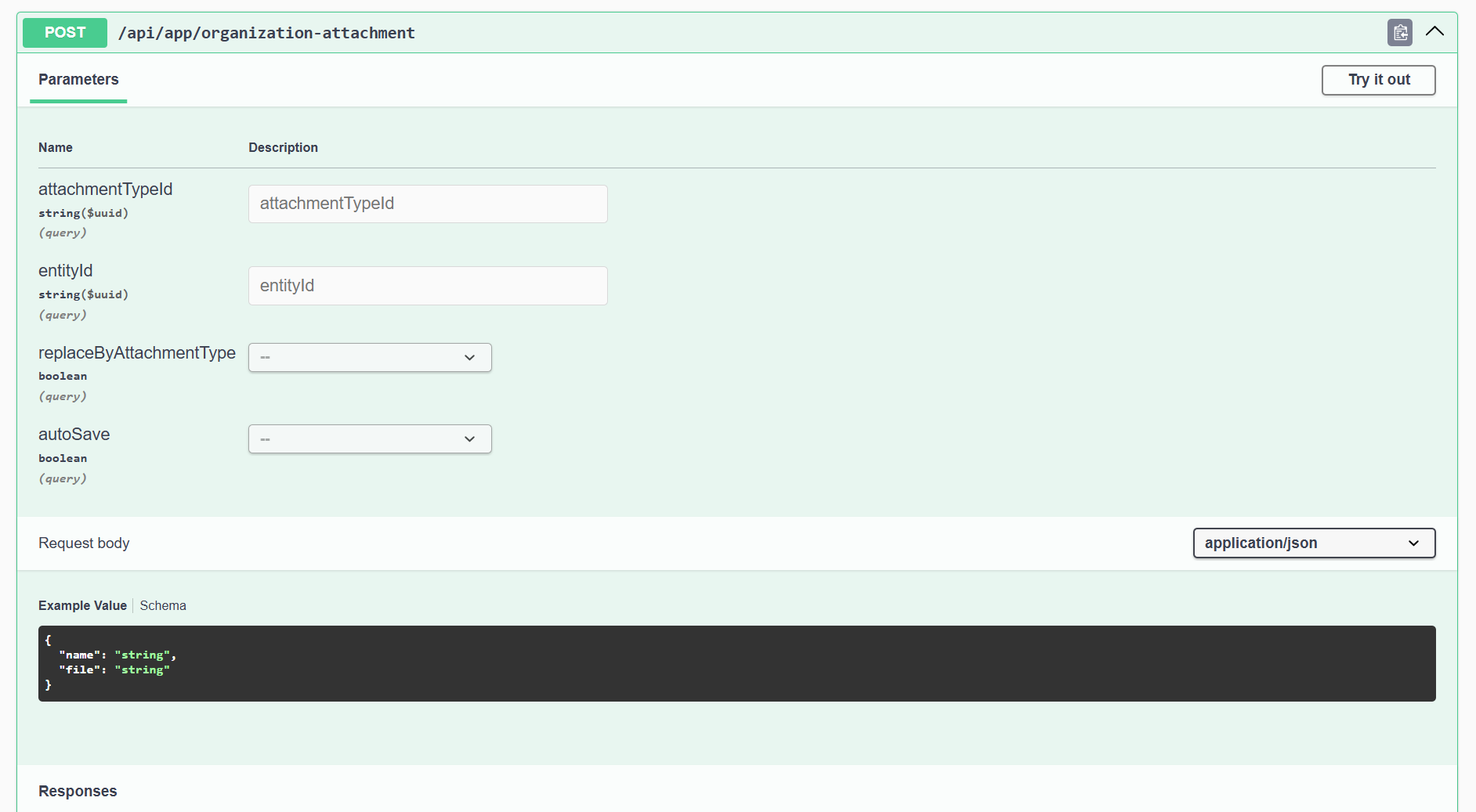
The issue is when I call the method via the static proxy classes in the Blazor WASM project, it returns 415 Unsupported Media Type. From my research this appears to be an issue with how the endpoints are generated in the Blazor Server site. The generated endpoints seen via swagger are missing the multipart content type that exist in the api copy of the endpoint.
The blazor server swagger
The api swagger
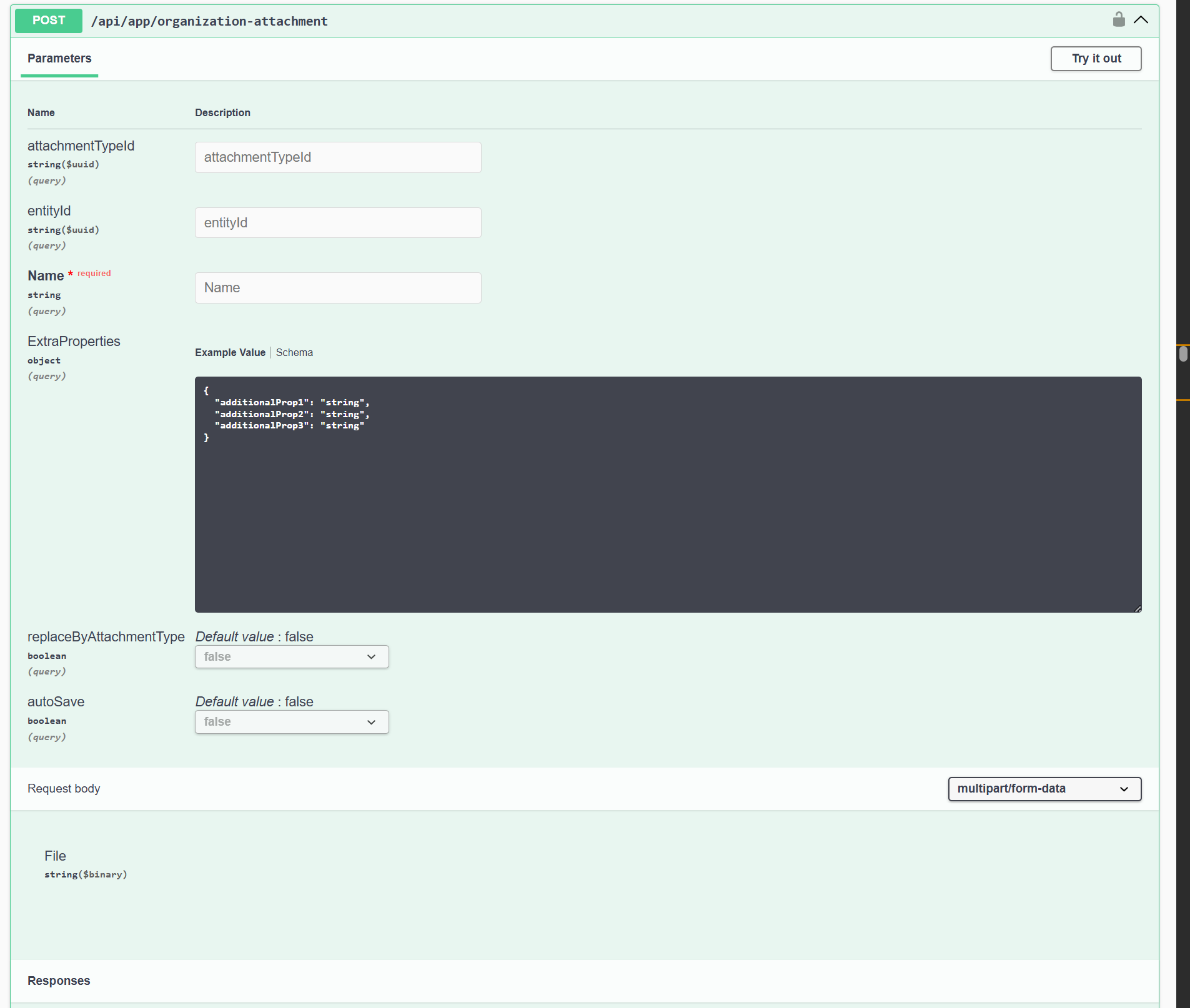
How can I fix this invalid endpoint registration?
I was able to fix the 400 error which was caused by the js fetch client not having the ABP specific header config set. However, I am still having the issues with the unsupported media types.









