I need to create the next structure on code
 !
!
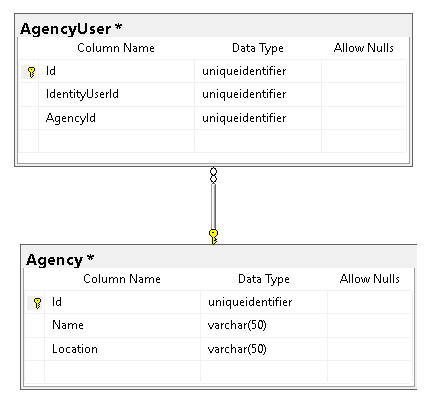
The table AbpUsers is on AbpIdentity Database The tables AgencyUser and Agency has to be on Agency Database I need to add the navigation property to the user to get some properties about the user
The documentation related to this case on FAQ are related on the same database, so the map and solutions do not work complete for me.
Current progress
Add reference to package: Volo.Abp.IdentityServer.Domain on Company.Project.AgencyService.EntityFrameworkCore and Company.Project.AgencyService.Domain
Entity Class
public class AgencyUser : FullAuditedTenantEntity<Guid>
{

    // Foreign key referenceing the AbpUser
    public Guid IdentityUserId { get; set; }
    public IdentityUser IdentityUser { get; set; }

    public Guid AgencyId { get; set; }
    public Agency Agency { get; set; }
}
`
> Mapp

`
public class AgencyUserMap : IEntityTypeConfiguration<AgencyUser>
{

    public void Configure(EntityTypeBuilder<AgencyUser> builder)
    {
        builder.ConfigureByConvention();

        builder.ToTable("AgencyUser");

        builder.HasKey(x => x.Id);

        builder.Property(x => x.Id).ValueGeneratedOnAdd();

        builder.HasOne< IdentityUser >().WithMany().HasForeignKey(x => x.IdentityUserId);
        builder.HasOne< Agency >().WithMany().HasForeignKey(x => x.AgencyId);

        builder.Navigation(x => x.IdentityUser).AutoInclude();
        builder.Navigation(x => x.Agency).AutoInclude();
    }
}
How may I use tag helper on angular?
I would like to implement a sub menu, using <router-outlet></router-outlet>, and reuse the component abp-sidebar, do you have documentation or any example that I can use to take a look?
There is an easy way to create client apps, just base infrastructure for microservices?
Enviroment: apps: - angular => access to: [administration, saas] - angular => access to: [service 2] - angular / pwa => access to: [service 1, service 2] - react native => access to: [service 1] - react native => access to: [service 2] - angular / pwa (offline) (desktop windows, mac optional) => access to: [service 3, service 2] services - saas - administration - identity - product - service 1 - service 2 - service 3
I just need basic setup with basic config to use lepton theme with outh no extra modules, like administration just empty and dummy structure for clients inside microservice template.
Or could you tell me which modules I have to delete from angular template to not break anything?
Using Progressive Web Application and Angular is it possible to create a desktop (offline) app ? Do you have documentation over this topic?
How do I create a custom theme for my apps?
How do I enable the new service to use an isolated database on microservice template?
Angular => NewTenant => ConnectionStrings => DropDown [... ProductService ]
ABP Framework version: v5.3.0 UI type: angular DB provider: EF Core Identity Server Separated (Angular): yes
2022-06-29 14:48:42.714 -05:00 [INF] No CORS policy found for the specified request. 2022-06-29 14:48:42.977 -05:00 [INF] Request finished HTTP/2 GET https://localhost:44322/swagger/v1/swagger.json - - - 200 - application/json;charset=utf-8 2675.0220ms
My environment
I have this configuration over Ports:
WebGateway: https: 44325 AuthServer: https: 44322 IdentityService: https: 44388 ProductService: https: 44361 NewService: https: 44752
AngularClient: http: 4200 ReactClient: http: 5200
CORS: WebGateway: "http://localhost:4200,http://localhost:5200,https://localhost:44307,https://localhost:44325,https://localhost:44353,https://localhost:44367,https://localhost:44388,https://localhost:44381,https://localhost:44361" AuthServer: "http://localhost:4200,http://localhost:5200,https://localhost:44307,https://localhost:44325,https://localhost:44353,https://localhost:44367,https://localhost:44388,https://localhost:44381,https://localhost:44361", IdentityService: "http://localhost:4200,http://localhost:5200,https://localhost:44307,https://localhost:44325,https://localhost:44353,https://localhost:44367,https://localhost:44388,https://localhost:44381,https://localhost:44361" ProductService: "https://localhost:44325,https://localhost:44353" NewService: "http://localhost:4200,http://localhost:5200,https://localhost:44307,https://localhost:44325,https://localhost:44353,https://localhost:44367,https://localhost:44388,https://localhost:44381,https://localhost:44361"
Result:
NewService: Swagger is working, and openApi definition is working ProductService: Swagger is working, and openApi definition is working
WebGateway: works over all old services, but when I try to switch to NewService Api definition from WebGateway it gives me a CORS error, if I pick ProductService it works, that not makes sense to me, it has be something else in between
Did you face this error before? Do you know how to deploy microservices solution to IIS?
if I run the publish folder on console using dotnet dll path it works, so I am not sure where the problem is
Chrome says: "ERR_HTTP2_PROTOCOL_ERROR" Firefox says: Secure connection failed









