Hello,
Yes, I have tested this with version 9.0 of ABP. Here is my configuration object and the request body that was successfully saved

           ObjectExtensionManager.Instance.Modules()
             .ConfigureIdentity(identity =>
                         {
                             identity.ConfigureOrganizationUnit(ou =>
                             {
                                 ou.AddOrUpdateProperty<int?>("MaxShareOfVoice", property =>
                                 {
                                     property.Attributes.Add(new RangeAttribute(0, 20));
                                     property.UI.OnTable.IsVisible = true;
                                     property.UI.OnCreateForm.IsVisible = true;
                                     property.UI.OnEditForm.IsVisible = true;
                                 });
                             });
                         });
I will look into this error and let you know
Hello,
Thank you for reporting this issue.
You can extend the organization unit, but there is a type error that needs to be fixed. We will address this issue in the next patch release.
In the meantime, as a workaround, you can add // @ts-ignore at the location where the error occurs.
Here is a working example:
// form-prop-contributors.ts

import { ePropType, FormProp, FormPropList } from '@abp/ng.components/extensible';
import {
  eIdentityComponents,
  IdentityCreateFormPropContributors,
} from '@volo/abp.ng.identity';
import { OrganizationUnitDto } from '@volo/abp.ng.identity/proxy';


const shareOfVoiceProp = new FormProp({
  type: ePropType.Number,
  name: 'ShareOfVoice',
  displayName: '::DisplayName:ShareOfVoice'
});

export function shareOfVoicePropContributor(propList: FormPropList<OrganizationUnitDto>) {
  propList.addByIndex(shareOfVoiceProp, 1);
}

export const identityCreateFormPropContributors: IdentityCreateFormPropContributors = {
  // enum indicates the page to add contributors to
  // @ts-ignore
  [eIdentityComponents.OrganizationUnits]: [
    shareOfVoicePropContributor
    // You can add more contributors here
  ],
};

export const identityEditFormPropContributors = identityCreateFormPropContributors;
// you may define different contributors for edit form if you like```
 // app-routing.module.ts
  {
    path: 'identity',
    loadChildren: () => import('@volo/abp.ng.identity').then(m =>
      m.IdentityModule.forLazy({
        createFormPropContributors: identityCreateFormPropContributors,
        editFormPropContributors: identityCreateFormPropContributors,
      })
    ),
  },

Also, I am unable to reproduce the RangeAttribute error. Could you please share the POST request body that you are sending?
Let us know if we can further assist you
Hello,
I have investigated your case, and it appears to be a bug in the abp-extensible-form. I have created this issue, and we expect to fix it in the next patch release. You can follow the progress on the release page: GitHub ABP Releases. Thank you for reporting this issue!
Best regards
Hello, thank you for reporting this issue. However, I am unable to see your HTML code properly. Could you please resend it?
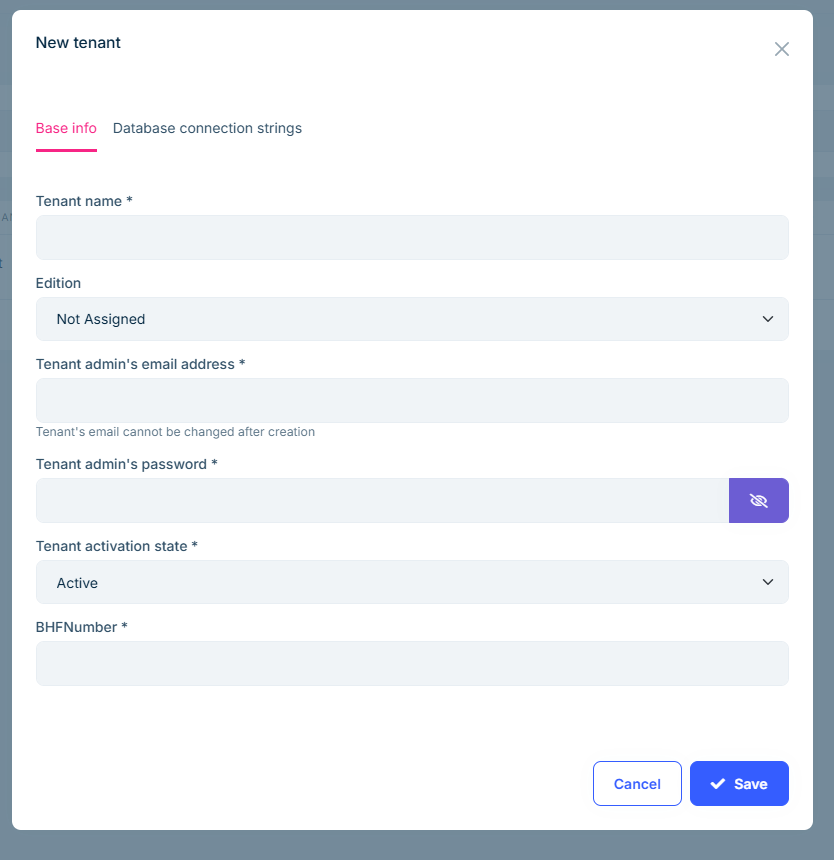
Hello, You can use Dynamic form extensions or Entity action extensions to extend the settings. I will provide examples for both approaches.
Create form-prop-contributors.ts file in the angular > src > app directory then add the following code to the file.
import { eSaasComponents, SaasCreateFormPropContributors } from '@volo/abp.ng.saas';
import { SaasTenantDto } from '@volo/abp.ng.saas/proxy';
import { ePropType, FormProp, FormPropList } from '@abp/ng.components/extensible';
import { Validators } from '@angular/forms';

const bhfNumberProp = new FormProp<SaasTenantDto>({
  type: ePropType.String,
  name: 'BHFNumber',
  displayName: 'BHFNumber',
  validators: () => [Validators.required],
});

export function tenantPropContributor(propList: FormPropList<SaasTenantDto>) {
  propList.addTail(bhfNumberProp);
}

export const saasCreateFormPropContributors: SaasCreateFormPropContributors = {
  // enum indicates the page to add contributors to
  [eSaasComponents.Tenants]: [
    tenantPropContributor,
    // You can add more contributors here
  ],
};

export const saasEditFormPropContributors = saasCreateFormPropContributors;
Import saasCreateFormPropContributors and saasEditFormPropContributors in your app-routing module and pass it to the static forLazy method of IdentityModule as seen below:
//other imports

import {
  saasCreateFormPropContributors,
  saasEditFormPropContributors,
} from './form-prop-contributors';

const routes: Routes = [
  // other routes
  {
    path: 'saas',
    loadChildren: () =>
      import('@volo/abp.ng.saas').then(m =>
        m.SaasModule.forLazy({
          createFormPropContributors: saasCreateFormPropContributors,
          editFormPropContributors: saasEditFormPropContributors,
        })
      ),
  },

  // other routes
];
After completing these steps BHFNumber field should appear in your tenant form
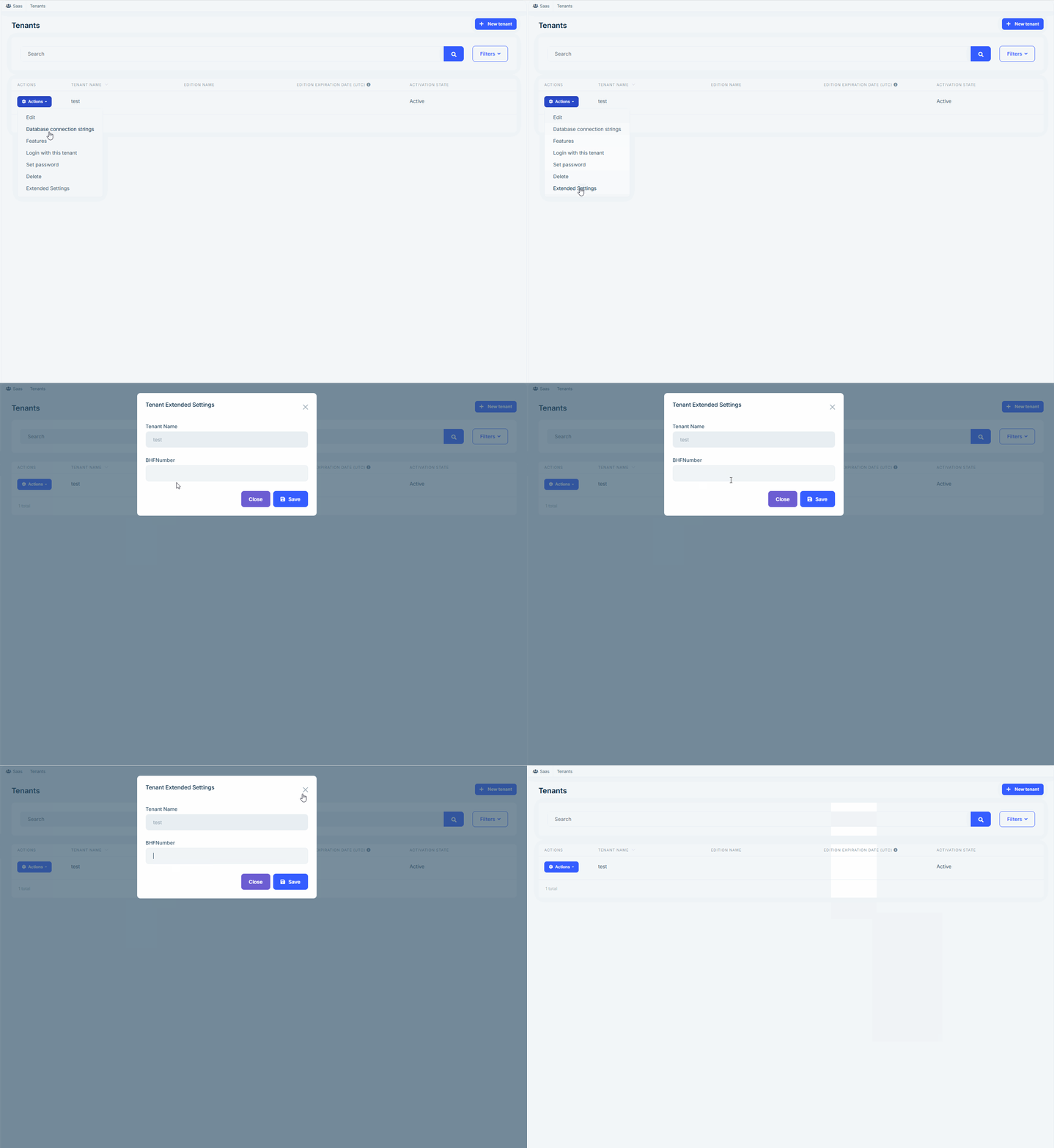
The Entity Action Extension system allows you to add a new action to an entity's action menu. In your project, we can add a new action to the tenant called Extended Settings. When the user clicks Extended Settings, a custom modal will open, allowing them to enter the BHFNumber value
The folder structure will be as follows;
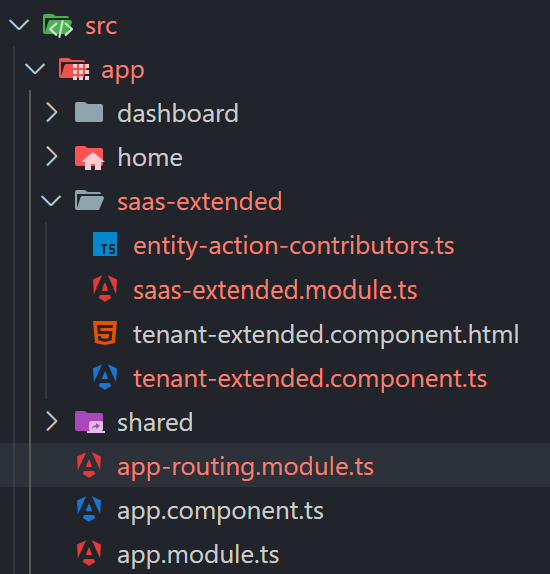
Create a new folder at the following path: src/app/saas-extended.
Add an entity-action-contributors.ts file inside the saas-extended folder
// src/app/saas-extended/entity-action-contributors.ts

import { eSaasComponents, SaasEntityActionContributors } from '@volo/abp.ng.saas';
import { SaasTenantDto } from '@volo/abp.ng.saas/proxy';
import { EntityAction, EntityActionList } from '@abp/ng.components/extensible';
import { TenantExtendedComponent } from './tenant-extended.component';

const tenantExtendedSettings = new EntityAction<SaasTenantDto>({
  text: 'Extended Settings',
  action: data => {
    const component = data.getInjected(TenantExtendedComponent);
    component.openTenantExtendedSettingsView(data.record);
  },
});

export function tenantExtendedSettingsContributor(actionList: EntityActionList<SaasTenantDto>) {
  actionList.addTail(tenantExtendedSettings);
}

export const saasEntityActionContributors: SaasEntityActionContributors = {
  // enum indicates the page to add contributors to
  [eSaasComponents.Tenants]: [
    tenantExtendedSettingsContributor,
    // You can add more contributors here
  ],
};
tenant-extended.component.ts
// src/app/saas-extended/tenant-extended.component.ts

import { SaasTenantDto } from '@volo/abp.ng.saas/proxy';
import { Component } from '@angular/core';

@Component({
  selector: 'app-tenant-extended',
  templateUrl: './tenant-extended.component.html',
})
export class TenantExtendedComponent {
  isTenantExtendedViewVisible: boolean;
  tenant: SaasTenantDto;
  BHFNumber: string;

  openTenantExtendedSettingsView(record: SaasTenantDto) {
    this.tenant = new Proxy(record, {
      get: (target, prop) => target[prop] || '—',
    });
    this.isTenantExtendedViewVisible = true;
  }

  save() {
    console.log('Saving BHFNumber:', this.BHFNumber);
  }
}
tenant-extended.component.html
<router-outlet></router-outlet>

<abp-modal [(visible)]="isTenantExtendedViewVisible">
  <ng-template #abpHeader>
    <h3>Tenant Extended Settings</h3>
  </ng-template>

  <ng-template #abpBody>
    <div class="abp-md-form">
      <div class="form-group">
        <label class="form-label">
          Tenant Name
          <span class="ms-1"></span>
        </label>
        <input type="text" [value]="tenant.name" disabled class="form-control"  />
      </div>
      <div class="form-group mt-3">
        <label class="form-label">
          BHFNumber
          <span class="ms-1"></span>
        </label>
        <input type="text" [(ngModel)]="BHFNumber" class="form-control"  />
      </div>
    </div>

  </ng-template>

  <ng-template #abpFooter>
    <button type="button" class="btn btn-secondary" abpClose>
      {{ 'AbpUi::Close' | abpLocalization }}
    </button>
    <button
    id="update-saas-tenantBasedConnStrSettings"
    class="btn btn-primary"
    type="button"
    [disabled]="loading"
    (click)="save()"
  >
  <i class="fa fa-save me-1"></i>
    {{ 'AbpUi::Save' | abpLocalization }}
  </button>
  </ng-template>
</abp-modal>
// src/app/saas-extended/saas-extended.module.ts

import { CoreModule } from '@abp/ng.core';
import { ThemeSharedModule } from '@abp/ng.theme.shared';
import { NgModule } from '@angular/core';
import { RouterModule } from '@angular/router';
import { saasEntityActionContributors } from './entity-action-contributors';
import { TenantExtendedComponent } from './tenant-extended.component';
import { SaasModule } from '@volo/abp.ng.saas';

@NgModule({
  imports: [
    CoreModule,
    ThemeSharedModule,
    RouterModule.forChild([
      {
        path: '',
        component: TenantExtendedComponent,
        children: [
          {
            path: '',
            loadChildren: () =>
              SaasModule.forLazy({
                entityActionContributors: saasEntityActionContributors,
              }),
          },
        ],
      },
    ]),
  ],
  declarations: [TenantExtendedComponent],
})
export class SaasExtendedModule {}
// src/app/app-routing.module.ts

const routes: Routes = [
  // other routes

  {
    path: 'saas',
    loadChildren: () =>
      import('./saas-extended/saas-extended.module')
        .then(m => m.SaasExtendedModule),
  },

  // other routes
];
Now, you should see the Extended Settings action under the actions menu. The final result will be as follows:
Let us know if we can assist you further
Hello, Thank you for reporting this issue! Based on your implementation, it looks like the image source ([src]) is not bound correctly, which may be causing the images not to display.
Suggested Fix
Please replace your <img> tag with the following:
<img [src]="'/image/' + row.photo" width="50" height="50" alt="Photo" />
Additional Recommendations
if row.photo already contains a full URL, use:
<img [src]="row.photo" width="50" height="50" alt="Photo" />
Let us know if we can assist you further









