Hello, I wasn’t able to reproduce the redirection issue on my local environment, but as you mentioned, the refreshAppState() call does seem unnecessary in this context, especially since the updated information doesn’t affect roles or permissions. Removing that line makes sense and is a valid solution. Best regards
Hello, Thanks for reaching out Unfortunately, there is currently no programmatic way to remove only specific tabs like "Two Factor" or "Captcha" in the ABP Angular UI. However, if you need to fully customize or remove these tabs, you can follow ABP’s Component Replacement approach to override the entire module responsible for them. Please refer to the official documentation for detailed guidance: https://abp.io/docs/latest/framework/ui/angular/component-replacement?_redirected=B8ABF606AA1BDF5C629883DF1061649A
Best regards
Hello, and thanks for reporting this issue.
Based on the logs from your Administration Service, it appears that the service is encountering both a CORS policy error and a missing connection string for the Identity Service.
Could you try making the following changes to see if it resolves the issue?
Missing Connection String It appears that the IdentityService connection string is not defined in your Administration Service configuration. Please make sure to define a valid connection string for the Identity Service under the ConnectionStrings section in your appsettings.json.
CORS Configuration Could you please add UI domain (http://localhost:4200) into the CorsOrigins configuration, like so:
"CorsOrigins": "http://localhost:4200,http://localhost:44368"
After making these changes, restart the service and see if the issue still occurs. Let me know the result
Hello, Thank you for reporting the issue and providing such detailed context. I'll look into the problem and try to reproduce it on my end. I'll get back to you with more information or a possible fix as soon as possible.
Hello,
Thank you for your contribution. Your pull request has been approved and will be included in the v9.3 release. Your other pr which is related to this issue, will be reviewed as soon as possible and is also planned for inclusion in v9.3.
Best regards
Hello,
At the moment, placing the checkbox column before the actions column is not supported. However, we appreciate your feedback and will consider this for future enhancements.
Best regards
Hello,
Sorry for late response.
The changes to CustomMultiSelectComponent depend on the specific type of component you need. What I mean is, you can create a custom component tailored to your needs and render it accordingly.
In the following example, I’ll demonstrate how to create a custom component and display it inside a table row.
Select component
import { Component } from '@angular/core';

@Component({
  selector: 'custom-select',
  template: `
    <div class="form-check mb-2">
      <input type="checkbox" id="custom-select" name="custom-select" class="form-check-input" />
    </div>
  `,
  standalone: false,
})
export class CustomSelectComponent {
  constructor() {}
}
Entity props definition
  {
    type: ePropType.String,
    name: 'select',
    columnWidth: 100,
    component: CustomSelectComponent,
  },
Result
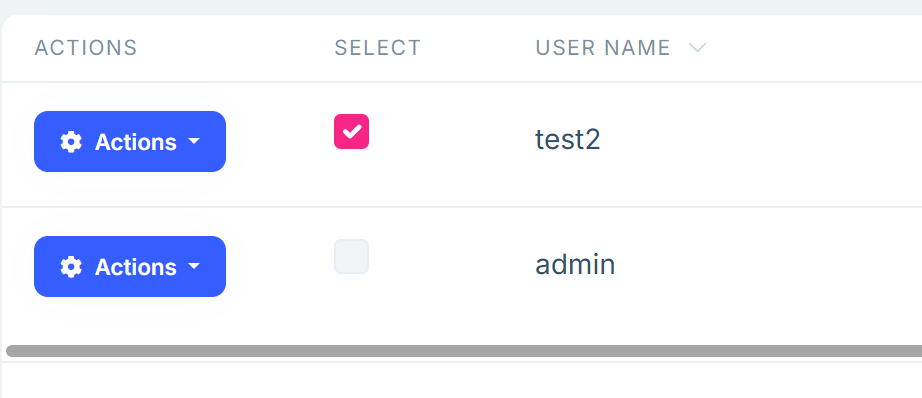
Let me know if this solution is suitable for your case.
Also, your ticket will be refunded.
Best regards
Hello
Thanks for reporting this issue. It seems to be a bug related to how localization keys are parsed differently between form fields and table headers. Once we have a fix in place, I’ll update you right away. Also, I’ll refund your ticket
Best regards
Hello,
You're right the abp-extensible-table doesn't directly support multi-select out of the box for a column. However, you can achieve this by passing a custom component to the component property in your entity props. Here's a basic example:
{
  type: ePropType.String,
  name: 'select',
  displayName: '::Select',
  columnWidth: 250,
  component: CustomMultiSelectComponent,
}
If you'd like, feel free to share your current column setup or sample code so we can help you further. Also, you can refer to the official documentation on table column extensions here: https://abp.io/docs/latest/framework/ui/angular/data-table-column-extensions
Best regards
Hello,
Thank you for reporting this issue. Could you please share the content of your _TenantsComponent.ts file?









