Hello! We are trying to hide the username field from the Create and Edit User forms and use the email address for the username instead.
I have successfully removed the username field from the Angular UI and moved the email field to the top like this:
export function removeUserNameContributor(
  propList: FormPropList<IdentityUserDto>
) {
  propList.dropByValue(
    'userName',
    (prop, text) => prop.name === text
  )
  let emailPropIndex = propList.findIndex(p => p.value.name == 'email');
  propList.addHead(propList.get(emailPropIndex).value);
  propList.dropByIndex(emailPropIndex + 1);
}

export const identityEntityCreateFormPropContributors: IdentityCreateFormPropContributors = {
  [eIdentityComponents.Users]: [
    removeUserNameContributor
  ]
}

export const identityEntityEditFormPropContributors: IdentityEditFormPropContributors = {
  [eIdentityComponents.Users]: [
    removeUserNameContributor
  ]
}

{
    path: 'identity',
    loadChildren: () => {
      import('./identity/identity.module').then(m => m.IdentityOverrideModule)
      return import('@volo/abp.ng.identity').then((m) => m.IdentityModule.forLazy({
        createFormPropContributors: identityEntityCreateFormPropContributors,
        editFormPropContributors: identityEntityEditFormPropContributors,
      }))
    }
},
I've also overwritten the CreateAsync method to set the username to the email address:
[Authorize(IdentityPermissions.Users.Create)]
public override async Task<IdentityUserDto> CreateAsync(IdentityUserCreateDto input)
{
    var user = new Volo.Abp.Identity.IdentityUser(
        GuidGenerator.Create(),
        input.Email,
        input.Email,
        CurrentTenant.Id
    );

    input.MapExtraPropertiesTo(user);

    (await UserManager.CreateAsync(user, input.Password)).CheckErrors();

    ...
}
But I am unable to remove the Required attribute from UserName on IdentityUserCreateDto so I get the following error from the form:
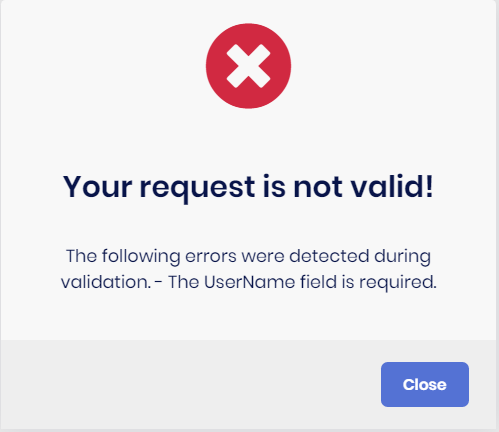
In my ...DtoExtensions.cs I have tried:
ObjectExtensionManager.Instance
.AddOrUpdateProperty<string > (
    new[]
    {
        typeof(IdentityUserCreateDto),
    },
    "UserName",
    options =>
    {
        options.Attributes.Clear();
        options.Validators.Clear();
    }
);
and
ObjectExtensionManager.Instance
.AddOrUpdate<IdentityUserCreateDto>(objConfig =>
{
    objConfig.AddOrUpdateProperty<string>("UserName", propertyConfig =>
    {
        propertyConfig.Attributes.Clear();
        propertyConfig.Validators.Clear();
    });
});
and have tried substituting IdentityUserCreateDto with IdentityUserCreateOrUpdateDtoBase but none of these solutions have removed the Required attribute.
Any ideas would be appreciated. Thanks!
Hello! A while back we disabled the Organization Unit functionality in part by disabling the permissions:
context.GetPermissionOrNull(IdentityPermissions.OrganizationUnits.Default).IsEnabled = false;
context.GetPermissionOrNull(IdentityPermissions.OrganizationUnits.ManageOU).IsEnabled = false;
context.GetPermissionOrNull(IdentityPermissions.OrganizationUnits.ManageRoles).IsEnabled = false;
context.GetPermissionOrNull(IdentityPermissions.OrganizationUnits.ManageUsers).IsEnabled = false;
After upgrading from 4.4.4 to 5.0.1, the new filters on the user table throw a Volo.Abp.Authorization.AbpAuthorizationException when trying to get the organization units from Volo.Abp.Identity.OrganizationUnitController.GetListAsync. Is there a way to disable these new filters on the user table or another workaround to solve this problem within version 5.0.1?
Thanks!
Hello. We have removed the Languages and Language Texts features from the tenants by changing the MultiTenancySides to Host on these permissions. However, we'd like to use the UI in the host to edit the language texts and have these changes apply to all tenants. Currently, it seems changing language texts in the host only changes them in for users logged into the host. Is there a way to override so all tenants will use language texts defined in the host?
Thanks!
Hello. For Angular projects using authorization code flow, clicking the logo on the login, logout, and reset password pages by default redirects to the swagger page - i.e. href="/". Is there a way to easily override this link without overriding all of these pages? I currently have only replaced the logo from wwwroot/images/logo and the AppName from a custom BrandingProvider.
Thanks!
Hello. This is a follow-up from a question a while back about removing functionality from the UI and API: https://support.abp.io/QA/Questions/255
By disabling the permissions to Organization Units and Claim Types we were able to remove these elements from the navigation:
//Remove the Organization Unit functionality by overriding permissions and setting it to not enabled/granted
context.GetPermissionOrNull(IdentityPermissions.OrganizationUnits.Default).IsEnabled = false;
context.GetPermissionOrNull(IdentityPermissions.OrganizationUnits.ManageOU).IsEnabled = false;
context.GetPermissionOrNull(IdentityPermissions.OrganizationUnits.ManageRoles).IsEnabled = false;
context.GetPermissionOrNull(IdentityPermissions.OrganizationUnits.ManageUsers).IsEnabled = false;

//Remove the Claim Types functionality by overriding permissions and setting it to not enabled/granted
context.GetPermissionOrNull(IdentityPermissions.ClaimTypes.Default).IsEnabled = false;
context.GetPermissionOrNull(IdentityPermissions.ClaimTypes.Create).IsEnabled = false;
context.GetPermissionOrNull(IdentityPermissions.ClaimTypes.Delete).IsEnabled = false;
context.GetPermissionOrNull(IdentityPermissions.ClaimTypes.Update).IsEnabled = false;
However, this did not stop these elements from appearing in other areas in the app:
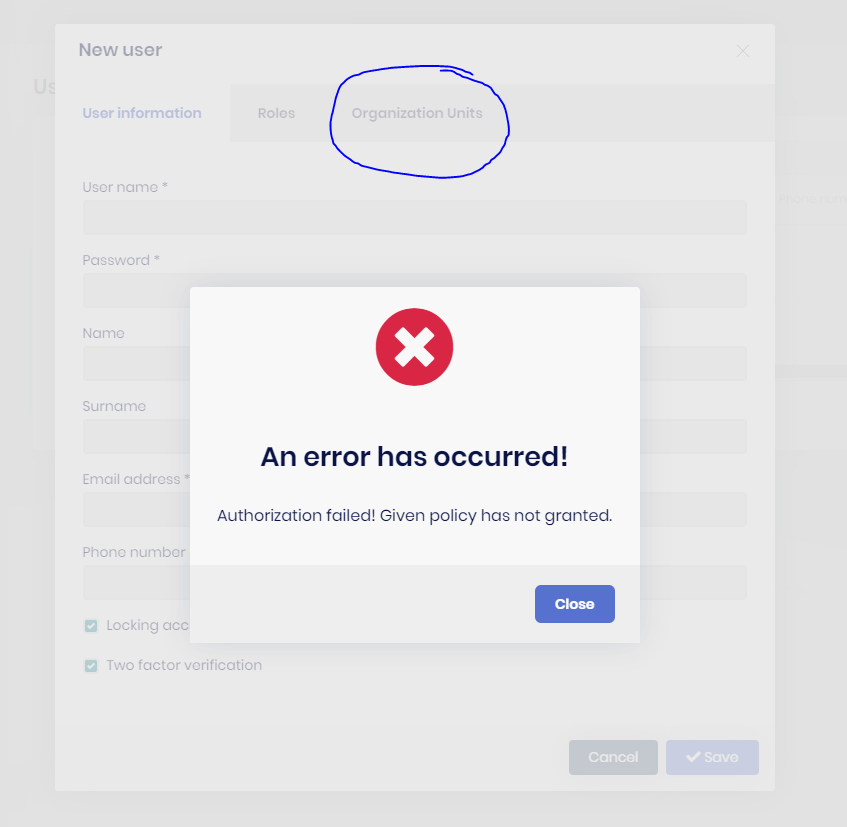
Organization Units tab still appears on Create/Edit User: When the modal opens to create or edit a user, the organization units tab is still present, but because the permission is disabled, it throws an error.
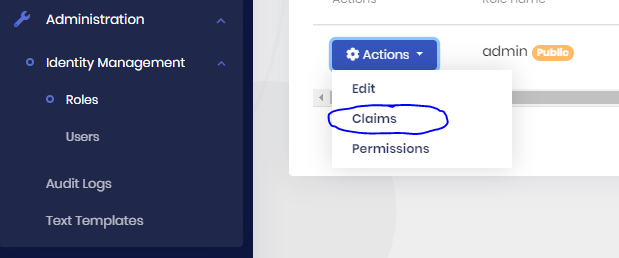
Claims still appears in User and Role action dropdown: On the user and role tables, a Claims option is still present, and clicking will still get claim-types and claims for that user or role successfully and allows adding or updating claims with no errors. It seems that is because these endpoints check the IdentityPermissions.Roles/Users.Default/Update permissions and not any related to IdentityPermissions.ClaimTypes.
Am I correct in assuming that these elements should be hidden if these permissions are disabled? If so, could these extra permission checks be added to the Identity Module to prevent this unexpected behavior? If not, what would be the best way for me to manually hide these elements?
Thanks for the help, Jack