Transient did the job. Thanks.
Well, after adding this fix and some testing I'm experiencing weird behaviour.
When I open edit dialog first time, everything works as it should. But next time it crashes with this error while opening:
Error: System.InvalidOperationException: The render handle is already set. Cannot initialize a ComponentBase more than once.
   at Microsoft.AspNetCore.Components.ComponentBase.Microsoft.AspNetCore.Components.IComponent.Attach(RenderHandle renderHandle)
   at Microsoft.AspNetCore.Components.RenderTree.Renderer.InstantiateChildComponentOnFrame(RenderTreeFrame[] frames, Int32 frameIndex, Int32 parentComponentId)
   at Microsoft.AspNetCore.Components.RenderTree.RenderTreeDiffBuilder.InitializeNewSubtree(DiffContext& diffContext, Int32 frameIndex)
   at Microsoft.AspNetCore.Components.RenderTree.RenderTreeDiffBuilder.InsertNewFrame(DiffContext& diffContext, Int32 newFrameIndex)
   at Microsoft.AspNetCore.Components.RenderTree.RenderTreeDiffBuilder.AppendDiffEntriesForRange(DiffContext& diffContext, Int32 oldStartIndex, Int32 oldEndIndexExcl, Int32 newStartIndex, Int32 newEndIndexExcl)
   at Microsoft.AspNetCore.Components.Rendering.ComponentState.RenderIntoBatch(RenderBatchBuilder batchBuilder, RenderFragment renderFragment, Exception& renderFragmentException)
   at Microsoft.AspNetCore.Components.RenderTree.Renderer.ProcessRenderQueue(users)
That works, thank you.
Do you have any estimation when this will be fixed in framework itself?
Thanks.
Hi,
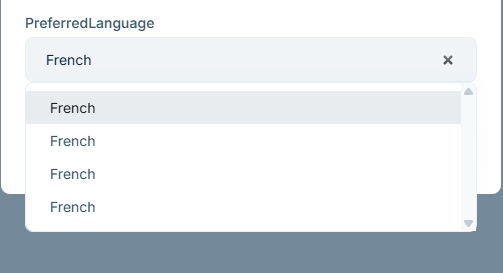
I've create dropdown extra property for IdentiyUser. When I open the update dialog for user and some option is already selected for this extra property, this option is listed in dropdown 4 times (I would expect one). After clearing value, options are displayed as they should.
Create a new ABP Blazor Web App
Create extra property for IdentityUser
ObjectExtensionManager.Instance.Modules()
    .ConfigureIdentity(identity =>
    {
        identity.ConfigureUser(user =>
        {
            user.AddOrUpdateProperty<string>(
                "PreferredLanguage",
                property =>
                {
                    property.UI.Lookup.Url = "/api/app/language/lookup";
                    property.UI.Lookup.DisplayPropertyName = "displayName";
                    property.UI.Lookup.ValuePropertyName = "id";
                }
            );
        });
    });
Controller method
[HttpGet]
 [Route("lookup")]
 public async Task<ListResultDto<LookupDto<string>>> GetLookupAsync()
 {
     var languages = await _languageProvider.GetLanguagesAsync();

     var items = languages
         .Select(l => new LookupDto<string>
         {
             Id = l.CultureName,
             DisplayName = l.DisplayName
         })
         .ToList();

     return new ListResultDto<LookupDto<string>>(items);
 }
Now set some value for this extra property. After that open the update dialog and click on dropdown. Four identical options will be listed in dropdown.
That works, thanks. :)
Will there be some fix with dynamic proxies in template itself?
Hi,
I would like to report that something is not quite right with the solution template for Blazor Web App. I've created Blazor WebApp (tiered) with sample CRUD page. After that, I started application and went to Book page. Initially everything works fine, but when rendermode is InteractiveWebassembly and list of books is requested, exception is occurring every time. It seems like something is not right with the remote service configuration out of the box. My other team members are experiencing the exact same behaviour, so it should be easy to reproduce this problem on your side as well.
Thanks in advance.
Volo.Abp.AspNetCore.Components.Web.ExceptionHandling.UserExceptionInformer[0]
Could not find remote action for method: System.Threading.Tasks.Task`1[Volo.Abp.Application.Dtos.PagedResultDto`1[AbpSolution10.Books.BookDto]] GetListAsync(Volo.Abp.Application.Dtos.PagedAndSortedResultRequestDto) on the URL: https://localhost:44331
Volo.Abp.AbpException: Could not find remote action for method: System.Threading.Tasks.Task`1[Volo.Abp.Application.Dtos.PagedResultDto`1[AbpSolution10.Books.BookDto]] GetListAsync(Volo.Abp.Application.Dtos.PagedAndSortedResultRequestDto) on the URL: https://localhost:44331
at Volo.Abp.Http.Client.DynamicProxying.ApiDescriptionFinder.FindActionAsync(HttpClient client, String baseUrl, Type serviceType, MethodInfo method)
at Volo.Abp.Http.Client.DynamicProxying.DynamicHttpProxyInterceptor`1.<GetActionApiDescriptionModel>d__25[[AbpSolution10.Books.IBookAppService, AbpSolution10.Application.Contracts, Version=1.0.0.0, Culture=neutral, PublicKeyToken=null]].MoveNext()
at Volo.Abp.Http.Client.DynamicProxying.DynamicHttpProxyInterceptor`1.<InterceptAsync>d__24[[AbpSolution10.Books.IBookAppService, AbpSolution10.Application.Contracts, Version=1.0.0.0, Culture=neutral, PublicKeyToken=null]].MoveNext()
at Volo.Abp.Castle.DynamicProxy.CastleAsyncAbpInterceptorAdapter`1.<InterceptAsync>d__3`1[[Volo.Abp.Http.Client.DynamicProxying.DynamicHttpProxyInterceptor`1[[AbpSolution10.Books.IBookAppService, AbpSolution10.Application.Contracts, Version=1.0.0.0, Culture=neutral, PublicKeyToken=null]], Volo.Abp.Http.Client, Version=9.3.4.0, Culture=neutral, PublicKeyToken=null],[Volo.Abp.Application.Dtos.PagedResultDto`1[[AbpSolution10.Books.BookDto, AbpSolution10.Application.Contracts, Version=1.0.0.0, Culture=neutral, PublicKeyToken=null]], Volo.Abp.Ddd.Application.Contracts, Version=9.3.4.0, Culture=neutral, PublicKeyToken=null]].MoveNext()
at Castle.DynamicProxy.AsyncInterceptorBase.<ProceedAsynchronous>d__14`1[[Volo.Abp.Application.Dtos.PagedResultDto`1[[AbpSolution10.Books.BookDto, AbpSolution10.Application.Contracts, Version=1.0.0.0, Culture=neutral, PublicKeyToken=null]], Volo.Abp.Ddd.Application.Contracts, Version=9.3.4.0, Culture=neutral, PublicKeyToken=null]].MoveNext()
at Volo.Abp.Castle.DynamicProxy.CastleAbpMethodInvocationAdapterWithReturnValue`1.<ProceedAsync>d__7[[Volo.Abp.Application.Dtos.PagedResultDto`1[[AbpSolution10.Books.BookDto, AbpSolution10.Application.Contracts, Version=1.0.0.0, Culture=neutral, PublicKeyToken=null]], Volo.Abp.Ddd.Application.Contracts, Version=9.3.4.0, Culture=neutral, PublicKeyToken=null]].MoveNext()
at Volo.Abp.Validation.ValidationInterceptor.InterceptAsync(IAbpMethodInvocation invocation)
at Volo.Abp.Castle.DynamicProxy.CastleAsyncAbpInterceptorAdapter`1.<InterceptAsync>d__3`1[[Volo.Abp.Validation.ValidationInterceptor, Volo.Abp.Validation, Version=9.3.4.0, Culture=neutral, PublicKeyToken=null],[Volo.Abp.Application.Dtos.PagedResultDto`1[[AbpSolution10.Books.BookDto, AbpSolution10.Application.Contracts, Version=1.0.0.0, Culture=neutral, PublicKeyToken=null]], Volo.Abp.Ddd.Application.Contracts, Version=9.3.4.0, Culture=neutral, PublicKeyToken=null]].MoveNext()
at Volo.Abp.BlazoriseUI.AbpCrudPageBase`10.<GetEntitiesAsync>d__70[[AbpSolution10.Books.IBookAppService, AbpSolution10.Application.Contracts, Version=1.0.0.0, Culture=neutral, PublicKeyToken=null],[AbpSolution10.Books.BookDto, AbpSolution10.Application.Contracts, Version=1.0.0.0, Culture=neutral, PublicKeyToken=null],[AbpSolution10.Books.BookDto, AbpSolution10.Application.Contracts, Version=1.0.0.0, Culture=neutral, PublicKeyToken=null],[System.Guid, System.Private.CoreLib, Version=9.0.0.0, Culture=neutral, PublicKeyToken=7cec85d7bea7798e],[Volo.Abp.Application.Dtos.PagedAndSortedResultRequestDto, Volo.Abp.Ddd.Application.Contracts, Version=9.3.4.0, Culture=neutral, PublicKeyToken=null],[AbpSolution10.Books.CreateUpdateBookDto, AbpSolution10.Application.Contracts, Version=1.0.0.0, Culture=neutral, PublicKeyToken=null],[AbpSolution10.Books.CreateUpdateBookDto, AbpSolution10.Application.Contracts, Version=1.0.0.0, Culture=neutral, PublicKeyToken=null],[AbpSolution10.Books.BookDto, AbpSolution10.Application.Contracts, Version=1.0.0.0, Culture=neutral, PublicKeyToken=null],[AbpSolution10.Books.CreateUpdateBookDto, AbpSolution10.Application.Contracts, Version=1.0.0.0, Culture=neutral, PublicKeyToken=null],[AbpSolution10.Books.CreateUpdateBookDto, AbpSolution10.Application.Contracts, Version=1.0.0.0, Culture=neutral, PublicKeyToken=null]].MoveNext()`
Hi,
I would like to report that some translations for the Slovak language in Account Pro module are not corrent. Instead of Slovak, the strings seem to be in Russian or a similar language.
Here are the specific strings affected: "ShowPassword": "Показать пароль", => should be something like "Zobraziť heslo" "HidePassword": "скрыть пароль", => should be something like "Skryť heslo" "CapsLockOn": "Включен верхний регистр", => should be something like "Caps lock zapnutý" (although this one is a bit tricky to phrase naturally in Slovak for me).
Thank you in advance.









