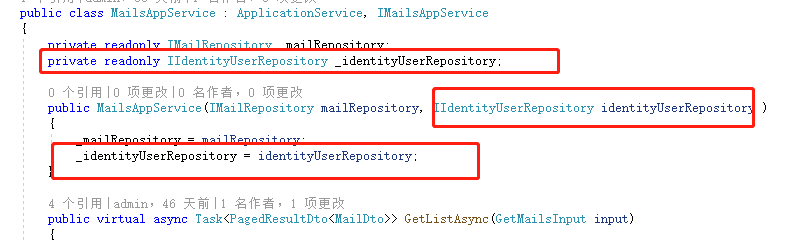
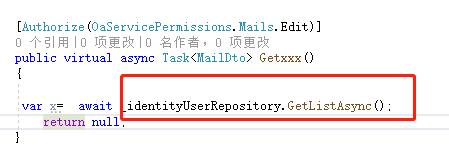
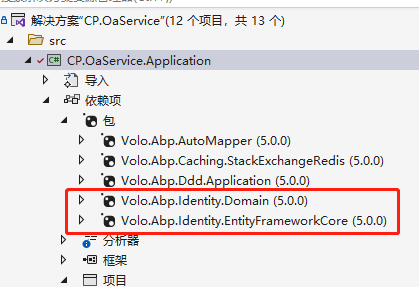
 have added the Volo.Abp.Identity.EntityFrameworkCore.dll
but still, get the same error.
do I need to add any code?
have added the Volo.Abp.Identity.EntityFrameworkCore.dll
but still, get the same error.
do I need to add any code?
[oaservice_a9a502b8-e]: [17:10:31 ERR] ---------- RemoteServiceErrorInfo ----------
[oaservice_a9a502b8-e]: {
[oaservice_a9a502b8-e]: "code": null,
[oaservice_a9a502b8-e]: "message": "对不起,在处理你的请求期间,产生了一个服务器内部错误!",
[oaservice_a9a502b8-e]: "details": null,
[oaservice_a9a502b8-e]: "data": {
[oaservice_a9a502b8-e]: "ActivatorChain": "CP.OaService.Controllers.Mails.MailController -> CP.OaService.Mails.MailsAppService"
[oaservice_a9a502b8-e]: },
[oaservice_a9a502b8-e]: "validationErrors": null
[oaservice_a9a502b8-e]: }
[oaservice_a9a502b8-e]:
[oaservice_a9a502b8-e]: [17:10:31 ERR] An exception was thrown while activating CP.OaService.Controllers.Mails.MailController -> CP.OaService.Mails.MailsAppService.
[oaservice_a9a502b8-e]: Autofac.Core.DependencyResolutionException: An exception was thrown while activating CP.OaService.Controllers.Mails.MailController -> CP.OaService.Mails.MailsAppService.
[oaservice_a9a502b8-e]: ---> Autofac.Core.DependencyResolutionException: None of the constructors found with 'Autofac.Core.Activators.Reflection.DefaultConstructorFinder' on type 'CP.OaService.Mails.MailsAppService' can be invoked with the available services and parameters:
[oaservice_a9a502b8-e]: Cannot resolve parameter 'Volo.Abp.Identity.IIdentityUserRepository identityUserRepository' of constructor 'Void .ctor(CP.OaService.Mails.IMailRepository, Volo.Abp.Identity.IIdentityUserRepository)'.
[oaservice_a9a502b8-e]: at Autofac.Core.Activators.Reflection.ReflectionActivator.GetAllBindings(ConstructorBinder[] availableConstructors, IComponentContext context, IEnumerable1 parameters) [oaservice_a9a502b8-e]: at Autofac.Core.Activators.Reflection.ReflectionActivator.ActivateInstance(IComponentContext context, IEnumerable1 parameters)
[oaservice_a9a502b8-e]: at Autofac.Core.Activators.Reflection.ReflectionActivator.<ConfigurePipeline>b__11_0(ResolveRequestContext ctxt, Action1 next) [oaservice_a9a502b8-e]: at Autofac.Core.Resolving.Middleware.DisposalTrackingMiddleware.Execute(ResolveRequestContext context, Action1 next)
[oaservice_a9a502b8-e]: at Autofac.Builder.RegistrationBuilder3.<>c__DisplayClass41_0.<PropertiesAutowired>b__0(ResolveRequestContext ctxt, Action1 next)
[oaservice_a9a502b8-e]: at Autofac.Extras.DynamicProxy.RegistrationExtensions.<>c__DisplayClass8_03.<EnableInterfaceInterceptors>b__1(ResolveRequestContext ctxt, Action1 next)
[oaservice_a9a502b8-e]: at Autofac.Core.Resolving.Middleware.ActivatorErrorHandlingMiddleware.Execute(ResolveRequestContext context, Action1 next) [oaservice_a9a502b8-e]: --- End of inner exception stack trace --- [oaservice_a9a502b8-e]: at Autofac.Core.Resolving.Middleware.ActivatorErrorHandlingMiddleware.Execute(ResolveRequestContext context, Action1 next)
[oaservice_a9a502b8-e]: at Autofac.Core.Resolving.Middleware.SharingMiddleware.Execute(ResolveRequestContext context, Action1 next) [oaservice_a9a502b8-e]: at Autofac.Core.Resolving.Middleware.CircularDependencyDetectorMiddleware.Execute(ResolveRequestContext context, Action1 next)
[oaservice_a9a502b8-e]: at Autofac.Core.Resolving.ResolveOperation.GetOrCreateInstance(ISharingLifetimeScope currentOperationScope, ResolveRequest request)
[oaservice_a9a502b8-e]: at Autofac.Core.Resolving.ResolveOperation.ExecuteOperation(ResolveRequest request)
[oaservice_a9a502b8-e]: at Autofac.ResolutionExtensions.TryResolveService(IComponentContext context, Service service, IEnumerable1 parameters, Object& instance) [oaservice_a9a502b8-e]: at Autofac.ResolutionExtensions.ResolveService(IComponentContext context, Service service, IEnumerable1 parameters)
[oaservice_a9a502b8-e]: at Microsoft.AspNetCore.Mvc.Controllers.ServiceBasedControllerActivator.Create(ControllerContext actionContext)
[oaservice_a9a502b8-e]: at Microsoft.AspNetCore.Mvc.Controllers.ControllerFactoryProvider.<>c__DisplayClass6_0.<CreateControllerFactory>g__CreateController|0(ControllerContext controllerContext)
[oaservice_a9a502b8-e]: at Microsoft.AspNetCore.Mvc.Infrastructure.ControllerActionInvoker.Next(State& next, Scope& scope, Object& state, Boolean& isCompleted)
[oaservice_a9a502b8-e]: at Microsoft.AspNetCore.Mvc.Infrastructure.ControllerActionInvoker.InvokeInnerFilterAsync()
[oaservice_a9a502b8-e]: --- End of stack trace from previous location ---
[oaservice_a9a502b8-e]: at Microsoft.AspNetCore.Mvc.Infrastructure.ResourceInvoker.<InvokeNextExceptionFilterAsync>g__Awaited|26_0(ResourceInvoker invoker, Task lastTask, State next, Scope scope, Object state, Boolean isCompleted)
I added the Volo.Abp.Identity.Domain to my application project. get error after call the method/ what do I miss?
[oaservice_6dfbae7e-7]: [16:30:21 ERR] ---------- RemoteServiceErrorInfo ----------
[oaservice_6dfbae7e-7]: {
[oaservice_6dfbae7e-7]: "code": null,
[oaservice_6dfbae7e-7]: "message": "对不起,在处理你的请求期间,产生了一个服务器内部错误!",
[oaservice_6dfbae7e-7]: "details": null,
[oaservice_6dfbae7e-7]: "data": {
[oaservice_6dfbae7e-7]: "ActivatorChain": "CP.OaService.Controllers.Mails.MailController -> CP.OaService.Mails.MailsAppService"
[oaservice_6dfbae7e-7]: },
[oaservice_6dfbae7e-7]: "validationErrors": null
[oaservice_6dfbae7e-7]: }
[oaservice_6dfbae7e-7]:
[oaservice_6dfbae7e-7]: [16:30:21 ERR] An exception was thrown while activating CP.OaService.Controllers.Mails.MailController -> CP.OaService.Mails.MailsAppService.
[oaservice_6dfbae7e-7]: Autofac.Core.DependencyResolutionException: An exception was thrown while activating CP.OaService.Controllers.Mails.MailController -> CP.OaService.Mails.MailsAppService.
[oaservice_6dfbae7e-7]: ---> Autofac.Core.DependencyResolutionException: None of the constructors found with 'Autofac.Core.Activators.Reflection.DefaultConstructorFinder' on type 'CP.OaService.Mails.MailsAppService' can be invoked with the available services and parameters:
[oaservice_6dfbae7e-7]: Cannot resolve parameter 'Volo.Abp.Identity.IIdentityUserRepository identityUserRepository' of constructor 'Void .ctor(CP.OaService.Mails.IMailRepository, Volo.Abp.Identity.IIdentityUserRepository)'.
[oaservice_6dfbae7e-7]: at Autofac.Core.Activators.Reflection.ReflectionActivator.GetAllBindings(ConstructorBinder[] availableConstructors, IComponentContext context, IEnumerable1 parameters) [oaservice_6dfbae7e-7]: at Autofac.Core.Activators.Reflection.ReflectionActivator.ActivateInstance(IComponentContext context, IEnumerable1 parameters)
[oaservice_6dfbae7e-7]: at Autofac.Core.Activators.Reflection.ReflectionActivator.<ConfigurePipeline>b__11_0(ResolveRequestContext ctxt, Action1 next) [oaservice_6dfbae7e-7]: at Autofac.Core.Resolving.Middleware.DisposalTrackingMiddleware.Execute(ResolveRequestContext context, Action1 next)
[oaservice_6dfbae7e-7]: at Autofac.Builder.RegistrationBuilder3.<>c__DisplayClass41_0.<PropertiesAutowired>b__0(ResolveRequestContext ctxt, Action1 next)
[oaservice_6dfbae7e-7]: at Autofac.Extras.DynamicProxy.RegistrationExtensions.<>c__DisplayClass8_03.<EnableInterfaceInterceptors>b__1(ResolveRequestContext ctxt, Action1 next)
[oaservice_6dfbae7e-7]: at Autofac.Core.Resolving.Middleware.ActivatorErrorHandlingMiddleware.Execute(ResolveRequestContext context, Action1 next) [oaservice_6dfbae7e-7]: --- End of inner exception stack trace --- [oaservice_6dfbae7e-7]: at Autofac.Core.Resolving.Middleware.ActivatorErrorHandlingMiddleware.Execute(ResolveRequestContext context, Action1 next)
[oaservice_6dfbae7e-7]: at Autofac.Core.Resolving.Middleware.SharingMiddleware.Execute(ResolveRequestContext context, Action1 next) [oaservice_6dfbae7e-7]: at Autofac.Core.Resolving.Middleware.CircularDependencyDetectorMiddleware.Execute(ResolveRequestContext context, Action1 next)
[oaservice_6dfbae7e-7]: at Autofac.Core.Resolving.ResolveOperation.GetOrCreateInstance(ISharingLifetimeScope currentOperationScope, ResolveRequest request)
[oaservice_6dfbae7e-7]: at Autofac.Core.Resolving.ResolveOperation.ExecuteOperation(ResolveRequest request)
[oaservice_6dfbae7e-7]: at Autofac.ResolutionExtensions.TryResolveService(IComponentContext context, Service service, IEnumerable1 parameters, Object& instance) [oaservice_6dfbae7e-7]: at Autofac.ResolutionExtensions.ResolveService(IComponentContext context, Service service, IEnumerable1 parameters)
[oaservice_6dfbae7e-7]: at Microsoft.AspNetCore.Mvc.Controllers.ServiceBasedControllerActivator.Create(ControllerContext actionContext)
[oaservice_6dfbae7e-7]: at Microsoft.AspNetCore.Mvc.Controllers.ControllerFactoryProvider.<>c__DisplayClass6_0.<CreateControllerFactory>g__CreateController|0(ControllerContext controllerContext)
[oaservice_6dfbae7e-7]: at Microsoft.AspNetCore.Mvc.Infrastructure.ControllerActionInvoker.Next(State& next, Scope& scope, Object& state, Boolean& isCompleted)
[oaservice_6dfbae7e-7]: at Microsoft.AspNetCore.Mvc.Infrastructure.ControllerActionInvoker.InvokeInnerFilterAsync()
[oaservice_6dfbae7e-7]: --- End of stack trace from previous location ---
[oaservice_6dfbae7e-7]: at Microsoft.AspNetCore.Mvc.Infrastructure.ResourceInvoker.<InvokeNextExceptionFilterAsync>g__Awaited|26_0(ResourceInvoker invoker, Task lastTask, State next, Scope scope, Object state, Boolean isCompleted)
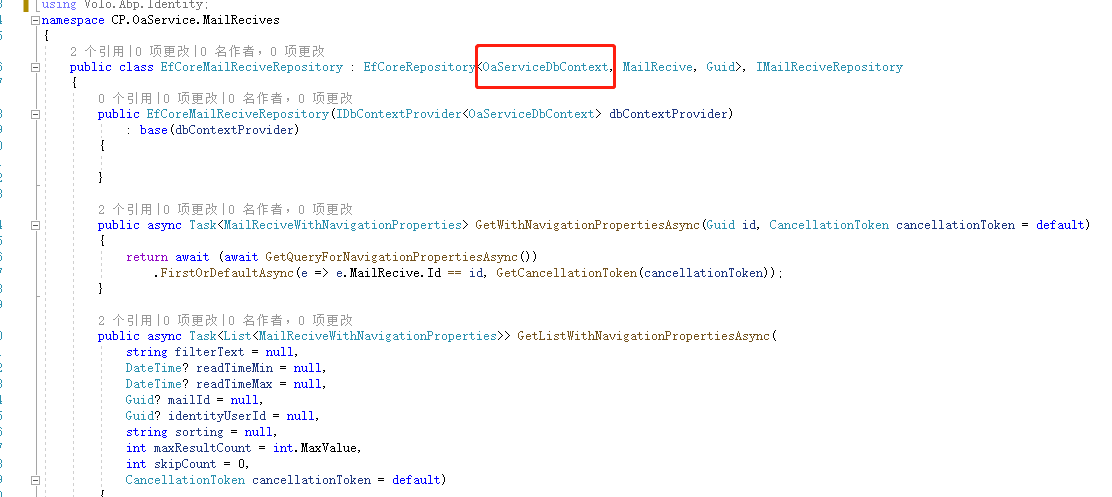
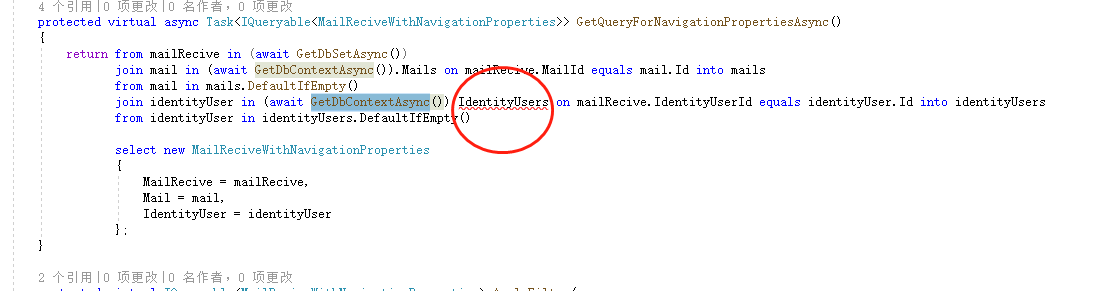 IdentityUsers doesn't exist in the current dbcontext.
Hello I want to get all the User Role Org entities from IdentityDbContext in my .*EntityFrameworkCore project How can I achieve that? thanks~ or are there User Role Org cache in Redis ?
In ABP SUITE "Server.Entity.Entity.txt" TEMPLATE
   public %%entity-name%%(%%primary-key%% id, %**%constructor-parameters%%**)
        {
            Id = id;
%%constructor-parameters-with-values%%
        }
IF Entity has NavigationProperties and optional parameters, NavigationPropertie's primary key is at the end of parameters
then get this error."CS1737: Optional parameters must appear after all required parameters."
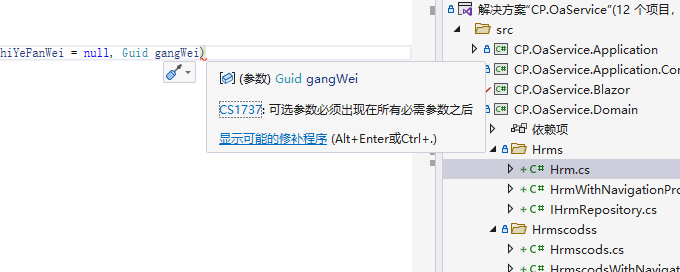
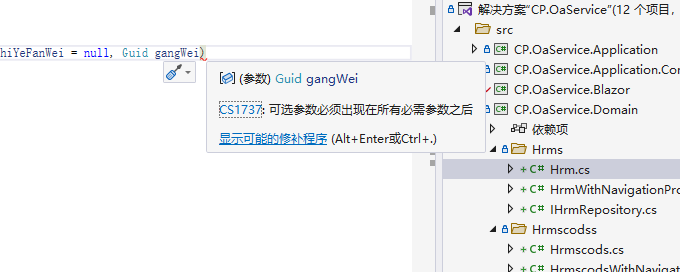
abp suite
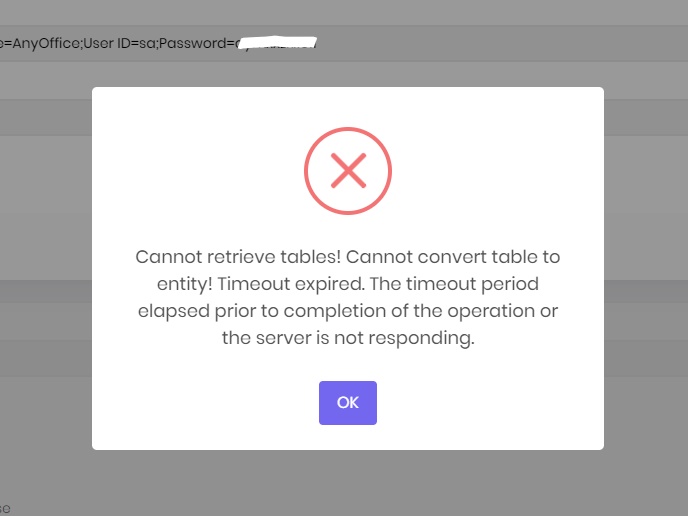
in Load Entity From Database page ,get errors when connecting to database (approximate 2000 tables in the database)
test connect is fine

@mailming 谢谢 筛选器已经可以使用了 但是有个问题 DataSourceLoadOptionsBase 中有2个属性都是SummaryInfo 类型的 用转换器的话只能添加一个类型, SummaryInfo a; SummaryInfo b; ulr只能像这样 “xxx/xxxx/a=[SummaryInfo ]”或者 “xxx/xxxx/a=[SummaryInfo ]” 有办法把在转换事件中获取属性名称吗?或者更改下转换器 在调用时将属性名称传入 或者接受自定义?
另外 如果我把API 更改成POST方法 是否可以把DataSourceLoadOptionsBase 直接传递给接口?
hi maliming 增加转换器后
Configure<AbpHttpClientProxyingOptions>(options => { options.QueryStringConverts.Add(typeof(DataSourceLoadOptionsBase), typeof(DataSourceLoadOptionsBaseToQueryString)); options.QueryStringConverts.Add(typeof(SummaryInfo[]), typeof(DataSourceLoadOptionsBaseSummaryInfoToQueryString)); });
DataSourceLoadOptionsBase 不会进行转换 但是SummaryInfo 可以 为什么?