Module: Volo.AIManagement (ABP Commercial) Version: observed on 10.4.0 (code paths unchanged in current source) Database provider: any (reproduced with MongoDB)
WorkspaceConfigurationStore and WorkspaceChangedHandler build the distributed cache key from different sources, so editing a workspace does not invalidate the cached configuration that other applications are actually reading. Those applications keep serving the stale provider/model/API key until the cache entry expires on its own.
Read path — WorkspaceConfigurationStore.GetOrNullAsync caches under the current application's name:
// Volo.AIManagement.Domain/Volo/AIManagement/Workspaces/Configuration/WorkspaceConfigurationStore.cs
var cacheKey = WorkspaceConfigurationCacheKeyGenerator.Create(
    ApplicationInfoAccessor.ApplicationName!, name);
Invalidation path — WorkspaceChangedHandler removes the key built from the entity's ApplicationName:
// Volo.AIManagement.Domain/Volo/AIManagement/Workspaces/WorkspaceChangedHandler.cs
return _cache.RemoveAsync(
    WorkspaceConfigurationCacheKeyGenerator.Create(
        eventData.Entity.ApplicationName ?? string.Empty,
        eventData.Entity.Name));
Whenever Workspace.ApplicationName ≠ the reading process's IApplicationInfoAccessor.ApplicationName, the handler removes a key nobody reads, and the key everybody reads is never removed.
This is easy to hit in a normal multi-application ABP solution because ApplicationWorkspaceManager.CreateAsync stamps the workspace with the ApplicationName of the process that created it:
// Volo.AIManagement.Domain/Volo/AIManagement/Workspaces/ApplicationWorkspaceManager.cs
newWorkspace.ApplicationName = ApplicationInfoAccessor.ApplicationName ?? string.Empty;
A workspace seeded by the DbMigrator carries the migrator's ApplicationName forever, while the Blazor host, the HttpApi host, etc. each cache it under their own ApplicationName.
ApplicationWorkspaceManager.CreateAsync("MyWorkspace", "OpenAI", "model-a")).IChatClientResolver.ResolveAsync("MyWorkspace") or IWorkspaceConfigurationStore.GetOrNullAsync("MyWorkspace")) → the configuration is cached under (webHostAppName, "MyWorkspace").ModelName to model-b) → WorkspaceChangedHandler removes (dbMigratorAppName, "MyWorkspace").The resolver returns a chat client configured with model-b (admin edits take effect on the next call).
The resolver keeps returning model-a until the cache entry expires (or the host restarts). With a long default cache expiration this looks like "workspace edits are silently ignored".
Make both sides derive the key from the same source. Options:
ApplicationName on the read path too (requires a lookup, or dropping ApplicationName from the key entirely since Workspace.Name is already unique), orAIManagementChatClient<T> resolves the inner client once and reuses it for the instance's lifetime (EnsureClientCreatedAsync), so long-lived consumers (Blazor Server circuits, background workers) additionally pin the configuration snapshot from their first call even after the cache is fixed. Consider re-resolving when the underlying configuration changes.
TenantUserSharingStrategy.Shared)The new Shared User Accounts feature introduces a "global authentication first, tenant selection after" model. While this is a great UX improvement for multi-tenant users, it creates a fundamental conflict with a very common B2B SaaS requirement: per-tenant external identity provider (IdP) configuration.
In enterprise B2B scenarios, each tenant (customer organization) typically brings their own Azure AD / Entra ID (or Okta, etc.) with their own ClientId, ClientSecret, and TenantId. This is standard practice — each organization controls their own identity infrastructure.
With the Shared strategy, authentication happens at the Host level before the tenant is known, which means the system cannot determine which tenant's IdP credentials to use for the OIDC challenge.
Scenario 1: Per-tenant Entra ID credentials
A SaaS platform serves multiple enterprise customers. Each customer has configured their own Azure AD application registration:
| Tenant | Entra ID ClientId | Entra ID TenantId |
| ------ | ----------------- | ----------------- |
| Acme Corp | aaa-111 | acme-tenant-id |
| Contoso | bbb-222 | contoso-tenant-id |
With the Isolated strategy, the tenant is resolved first (via subdomain, email domain, etc.), so the system knows which Entra ID credentials to use for the OIDC challenge.
With the Shared strategy, the user authenticates globally first — but against which Entra ID? The system doesn't know the target tenant yet.
Scenario 2: Mixed authentication methods across tenants
A user (john@example.com) belongs to two tenants:
With Shared, authentication is global — so which method applies? If the Host enforces Entra ID, Tenant B users can't log in with passwords. If it allows passwords, Tenant A's enterprise SSO requirement is bypassed.
Scenario 3: Per-tenant security policies
The documentation states that security settings (2FA, lockout, password policies) are managed at the Host level with Shared strategy. In B2B SaaS, each tenant admin typically controls their own security policies:
Centralizing these at Host level removes a key selling point for enterprise customers who need to enforce their own compliance requirements.
Per-tenant IdP configuration is not an edge case — it's a core requirement for B2B SaaS platforms:
Option A: Hybrid flow — Tenant selection before authentication
Allow a pre-authentication tenant selection step. The flow would be:
This preserves the UX benefits of Shared (one account, multiple tenants) while supporting per-tenant IdP.
Option B: Per-tenant security policy overrides
Even if authentication is global, allow tenants to define security policy overrides that apply when a user is operating within that tenant's context (e.g., require 2FA to access Tenant A, but not Tenant B).
The default tiered Blazor Server project template includes options.IntrospectAccessToken() in the cookie authentication configuration. This causes an HTTP POST to the AuthServer's /connect/introspect endpoint for every HTTP request — including static assets (CSS, JS, images), SignalR negotiation, and _blazor calls.
When UseDynamicClaims() + IsDynamicClaimsEnabled = true are also configured (which they are by default in the same template), session validation is already handled via Redis/DB by IdentitySessionDynamicClaimsPrincipalContributor. The introspection is completely redundant.
The result is ~50 unnecessary HTTP POST calls to the AuthServer after login, adding 5–8 seconds of latency to the first page load.
// Generated by ABP template in BlazorModule.cs (tiered Blazor Server)
context.Services.AddAuthentication(options =>
{
    options.DefaultScheme = "Cookies";
    options.DefaultChallengeScheme = "oidc";
})
    .AddCookie("Cookies", options =>
    {
        options.ExpireTimeSpan = TimeSpan.FromDays(365);
        options.IntrospectAccessToken(); // ❌ Causes HTTP POST per request
    })
    .AddAbpOpenIdConnect("oidc", options => { ... });

// Also in the same template:
context.Services.Configure<AbpClaimsPrincipalFactoryOptions>(options =>
{
    options.IsDynamicClaimsEnabled = true; // ✅ Already validates sessions
});

// In OnApplicationInitialization:
app.UseDynamicClaims(); // ✅ Already validates sessions via Redis/DB
With IntrospectAccessToken() enabled, after the user authenticates:
[Browser] GET /css/styles.css
  → [Blazor Server] POST /connect/introspect → [AuthServer]  ~50-200ms
  ← 200 OK (token is active)
  ← serves CSS

[Browser] GET /js/app.js
  → [Blazor Server] POST /connect/introspect → [AuthServer]  ~50-200ms
  ← 200 OK (token is active)
  ← serves JS

[Browser] POST /_blazor/negotiate
  → [Blazor Server] POST /connect/introspect → [AuthServer]  ~50-200ms
  ...

(repeated ~50 times for all resources loaded during page initialization)
The default template configures both mechanisms, but only one is needed:
| Mechanism | Cost per request | Session revocation | Source |
|-----------|-----------------|-------------------|--------|
| IntrospectAccessToken() | HTTP POST to AuthServer (50–200ms) | Yes | Cookie middleware |
| UseDynamicClaims() + IsDynamicClaimsEnabled | Redis/DB lookup (<1ms) | Yes | IdentitySessionDynamicClaimsPrincipalContributor |
IdentitySessionDynamicClaimsPrincipalContributor (part of UseDynamicClaims()) validates the session on every request by checking the session ID in Redis/distributed cache. If an admin revokes a session (e.g., via Identity Management → Users → Sessions), the user is logged out on the next request — exactly the same behavior as IntrospectAccessToken(), but using a local Redis lookup instead of an HTTP round-trip to the AuthServer.
Tested on a Blazor Server tiered application (ABP 10.0.0 Commercial, .NET 10, localhost).
| Metric | With IntrospectAccessToken | Without IntrospectAccessToken | Improvement | |--------|---------------------------|-------------------------------|-------------| | Introspection calls | ~50 POST requests | 0 | -100% | | AuthServer load | ~50 requests/page load | 0 | -100% | | Post-login page load time | ~8 seconds | ~2 seconds | ~6 seconds faster |
IntrospectAccessToken() adds an HTTP call to each one._blazor/negotiate, SignalR WebSocket upgrade, and multiple _blazor framework calls — easily 50+ requests.Remove IntrospectAccessToken() from the default Blazor Server tiered template, since UseDynamicClaims() + IsDynamicClaimsEnabled = true already provide session validation:
.AddCookie("Cookies", options =>
{
    options.ExpireTimeSpan = TimeSpan.FromDays(365);
    // IntrospectAccessToken() removed — session validation is handled by
    // UseDynamicClaims() + IsDynamicClaimsEnabled via IdentitySessionDynamicClaimsPrincipalContributor
})
If IntrospectAccessToken() is intentionally kept for scenarios where UseDynamicClaims() is not enabled, consider:
IntrospectAccessToken() only when IsDynamicClaimsEnabled is falseSession revocation still works: IdentitySessionDynamicClaimsPrincipalContributor checks session validity in Redis/DB on every request. Revoked sessions are detected immediately.
Token validation still works: The HttpApi.Host validates JWT tokens locally with AddAbpJwtBearer(). The Blazor Server app sends the access token in API calls, and the API host validates it without needing introspection.
The AuthServer uses UseLocalServer(): It validates its own tokens locally, not via introspection.
No behavioral change for users: Login, logout, session timeout, and session revocation all work identically. The only difference is the elimination of redundant HTTP calls.
After removing IntrospectAccessToken():
/connect/introspect requests from BlazorUseDynamicClaims() handles it)Remove the IntrospectAccessToken() call from the Blazor module:
.AddCookie("Cookies", options =>
{
    options.ExpireTimeSpan = TimeSpan.FromDays(365);
    // options.IntrospectAccessToken(); // Remove this line
})
Ensure UseDynamicClaims() and IsDynamicClaimsEnabled = true remain configured (they are by default).
MvcCachedApplicationConfigurationClient.GetRemoteConfigurationAsync() fetches application-configuration and application-localization sequentially, but they can safely run in parallel. The localization call depends on a culture name that is already available from CultureInfo.CurrentCulture (set by ABP's RequestLocalizationMiddleware) — it does not need to wait for the configuration response.
This is a low-risk, high-impact optimization for all tiered Blazor Server deployments.
[Request starts]
  → GET /api/abp/application-configuration    ~120ms
  ← Response received
  → GET /api/abp/application-localization      ~200ms  (waits for config to finish)
  ← Response received
[Total: ~320ms]
The sequential dependency exists because the current code extracts cultureName from config.Localization.CurrentCulture.Name before calling the localization endpoint:
// Current implementation in MvcCachedApplicationConfigurationClient
private async Task<ApplicationConfigurationDto> GetRemoteConfigurationAsync()
{
    var config = await ApplicationConfigurationAppService.GetAsync(
        new ApplicationConfigurationRequestOptions { IncludeLocalizationResources = false }
    );

    // ❌ Waits for config just to get cultureName
    config.Localization.Resources = (await ApplicationLocalizationClientProxy.GetAsync(
        new ApplicationLocalizationRequestDto
        {
            CultureName = config.Localization.CurrentCulture.Name,
            OnlyDynamics = true
        }
    )).Resources;

    return config;
}
[Request starts]
  → GET /api/abp/application-configuration    ~120ms  (parallel)
  → GET /api/abp/application-localization      ~200ms  (parallel)
  ← Both responses received
[Total: ~200ms — savings: ~120ms per cache miss]
The key insight is that CultureInfo.CurrentCulture.Name is already set by ABP's RequestLocalizationMiddleware before MvcCachedApplicationConfigurationClient is invoked. It will always match config.Localization.CurrentCulture.Name, so we can use it directly without waiting for the configuration response:
// Proposed implementation
private async Task<ApplicationConfigurationDto> GetRemoteConfigurationAsync()
{
    // CultureInfo.CurrentCulture is already set by ABP's RequestLocalizationMiddleware
    var cultureName = CultureInfo.CurrentCulture.Name;

    var configTask = ApplicationConfigurationAppService.GetAsync(
        new ApplicationConfigurationRequestOptions { IncludeLocalizationResources = false }
    );

    var localizationTask = ApplicationLocalizationClientProxy.GetAsync(
        new ApplicationLocalizationRequestDto
        {
            CultureName = cultureName,
            OnlyDynamics = true
        }
    );

    await Task.WhenAll(configTask, localizationTask);

    var config = await configTask;
    config.Localization.Resources = (await localizationTask).Resources;

    return config;
}
Tested on a Blazor Server tiered application (ABP 10.0.0 Commercial, .NET 10, localhost).
| Metric | Sequential (before) | Parallel (after) | Savings |
|--------|---------------------|-------------------|---------|
| application-configuration | 124ms | 117ms | — |
| application-localization | 208ms | 237ms | — |
| Total wall time | 332ms (sum) | 238ms (max) | ~94ms |
| Metric | Sequential (before) | Parallel (after) | Savings |
|--------|---------------------|-------------------|---------|
| application-configuration | 95ms | 116ms | — |
| application-localization | 73ms | 120ms | — |
| Total wall time | 168ms (sum) | 121ms (max) | ~47ms |
Note: In production environments with higher latency to the API host, the savings scale proportionally. If the shorter call takes 200ms in production, you save ~200ms per cache miss.
Each page load triggers this on cache miss during both prerender and interactive phases. Savings compound:
CultureInfo.CurrentCulture is guaranteed correct: ABP's RequestLocalizationMiddleware runs early in the pipeline and sets the culture before any application code executes. The MvcCachedApplicationConfigurationClient is invoked later (during Razor page rendering or Blazor circuit initialization), so the culture is already set.
No behavioral change: The localization endpoint receives the exact same CultureName — we're just reading it from a different (but equivalent) source.
No API contract change: Both endpoints are called with the same parameters as before.
Cache key unchanged: The distributed cache key generation (MvcCachedApplicationConfigurationClientHelper.CreateCacheKey) is not affected.
MvcCachedApplicationConfigurationClient)Until this is addressed in ABP, applications can replace the service by implementing ICachedApplicationConfigurationClient directly with [Dependency(ReplaceServices = true)]:
[ExposeServices(typeof(ICachedApplicationConfigurationClient))]
[Dependency(ReplaceServices = true)]
public class ParallelCachedApplicationConfigurationClient
    : ICachedApplicationConfigurationClient, ITransientDependency
{
    // ... (full implementation available on request)
}
Important: The module containing this replacement must declare [DependsOn(typeof(AbpAspNetCoreMvcClientModule))] to ensure it loads after ABP's default registration.
This ABP Suite issue is also reported as a request in https://abp.io/qa/questions/8803/3a18c029-e901-3c3a-86d9-0bc6255b445f. But I am reporting it as issue because I think it is important.
When creating a master - child entities, ABP suite is generating managers (DomainService) for master (AggregateRoot) and child (Entity) entities. This means child entities can be managed directly from child services (application and domain services) without using the master entity, and I think it is not DDD friendly. My suggestions for ABP Suite is:
We have a tiered solution created some months ago. There are 3 developers working on it and when 2 of them try to open the solution with ABP Suite, it's is failing. But it is working for one of them.
This is the project structure (I do not see the option to get the solution configuration with ABP Studio, the button is not visible now):
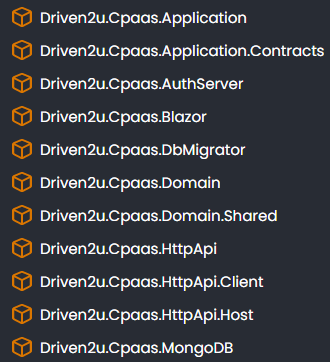 ABP Studio version is 1.0.2
ABP Suite version is 9.1.1, same as the solution.
Below you can find the error and the workaround. We are reporting it in case there is an issue with ABP Suite reading the solution or something similar.
ABP Studio version is 1.0.2
ABP Suite version is 9.1.1, same as the solution.
Below you can find the error and the workaround. We are reporting it in case there is an issue with ABP Suite reading the solution or something similar.
This is the error we found in ABP Suite logs when trying to open the solution without success:
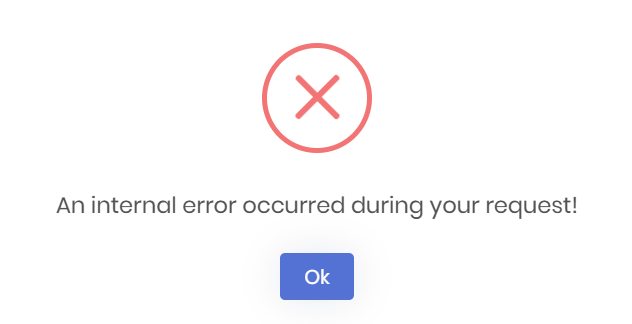
2025-07-01 12:19:42.041 +02:00 [INF] Loaded ABP modules:
...
2025-07-01 12:19:43.137 +02:00 [INF] Now listening on: http://localhost:3000
...
2025-07-01 12:19:46.935 +02:00 [INF] Executing ContentResult with HTTP Response ContentType of application/javascript
2025-07-01 12:19:46.935 +02:00 [INF] Request finished HTTP/1.1 GET http://localhost:3000/Abp/ServiceProxyScript - 200 9386 application/javascript 419.1011ms
2025-07-01 12:19:46.936 +02:00 [DBG] Executed AbpApplicationConfigurationAppService.GetAsync().
2025-07-01 12:19:46.936 +02:00 [INF] Executed action Volo.Abp.AspNetCore.Mvc.Localization.AbpApplicationLocalizationScriptController.GetAsync (Volo.Abp.AspNetCore.Mvc) in 409.6628ms
2025-07-01 12:19:46.936 +02:00 [INF] Executed endpoint 'Volo.Abp.AspNetCore.Mvc.Localization.AbpApplicationLocalizationScriptController.GetAsync (Volo.Abp.AspNetCore.Mvc)'
2025-07-01 12:19:46.936 +02:00 [INF] Request finished HTTP/1.1 GET http://localhost:3000/Abp/ApplicationLocalizationScript?cultureName=en - 200 69286 application/javascript 422.0271ms
2025-07-01 12:19:46.963 +02:00 [WRN] The cookie 'XSRF-TOKEN' has set 'SameSite=None' and must also set 'Secure'.
2025-07-01 12:19:46.965 +02:00 [INF] Executing ContentResult with HTTP Response ContentType of application/javascript
2025-07-01 12:19:46.966 +02:00 [INF] Executed action Volo.Abp.AspNetCore.Mvc.ApplicationConfigurations.AbpApplicationConfigurationScriptController.Get (Volo.Abp.AspNetCore.Mvc) in 445.6118ms
2025-07-01 12:19:46.966 +02:00 [INF] Executed endpoint 'Volo.Abp.AspNetCore.Mvc.ApplicationConfigurations.AbpApplicationConfigurationScriptController.Get (Volo.Abp.AspNetCore.Mvc)'
2025-07-01 12:19:46.966 +02:00 [INF] Request finished HTTP/1.1 GET http://localhost:3000/Abp/ApplicationConfigurationScript - 200 2207 application/javascript 451.5745ms
2025-07-01 12:19:47.086 +02:00 [INF] Request starting HTTP/1.1 POST http://localhost:3000/api/abpSuite/addSolution - application/json 82
2025-07-01 12:19:47.090 +02:00 [INF] Executing endpoint 'Volo.Abp.Suite.Controllers.AbpSuiteController.AddSolutionAsync (Volo.Abp.Suite)'
2025-07-01 12:19:47.094 +02:00 [INF] Route matched with {action = "AddSolution", controller = "AbpSuite", area = "", page = ""}. Executing controller action with signature System.Threading.Tasks.Task`1[Volo.Abp.Suite.Models.Solution] AddSolutionAsync(Volo.Abp.Suite.Services.AddSolutionInput) on controller Volo.Abp.Suite.Controllers.AbpSuiteController (Volo.Abp.Suite).
2025-07-01 12:19:47.161 +02:00 [INF] Request starting HTTP/1.1 GET http://localhost:3000/libs/@fortawesome/fontawesome-free/webfonts/fa-regular-400.woff2 - null null
2025-07-01 12:19:47.162 +02:00 [INF] The file /libs/@fortawesome/fontawesome-free/webfonts/fa-regular-400.woff2 was not modified
2025-07-01 12:19:47.163 +02:00 [INF] Request finished HTTP/1.1 GET http://localhost:3000/libs/@fortawesome/fontawesome-free/webfonts/fa-regular-400.woff2 - 304 null font/woff2 1.5587ms
2025-07-01 12:19:47.185 +02:00 [INF] Received HTTP response headers after 252.7415ms - 200
2025-07-01 12:19:47.186 +02:00 [INF] End processing HTTP request after 271.0727ms - 200
2025-07-01 12:19:47.208 +02:00 [INF] Executing ObjectResult, writing value of type 'System.Boolean'.
2025-07-01 12:19:47.209 +02:00 [INF] Executed action Volo.Abp.Suite.Controllers.AbpSuiteController.IsSuiteOutDatedAsync (Volo.Abp.Suite) in 594.6038ms
2025-07-01 12:19:47.209 +02:00 [INF] Executed endpoint 'Volo.Abp.Suite.Controllers.AbpSuiteController.IsSuiteOutDatedAsync (Volo.Abp.Suite)'
2025-07-01 12:19:47.209 +02:00 [INF] Request finished HTTP/1.1 GET http://localhost:3000/api/abpSuite/is-suite-outdated - 200 null application/json; charset=utf-8 627.9899ms
2025-07-01 12:19:48.605 +02:00 [ERR] ---------- RemoteServiceErrorInfo ----------
{
  "code": null,
  "message": "An internal error occurred during your request!",
  "details": null,
  "data": null,
  "validationErrors": null
}

2025-07-01 12:19:48.609 +02:00 [ERR] Error getting value from 'MigrationsMigrationsDbContext' on 'Volo.Abp.Suite.Models.Solution'.
Newtonsoft.Json.JsonSerializationException: Error getting value from 'MigrationsMigrationsDbContext' on 'Volo.Abp.Suite.Models.Solution'.
 ---> System.NullReferenceException: Object reference not set to an instance of an object.
   at Volo.Abp.Suite.Models.Solution.get_MigrationsMigrationsDbContext()
   at Newtonsoft.Json.Serialization.ExpressionValueProvider.GetValue(Object target)
   --- End of inner exception stack trace ---
   at Newtonsoft.Json.Serialization.ExpressionValueProvider.GetValue(Object target)
   at Newtonsoft.Json.Serialization.JsonSerializerInternalWriter.CalculatePropertyValues(JsonWriter writer, Object value, JsonContainerContract contract, JsonProperty member, JsonProperty property, JsonContract& memberContract, Object& memberValue)
   at Newtonsoft.Json.Serialization.JsonSerializerInternalWriter.SerializeObject(JsonWriter writer, Object value, JsonObjectContract contract, JsonProperty member, JsonContainerContract collectionContract, JsonProperty containerProperty)
   at Newtonsoft.Json.Serialization.JsonSerializerInternalWriter.SerializeValue(JsonWriter writer, Object value, JsonContract valueContract, JsonProperty member, JsonContainerContract containerContract, JsonProperty containerProperty)
   at Newtonsoft.Json.Serialization.JsonSerializerInternalWriter.SerializeList(JsonWriter writer, IEnumerable values, JsonArrayContract contract, JsonProperty member, JsonContainerContract collectionContract, JsonProperty containerProperty)
   at Newtonsoft.Json.Serialization.JsonSerializerInternalWriter.SerializeValue(JsonWriter writer, Object value, JsonContract valueContract, JsonProperty member, JsonContainerContract containerContract, JsonProperty containerProperty)
   at Newtonsoft.Json.Serialization.JsonSerializerInternalWriter.SerializeObject(JsonWriter writer, Object value, JsonObjectContract contract, JsonProperty member, JsonContainerContract collectionContract, JsonProperty containerProperty)
   at Newtonsoft.Json.Serialization.JsonSerializerInternalWriter.SerializeValue(JsonWriter writer, Object value, JsonContract valueContract, JsonProperty member, JsonContainerContract containerContract, JsonProperty containerProperty)
   at Newtonsoft.Json.Serialization.JsonSerializerInternalWriter.Serialize(JsonWriter jsonWriter, Object value, Type objectType)
   at Newtonsoft.Json.JsonSerializer.SerializeInternal(JsonWriter jsonWriter, Object value, Type objectType)
   at Newtonsoft.Json.JsonSerializer.Serialize(JsonWriter jsonWriter, Object value, Type objectType)
   at Newtonsoft.Json.JsonConvert.SerializeObjectInternal(Object value, Type type, JsonSerializer jsonSerializer)
   at Newtonsoft.Json.JsonConvert.SerializeObject(Object value, Type type, Formatting formatting, JsonSerializerSettings settings)
   at Newtonsoft.Json.JsonConvert.SerializeObject(Object value, Formatting formatting, JsonSerializerSettings settings)
   at Newtonsoft.Json.JsonConvert.SerializeObject(Object value, Formatting formatting)
   at Volo.Abp.Suite.Areas.AbpSuite.CrudPageGenerator.Helpers.IoHelper.WriteObjectToFileAsync[T](String filePath, T obj, Formatting serializeFormat)
   at Volo.Abp.Suite.Services.PersistanceService.SaveAppSettingsAsync(AppSettings appSettings)
   at Volo.Abp.Suite.Services.PersistanceService.JyuRJXBu39(AddSolutionInput  )
   at Volo.Abp.Suite.Services.PersistanceService.AddSolutionAsync(AddSolutionInput input)
   at Volo.Abp.Suite.Controllers.AbpSuiteController.AddSolutionAsync(AddSolutionInput input)
   at lambda_method1880(Closure, Object)
   at Microsoft.AspNetCore.Mvc.Infrastructure.ActionMethodExecutor.AwaitableObjectResultExecutor.Execute(ActionContext actionContext, IActionResultTypeMapper mapper, ObjectMethodExecutor executor, Object controller, Object[] arguments)
   at Microsoft.AspNetCore.Mvc.Infrastructure.ControllerActionInvoker.<InvokeActionMethodAsync>g__Awaited|12_0(ControllerActionInvoker invoker, ValueTask`1 actionResultValueTask)
   at Microsoft.AspNetCore.Mvc.Infrastructure.ControllerActionInvoker.<InvokeNextActionFilterAsync>g__Awaited|10_0(ControllerActionInvoker invoker, Task lastTask, State next, Scope scope, Object state, Boolean isCompleted)
   at Microsoft.AspNetCore.Mvc.Infrastructure.ControllerActionInvoker.Rethrow(ActionExecutedContextSealed context)
   at Microsoft.AspNetCore.Mvc.Infrastructure.ControllerActionInvoker.Next(State& next, Scope& scope, Object& state, Boolean& isCompleted)
   at Microsoft.AspNetCore.Mvc.Infrastructure.ControllerActionInvoker.<InvokeInnerFilterAsync>g__Awaited|13_0(ControllerActionInvoker invoker, Task lastTask, State next, Scope scope, Object state, Boolean isCompleted)
   at Microsoft.AspNetCore.Mvc.Infrastructure.ResourceInvoker.<InvokeNextExceptionFilterAsync>g__Awaited|26_0(ResourceInvoker invoker, Task lastTask, State next, Scope scope, Object state, Boolean isCompleted)
2025-07-01 12:19:48.632 +02:00 [INF] Executing ObjectResult, writing value of type 'Volo.Abp.Http.RemoteServiceErrorResponse'.
2025-07-01 12:19:48.634 +02:00 [INF] Executed action Volo.Abp.Suite.Controllers.AbpSuiteController.AddSolutionAsync (Volo.Abp.Suite) in 1539.9778ms
2025-07-01 12:19:48.634 +02:00 [INF] Executed endpoint 'Volo.Abp.Suite.Controllers.AbpSuiteController.AddSolutionAsync (Volo.Abp.Suite)'
2025-07-01 12:19:48.634 +02:00 [INF] Request finished HTTP/1.1 POST http://localhost:3000/api/abpSuite/addSolution - 500 null application/json; charset=utf-8 1548.826ms
The workaround we found out is to modify the ABP Suite appsettings.json configuration. Once done, all developers could open the solution with ABP Suite again. First, we remove the configuration related to the project. Tried to open the solution again without success. Then we copy the following configuration (updating the paths accordingly to the local paths), and the solution could be opened.
    {
      "Id": "6d30d4ee-9166-4389-86ed-761acaa03b31",
      "Name": "Driven2u.Cpaas",
      "UiFramework": 5,
      "ProjectNameWithCompanyName": "Driven2u.Cpaas",
      "OnlyProjectName": "Cpaas",
      "Path": "C:\\repos\\driven2u\\cpaas\\Driven2u.Cpaas.sln",
      "RootProjectDirectory": "C:\\repos\\driven2u\\cpaas",
      "SrcFolderDirectory": "C:\\repos\\driven2u\\cpaas\\src",
      "TestFolderDirectory": "C:\\repos\\driven2u\\cpaas\\test",
      "IsMicroserviceNolayerProject": false,
      "NolayerProjectDirectory": null,
      "NolayerContractsProjectDirectory": null,
      "WebProjectDirectory": null,
      "DomainProjectDirectory": "C:\\repos\\driven2u\\cpaas\\src\\Driven2u.Cpaas.Domain",
      "DomainSharedProjectDirectory": "C:\\repos\\driven2u\\cpaas\\src\\Driven2u.Cpaas.Domain.Shared",
      "ApplicationProjectDirectory": "C:\\repos\\driven2u\\cpaas\\src\\Driven2u.Cpaas.Application",
      "ApplicationContractsProjectDirectory": "C:\\repos\\driven2u\\cpaas\\src\\Driven2u.Cpaas.Application.Contracts",
      "EntityFrameworkCoreProjectDirectory": null,
      "MongoDbProjectDirectory": "C:\\repos\\driven2u\\cpaas\\src\\Driven2u.Cpaas.MongoDB",
      "EntityFrameworkCoreDbMigrationsProjectDirectory": null,
      "MongoDbTestsProjectDirectory": "C:\\repos\\driven2u\\cpaas\\test\\Driven2u.Cpaas.MongoDB.Tests",
      "EntityFrameworkCoreTestsProjectDirectory": null,
      "DomainTestsProjectDirectory": "C:\\repos\\driven2u\\cpaas\\test\\Driven2u.Cpaas.Domain.Tests",
      "ApplicationTestsProjectDirectory": "C:\\repos\\driven2u\\cpaas\\test\\Driven2u.Cpaas.Application.Tests",
      "TestBaseProjectDirectory": "C:\\repos\\driven2u\\cpaas\\test\\Driven2u.Cpaas.TestBase",
      "MigratorProjectDirectory": "C:\\repos\\driven2u\\cpaas\\src\\Driven2u.Cpaas.DbMigrator",
      "MigratorCsprojFileName": "Driven2u.Cpaas.DbMigrator.csproj",
      "AngularSolutionRootPath": null,
      "DefaultNamespace": "Driven2u.Cpaas",
      "DefaultNamespaceAsCamelCase": "driven2u.cpaas",
      "MigrationsMigrationsDbContext": "CpaasDbContext",
      "TenantMigrationsMigrationsDbContext": "CpaasTenantDbContext",
      "DbContextFilePath": "C:\\repos\\driven2u\\cpaas\\src\\Driven2u.Cpaas.MongoDB\\MongoDb\\CpaasMongoDbContext.cs",
      "TenantDbContextFilePath": null,
      "DbContextModelCreatingExtensionsFilePath": "C:\\repos\\driven2u\\cpaas\\src\\Driven2u.Cpaas.MongoDB\\MongoDb\\CpaasMongoDbContext.cs",
      "HttpApiHostProjectDirectory": "C:\\repos\\driven2u\\cpaas\\src\\Driven2u.Cpaas.HttpApi.Host",
      "HttpApiProjectDirectory": "C:\\repos\\driven2u\\cpaas\\src\\Driven2u.Cpaas.HttpApi",
      "HttpApiClientProjectDirectory": "C:\\repos\\driven2u\\cpaas\\src\\Driven2u.Cpaas.HttpApi.Client",
      "BlazorProjectDirectory": "C:\\repos\\driven2u\\cpaas\\src\\Driven2u.Cpaas.Blazor",
      "MauiBlazorProjectDirectory": null,
      "BlazorWebAppProjectDirectory": null,
      "StartupProjectDirectory": "C:\\repos\\driven2u\\cpaas\\src\\Driven2u.Cpaas.HttpApi.Host",
      "StartupProjectName": "Driven2u.Cpaas.HttpApi.Host",
      "DatabaseProvider": 2,
      "DatabaseProviderName": "MongoDb",
      "UiFrameworkName": "BlazorServer",
      "ApplicationContractsExists": true,
      "MigratorProjectExists": true,
      "UpdateDatabaseMethod": 1,
      "IsTieredArchitecture": true,
      "ActiveDate": "2025-07-01T13:05:34.0123789+02:00",
      "ProjectTemplateType": 1,
      "AbpVersion": "9.1.1"
    }
Hi ABP team,
We have to pass SAST (Static Application Security Testing) and DAST (Dynamic Application Security Testing) tests.
SAST analyzes the source code of the application to find flaws, while DAST examines a running application from an external perspective to detect vulnerabilities.
Right now we only executed SAST tests and we saw some vulnerabilities related to the framework and deployment code. I am sharing those findings with you, hope it helps to enhance the framework security (note: rename the png file to html to see the report):  Once we execute the DAST tests, I can share with you the results as well.
This is the solution configuration:
Once we execute the DAST tests, I can share with you the results as well.
This is the solution configuration:









