Hi, after I deployed my application into Azure VM, it threw exception when trying to register new user, the log showing it was trying to send confirmation email. However, I did not get this error when running in localhost without email setup as well.
Any help is appreciated!
2021-01-18 09:50:45.497 +08:00 [INF] Executing endpoint '/Account/Register'
2021-01-18 09:50:45.498 +08:00 [INF] Route matched with {page = "/Account/Register", area = "", action = "", controller = ""}. Executing page /Account/Register
2021-01-18 09:50:45.498 +08:00 [INF] Skipping the execution of current filter as its not the most effective filter implementing the policy Microsoft.AspNetCore.Mvc.ViewFeatures.IAntiforgeryPolicy
2021-01-18 09:50:45.511 +08:00 [INF] Executing handler method Volo.Abp.Account.Public.Web.Pages.Account.RegisterModel.OnPostAsync - ModelState is "Valid"
2021-01-18 09:50:45.614 +08:00 [INF] Executed page /Account/Register in 115.9001ms
2021-01-18 09:50:45.614 +08:00 [INF] Executed endpoint '/Account/Register'
2021-01-18 09:50:45.631 +08:00 [ERR] An unhandled exception has occurred while executing the request.
Volo.Abp.AbpException: Setting value for 'Abp.Mailing.Smtp.UserName' is null or empty!
at Volo.Abp.Emailing.EmailSenderConfiguration.GetNotEmptySettingValueAsync(String name)
at Volo.Abp.Emailing.Smtp.SmtpEmailSender.BuildClientAsync()
at Volo.Abp.Emailing.Smtp.SmtpEmailSender.SendEmailAsync(MailMessage mail)
at Volo.Abp.Emailing.EmailSenderBase.SendAsync(MailMessage mail, Boolean normalize)
at Volo.Abp.Emailing.EmailSenderBase.SendAsync(String to, String subject, String body, Boolean isBodyHtml)
at Volo.Abp.Account.Emailing.AccountEmailer.SendEmailConfirmationLinkAsync(IdentityUser user, String confirmationToken, String appName, String returnUrl, String returnUrlHash)
at Volo.Abp.Account.AccountAppService.SendEmailConfirmationTokenAsync(IdentityUser user, String applicationName, String returnUrl, String returnUrlHash)
at Volo.Abp.Account.AccountAppService.RegisterAsync(RegisterDto input)
at Castle.DynamicProxy.AsyncInterceptorBase.ProceedAsynchronous[TResult](IInvocation invocation, IInvocationProceedInfo proceedInfo)
at Volo.Abp.Castle.DynamicProxy.CastleAbpMethodInvocationAdapterWithReturnValue1.ProceedAsync() at Volo.Abp.Validation.ValidationInterceptor.InterceptAsync(IAbpMethodInvocation invocation) at Volo.Abp.Castle.DynamicProxy.CastleAsyncAbpInterceptorAdapter1.InterceptAsync[TResult](IInvocation invocation, IInvocationProceedInfo proceedInfo, Func3 proceed) at Castle.DynamicProxy.AsyncInterceptorBase.ProceedAsynchronous[TResult](IInvocation invocation, IInvocationProceedInfo proceedInfo) at Volo.Abp.Castle.DynamicProxy.CastleAbpMethodInvocationAdapterWithReturnValue1.ProceedAsync()
at Volo.Abp.Authorization.AuthorizationInterceptor.InterceptAsync(IAbpMethodInvocation invocation)
at Volo.Abp.Castle.DynamicProxy.CastleAsyncAbpInterceptorAdapter1.InterceptAsync[TResult](IInvocation invocation, IInvocationProceedInfo proceedInfo, Func3 proceed)
at Castle.DynamicProxy.AsyncInterceptorBase.ProceedAsynchronous[TResult](IInvocation invocation, IInvocationProceedInfo proceedInfo)
at Volo.Abp.Castle.DynamicProxy.CastleAbpMethodInvocationAdapterWithReturnValue1.ProceedAsync() at Volo.Abp.Auditing.AuditingInterceptor.InterceptAsync(IAbpMethodInvocation invocation) at Volo.Abp.Castle.DynamicProxy.CastleAsyncAbpInterceptorAdapter1.InterceptAsync[TResult](IInvocation invocation, IInvocationProceedInfo proceedInfo, Func3 proceed) at Castle.DynamicProxy.AsyncInterceptorBase.ProceedAsynchronous[TResult](IInvocation invocation, IInvocationProceedInfo proceedInfo) at Volo.Abp.Castle.DynamicProxy.CastleAbpMethodInvocationAdapterWithReturnValue1.ProceedAsync()
at Volo.Abp.Uow.UnitOfWorkInterceptor.InterceptAsync(IAbpMethodInvocation invocation)
at Volo.Abp.Castle.DynamicProxy.CastleAsyncAbpInterceptorAdapter1.InterceptAsync[TResult](IInvocation invocation, IInvocationProceedInfo proceedInfo, Func3 proceed)
at Volo.Abp.Account.Public.Web.Pages.Account.RegisterModel.RegisterLocalUserAsync()
at Volo.Abp.Account.Public.Web.Pages.Account.RegisterModel.OnPostAsync()
at Microsoft.AspNetCore.Mvc.RazorPages.Infrastructure.ExecutorFactory.GenericTaskHandlerMethod.Convert[T](Object taskAsObject)
at Microsoft.AspNetCore.Mvc.RazorPages.Infrastructure.ExecutorFactory.GenericTaskHandlerMethod.Execute(Object receiver, Object[] arguments)
at Microsoft.AspNetCore.Mvc.RazorPages.Infrastructure.PageActionInvoker.InvokeHandlerMethodAsync()
at Microsoft.AspNetCore.Mvc.RazorPages.Infrastructure.PageActionInvoker.InvokeNextPageFilterAsync()
at Microsoft.AspNetCore.Mvc.RazorPages.Infrastructure.PageActionInvoker.Rethrow(PageHandlerExecutedContext context)
at Microsoft.AspNetCore.Mvc.RazorPages.Infrastructure.PageActionInvoker.Next(State& next, Scope& scope, Object& state, Boolean& isCompleted)
at Microsoft.AspNetCore.Mvc.RazorPages.Infrastructure.PageActionInvoker.InvokeInnerFilterAsync()
at Microsoft.AspNetCore.Mvc.Infrastructure.ResourceInvoker.<InvokeNextExceptionFilterAsync>g__Awaited|25_0(ResourceInvoker invoker, Task lastTask, State next, Scope scope, Object state, Boolean isCompleted)
at Microsoft.AspNetCore.Mvc.Infrastructure.ResourceInvoker.Rethrow(ExceptionContextSealed context)
at Microsoft.AspNetCore.Mvc.Infrastructure.ResourceInvoker.Next(State& next, Scope& scope, Object& state, Boolean& isCompleted)
at Microsoft.AspNetCore.Mvc.Infrastructure.ResourceInvoker.<InvokeNextResourceFilter>g__Awaited|24_0(ResourceInvoker invoker, Task lastTask, State next, Scope scope, Object state, Boolean isCompleted)
at Microsoft.AspNetCore.Mvc.Infrastructure.ResourceInvoker.Rethrow(ResourceExecutedContextSealed context)
at Microsoft.AspNetCore.Mvc.Infrastructure.ResourceInvoker.Next(State& next, Scope& scope, Object& state, Boolean& isCompleted)
at Microsoft.AspNetCore.Mvc.Infrastructure.ResourceInvoker.<InvokeFilterPipelineAsync>g__Awaited|19_0(ResourceInvoker invoker, Task lastTask, State next, Scope scope, Object state, Boolean isCompleted)
at Microsoft.AspNetCore.Mvc.Infrastructure.ResourceInvoker.<InvokeAsync>g__Logged|17_1(ResourceInvoker invoker)
at Microsoft.AspNetCore.Routing.EndpointMiddleware.<Invoke>g__AwaitRequestTask|6_0(Endpoint endpoint, Task requestTask, ILogger logger)
at Volo.Abp.AspNetCore.Auditing.AbpAuditingMiddleware.InvokeAsync(HttpContext context, RequestDelegate next)
at Volo.Abp.AspNetCore.Auditing.AbpAuditingMiddleware.InvokeAsync(HttpContext context, RequestDelegate next)
at Microsoft.AspNetCore.Builder.UseMiddlewareExtensions.<>c__DisplayClass5_1.<<UseMiddlewareInterface>b__1>d.MoveNext()
--- End of stack trace from previous location where exception was thrown ---
at Microsoft.AspNetCore.Authorization.AuthorizationMiddleware.Invoke(HttpContext context)
at IdentityServer4.Hosting.IdentityServerMiddleware.Invoke(HttpContext context, IEndpointRouter router, IUserSession session, IEventService events)
at IdentityServer4.Hosting.MutualTlsTokenEndpointMiddleware.Invoke(HttpContext context, IAuthenticationSchemeProvider schemes)
at Microsoft.AspNetCore.Authentication.AuthenticationMiddleware.Invoke(HttpContext context)
at IdentityServer4.Hosting.BaseUrlMiddleware.Invoke(HttpContext context)
at Volo.Abp.AspNetCore.MultiTenancy.MultiTenancyMiddleware.InvokeAsync(HttpContext context, RequestDelegate next)
at Microsoft.AspNetCore.Builder.UseMiddlewareExtensions.<>c__DisplayClass5_1.<<UseMiddlewareInterface>b__1>d.MoveNext()
--- End of stack trace from previous location where exception was thrown ---
at Microsoft.AspNetCore.Authentication.AuthenticationMiddleware.Invoke(HttpContext context)
at Volo.Abp.AspNetCore.Tracing.AbpCorrelationIdMiddleware.InvokeAsync(HttpContext context, RequestDelegate next)
at Microsoft.AspNetCore.Builder.UseMiddlewareExtensions.<>c__DisplayClass5_1.<<UseMiddlewareInterface>b__1>d.MoveNext()
--- End of stack trace from previous location where exception was thrown ---
at Microsoft.AspNetCore.Diagnostics.ExceptionHandlerMiddleware.<Invoke>g__Awaited|6_0(ExceptionHandlerMiddleware middleware, HttpContext context, Task task)
Hi, I am trying to split the IS4 to a separated database, and I need to remove all the endpoints related to identity and identity server in swagger, I have tried to comment these 2 lines but the it does not work
[DependsOn(
        typeof(TestingAbpApplicationContractsModule),
        //typeof(AbpIdentityHttpApiModule),
        typeof(AbpPermissionManagementHttpApiModule),
        typeof(AbpFeatureManagementHttpApiModule),
        typeof(AbpAuditLoggingHttpApiModule),
        //typeof(AbpIdentityServerHttpApiModule),
        typeof(AbpAccountAdminHttpApiModule),
        typeof(AbpAccountPublicHttpApiModule),
        typeof(LanguageManagementHttpApiModule),
        typeof(SaasHostHttpApiModule),
        typeof(LeptonThemeManagementHttpApiModule),
        typeof(TextTemplateManagementHttpApiModule)
        )]
Did I miss any steps? Any help is appreciated.
Hi, I want to use the text template management module to manage the email template in our application. However, I could not find the create button in text template management page under Administration -> Text Templates. I checked the permission, there is no create permission as well. Is there any reason why we don't allow to create a new text template?
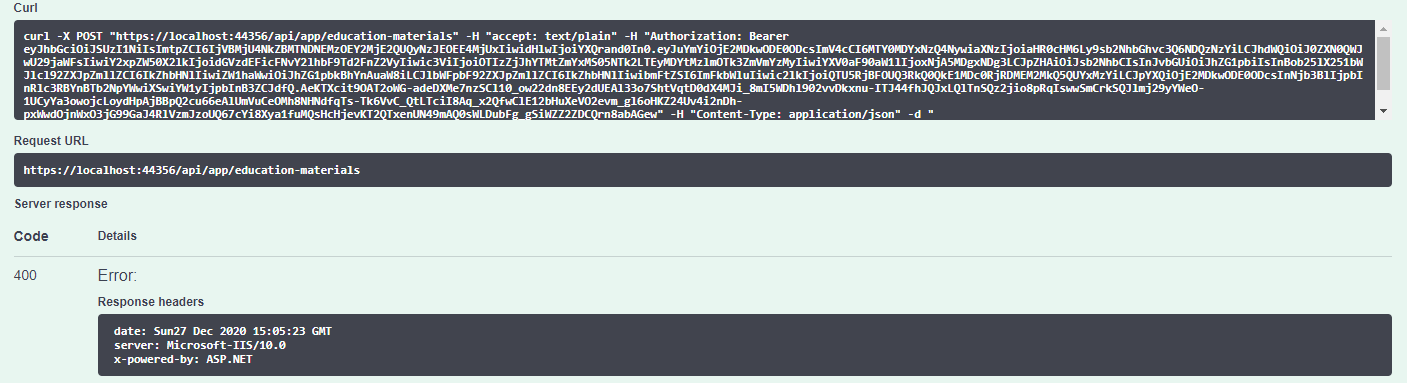
Hi, I got this error when trying to make a POST call via swagger, there is no issue with GET.
[22:55:53 INF] Request starting HTTP/2 POST https://localhost:44356/api/app/education-materials application/json 74
[22:55:53 INF] CORS policy execution failed.
[22:55:53 INF] Request origin https://localhost:44356 does not have permission to access the resource.
[22:55:54 INF] Successfully validated the token.
[22:55:54 INF] Executing endpoint 'testAbpSocial.Controllers.EducationMaterials.EducationMaterialController.CreateAsync (testAbpSocial.HttpApi)'
[22:55:54 INF] Route matched with {area = "app", controller = "EducationMaterial", action = "Create", page = ""}. Executing controller action with signature System.Threading.Tasks.Task`1[testAbpSocial.EducationMaterials.EducationMaterialDto] CreateAsync(testAbpSocial.EducationMaterials.EducationMaterialCreateDto) on controller testAbpSocial.Controllers.EducationMaterials.EducationMaterialController (testAbpSocial.HttpApi).
[22:55:54 ERR] The required antiforgery cookie ".AspNetCore.Antiforgery.k7aueVLaN4c" is not present.
[22:55:54 INF] Authorization failed for the request at filter 'Volo.Abp.AspNetCore.Mvc.AntiForgery.AbpAutoValidateAntiforgeryTokenAuthorizationFilter'.
[22:55:54 INF] Executing HttpStatusCodeResult, setting HTTP status code 400
Below is my application template:
Someone has faced the same issue and they have to downgrade the version, no solution so far: https://support.abp.io/QA/Questions/554/REST-API-Antiforgery-Cookie-Error-After-POST-apiLogin---POST-apimyentity-Call-Sequence
I also tried with the latest version 4.0.2 which I have authenticated and can see the token inside the request, still same issue:
Hi, is it possible to have a shared Identity Server for multiple applications? I have tried to create 2 application with app-pro template as below
I have removed the Identity Server in one application and updated the Angular UI to point to the shared Identity Server, I already created a new client in the shared Identity Server. However, I am not able to login successul, it managed to get the token but dashboard still show login button, I suspected it due to no claims:
[12:14:21 DBG] In addition to an id_token, an access_token was requested. No claims other than sub are included in the id_token. To obtain more user claims, either use the user info endpoint or set AlwaysIncludeUserClaimsInIdToken on the client configuration.
Below is the log content:
[12:14:21 INF] Token request validation success, {"ClientId": "App_UI", "ClientName": "App_UI", "GrantType": "authorization_code", "Scopes": null, "AuthorizationCode": "O345sXye9QaFRc8RPs-Bs3MxRLDX_kdqkjiymvtcX8o", "RefreshToken": null, "UserName": null, "AuthenticationContextReferenceClasses": null, "Tenant": null, "IdP": null, "Raw": {"grant_type": "authorization_code", "code": "O345sXye9QaFRc8RPs-Bs3MxRLDX_kdqkjiymvtcX8o", "redirect_uri": "http://localhost:4200", "code_verifier": "N1VsY3FSSmhsRXlMYVY4R0pjajRXN3FTOWJMdmFvTmF3SW9xNURIUUQ3dWFZ", "client_id": "App_UI"}, "$type": "TokenRequestValidationLog"} [12:14:21 DBG] client configuration validation for client App_UI succeeded. [12:14:21 DBG] Getting claims for access token for client: App_UI [12:14:21 DBG] Getting claims for access token for subject: 50d71d93-636f-f84d-d2c1-39f97c701cbe [12:14:21 DBG] Creating refresh token [12:14:21 DBG] Setting an absolute lifetime: 2592000 [12:14:21 DBG] client configuration validation for client App_UI succeeded. [12:14:21 DBG] Getting claims for identity token for subject: 50d71d93-636f-f84d-d2c1-39f97c701cbe and client: App_UI [12:14:21 DBG] In addition to an id_token, an access_token was requested. No claims other than sub are included in the id_token. To obtain more user claims, either use the user info endpoint or set AlwaysIncludeUserClaimsInIdToken on the client configuration. [12:14:21 INF] {"ClientId": "App_UI", "ClientName": "App_UI", "RedirectUri": null, "Endpoint": "Token", "SubjectId": "50d71d93-636f-f84d-d2c1-39f97c701cbe", "Scopes": "openid App_UI offline_access", "GrantType": "authorization_code", "Tokens": [{"TokenType": "id_token", "TokenValue": "****8QnQ", "$type": "Token"}, {"TokenType": "refresh_token", "TokenValue": "****0m14", "$type": "Token"}, {"TokenType": "access_token", "TokenValue": "****N8rQ", "$type": "Token"}], "Category": "Token", "Name": "Token Issued Success", "EventType": "Success", "Id": 2000, "Message": null, "ActivityId": "80000095-0001-f700-b63f-84710c7967bb", "TimeStamp": "2020-12-18T04:14:21.0000000Z", "ProcessId": 23956, "LocalIpAddress": "::1:44306", "RemoteIpAddress": "::1", "$type": "TokenIssuedSuccessEvent"} [12:14:21 DBG] Token request success. [12:14:21 INF] Request finished in 148.3784ms 200 application/json; charset=UTF-8
Is it the correct way? please advise.
Hi, I have 2 applications: application A and application B, both applications were created using abp suite with the options as below:
I want user from application A can login into application B, so I have created client id and client secret in Identity Server A and added Identity Server A as external authentication provider in Identity Server B:
context.Services.AddAuthentication()
                .AddOpenIdConnect("oidc", "Intranet OpenID Connect", options =>
                {
                    options.SignInScheme = IdentityServerConstants.ExternalCookieAuthenticationScheme;
                    options.SignOutScheme = IdentityServerConstants.SignoutScheme;

                    options.Authority = "https://localhost:44306/";
                    options.ClientId = "internetprovider";
                    options.ClientSecret = "R73vz3w4ttIAhETTO2xp/FW5b2m90nPw0aLvOvA50d4=";
                    options.ResponseType = "code";
                    options.TokenValidationParameters = new TokenValidationParameters
                    {
                        NameClaimType = "name",
                        RoleClaimType = "role"
                    };
                })
the login option is shown in Identity Server B login page:
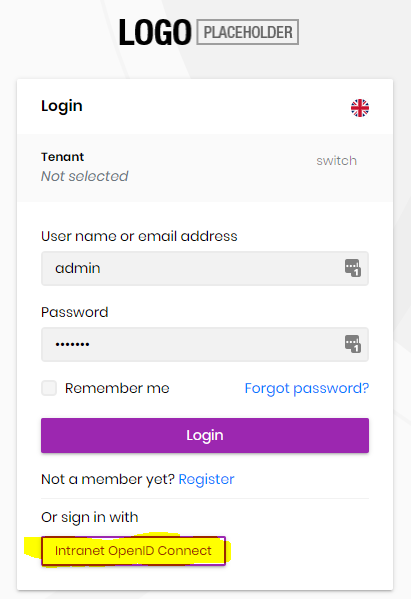
However, I got timeout error when trying to click the above button, this is the log content: https://drive.google.com/file/d/1VEQzShv4mI3tLc1ZbiAXi6OqOZuKNXY-/view?usp=sharing









