[maliming] said: hi
Try configuring IIS Request Limits in web config like this to increase the allowed query string length:
https://learn.microsoft.com/en-us/iis/configuration/system.webserver/security/requestfiltering/requestlimits/
<?xml version="1.0" encoding="utf-8"?>
<configuration>
  <!-- Any existing configuration you may have -->
+ <system.webServer>
+   <security>
+     <requestFiltering>
+       <requestLimits maxQueryString="4096" />
+     </requestFiltering>
+   </security>
+ </system.webServer>
</configuration>
Could you please share the request URL that returns a 400 error?
Thanks
Hi, I tried to update config, it is still giving the same error. I'm sharing the URL as well, it is when we get permission details.
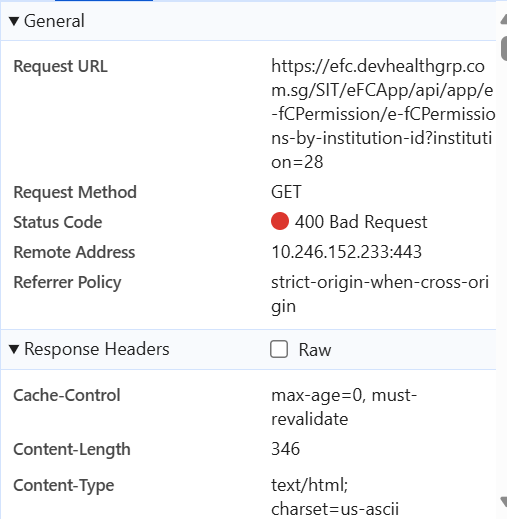
Thanks
[maliming] said: hi
What is your web server?
IIS, Kestrel or Nginx?
Thanks.
Hi, it's IIS.
Thanks.
ABP Framework version: v8.3.4
UI Type: React
Database System: EF Core (SQL Server)
Tiered (for MVC) or Auth Server Separated (for Angular): yes
We have recently increased permission for admin user but after adding the permission user started getting error "HTTP Error 400. The size of the request header is too long".
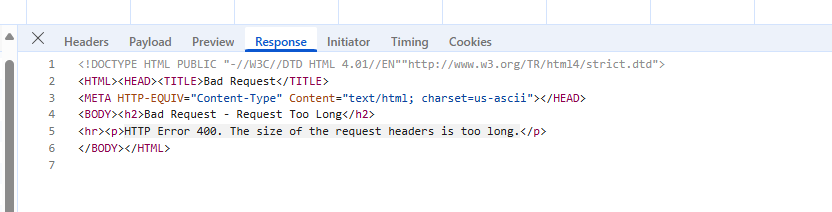
How to fix this ?
[maliming] said: hi
but on package creation it is coming
Can you share a test project to show it?
liming.ma@volosoft.com Thanks
Can you please confirm if I go by version 9 and above, will it work with .net 8 ?
Thanks, Priyanka
[maliming] said: hi
Your project doesn't reference the
Volo.Abp.Clipackage.
Can you share how you got the vulnerability details from your project?Thanks.
I have the same query, If I see in nuget package list, Volo.Abp.Cli is not listed but on package creation it is coming so I wanted to confirm if there is any package which is internally using it ?
Thanks
[maliming] said: hi
I'm getting security vulnerability for the Volo.Abp.Cli 8.3.4
What are the vulnerability details?
Thanks.
It is blocked as per my company policy; I'm sharing CVE link- https://nvd.nist.gov/vuln/detail/CVE-2024-43483.
Thanks.
ABP Framework version: v8.3.4
UI Type: React
Database System: EF Core (SQL Server)
Tiered (for MVC) or Auth Server Separated (for Angular): yes
I have recently upgraded ABP version from 8.3.1 to 8.3.4 but after upgrading I'm getting security vulnerability for the Volo.Abp.Cli 8.3.4. I'm not directly using it as NuGet package in my application; can you tell me how it is in use and what can I do to remove security vulnerability.
Thanks,
[maliming] said: hi
How can I reproduce this?
Can you share some code and steps
Thanks.
yes, to reproduce refer the below example, here my teams table is child table and its parent is user table, in first example I just updated isActive value from false to true and with that Modifier id and modification time was update but in second example I updated teams so Modifier id and modification time is not updated for user table, it is updated for user and team mapping table, audit information for parent table used to update earlier but it stopped updating after abp version update
{ "userId": "03a062cb-49b9-4b1e-94b9-69bfdb381a8f", "fullName": "test", "email": "testuser@test.sg", "isActive": true, "institutionId": 5, "remark": null, "roleId": "1d761946-076c-dfaa-832f-3a09ec002f59", "teams": [ 23 ] }
{ "userId": "03a062cb-49b9-4b1e-94b9-69bfdb381a8f", "fullName": "test", "email": "testuser@test.sg", "isActive": true, "institutionId": 5, "remark": null, "roleId": "1d761946-076c-dfaa-832f-3a09ec002f59", "teams": [ 23, 25 ] }
let me know if you need more details.
ABP Framework version: v8.1.1
UI Type: React
Database System: EF Core (SQL Server)
Tiered (for MVC) or Auth Server Separated (for Angular): yes
Exception message and full stack trace: NA
Hi, I have updated ABP's version few months back and I noticed after version update, if user is updating data for any child table then Audit columns like last modifier id and last modification time is not updating, earlier it used to update automatically, we display last modification time of parent's table to user, so if any data is updated from same page which contains only child class change, it is not changing last modification time, please help to find the root cause and fix.
Thanks
Hi,
Can you share how you configured your Background Jobs in your each application? Including
.Weband.Web_IntNormally, if you disable job execution, it shouldn't even be triggered. It seems some misconfiguration.
I checked, this is happening as my application layer is shared between both solutions, I believe I need to split both solutions.
Hi @priyankasynapxe, did you do that? What's the last status of this?
Hi, after splitting the solution, it is working fine, I cannot see hangfire in .Web_Int now, thanks for the support.









