LeptonX's FormSelect replaces every select.form-select with markup of its own
<div class="custom-select-wrapper" data-lpx-bound="true">
  <div class="custom-select-display form-select" role="combobox" aria-labelledby="{select id}">…</div>
  <select …>  <!-- Blazor owns only this -->
</div>
The wrapper is created by JS and is not part of Blazor's render tree. Its observer only ever reacts to additions:
setupMutationObserver() {
  observer = new MutationObserver(e => e.forEach(t => {
    …
    t.addedNodes.forEach(n => { … c.processSelect(a) })   // added only — no removedNodes branch
  }))
  observer.observe(document.body, { childList: true, subtree: true, … })
}
and there is no dispose/destroy/cleanup on the class (Object.getOwnPropertyNames(leptonx.FormSelect) has none).
So when Blazor removes a <select>, only the <select> goes. LeptonX's fully-rendered combobox stays behind — visible, clickable, with an aria-labelledby pointing at an id that no longer exists — and the next render binds the new select and builds another wrapper beside it.
Measured live: orphan wrappers climbed 4 → 5 → 6 → 7 while clicking between columns, and never dropped.
We run a non-tiered ABP Commercial Blazor Web App. The WASM/Auto island carries the commercial Pro admin surfaces (Account.Pro, Identity.Pro, Saas.Host, OpenIddict.Pro, AuditLogging, SettingManagement, FeatureManagement, LanguageManagement, TextTemplateManagement, Gdpr, plus the LeptonX WASM theme). We deploy as Linux containers (mcr.microsoft.com/dotnet/aspnet:10.0) via Docker Compose (Coolify) and GitHub Actions. Host is framework-dependent with PublishReadyToRun=true, SatelliteResourceLanguages=en; publish is dotnet publish -c Release -r linux-x64 --no-self-contained.
We want to reduce the WASM cold-start payload and improve production startup, and we need your official position on which .NET 10 publish optimizations are supported/recommended with ABP Commercial 10.4 before we change our Dockerfile/publish. We're aware trimming and single-file had problems with ABP in the past — we want to know what's changed for ABP 10 / .NET 10.
What we've already measured (untrimmed Release, brotli, our app):
Published _framework brotli total 14.3 MB (461 files); cold wire transfer 8.3 MB across 184 files, ~29.6 MB decoded. Full IL trimming reduces _framework brotli to 9.6 MB (−33%, 356 files) and the build succeeds and boots — but the trim-analysis pass (-p:SuppressTrimAnalysisWarnings=false) reports 918 IL2xxx warnings, ~490 of them inside ABP's reflection core: Castle.DynamicProxy (132), Autofac (95), Volo.Abp (273) — interceptors, dynamic HTTP client proxies, and reflection-based DI. The rest are app/3rd-party. TrimMode=partial is a no-op on Blazor WASM for us — measured identical size (9.6 MB) and identical 918 warnings to full trim. We must keep BlazorWebAssemblyLoadAllGlobalizationData=true (see Q8). Questions
A. IL Trimming (PublishTrimmed)
Is full IL trimming officially supported and tested for ABP Commercial 10.4 Blazor WASM, including the dynamic HTTP client proxies, Castle DynamicProxy interception, reflection-based DI, object mapping, and the Pro modules listed above? Does ABP ship (or plan to ship) trimmer-safety metadata for its reflection-heavy paths — [DynamicDependency], ILLink.Descriptors.xml, [DynamicallyAccessedMembers], [RequiresUnreferencedCode], or feature switches — so those ~490 Castle/Autofac/Volo.Abp warnings are annotated-safe rather than something each customer must validate and re-validate on every ABP bump? Our hard blocker is that trimming can silently drop un-rooted DTO JSON properties (no exception — just missing fields over the dynamic-proxy wire). What is the recommended pattern to guarantee Application.Contracts DTO round-trip safety under trimming — rooting Contracts via TrimmerRootAssembly, an ABP-provided descriptor, a System.Text.Json source-generator context, or something else? Since TrimMode=partial is a no-op on Blazor WASM, is there an ABP-sanctioned way to trim the .NET framework/runtime assemblies while leaving Volo.Abp.* and Castle.* whole, to capture the framework savings without the reflection risk surface? B. WASM AOT (RunAOTCompilation) 5. Is RunAOTCompilation=true supported/recommended for ABP Commercial 10.4 WASM? AOT requires trimming and disables runtime IL generation — does ABP's WASM interception/proxy path (Castle DynamicProxy uses Reflection.Emit) remain functional under AOT, or does ABP rely solely on static/source-generated client proxies there? What size and startup deltas have you measured on a representative commercial app?
C. Single-file & publish packaging 6. Is PublishSingleFile=true (and trimming the server host) supported for the ABP host, given the embedded resources / Virtual File System and the LeptonX bundling pipeline? Single-file historically broke embedded-resource/IFileProvider resolution — is that resolved on ABP 10 / .NET 10? 7. Our published _framework has 461 files (356 trimmed). Is WasmEnableWebcil (default) the recommended packaging, and is there a supported way to reduce WASM request count (assembly bundling) on ABP 10.4?
D. Globalization data 8. We keep BlazorWebAssemblyLoadAllGlobalizationData=true because ABP applies the user/tenant culture dynamically during WASM startup; with it false we get "Blazor detected a change in the application's culture that is not supported" on every load. Is there an ABP-supported way to do dynamic culture switching with a bounded culture set (predefined supported cultures / custom ICU shard) so we don't ship the full ICU dataset? We only need en and es-* (Latin America).
E. Lazy loading Pro module assemblies 9. Can the commercial Pro module assemblies (Identity.Pro, Saas.Host, AuditLogging, OpenIddict.Pro, LanguageManagement, TextTemplateManagement, Gdpr — admin-only surfaces) be BlazorWebAssemblyLazyLoad-ed so they're fetched on-demand per route instead of in the cold-boot closure, given the ABP module system discovers/initializes modules from loaded assemblies at startup? If not supported today, is route-based code-splitting on the roadmap?
F. Compressed static assets & serving (we run behind a reverse proxy) 10. Is ABP's host static-file + LeptonX bundling pipeline fully compatible with .NET 10 compressed static web assets (build-time .br/.gz + fingerprinted import maps / MapStaticAssets)? In a containerized deploy behind a reverse proxy, should Kestrel serve the precompressed _framework/*.br, or should we offload compression/caching to the proxy? Recommended cache-control/immutable headers for the fingerprinted WASM assets?
G. Server image / runtime 11. Beyond PublishReadyToRun=true, what server-side production knobs do you recommend for the ABP host on .NET 10 containers (host trimming, R2R composite, tiered compilation, runtime/GC settings)? InvariantGlobalization is off the table for us (multi-culture) — anything else ABP-specific that interferes?
What would close this out for us: a concrete, supported set of publish properties we can pin in the .csproj / Dockerfile, and — ideally — a support matrix marking each of the above as supported / works-with-caveats / not supported on ABP Commercial 10.4 + .NET 10, plus a link to an official trimmed/AOT ABP Commercial Blazor WASM reference if one exists.
On a Blazor WebApp page rendered with InteractiveWebAssembly(prerender: false),
the LeptonX SideMenuLayout calls JS-interop functions from the abp / LeptonX
script bundle during component initialization, before that bundle has loaded.
This throws repeated Microsoft.JSInterop.JSExceptions that are caught by the
router's ErrorBoundary, which auto-recovers and retries — re-mounting the whole
layout dozens of times for ~10–15s until the WASM script bundle finishes loading,
then self-heals.
This is reproducible in a clean template (not specific to our code) and is caused by two framework components together:
AbpScripts.razor emits the WebAssembly script bundle (the one that defines
window.abp and the LeptonX globals) only when OperatingSystem.IsBrowser()
is true — i.e. after the WASM runtime boots and the component re-renders.SideMenuLayout (and LeptonXStyleProvider) call into that bundle from
OnInitializedAsync and OnAfterRenderAsync, with no guard for the script
not yet being loaded.On a prerender:false page there is no server-prerendered copy of the bundle, so
(2) runs before (1) has injected/loaded the scripts.
Pages rendered with prerender (the default) do not hit this, because the
bundle is written into the initial HTML and window.abp exists before the layout
becomes interactive.
new InteractiveWebAssemblyRenderMode(prerender: false)<MyPage @rendermode="new InteractiveWebAssemblyRenderMode(prerender: false)" />
(or set prerender: false on the component/route). Keep the default
App.razor wiring of <AbpScripts ... WebAssemblyScriptFiles="..." @rendermode="..." />.ErrorBoundary (as the default template does) so the
exception is observable rather than fatal.Expected: the side-menu layout initializes once the page is interactive, with no exceptions.
Actual: repeated JSExceptions during warm-up (see below), each caught by the
ErrorBoundary and auto-recovered, re-mounting the layout many times until the
abp/LeptonX bundle loads.
(1) During OnInitializedAsync:
Microsoft.JSInterop.JSException: Could not find 'abp.utils.getCookieValue' ('abp' was undefined).
Error: Could not find 'abp.utils.getCookieValue' ('abp' was undefined).
at Microsoft.JSInterop.JSRuntime.<InvokeAsync>d__23`1[[System.String, System.Private.CoreLib]].MoveNext()
at Volo.Abp.AspNetCore.Components.Web.CookieService.GetAsync(String key)
at Volo.Abp.AspNetCore.Components.WebAssembly.LeptonXTheme.LeptonXStyleProvider.GetSideMenuStateAsync()
at Volo.Abp.AspNetCore.Components.Web.LeptonXTheme.Components.ApplicationLayout.SideMenuLayout.OnInitializedAsync()
at Microsoft.AspNetCore.Components.ComponentBase.RunInitAndSetParametersAsync()
at Microsoft.AspNetCore.Components.RenderTree.Renderer.GetErrorHandledTask(Task taskToHandle, ComponentState owningComponentState)
(2) During OnAfterRenderAsync (after (1) is worked around, or in parallel):
Microsoft.JSInterop.JSException: The value 'abp.utils.addClassToTag' is not a function.
Error: The value 'abp.utils.addClassToTag' is not a function.
at Microsoft.JSInterop.JSRuntime.<InvokeAsync>d__23`1[[Microsoft.JSInterop.Infrastructure.IJSVoidResult, Microsoft.JSInterop]].MoveNext()
at Microsoft.JSInterop.JSRuntimeExtensions.InvokeVoidAsync(IJSRuntime jsRuntime, String identifier, Object[] args)
at Volo.Abp.AspNetCore.Components.Web.LeptonXTheme.Components.ApplicationLayout.SideMenuLayout.OnAfterRenderAsync(Boolean firstRender)
at Microsoft.AspNetCore.Components.RenderTree.Renderer.GetErrorHandledTask(Task taskToHandle, ComponentState owningComponentState)
SideMenuLayout.OnAfterRenderAsync also invokes initLeptonX and
afterLeptonXInitialization (theme initialization) from the same bundle, which
fail the same way until the bundle is loaded.
AbpScripts.razor resolves WebAssemblyScriptFiles only under
if (OperatingSystem.IsBrowser() && WebAssemblyScriptFiles != null), so on a
prerender:false page the script bundle is injected only after WASM activation.
SideMenuLayout/LeptonXStyleProvider then call abp.utils.getCookieValue,
abp.utils.addClassToTag, initLeptonX, and afterLeptonXInitialization from
OnInitializedAsync/OnAfterRenderAsync without verifying the bundle is loaded,
so they throw until it is.
SideMenuLayout / LeptonXStyleProvider should make their JS interop resilient
to the script bundle not yet being present under
InteractiveWebAssembly(prerender: false) — e.g. feature-detect window.abp
before calling, await a "scripts ready" signal, or defer the cookie/class/init
interop until the abp + LeptonX bundle is guaranteed loaded.
abp.utils.* functions early (in a plain <head>
script) does not work: it just moves the failure to the next call, and
initLeptonX is the theme's real initialization, which cannot be stubbed.ContentToolbar in Volo.Abp.AspNetCore.Components.Web.LeptonXTheme (LeptonX 5.4.1) subscribes two async lambdas to the scoped PageLayout service's events in OnInitializedAsync and never unsubscribes (the component does not implement IDisposable):
// Components/ApplicationLayout/Common/ContentToolbar.razor.cs
protected override Task OnInitializedAsync()
{
    PageLayout.ToolbarItems.CollectionChanged += async (s, e) => await RenderAsync();
    PageLayout.PropertyChanged += async (s, e) => await InvokeAsync(StateHasChanged);
    return base.OnInitializedAsync();
}
This causes two problems:
PageLayout. The request's DI scope is disposed when the response completes, but a pending event-handler continuation can still execute afterwards. Its StateHasChanged triggers a render in which Blazorise's ComponentActivator resolves toolbar item component types from the now-disposed Autofac lifetime scope → ObjectDisposedException (stack trace below). Component disposal is not ordered before scope disposal, so this is a race that fires intermittently on any prerendered page using the application layout.ContentToolbar instance stays referenced by the scoped PageLayout for the lifetime of the circuit/scope.System.ObjectDisposedException
Message=Instances cannot be resolved and nested lifetimes cannot be created from this LifetimeScope as it (or one of its parent scopes) has already been disposed.
Source=Autofac
at Autofac.Core.Lifetime.LifetimeScope.ThrowDisposedException()
at Autofac.Extensions.DependencyInjection.AutofacServiceProvider.GetService(Type serviceType)
at Blazorise.ComponentActivator.CreateInstance(Type componentType)
at Microsoft.AspNetCore.Components.ComponentFactory.InstantiateComponent(...)
at Microsoft.AspNetCore.Components.RenderTree.Renderer.InstantiateChildComponentOnFrame(...)
at Microsoft.AspNetCore.Components.RenderTree.RenderTreeDiffBuilder.InitializeNewComponentFrame(...)
...
at Microsoft.AspNetCore.Components.ComponentBase.StateHasChanged()
at Microsoft.AspNetCore.Components.Rendering.RendererSynchronizationContext.<InvokeAsync>g__Execute|8_0(ValueTuple`3 state)
--- End of stack trace from previous location ---
at Volo.Abp.AspNetCore.Components.Web.LeptonXTheme.Components.ApplicationLayout.Common.ContentToolbar.<<OnInitializedAsync>b__7_1>d.MoveNext()
at System.Threading.Tasks.Task.<>c.<ThrowAsync>b__124_1(Object state)
InteractiveAuto render mode.PageLayout toolbar items / title (e.g. PageToolbar items added from OnAfterRenderAsync, as in standard CRUD pages).ObjectDisposedException above is thrown from the prerender pass. With a debugger attached it breaks every time it occurs; without one it surfaces as unobserved-task exceptions / log noise on every unlucky prerender.Volo.Abp.AspNetCore.Components.Server.LeptonXTheme + Volo.Abp.AspNetCore.Components.WebAssembly.LeptonXTheme)InteractiveServer + InteractiveAuto render modes with prerenderingAbpAutofacModule), Blazorise 2.0.4In ContentToolbar (and any other LeptonX components subscribing to scoped services from lifecycle methods):
RendererInfo.IsInteractive == false — a static prerender produces a single snapshot, so change events can never affect its output.IDisposable, store the handlers in fields, and unsubscribe on dispose (fixes the leak for interactive sessions).We have verified this exact change resolves the crash in our application by replacing the component via [ExposeServices(typeof(ContentToolbar))] / [Dependency(ReplaceServices = true)]. Note that a "disposed" flag alone is not sufficient — component disposal is not guaranteed to happen before the DI scope is disposed under prerendering, so the not-yet-subscribing gate (or catching ObjectDisposedException) is required.
using System;
using System.Collections.Specialized;
using System.ComponentModel;
using System.Threading.Tasks;

using Volo.Abp.AspNetCore.Components.Web.LeptonXTheme.Components.ApplicationLayout.Common;
using Volo.Abp.DependencyInjection;

namespace Cns.Cloud.Apps.Blazor.Client;

// Replaces LeptonX's ContentToolbar (5.4.1): the stock component subscribes async lambdas to the
// scoped PageLayout's events in OnInitializedAsync and never unsubscribes. Under Blazor Web App
// prerendering (the Interactive Auto island), a continuation can fire after the request's DI scope
// is disposed, and the resulting StateHasChanged render throws ObjectDisposedException out of
// Autofac when Blazorise's activator tries to resolve toolbar item components.
[ExposeServices(typeof(ContentToolbar))]
[Dependency(ReplaceServices = true)]
public class SafeContentToolbar : ContentToolbar, IDisposable
{
    private bool _disposed;
    private NotifyCollectionChangedEventHandler? _collectionChanged;
    private PropertyChangedEventHandler? _propertyChanged;

    protected override Task OnInitializedAsync()
    {
        // Deliberately does NOT call base.OnInitializedAsync(): the base body subscribes the
        // unguarded, never-removed lambdas this class exists to replace.
        //
        // Static prerender (RendererInfo.IsInteractive == false) produces a single HTML snapshot:
        // change events can never affect the output, but their continuations CAN outlive the
        // request's DI scope and throw ObjectDisposedException (component disposal is not ordered
        // before scope disposal, so a _disposed guard alone is insufficient). Don't subscribe.
        if (!RendererInfo.IsInteractive)
        {
            return Task.CompletedTask;
        }

        _collectionChanged = async (_, _) =>
        {
            if (!_disposed)
            {
                await RenderAsync();
            }
        };
        _propertyChanged = async (_, _) =>
        {
            if (!_disposed)
            {
                await InvokeAsync(StateHasChanged);
            }
        };

        PageLayout.ToolbarItems.CollectionChanged += _collectionChanged;
        PageLayout.PropertyChanged += _propertyChanged;
        return Task.CompletedTask;
    }

    protected override async Task RenderAsync()
    {
        if (_disposed)
        {
            return;
        }

        await base.RenderAsync();
    }

    public void Dispose()
    {
        _disposed = true;

        if (_collectionChanged is not null)
        {
            PageLayout.ToolbarItems.CollectionChanged -= _collectionChanged;
        }

        if (_propertyChanged is not null)
        {
            PageLayout.PropertyChanged -= _propertyChanged;
        }
    }
}
<optgroup> and Breaks Inside <Modal> (Blazor Server)LeptonX's custom-select overlay (the Bootstrap-style <button class="select-button"> /
<ul class="dropdown-menu"> overlay that LeptonX paints over every native <select> /
Blazorise <Select> on the page) has two distinct rendering bugs that surface in a
Blazor Server app running ABP 10.3.0 + LeptonX 5.3.0 + Blazorise 2.0.4:
<optgroup> headers are dropped — when a Blazorise <Select> contains
<SelectGroup> (or a native <select> contains <optgroup>), the overlay
flattens all options into a single ungrouped list. The group labels are gone
and the user cannot tell which entry belongs to which group.<Select> is inside a <Modal> — the overlay
button paints (showing the placeholder text) but the dropdown panel is empty
when opened, no matter how many <SelectItem>s the underlying <select> has.
This appears specific to Blazorise modals, where the <select> element is
moved/wrapped after LeptonX has run its initial overlay pass.| Component | Version |
| --- | --- |
| .NET | 10.0 |
| ABP Framework | 10.3.0 |
| Volo.Abp.AspNetCore.Components.Server.LeptonXTheme | 5.3.0 |
| Volo.Abp.AspNetCore.Components.Web.LeptonXTheme | 5.3.0 (transitive) |
| Volo.Abp.AspNetCore.Mvc.UI.Theme.LeptonX | 5.3.0 |
| Blazorise | 2.0.4 |
| LeptonX layout | LeptonXBlazorLayouts.SideMenu |
| Browser | Chrome (latest), reproduced in Edge |
Confirmed on LeptonX 5.3.0 with Blazorise 2.0.4 (our 10.3 baseline), so the bugs are LeptonX-side, not Blazorise.
<optgroup> headers droppedSideMenu layout.<Select> outside any modal with grouped options, e.g.:<Select TValue="string" @bind-Value="@SelectedLayoutCode">
<SelectItem Value="@string.Empty">Select report or layout</SelectItem>
@foreach (var reportType in ReportCollection)
{
<SelectGroup Label="@reportType.TypeName">
@foreach (var reportLayout in reportType.ReportLayoutList ?? [])
{
<SelectItem Value="@reportLayout.LayoutCode">@reportLayout.LayoutName</SelectItem>
}
</SelectGroup>
}
</Select>
Expected (and what the underlying <select> actually emits):
[Select report or layout]
─── A/R Aging ───
   AR_Aging_Standard
   AR_Aging_Detailed
─── Sales ───
   Sales_Order_Open
   Sales_Order_Closed
Actual: the overlay strips the group rows; the user sees a flat list:
[Select report or layout]
AR_Aging_Standard
AR_Aging_Detailed
Sales_Order_Open
Sales_Order_Closed
Inspect <select> in DevTools and the <optgroup label="…"> elements are
present and well-formed. Native browser <select> rendering (when LeptonX's
overlay JS is removed) shows the groups correctly. Bug is in the overlay's
DOM walk; it iterates <option> only and ignores <optgroup>.
"Reports and Layouts" picker. Layouts are grouped by report type (e.g., A/R Aging, Sales). With the overlay, every layout name appears flattened with no indication of which report family it belongs to.
<Select> content empty when hosted inside <Modal><Select> inside a Blazorise <Modal>:<Modal @ref="MyModal" Centered="true">
<ModalContent>
<ModalBody>
<Select TValue="string" @bind-Value="@SelectedCurrency">
<SelectItem Value="">Select currency</SelectItem>
@foreach (var c in AvailableCurrencies)
{
<SelectItem Value="@c.Code">@c.Code - @c.Name</SelectItem>
}
</Select>
</ModalBody>
</ModalContent>
</Modal>
Expected: the dropdown panel lists every currency.
Actual: the overlay button shows the placeholder ("Select currency"),
but the dropdown panel is empty — no <li> rows are rendered, even though
the underlying <select> is fully populated.
<select> in DevTools while the modal is open: every
<option> is present and has the right value/text content.<ul> is empty.<Select> with a native <select class="form-control">
in the same modal: the overlay still paints, but its <ul> is now populated
correctly. This is the smoking gun: the overlay successfully consumes a
static native <select> but fails when the <select> is the one Blazorise
rendered. Our hypothesis is that LeptonX runs its overlay-decoration pass
once on modal open, before Blazorise has finished rendering the <select>'s
<option> children, and never re-runs after Blazorise's second render pass.Replace Blazorise <Select> with native <select class="form-control">
elements (with explicit @onchange handlers, since @bind does not work
the same on native <select> for non-string values). The native <select>
keeps its native behaviour underneath the overlay, and either renders
correctly (groups visible) or, when LeptonX's overlay still mis-renders,
the native control behind it remains usable as a fallback.
@* Native <select> — LeptonX's custom-select overlay ignores <optgroup> *@
<select class="form-control" value="@Filter.LayoutCode" @onchange="OnLayoutCodeChanged" disabled="@IsLoading">
    <option value="">@(IsLoading ? L["LoadingWithThreeDot"] : L["SelectReportOrLayout"])</option>
    @foreach (var reportType in ReportCollection)
    {
        <optgroup label="@reportType.TypeName">
            @foreach (var reportLayout in reportType.ReportLayoutList ?? [])
            {
                <option value="@reportLayout.LayoutCode">@reportLayout.LayoutName</option>
            }
        </optgroup>
    }
</select>
private async Task OnLayoutCodeChanged(ChangeEventArgs e)
{
    var layoutCode = e.Value?.ToString() ?? string.Empty;
    Filter.LayoutCode = layoutCode;
    await LoadLayoutParametersAsync(layoutCode);
}
@* Native <select> — LeptonX's custom-select overlay breaks inside modals *@
<select class="form-control" value="@NewSyncJob.BaseCurrency" @onchange="OnBaseCurrencyChanged" disabled="@(!AvailableCurrencies.Any())">
    <option value="">@L["SelectCurrency"]</option>
    @foreach (var currency in AvailableCurrencies)
    {
        <option value="@currency.Code">@currency.Code - @currency.Name</option>
    }
</select>
private void OnBaseCurrencyChanged(ChangeEventArgs e)
{
    NewSyncJob.BaseCurrency = e.Value?.ToString() ?? string.Empty;
}
For nullable enums in modals (e.g., DayOfWeek?), the value round-trips as
the integer string:
<select class="form-control" value="@((int?)NewSyncJob.SyncDayOfWeek)" @onchange="OnDayOfWeekChanged" disabled="@(NewSyncJob.Frequency != SyncFrequency.Weekly)">
    <option value="">@L["SelectDay"]</option>
    @foreach (var day in Enum.GetValues<DayOfWeek>())
    {
        <option value="@((int)day)">@L[$"Enum:DayOfWeek.{day}"]</option>
    }
</select>
private void OnDayOfWeekChanged(ChangeEventArgs e)
{
    var val = e.Value?.ToString();
    NewSyncJob.SyncDayOfWeek = string.IsNullOrEmpty(val) ? null : (DayOfWeek)int.Parse(val);
}
After upgrading from Volo.Abp.AspNetCore.Components.Web.LeptonXTheme 5.0.1 → 5.3.0 (alongside ABP Framework 10.0.1 → 10.3.0), the side-menu items in our Blazor Server application render correctly but do not respond to clicks:
<ul> (the collapsed class is never removed).href), but selected highlighting and any other LeptonX-driven behaviour is missing.| Component | Version |
| --- | --- |
| .NET | 10.0 |
| ABP Framework | 10.3.0 |
| Volo.Abp.AspNetCore.Components.Server.LeptonXTheme | 5.3.0 |
| Volo.Abp.AspNetCore.Components.Web.LeptonXTheme | 5.3.0 (transitive) |
| Volo.Abp.AspNetCore.Mvc.UI.Theme.LeptonX | 5.3.0 |
| Blazorise | 2.0.4 |
| LeptonX layout | LeptonXBlazorLayouts.SideMenu |
| Browser | Chrome (latest) |
Pre-upgrade versions (where the menu worked): ABP 10.0.1, LeptonX 5.0.1.
SideMenu LeptonX layout.IMenuContributor that adds at least one parent group with children (e.g., "AI" → ["Chat", "Usage"]).Expected: The inner <ul> loses its collapsed class and the children become visible.
Actual: Nothing happens. The DOM is unchanged.
Open Chrome DevTools → Console on the running app and run the script below. It captures the <ul> class before and after a programmatic click, then re-runs the side-menu initializer and clicks again. The before/after output proves that the click handler is missing until the initializer is re-invoked against the populated DOM.
(async () => {
  const out = {};
  const aiParent = Array.from(document.querySelectorAll('a.lpx-menu-item-link'))
                        .find(a => a.innerText.trim() === 'AI'); // any parent group works
  const ul = aiParent?.nextElementSibling;

  // Step 1 — simulate a real click BEFORE re-init
  out.before = { ulClasses: ul?.className };
  aiParent?.click();
  await new Promise(r => setTimeout(r, 500));
  out.afterClickBeforeInit = { ulClasses: ul?.className };

  // Step 2 — re-run the side-menu initializer manually
  // (equivalent: window.initLeptonX('side-menu') — but that re-runs every initializer)
  window.leptonx.init.initializers.get('initSideMenu')();

  // Step 3 — click again AFTER re-init
  aiParent?.click();
  await new Promise(r => setTimeout(r, 500));
  out.afterClickAfterInit = { ulClasses: ul?.className };

  console.log(JSON.stringify(out, null, 2));
})();
Observed output on a fresh page load (no workaround in place):
{
  "before":               { "ulClasses": "lpx-inner-menu hidden-in-hover-trigger collapsed " },
  "afterClickBeforeInit": { "ulClasses": "lpx-inner-menu hidden-in-hover-trigger collapsed " }, // click did nothing
  "afterClickAfterInit":  { "ulClasses": "lpx-inner-menu hidden-in-hover-trigger" }             // collapsed removed → menu expanded
}
The single behavioural difference between the two clicks is the manual initializers.get('initSideMenu')() call between them — confirming that the initializer registered at init.push('initSideMenu', …) ran originally against an empty #lpx-sidebar and therefore bound no click handlers.
In Volo.Abp.AspNetCore.Components.Web.LeptonXTheme 5.3.0, the side-menu initializer is registered as:
// html-build/src/scripts/layouts/pro/side-menu/pro-side-menu.ts
init.push('initSideMenu', () => {
  if (document.querySelector('#lpx-sidebar')) {
    sideMenu = SideMenu.create();
  }
});
SideMenu.create() (extends BaseSideMenu) immediately queries .outer-menu-item > .lpx-menu-item and binds click handlers via MenuItem's constructor:
// html-build/src/scripts/layouts/common/side-menu/base-side-menu.ts
createMenuItems() {
  const menuItems = this.el.querySelectorAll(`.outer-menu-item > .lpx-menu-item`);
  menuItems.forEach(item => {
    const menuItem = new MenuItem(item); // attaches click + keydown listeners
    this.menuItems.push(menuItem);
  });
}
The initializer is invoked from SideMenuLayout.OnAfterRenderAsync(firstRender: true):
// src/Volo.Abp.AspNetCore.Components.Web.LeptonXTheme/Components/ApplicationLayout/SideMenuLayout.razor.cs
protected override async Task OnAfterRenderAsync(bool firstRender)
{
    if (firstRender)
    {
        await UtilsService.AddClassToTagAsync("body", GetBodyClassName());
        await JSRuntime.InvokeVoidAsync("initLeptonX",
            new[] { "side-menu", Options.Value.DefaultStyle, Options.Value.ContainerWidth });
        await JSRuntime.InvokeVoidAsync("afterLeptonXInitialization",
            new[] { "side-menu", Options.Value.DefaultStyle });
    }
}
The problem is the timing relative to MainMenu:
// src/Volo.Abp.AspNetCore.Components.Web.LeptonXTheme/Components/ApplicationLayout/SideMenu/Navigation/MainMenu.razor.cs
protected override async Task OnInitializedAsync()
{
    Menu = await MainMenuProvider.GetMenuAsync(); // async permission/feature checks
    Menu.StateChanged += Menu_StateChanged;
    ApplicationConfigurationChangedService.Changed += ApplicationConfigurationChanged;
}
Because MainMenuProvider.GetMenuAsync() is awaiting (permission resolution, feature checks, etc.), Menu is null during the first render of MainMenu.razor and the @if (Menu != null) { … } block emits nothing. By the time the surrounding SideMenuLayout reaches OnAfterRenderAsync(firstRender: true), #lpx-sidebar exists in the DOM but contains zero .outer-menu-item children.
SideMenu.create() therefore constructs an instance with an empty menuItems array. No click handlers are bound. When MainMenu later re-renders with the actual items (after GetMenuAsync resolves), nothing re-runs the initializer — there is no MutationObserver / waitForElement wrapping initSideMenu in 5.3.0.
This worked in 5.0.x because the side-menu bundle's init logic was wrapped in a waitForElement-style observer (the 5.0.1 minified bundle still contains MutationObserver(function(o){document.querySelector(t)&&(n.disconnect()…}) near the side-menu wiring).
Captured live from the running app:
// Before manual fix
{
  "url": "https://localhost:44320/",
  "leptonxInit": "object",
  "menuLinkCount": 148,                 // items DO render eventually
  "bodyClasses": "abp-application-layout lpx-theme-system lpx-theme-light",
  "currentLayout": "side-menu",         // initLeptonX did run
  "defaultSettings": { "appearance": "dim", "containerWidth": "full" }
}

// Click "AI" parent — UL stays collapsed
{ "ulClasses": "lpx-inner-menu hidden-in-hover-trigger collapsed " }

// After window.initLeptonX() (manual)
// Click "AI" parent — UL expands
{ "ulClasses": "lpx-inner-menu hidden-in-hover-trigger" }
Bundle size diff between versions (suggests the regression is part of a bundle rewrite):
62,404 bytes  /volo.abp.aspnetcore.components.web.leptonxtheme/5.0.1/.../side-menu/js/lepton-x.bundle.min.js
39,070 bytes  /volo.abp.aspnetcore.components.web.leptonxtheme/5.3.0/.../side-menu/js/lepton-x.bundle.min.js
The same broken state recurs whenever MainMenu re-renders. The simplest path to trigger it:
Volo.Saas impersonation).Volo.Abp.Account.Pro.Public.Web.Impersonation) to return to the host session.The trigger is MainMenu.ApplicationConfigurationChanged at MainMenu.razor.cs:35-41:
private async void ApplicationConfigurationChanged()
{
    Menu.StateChanged -= Menu_StateChanged;
    Menu = await MainMenuProvider.GetMenuAsync();
    Menu.StateChanged += Menu_StateChanged;
    await InvokeAsync(StateHasChanged);
}
When the impersonation switch fires ApplicationConfigurationChangedService.Changed, MainMenuProvider.GetMenuAsync() is awaited and Blazor diffs the new menu over the old one. The previously-bound <a class="lpx-menu-item-link"> elements are replaced, dropping the click listeners that MenuItem's constructor attached. Nothing re-runs initSideMenu, so the menu becomes unclickable a second time — and a third time on every subsequent impersonation/return cycle.
Inline script appended to Pages/_Host.cshtml, after <abp-script-bundle name="@BlazorLeptonXThemeBundles.Scripts.Global"/> and app.js. It re-runs initSideMenu whenever new (unbound) menu items appear in #lpx-sidebar, using a per-element marker to avoid double-binding when Blazor preserves elements in place: Works sporadically.
<script>
    (function () {
        const SEL = '#lpx-sidebar .outer-menu-item > .lpx-menu-item';
        const MARKER = '__lpxBound';
        function ensure() {
            const items = document.querySelectorAll(SEL);
            if (items.length === 0) return;
            let needsInit = false;
            for (const el of items) { if (!el[MARKER]) { needsInit = true; break; } }
            if (!needsInit) return;
            window.leptonx?.init?.initializers?.get('initSideMenu')?.();
            items.forEach(el => { el[MARKER] = true; });
        }
        new MutationObserver(ensure).observe(document.body, { childList: true, subtree: true });
        ensure();
    })();
</script>
Why this shape:
initSideMenu initializer (not the full initLeptonX) so toolbar / mobile navbar / theme switcher are not re-bound.<a> element, the new element has no marker and we re-init; when Blazor updates the same element in place, the marker survives and we skip re-init (so handlers attached by the previous MenuItem constructor are not duplicated by addEventListener).ApplicationConfigurationChanged cycle, so impersonation in either direction recovers automatically.Wrap the initSideMenu initializer in waitForElement (already exported by @lpx/pro/utils) so it waits for menu items to be present, similar to how it worked in 5.0.x:
// html-build/src/scripts/layouts/pro/side-menu/pro-side-menu.ts
init.push('initSideMenu', () => {
  waitForElement('#lpx-sidebar .outer-menu-item > .lpx-menu-item', () => {
    sideMenu = SideMenu.create();
  });
});
Equivalently, MainMenu.razor.cs could trigger JSRuntime.InvokeVoidAsync("initLeptonX", ...) after Menu is set, but the JS-side fix is less invasive and covers any host project that has slow MainMenuProvider providers.
What works every time, open the console when the issue is present and type window.initLeptonX()
This is a hiigh priority issue as end users cannot be expected to open console for anything.
Updated to 10.3.0 on run we see this You are not granted permission to use the module 'Volo.Abp.OperationRateLimiting.Domain-v10.3.0.0' Why is that?
We have an application that is multitenant. We have enabled the tenant domain name resolver. However we use sign in with microsoft, meaning we have to register an app on azure and provide the redirect uri. if we provide the standard root of our app, we can login with no problem because the redirect uri is valid. when a tenant tries to login it says the redirect uri is invalid. In this case we would have to add a new redirect uri for each subdomain for each tenant, which is tedious and could hit a limit. What can we do in code to work around this and use the one root redirect uri for the auth part?
for example app.mydomain.com works tenant1.app.mydomain.com does not work after returning from microsoft login to our app
create a new project, add a tenant, login to tenant and set account overide for external login support.
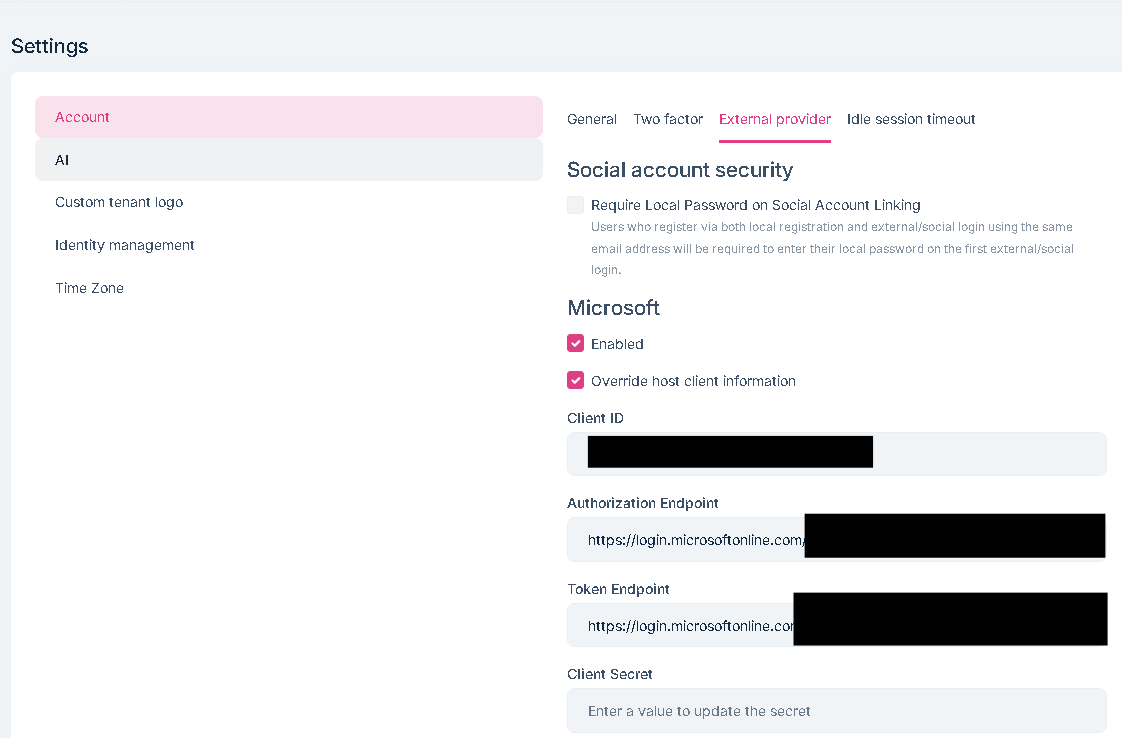
Fill in the settings and log out. Attempt to login to the tenant with the external provider (without first creating abp user). External provider login succeeds redirects to main application, 400 bad request error: Logs show as below
[22:32:51 INF] Executing endpoint '/Account/Register'
[22:32:51 INF] Route matched with {page = "/Account/Register", action = "", controller = "", area = ""}. Executing page /Account/Register
[22:32:51 INF] Skipping the execution of current filter as its not the most effective filter implementing the policy Microsoft.AspNetCore.Mvc.ViewFeatures.IAntiforgeryPolicy
[22:32:51 INF] Executing handler method Volo.Abp.Account.Public.Web.Pages.Account.RegisterModel.OnPostAsync - ModelState is Invalid
[22:32:51 INF] Start processing HTTP request GET https://graph.microsoft.com/v1.0/me/photo/$value
[22:32:51 INF] Sending HTTP request GET https://graph.microsoft.com/v1.0/me/photo/$value
[22:32:51 INF] Received HTTP response headers after 228.7578ms - 200
[22:32:51 INF] End processing HTTP request after 228.9203ms - 200
[22:32:52 INF] AuthenticationScheme: Identity.Application signed in.
[22:32:52 INF] Executed handler method OnPostAsync, returned result Microsoft.AspNetCore.Mvc.RedirectResult.
[22:32:52 INF] Executing RedirectResult, redirecting to https://mydomain/?page=%2FAccount%2F~%2FAccount%2FLogin.
[22:32:52 INF] Executed page /Account/Register in 816.1899ms
[22:32:52 INF] Executed endpoint '/Account/Register'
[22:32:52 INF] Sending welcome email to tenant user: 3a1f6215-78b1-8c0b-88c4-73b736847965, TenantId: 3a1f6144-16da-f3f5-27cf-6826c562fcbf
[22:32:52 INF] Executing endpoint 'Volo.Abp.AspNetCore.Mvc.UI.Theme.Shared.Controllers.ErrorController.Index (Volo.Abp.AspNetCore.Mvc.UI.Theme.Shared)'
[22:32:52 INF] Route matched with {action = "Index", controller = "Error", area = "", page = ""}. Executing controller action with signature System.Threading.Tasks.Task`1[Microsoft.AspNetCore.Mvc.IActionResult] Index(Int32) on controller Volo.Abp.AspNetCore.Mvc.UI.Theme.Shared.Controllers.ErrorController (Volo.Abp.AspNetCore.Mvc.UI.Theme.Shared).
[22:32:52 WRN] The provided antiforgery token was meant for a different claims-based user than the current user.
[22:32:52 INF] Authorization failed for the request at filter 'Volo.Abp.AspNetCore.Mvc.AntiForgery.AbpAutoValidateAntiforgeryTokenAuthorizationFilter'.
[22:32:52 INF] Executing StatusCodeResult, setting HTTP status code 400
[22:32:52 INF] Executed action Volo.Abp.AspNetCore.Mvc.UI.Theme.Shared.Controllers.ErrorController.Index (Volo.Abp.AspNetCore.Mvc.UI.Theme.Shared) in 2.6912ms
[22:32:52 INF] Executed endpoint 'Volo.Abp.AspNetCore.Mvc.UI.Theme.Shared.Controllers.ErrorController.Index (Volo.Abp.AspNetCore.Mvc.UI.Theme.Shared)'
[22:32:52 ERR] An unhandled exception has occurred while executing the request.
System.Collections.Generic.KeyNotFoundException: The given key 'IsSeeding' was not present in the dictionary.
at System.Collections.Generic.Dictionary`2.get_Item(TKey key)
at Cns.Cloud.Apps.Users.UserCreatedEventHandler.HandleEventAsync(EntityCreatedEto`1 eventData) in /work/src/myproject/Users/UserCreatedEventHandler.cs:line 46
at Volo.Abp.EventBus.EventHandlerInvoker.InvokeAsync(IEventHandler eventHandler, Object eventData, Type eventType)
at Volo.Abp.EventBus.EventBusBase.TriggerHandlerAsync(IEventHandlerFactory asyncHandlerFactory, Type eventType, Object eventData, List`1 exceptions, InboxConfig inboxConfig)
at Volo.Abp.EventBus.EventBusBase.ThrowOriginalExceptions(Type eventType, List`1 exceptions)
at Volo.Abp.EventBus.EventBusBase.TriggerHandlersAsync(Type eventType, Object eventData)
at Volo.Abp.EventBus.Local.LocalEventBus.PublishAsync(LocalEventMessage localEventMessage)
at Volo.Abp.EventBus.Local.LocalEventBus.PublishToEventBusAsync(Type eventType, Object eventData)
at Volo.Abp.EventBus.EventBusBase.PublishAsync(Type eventType, Object eventData, Boolean onUnitOfWorkComplete)
at Volo.Abp.EventBus.Distributed.LocalDistributedEventBus.PublishToEventBusAsync(Type eventType, Object eventData)
at Volo.Abp.EventBus.Distributed.LocalDistributedEventBus.PublishAsync(Type eventType, Object eventData, Boolean onUnitOfWorkComplete, Boolean useOutbox)
at Volo.Abp.EventBus.UnitOfWorkEventPublisher.PublishDistributedEventsAsync(IEnumerable`1 distributedEvents)
at Volo.Abp.Uow.UnitOfWork.CompleteAsync(CancellationToken cancellationToken)
at Volo.Abp.AspNetCore.Uow.AbpUnitOfWorkMiddleware.InvokeAsync(HttpContext context, RequestDelegate next)
at Microsoft.AspNetCore.Builder.UseMiddlewareExtensions.InterfaceMiddlewareBinder.<>c__DisplayClass2_0.<b__0>d.MoveNext()
--- End of stack trace from previous location ---
at Volo.Abp.AspNetCore.ExceptionHandling.AbpExceptionHandlingMiddleware.InvokeAsync(HttpContext context, RequestDelegate next)
at Volo.Abp.AspNetCore.ExceptionHandling.AbpExceptionHandlingMiddleware.InvokeAsync(HttpContext context, RequestDelegate next)
at Microsoft.AspNetCore.Builder.UseMiddlewareExtensions.InterfaceMiddlewareBinder.<>c__DisplayClass2_0.<b__0>d.MoveNext()
--- End of stack trace from previous location ---
at Microsoft.AspNetCore.Timing.AbpTimeZoneMiddleware.InvokeAsync(HttpContext context, RequestDelegate next)
at Microsoft.AspNetCore.Builder.UseMiddlewareExtensions.InterfaceMiddlewareBinder.<>c__DisplayClass2_0.<b__0>d.MoveNext()
--- End of stack trace from previous location ---
at Volo.Abp.AspNetCore.MultiTenancy.MultiTenancyMiddleware.InvokeAsync(HttpContext context, RequestDelegate next)
at Microsoft.AspNetCore.Builder.UseMiddlewareExtensions.InterfaceMiddlewareBinder.<>c__DisplayClass2_0.<b__0>d.MoveNext()
--- End of stack trace from previous location ---
at Microsoft.AspNetCore.Builder.ApplicationBuilderAbpOpenIddictMiddlewareExtension.<>c__DisplayClass0_0.<b__0>d.MoveNext()
--- End of stack trace from previous location ---
at Microsoft.AspNetCore.Authentication.AuthenticationMiddleware.Invoke(HttpContext context)
at Volo.Abp.AspNetCore.Security.AbpSecurityHeadersMiddleware.InvokeAsync(HttpContext context, RequestDelegate next)
at Microsoft.AspNetCore.Builder.UseMiddlewareExtensions.InterfaceMiddlewareBinder.<>c__DisplayClass2_0.<b__0>d.MoveNext()
--- End of stack trace from previous location ---
at Volo.Abp.Studio.Client.AspNetCore.AbpStudioMiddleware.InvokeAsync(HttpContext context, RequestDelegate next)
at Volo.Abp.Studio.Client.AspNetCore.AbpStudioMiddleware.InvokeAsync(HttpContext context, RequestDelegate next)
at Microsoft.AspNetCore.Builder.UseMiddlewareExtensions.InterfaceMiddlewareBinder.<>c__DisplayClass2_0.<b__0>d.MoveNext()
--- End of stack trace from previous location ---
at Volo.Abp.AspNetCore.Tracing.AbpCorrelationIdMiddleware.InvokeAsync(HttpContext context, RequestDelegate next)
at Microsoft.AspNetCore.Builder.UseMiddlewareExtensions.InterfaceMiddlewareBinder.<>c__DisplayClass2_0.<b__0>d.MoveNext()
--- End of stack trace from previous location ---
at Microsoft.AspNetCore.Diagnostics.ExceptionHandlerMiddlewareImpl.g__Awaited|10_0(ExceptionHandlerMiddlewareImpl middleware, HttpContext context, Task task)
[22:32:52 INF] Request finished HTTP/1.1 POST https://mydomain/Account/Register?isExternalLogin=True&returnUrl=https%3A%2F%2Fmydomain%2F%3Fpage%3D%252FAccount%252F%7E%252FAccount%252FLogin - 302 0 null 1190.0806ms
[22:32:52 INF] Request starting HTTP/1.1 GET http://mydomain/Error?httpStatusCode=400 - null null
[22:32:52 INF] Executing endpoint 'Volo.Abp.AspNetCore.Mvc.UI.Theme.Shared.Controllers.ErrorController.Index (Volo.Abp.AspNetCore.Mvc.UI.Theme.Shared)'
[22:32:52 INF] Route matched with {action = "Index", controller = "Error", area = "", page = ""}. Executing controller action with signature System.Threading.Tasks.Task`1[Microsoft.AspNetCore.Mvc.IActionResult] Index(Int32) on controller Volo.Abp.AspNetCore.Mvc.UI.Theme.Shared.Controllers.ErrorController (Volo.Abp.AspNetCore.Mvc.UI.Theme.Shared).
[22:32:52 INF] Executing ViewResult, running view ~/Views/Error/Default.cshtml.
Create a new project, try to use oauth for the email sender, theres no native support. Override the EmailSender or the EmailSenderBase to add oauth, this is successful if you want to always send from same mailbox, with same credentials. If you want tenants to be able to configure their own oauth on their tenant (for example to send email notifications to their users using their own domain) its not possible in current UI.









