When creating a standard abp framework project, it is possible to run abp update to update it.
When creating a commercial abp framework project, with a logged in cli account, it is not possible to run abp update to update it. Checking on the nuget source with the corresponding apikey we can see that the following links all return 404
https://nuget.abp.io/myapikey/v3/index.json <-- works
https://nuget.abp.io/myapikey/api/v2/package <-- Fails with 404 https://nuget.abp.io/myapikey/api/v2/symbol <-- Fails with 404 https://nuget.abp.io/myapikey/v3/registration <-- Fails with 404 https://nuget.abp.io/myapikey/v3/package <-- Fails with 404
I think this needs help from the license team
Trying to run abp update -v 7.2.3 i receive many errors with 404 blob not found, when i go to the https://nuget.abp.io/myprivatekey where the key comes from my https://commercial.abp.io/my-organizations I can see links but when i click any link i receive 404.
My project is not building due to some inconsistency with abp multitenancy requirement on lepton.
I'm having a problem with jobs that are processed via hangfire module. When a job fails it can be requeued through the hangifre ui, but this interface is more backend than frontend user. I have a page in the application for front end user to see jobs in error state. I want them to be able to click a button and retry this job (not enqueue again, but reprocess failed job just like in backend ui). I've tried many things but in the end I always reach a point where I get stuck.
During job execution can I capture the job id somehow to set it in the error property of my transaction and then use this to retry the job when the user presses the button to retry?
Upgrade 6.0 to 7, now receiving this message. if I go to the domain.shared project where the method is used and press F12 it browses to the definition of the method so i can see it still exists.
InnerException {"Method not found: 'Volo.Abp.Localization.LocalizationResource Volo.Abp.Localization.LocalizationResourceExtensions.AddBaseTypes(Volo.Abp.Localization.LocalizationResource, System.Type[])'."} System.Exception {System.MissingMethodException}
created and applied migration to db.
Generate a new standard abp solution using blazor, add angular project as well.
In dev everything works correct since the backend is running on localhost:44325 and the frontend on localhost:4200, same network, they can talk.
Update appsettings App -> SelfUrl, RedirectAllowedUrl, and CorsOrigins per https://docs.abp.io/en/commercial/6.0/guides/identityserver-deployment.
Deploy the backend to this new address. Update the environment on the angular app as well.
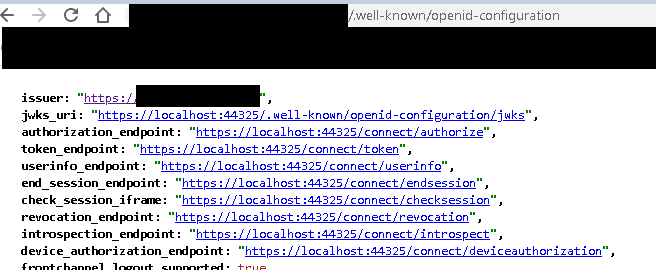
Although the settings are updated on the backend, when the frontend retrieves the https://myurl/.well-known/openid-configuration the endpoints still say localhost:44325 so the frontend doesn't redirect to the login screen. This error is present
 Okay so we can add this to our oAuthConfig on frontend
 strictDiscoveryDocumentValidation: false this way it doesn't validate, but in the end it of course can't reach those localhost endpoints.
Is there anything else to change other than the information at https://docs.abp.io/en/commercial/6.0/guides/identityserver-deployment?
Create a new app-nolayers-pro solution. Add dependies and depends on related modules
    // Hangfire Background worker
    typeof(AbpBackgroundWorkersHangfireModule),

    // Hangfire background jobs
    typeof(AbpBackgroundJobsModule),
    typeof(AbpBackgroundJobsHangfireModule)
    private void ConfigureHangfire(ServiceConfigurationContext context, IConfiguration configuration)
    {
        context.Services.AddHangfire(config =>
        {
            config.UseSqlServerStorage(configuration.GetConnectionString("Default"));
        });
    }
public override void OnApplicationInitialization(ApplicationInitializationContext context)
{
    ..... other confs
    app.UseHangfireDashboard("/hangfire", new DashboardOptions
    {
        AsyncAuthorization = new[] { new AbpHangfireAuthorizationFilter() }
    });

    .... also register background workers
    await context.AddBackgroundWorkerAsync<worker1>();
    await context.AddBackgroundWorkerAsync<worker2>();
}
Start up the app. it works. queue some jobs. Your yourproject.hangfire.job table should have stuff in it now
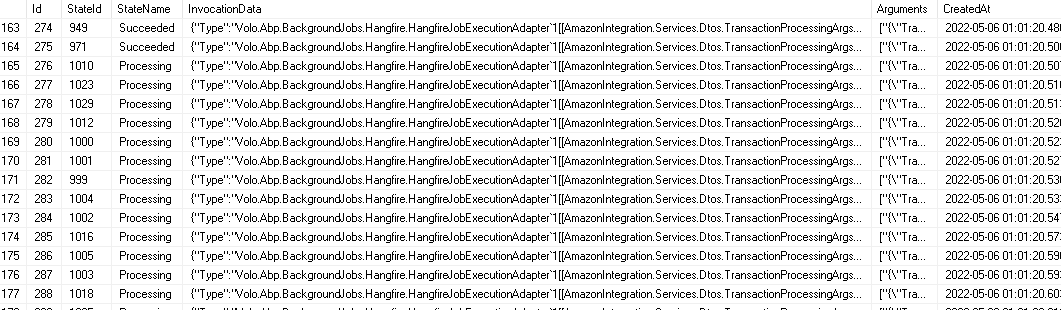
Stop app, next time application attempts startup, it just hangs, no errors. If you DELETE FROM hangfire.job table and start up app, it starts...
Check the docs before asking a question: https://docs.abp.io/en/commercial/latest/ Check the samples, to see the basic tasks: https://docs.abp.io/en/commercial/latest/samples/index The exact solution to your question may have been answered before, please use the search on the homepage.
If you're creating a bug/problem report, please include followings:
1.ProceedAsync() at Volo.Abp.GlobalFeatures.GlobalFeatureInterceptor.InterceptAsync(IAbpMethodInvocation invocation) at Volo.Abp.Castle.DynamicProxy.CastleAsyncAbpInterceptorAdapter1.InterceptAsync[TResult](IInvocation invocation, IInvocationProceedInfo proceedInfo, Func3 proceed) at Castle.DynamicProxy.AsyncInterceptorBase.ProceedAsynchronous[TResult](IInvocation invocation, IInvocationProceedInfo proceedInfo) at Volo.Abp.Castle.DynamicProxy.CastleAbpMethodInvocationAdapterWithReturnValue1.ProceedAsync()
at Volo.Abp.Validation.ValidationInterceptor.InterceptAsync(IAbpMethodInvocation invocation)
at Volo.Abp.Castle.DynamicProxy.CastleAsyncAbpInterceptorAdapter1.InterceptAsync[TResult](IInvocation invocation, IInvocationProceedInfo proceedInfo, Func3 proceed)
at Castle.DynamicProxy.AsyncInterceptorBase.ProceedAsynchronous[TResult](IInvocation invocation, IInvocationProceedInfo proceedInfo)
at Volo.Abp.Castle.DynamicProxy.CastleAbpMethodInvocationAdapterWithReturnValue1.ProceedAsync() at Volo.Abp.Authorization.AuthorizationInterceptor.InterceptAsync(IAbpMethodInvocation invocation) at Volo.Abp.Castle.DynamicProxy.CastleAsyncAbpInterceptorAdapter1.InterceptAsync[TResult](IInvocation invocation, IInvocationProceedInfo proceedInfo, Func3 proceed) at Castle.DynamicProxy.AsyncInterceptorBase.ProceedAsynchronous[TResult](IInvocation invocation, IInvocationProceedInfo proceedInfo) at Volo.Abp.Castle.DynamicProxy.CastleAbpMethodInvocationAdapterWithReturnValue1.ProceedAsync()
at Volo.Abp.Auditing.AuditingInterceptor.ProceedByLoggingAsync(IAbpMethodInvocation invocation, IAuditingHelper auditingHelper, IAuditLogScope auditLogScope)
at Volo.Abp.Auditing.AuditingInterceptor.InterceptAsync(IAbpMethodInvocation invocation)
at Volo.Abp.Castle.DynamicProxy.CastleAsyncAbpInterceptorAdapter1.InterceptAsync[TResult](IInvocation invocation, IInvocationProceedInfo proceedInfo, Func3 proceed)
at Castle.DynamicProxy.AsyncInterceptorBase.ProceedAsynchronous[TResult](IInvocation invocation, IInvocationProceedInfo proceedInfo)
at Volo.Abp.Castle.DynamicProxy.CastleAbpMethodInvocationAdapterWithReturnValue1.ProceedAsync() at Volo.Abp.Uow.UnitOfWorkInterceptor.InterceptAsync(IAbpMethodInvocation invocation) at Volo.Abp.Castle.DynamicProxy.CastleAsyncAbpInterceptorAdapter1.InterceptAsync[TResult](IInvocation invocation, IInvocationProceedInfo proceedInfo, Func`3 proceed)
at Volo.Abp.PermissionManagement.Web.Pages.AbpPermissionManagement.PermissionManagementModal.OnGetAsync()
at Microsoft.AspNetCore.Mvc.RazorPages.Infrastructure.ExecutorFactory.GenericTaskHandlerMethod.Convert[T](Object taskAsObject)
at Microsoft.AspNetCore.Mvc.RazorPages.Infrastructure.ExecutorFactory.GenericTaskHandlerMethod.Execute(Object receiver, Object[] arguments)
at Microsoft.AspNetCore.Mvc.RazorPages.Infrastructure.PageActionInvoker.InvokeHandlerMethodAsync()
at Microsoft.AspNetCore.Mvc.RazorPages.Infrastructure.PageActionInvoker.InvokeNextPageFilterAsync()
[21:59:05 INF] Executing ObjectResult, writing value of type 'Volo.Abp.Http.RemoteServiceErrorResponse'.
[21:59:05 INF] Executed page /AbpPermissionManagement/PermissionManagementModal in 128.6614ms
[21:59:05 INF] Executed endpoint '/AbpPermissionManagement/PermissionManagementModal'Volo.Abp.AbpException: 'Could not find the bundle file '/Components/ServiceLayerSettingGroup/Index.js' for the bundle 'Volo.Abp.SettingManagement.Web.Pages.SettingManagement.IndexModel'!'
at Volo.Abp.AspNetCore.Mvc.UI.Bundling.TagHelpers.AbpTagHelperResourceService.<ProcessAsync>d__14.MoveNext()
at System.Runtime.ExceptionServices.ExceptionDispatchInfo.Throw()
at System.Runtime.CompilerServices.TaskAwaiter.ThrowForNonSuccess(Task task)
at System.Runtime.CompilerServices.TaskAwaiter.HandleNonSuccessAndDebuggerNotification(Task task)
at Volo.Abp.AspNetCore.Mvc.UI.Bundling.TagHelpers.AbpBundleTagHelperService`2.<ProcessAsync>d__4.MoveNext()
at System.Runtime.ExceptionServices.ExceptionDispatchInfo.Throw()
at System.Runtime.CompilerServices.TaskAwaiter.ThrowForNonSuccess(Task task)
at System.Runtime.CompilerServices.TaskAwaiter.HandleNonSuccessAndDebuggerNotification(Task task)
at Microsoft.AspNetCore.Razor.Runtime.TagHelpers.TagHelperRunner.<<RunAsync>g__Awaited|0_0>d.MoveNext()
at System.Runtime.ExceptionServices.ExceptionDispatchInfo.Throw()
at System.Runtime.CompilerServices.TaskAwaiter.ThrowForNonSuccess(Task task)
at System.Runtime.CompilerServices.TaskAwaiter.HandleNonSuccessAndDebuggerNotification(Task task)
at AspNetCore.Pages_SettingManagement_Index.<<ExecuteAsync>b__13_0>d.MoveNext()
at System.Runtime.ExceptionServices.ExceptionDispatchInfo.Throw()
at System.Runtime.CompilerServices.TaskAwaiter.ThrowForNonSuccess(Task task)
at System.Runtime.CompilerServices.TaskAwaiter.HandleNonSuccessAndDebuggerNotification(Task task)
at Microsoft.AspNetCore.Mvc.Razor.RazorPage.<RenderSectionAsyncCore>d__14.MoveNext()
at System.Runtime.ExceptionServices.ExceptionDispatchInfo.Throw()
at System.Runtime.CompilerServices.TaskAwaiter.ThrowForNonSuccess(Task task)
at System.Runtime.CompilerServices.TaskAwaiter.HandleNonSuccessAndDebuggerNotification(Task task)
at System.Runtime.CompilerServices.TaskAwaiter`1.GetResult()
at AspNetCore.Themes_Lepton_Layouts_Application_Default.<>c__DisplayClass28_0.<<ExecuteAsync>b__1>d.MoveNext()
at System.Runtime.ExceptionServices.ExceptionDispatchInfo.Throw()
at System.Runtime.CompilerServices.TaskAwaiter.ThrowForNonSuccess(Task task)
at System.Runtime.CompilerServices.TaskAwaiter.HandleNonSuccessAndDebuggerNotification(Task task)
at Microsoft.AspNetCore.Razor.Runtime.TagHelpers.TagHelperExecutionContext.<SetOutputContentAsync>d__30.MoveNext()
at System.Runtime.ExceptionServices.ExceptionDispatchInfo.Throw()
at System.Runtime.CompilerServices.TaskAwaiter.ThrowForNonSuccess(Task task)
at System.Runtime.CompilerServices.TaskAwaiter.HandleNonSuccessAndDebuggerNotification(Task task)
at AspNetCore.Themes_Lepton_Layouts_Application_Default.<ExecuteAsync>d__28.MoveNext()
at System.Runtime.ExceptionServices.ExceptionDispatchInfo.Throw()
at System.Runtime.CompilerServices.TaskAwaiter.ThrowForNonSuccess(Task task)
at System.Runtime.CompilerServices.TaskAwaiter.HandleNonSuccessAndDebuggerNotification(Task task)
at Microsoft.AspNetCore.Mvc.Razor.RazorView.<RenderPageCoreAsync>d__20.MoveNext()
at System.Runtime.ExceptionServices.ExceptionDispatchInfo.Throw()
at System.Runtime.CompilerServices.TaskAwaiter.ThrowForNonSuccess(Task task)
at System.Runtime.CompilerServices.TaskAwaiter.HandleNonSuccessAndDebuggerNotification(Task task)
at Microsoft.AspNetCore.Mvc.Razor.RazorView.<RenderPageAsync>d__19.MoveNext()
at System.Runtime.ExceptionServices.ExceptionDispatchInfo.Throw()
at System.Runtime.CompilerServices.TaskAwaiter.ThrowForNonSuccess(Task task)
at Microsoft.AspNetCore.Mvc.Razor.RazorView.<RenderLayoutAsync>d__22.MoveNext()
at System.Runtime.ExceptionServices.ExceptionDispatchInfo.Throw()
at System.Runtime.CompilerServices.TaskAwaiter.ThrowForNonSuccess(Task task)
at System.Runtime.CompilerServices.TaskAwaiter.HandleNonSuccessAndDebuggerNotification(Task task)
at Microsoft.AspNetCore.Mvc.Razor.RazorView.<RenderAsync>d__18.MoveNext()
at System.Runtime.ExceptionServices.ExceptionDispatchInfo.Throw()
at System.Runtime.CompilerServices.TaskAwaiter.ThrowForNonSuccess(Task task)
at System.Runtime.CompilerServices.TaskAwaiter.HandleNonSuccessAndDebuggerNotification(Task task)
at Microsoft.AspNetCore.Mvc.ViewFeatures.ViewExecutor.<ExecuteAsync>d__22.MoveNext()
at System.Runtime.ExceptionServices.ExceptionDispatchInfo.Throw()
at Microsoft.AspNetCore.Mvc.ViewFeatures.ViewExecutor.<ExecuteAsync>d__22.MoveNext()
at System.Runtime.ExceptionServices.ExceptionDispatchInfo.Throw()
at System.Runtime.CompilerServices.TaskAwaiter.ThrowForNonSuccess(Task task)
at System.Runtime.CompilerServices.TaskAwaiter.HandleNonSuccessAndDebuggerNotification(Task task)
at Microsoft.AspNetCore.Mvc.Infrastructure.ResourceInvoker.<<InvokeNextResultFilterAsync>g__Awaited|29_0>d`2.MoveNext()
at System.Runtime.ExceptionServices.ExceptionDispatchInfo.Throw()
at Microsoft.AspNetCore.Mvc.Infrastructure.ResourceInvoker.Rethrow(ResultExecutedContextSealed context)
at Microsoft.AspNetCore.Mvc.Infrastructure.ResourceInvoker.ResultNext[TFilter,TFilterAsync](State& next, Scope& scope, Object& state, Boolean& isCompleted)
at Microsoft.AspNetCore.Mvc.Infrastructure.ResourceInvoker.<<InvokeResultFilters>g__Awaited|27_0>d.MoveNext()
at System.Runtime.ExceptionServices.ExceptionDispatchInfo.Throw()
at System.Runtime.CompilerServices.TaskAwaiter.ThrowForNonSuccess(Task task)
at System.Runtime.CompilerServices.TaskAwaiter.HandleNonSuccessAndDebuggerNotification(Task task)
at Microsoft.AspNetCore.Mvc.Infrastructure.ResourceInvoker.<<InvokeNextResourceFilter>g__Awaited|24_0>d.MoveNext()
at System.Runtime.ExceptionServices.ExceptionDispatchInfo.Throw()
at Microsoft.AspNetCore.Mvc.Infrastructure.ResourceInvoker.Rethrow(ResourceExecutedContextSealed context)
at Microsoft.AspNetCore.Mvc.Infrastructure.ResourceInvoker.Next(State& next, Scope& scope, Object& state, Boolean& isCompleted)
at Microsoft.AspNetCore.Mvc.Infrastructure.ResourceInvoker.<<InvokeFilterPipelineAsync>g__Awaited|19_0>d.MoveNext()
at System.Runtime.ExceptionServices.ExceptionDispatchInfo.Throw()
at System.Runtime.CompilerServices.TaskAwaiter.ThrowForNonSuccess(Task task)
at System.Runtime.CompilerServices.TaskAwaiter.HandleNonSuccessAndDebuggerNotification(Task task)
at Microsoft.AspNetCore.Mvc.Infrastructure.ResourceInvoker.<<InvokeAsync>g__Logged|17_1>d.MoveNext()
at System.Runtime.ExceptionServices.ExceptionDispatchInfo.Throw()
at System.Runtime.CompilerServices.TaskAwaiter.ThrowForNonSuccess(Task task)
at System.Runtime.CompilerServices.TaskAwaiter.HandleNonSuccessAndDebuggerNotification(Task task)
at Microsoft.AspNetCore.Routing.EndpointMiddleware.<<Invoke>g__AwaitRequestTask|6_0>d.MoveNext()
at System.Runtime.ExceptionServices.ExceptionDispatchInfo.Throw()
at System.Runtime.CompilerServices.TaskAwaiter.ThrowForNonSuccess(Task task)
at System.Runtime.CompilerServices.TaskAwaiter.HandleNonSuccessAndDebuggerNotification(Task task)
at Volo.Abp.AspNetCore.Serilog.AbpSerilogMiddleware.<InvokeAsync>d__6.MoveNext()
at System.Runtime.ExceptionServices.ExceptionDispatchInfo.Throw()
at System.Runtime.CompilerServices.TaskAwaiter.ThrowForNonSuccess(Task task)
at System.Runtime.CompilerServices.TaskAwaiter.HandleNonSuccessAndDebuggerNotification(Task task)
at Microsoft.AspNetCore.Builder.UseMiddlewareExtensions.<>c__DisplayClass6_1.<<UseMiddlewareInterface>b__1>d.MoveNext()
at System.Runtime.ExceptionServices.ExceptionDispatchInfo.Throw()
at System.Runtime.CompilerServices.TaskAwaiter.ThrowForNonSuccess(Task task)
at System.Runtime.CompilerServices.TaskAwaiter.HandleNonSuccessAndDebuggerNotification(Task task)
at Volo.Abp.AspNetCore.Auditing.AbpAuditingMiddleware.<InvokeAsync>d__14.MoveNext()
at System.Runtime.ExceptionServices.ExceptionDispatchInfo.Throw()
at Volo.Abp.AspNetCore.Auditing.AbpAuditingMiddleware.<InvokeAsync>d__14.MoveNext()
at System.Runtime.ExceptionServices.ExceptionDispatchInfo.Throw()
at System.Runtime.CompilerServices.TaskAwaiter.ThrowForNonSuccess(Task task)
at System.Runtime.CompilerServices.TaskAwaiter.HandleNonSuccessAndDebuggerNotification(Task task)
at Microsoft.AspNetCore.Builder.UseMiddlewareExtensions.<>c__DisplayClass6_1.<<UseMiddlewareInterface>b__1>d.MoveNext()
at System.Runtime.ExceptionServices.ExceptionDispatchInfo.Throw()
at System.Runtime.CompilerServices.TaskAwaiter.ThrowForNonSuccess(Task task)
at System.Runtime.CompilerServices.TaskAwaiter.HandleNonSuccessAndDebuggerNotification(Task task)
at Swashbuckle.AspNetCore.SwaggerUI.SwaggerUIMiddleware.<Invoke>d__5.MoveNext()
at System.Runtime.ExceptionServices.ExceptionDispatchInfo.Throw()
at System.Runtime.CompilerServices.TaskAwaiter.ThrowForNonSuccess(Task task)
at System.Runtime.CompilerServices.TaskAwaiter.HandleNonSuccessAndDebuggerNotification(Task task)
at Swashbuckle.AspNetCore.Swagger.SwaggerMiddleware.<Invoke>d__4.MoveNext()
at System.Runtime.ExceptionServices.ExceptionDispatchInfo.Throw()
at System.Runtime.CompilerServices.TaskAwaiter.ThrowForNonSuccess(Task task)
at System.Runtime.CompilerServices.TaskAwaiter.HandleNonSuccessAndDebuggerNotification(Task task)
at Microsoft.AspNetCore.Authorization.AuthorizationMiddleware.<Invoke>d__6.MoveNext()
at System.Runtime.ExceptionServices.ExceptionDispatchInfo.Throw()
at System.Runtime.CompilerServices.TaskAwaiter.ThrowForNonSuccess(Task task)
at System.Runtime.CompilerServices.TaskAwaiter.HandleNonSuccessAndDebuggerNotification(Task task)
at IdentityServer4.Hosting.IdentityServerMiddleware.<Invoke>d__3.MoveNext()
at System.Runtime.ExceptionServices.ExceptionDispatchInfo.Throw()
at System.Runtime.CompilerServices.TaskAwaiter.ThrowForNonSuccess(Task task)
at System.Runtime.CompilerServices.TaskAwaiter.HandleNonSuccessAndDebuggerNotification(Task task)
at IdentityServer4.Hosting.MutualTlsEndpointMiddleware.<Invoke>d__4.MoveNext()
at System.Runtime.ExceptionServices.ExceptionDispatchInfo.Throw()
at System.Runtime.CompilerServices.TaskAwaiter.ThrowForNonSuccess(Task task)
at System.Runtime.CompilerServices.TaskAwaiter.HandleNonSuccessAndDebuggerNotification(Task task)
at Microsoft.AspNetCore.Authentication.AuthenticationMiddleware.<Invoke>d__6.MoveNext()
at System.Runtime.ExceptionServices.ExceptionDispatchInfo.Throw()
at System.Runtime.CompilerServices.TaskAwaiter.ThrowForNonSuccess(Task task)
at System.Runtime.CompilerServices.TaskAwaiter.HandleNonSuccessAndDebuggerNotification(Task task)
at IdentityServer4.Hosting.BaseUrlMiddleware.<Invoke>d__3.MoveNext()
at System.Runtime.ExceptionServices.ExceptionDispatchInfo.Throw()
at System.Runtime.CompilerServices.TaskAwaiter.ThrowForNonSuccess(Task task)
at System.Runtime.CompilerServices.TaskAwaiter.HandleNonSuccessAndDebuggerNotification(Task task)
at Volo.Abp.AspNetCore.Uow.AbpUnitOfWorkMiddleware.<InvokeAsync>d__3.MoveNext()
at System.Runtime.ExceptionServices.ExceptionDispatchInfo.Throw()
at System.Runtime.CompilerServices.TaskAwaiter.ThrowForNonSuccess(Task task)
at System.Runtime.CompilerServices.TaskAwaiter.HandleNonSuccessAndDebuggerNotification(Task task)
at Microsoft.AspNetCore.Builder.UseMiddlewareExtensions.<>c__DisplayClass6_1.<<UseMiddlewareInterface>b__1>d.MoveNext()
at System.Runtime.ExceptionServices.ExceptionDispatchInfo.Throw()
at System.Runtime.CompilerServices.TaskAwaiter.ThrowForNonSuccess(Task task)
at System.Runtime.CompilerServices.TaskAwaiter.HandleNonSuccessAndDebuggerNotification(Task task)
at Volo.Abp.AspNetCore.ExceptionHandling.AbpExceptionHandlingMiddleware.<InvokeAsync>d__3.MoveNext()
at System.Runtime.ExceptionServices.ExceptionDispatchInfo.Throw()
at Volo.Abp.AspNetCore.ExceptionHandling.AbpExceptionHandlingMiddleware.<InvokeAsync>d__3.MoveNext()
at System.Runtime.ExceptionServices.ExceptionDispatchInfo.Throw()
at System.Runtime.CompilerServices.TaskAwaiter.ThrowForNonSuccess(Task task)
at System.Runtime.CompilerServices.TaskAwaiter.HandleNonSuccessAndDebuggerNotification(Task task)
at Microsoft.AspNetCore.Builder.UseMiddlewareExtensions.<>c__DisplayClass6_1.<<UseMiddlewareInterface>b__1>d.MoveNext()
at System.Runtime.ExceptionServices.ExceptionDispatchInfo.Throw()
at System.Runtime.CompilerServices.TaskAwaiter.ThrowForNonSuccess(Task task)
at System.Runtime.CompilerServices.TaskAwaiter.HandleNonSuccessAndDebuggerNotification(Task task)
at Volo.Abp.AspNetCore.MultiTenancy.MultiTenancyMiddleware.<InvokeAsync>d__5.MoveNext()
at System.Runtime.ExceptionServices.ExceptionDispatchInfo.Throw()
at System.Runtime.CompilerServices.TaskAwaiter.ThrowForNonSuccess(Task task)
at System.Runtime.CompilerServices.TaskAwaiter.HandleNonSuccessAndDebuggerNotification(Task task)
at Microsoft.AspNetCore.Builder.UseMiddlewareExtensions.<>c__DisplayClass6_1.<<UseMiddlewareInterface>b__1>d.MoveNext()
at System.Runtime.ExceptionServices.ExceptionDispatchInfo.Throw()
at System.Runtime.CompilerServices.TaskAwaiter.ThrowForNonSuccess(Task task)
at System.Runtime.CompilerServices.TaskAwaiter.HandleNonSuccessAndDebuggerNotification(Task task)
at Microsoft.AspNetCore.Builder.ApplicationBuilderAbpJwtTokenMiddlewareExtension.<>c__DisplayClass0_0.<<UseJwtTokenMiddleware>b__0>d.MoveNext()
at System.Runtime.ExceptionServices.ExceptionDispatchInfo.Throw()
at System.Runtime.CompilerServices.TaskAwaiter.ThrowForNonSuccess(Task task)
at System.Runtime.CompilerServices.TaskAwaiter.HandleNonSuccessAndDebuggerNotification(Task task)
at Microsoft.AspNetCore.Authentication.AuthenticationMiddleware.<Invoke>d__6.MoveNext()
at System.Runtime.ExceptionServices.ExceptionDispatchInfo.Throw()
at System.Runtime.CompilerServices.TaskAwaiter.ThrowForNonSuccess(Task task)
at System.Runtime.CompilerServices.TaskAwaiter.HandleNonSuccessAndDebuggerNotification(Task task)
at MyProject.Web.MyProjectWebModule.<>c.<<OnApplicationInitialization>b__15_0>d.MoveNext() in D:\Dev\ConsensusProjects\Roka\MyProject\src\MyProject.Web\MyProjectWebModule.cs:line 315
Configure<AbpBundlingOptions>(options =>
{
    options.ScriptBundles.Configure(typeof(IndexModel).FullName, configuration =>
    {
        configuration.AddFiles("/Components/ServiceLayerSettingGroup/Index.js");
    });
});
The IndexModel here points to Volo.Abp.SettingManagement.Web.Pages.SettingManagement.IndexModel
Per https://docs.abp.io/en/abp/5.0/UI/AspNetCore/Bundling-Minification#single-file and https://docs.abp.io/en/abp/5.0/UI/AspNetCore/Bundling-Minification#best-practices-suggestions I've tried also using the Configure
I'm storing tenant level configuration using the SettingsManager on each tenant. I'd like to register an httpclient in configureservices for each tenant using this configuration data for each tenant.
Whats the correct way to do this? I would need to
Could you provide an example or documentation of how to consume these services (settingmanager?, tenantmanager?) in configure service method of the application module?
I can then use the correct httpclient when a call is needed to the external remote service of that tenant.
What happens when the tenant updates their configuration, I'd need to deregister and register a new httpclient for them?
Hi!
I have some general architecture questions. I'm starting a new project on 4.4.3. The idea is that this will be a multitenant sas app. I will create several modules under the main application, each module will be for a specific webcart software, for example magento, shopify, etc. The implementation of the endpoints that remote carts will call and domain data for each of these is contained inside the module. When new data comes in ( new orders for example ) the module will kick off a distributed event (these will be local initially but the code should work for when we move to microservice, per the docs). The main application then subscribes to these events and should record the transaction locally on abp database, and then schedule and process a background job (using the hangfire implementation) that posts the transactions into the appropriate remote backend.
Does this make sense to do? Also since the background jobs seems to be picked up from the queue sequentially and there could be many jobs and tenants, would we run into a problem where there could be a ton of transactions queued and they'd only be processed sequentially so a particular tenant could see huge delays getting their transactions in?
A bigger concern is the fact that creating a bunch of httpclients to make the outgoing requests to the remote backends could cause resource exhaustion. In the past I've used an httpclient in DI to make the requests, however there's a problem here, and that is that each tenant will configure via settings management their remote backend url, these are different servers (but all the same software so contracts are the same). When the transaction is processed and send to the remote backend, the url will be different because they are different servers. To complicate matters most, the remote backend requires Login -> Receive SesssionID -> Then send this in the header of every subsequent request. In non multi-tenant implementations where its only one backend the application is sending these requests to, i simply use an interceptor to modify the header on the outgoing request.In multi-tenant I assume the best thing to do would be to login -> send to redis cache for the tenant, and check this each time in the future when a request needs to go out and its for a particular tenant ID.
I'm looking for any suggestion on how to accomplish this reliably without collapsing the application, keeping in mind that thousands of transactions can be posted in to the abp app, from different web carts, from different tenants.
I know this is a loaded question. Just looking for direction to make the most of this framework using best practices.









