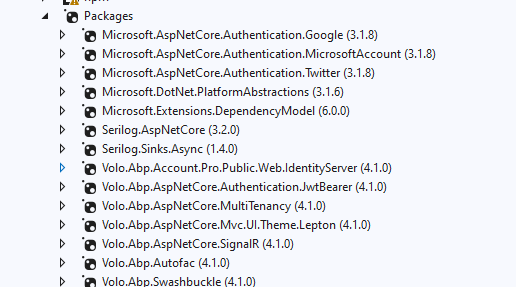
Getting the below error
./node_modules/@angular/common/locales/zu.js.map:1:10 - Error: Module parse failed: Unexpected token (1:10) You may need an appropriate loader to handle this file type, currently no loaders are configured to process this file. See https://webpack.js.org/concepts#loaders
{"version":3,"file":"zu.js","sourceRoot":"","sources":["zu.ts"],"names":[],"mappings":"AAAA;;;;;;GAMG;AAEH,0CAA0C;AAC1C,MAAM,CAAC,GAAG,SAAS,CAAC;AAEpB,SAAS,MAAM,CAAC,GAAW;IAC3B,MAAM,CAAC,GAAG,GAAG,EAAE,CAAC,GAAG,IAAI,CAAC,KAAK,CAAC,IAAI,CAAC,GAAG,CAAC,GAAG,CAAC,CAAC,CAAC;IAE7C,IAAI,CAAC,KAAK,CAAC,IAAI,CAAC,KAAK,CAAC;QAClB,OAAO,CAAC,CAAC;IACb,OAAO,CAAC,CAAC;AACT,CAAC;AAED,eAAe,CAAC,IAAI,EAAC,CAAC,CAAC,GAAG,EAAC,GAAG,CAAC,EAAC,CAAC,IAAI,EAAC,IAAI,CAAC,EAAC,CAAC,CAAC,EAAC,CAAC,CAAC,IAAI,EAAC,IAAI,CAAC,EAAC,CAAC,EAAC,CAAC,CAAC,EAAC,CAAC,CAAC,GAAG,EAAC,GAAG,EAAC,GAAG,EAAC,GAAG,EAAC,GAAG,EAAC,GAAG,EAAC,GAAG,CAAC,EAAC,CAAC,KAAK,EAAC,KAAK,EAAC,KAAK,EAAC,KAAK,EAAC,KAAK,EAAC,KAAK,EAAC,KAAK,CAAC,EAAC,CAAC,QAAQ,EAAC,aAAa,EAAC,YAAY,EAAC,cAAc,EAAC,UAAU,EAAC,aAAa,EAAC,WAAW,CAAC,EAAC,CAAC,KAAK,EAAC,KAAK,EAAC,KAAK,EAAC,KAAK,EAAC,KAAK,EAAC,KAAK,EAAC,KAAK,CAAC,CAAC,EAAC,CAAC,EAAC,CAAC,CAAC,GAAG,EAAC,GAAG,EAAC,GAAG,EAAC,GAAG,EAAC,GAAG,EAAC,GAAG,EAAC,GAAG,EAAC,GAAG,EAAC,GAAG,EAAC,GAAG,EAAC,GAAG,EAAC,GAAG,CAAC,EAAC,CAAC,KAAK,EAAC,KAAK,EAAC,KAAK,EAAC,KAAK,EAAC,KAAK,EAAC,KAAK,EAAC,KAAK,EAAC,KAAK,EAAC,KAAK,EAAC,KAAK,EAAC,KAAK,EAAC,KAAK,CAAC,EAAC,CAAC,UAAU,EAAC,WAAW,EAAC,OAAO,EAAC,SAAS,EAAC,MAAM,EAAC,MAAM,EAAC,QAAQ,EAAC,QAAQ,EAAC,WAAW,EAAC,SAAS,EAAC,SAAS,EAAC,SAAS,CAAC,CAAC,EAAC,CAAC,CAAC,GAAG,EAAC,GAAG,EAAC,GAAG,EAAC,GAAG,EAAC,GAAG,EAAC,GAAG,EAAC,GAAG,EAAC,GAAG,EAAC,GAAG,EAAC,GAAG,EAAC,GAAG,EAAC,GAAG,CAAC,EAAC,CAAC,KAAK,EAAC,KAAK,EAAC,KAAK,EAAC,KAAK,EAAC,KAAK,EAAC,KAAK,EAAC,KAAK,EAAC,KAAK,EAAC,KAAK,EAAC,KAAK,EAAC,KAAK,EAAC,KAAK,CAAC,EAAC,CAAC,UAAU,EAAC,WAAW,EAAC,OAAO,EAAC,SAAS,EAAC,MAAM,EAAC,MAAM,EAAC,QAAQ,EAAC,QAAQ,EAAC,WAAW,EAAC,SAAS,EAAC,SAAS,EAAC,SAAS,CAAC,CAAC,EAAC,CAAC,CAAC,IAAI,EAAC,IAAI,CAAC,EAAC,CAAC,EAAC,CAAC,CAAC,EAAC,CAAC,EAAC,CAAC,CAAC,EAAC,CAAC,CAAC,EAAC,CAAC,QAAQ,EAAC,UAAU,EAAC,WAAW,EAAC,iBAAiB,CAAC,EAAC,CAAC,OAAO,EAAC,UAAU,EAAC,YAAY,EAAC,eAAe,CAAC,EAAC,CAAC,SAAS,EAAC,CAAC,EAAC,CAAC,EAAC,CAAC,CAAC,EAAC,CAAC,GAAG,EAAC,GAAG,EAAC,GAAG,EAAC,GAAG,EAAC,GAAG,EAAC,GAAG,EAAC,GAAG,EAAC,GAAG,EAAC,GAAG,EAAC,GAAG,EAAC,KAAK,EAAC,GAAG,CAAC,EAAC,CAAC,WAAW,EAAC,QAAQ,EAAC,WAAW,EAAC,KAAK,CAAC,EAAC,KAAK,EAAC,GAAG,EAAC,sBAAsB,EAAC,EAAC,KAAK,EAAC,CAAC,CAAC,EAAC,IAAI,CAAC,EAAC,KAAK,EAAC,CAAC,CAAC,EAAC,IAAI,CAAC,EAAC,KAAK,EAAC,CAAC,CAAC,EAAC,IAAI,CAAC,EAAC,KAAK,EAAC,CAAC,CAAC,EAAC,IAAI,CAAC,EAAC,KAAK,EAAC,CAAC,KAAK,EAAC,GAAG,CAAC,EAAC,KAAK,EAAC,CAAC,CAAC,EAAC,IAAI,CAAC,EAAC,KAAK,EAAC,CAAC,CAAC,EAAC,GAAG,CAAC,EAAC,KAAK,EAAC,CAAC,CAAC,EAAC,IAAI,CAAC,EAAC,KAAK,EAAC,CAAC,CAAC,EAAC,IAAI,CAAC,EAAC,KAAK,EAAC,CAAC,GAAG,CAAC,EAAC,KAAK,EAAC,CAAC,KAAK,CAAC,EAAC,KAAK,EAAC,CAAC,GAAG,CAAC,EAAC,EAAC,KAAK,EAAE,MAAM,CAAC,CAAC","sourcesContent":["/**\n * @license\n * Copyright Google LLC All Rights Reserved.\n *\n * Use of this source code is governed by an MIT-style license that can be\n * found in the LICENSE file
I looking into ABP-Angular--Error-Module-parse-failed , I belie its the same error - but didn't find any solution.
Already tried, couple of times
rm -rf node_modules package-lock.json npm cache clean --force npm install --legacy-peer-deps
Tied excluding below in my tsconfig..json , "exclude": [ "/*.spec.ts", "/.js.map", "**/.js", "node_modules" ]
Below is snippet of m angular.json for reference
{
  "$schema": "./node_modules/@angular/cli/lib/config/schema.json",
  "version": 1,
  "newProjectRoot": "projects",
  "projects": {
    "MYPROJECT3": {
      "projectType": "application",
      "schematics": {
        "@schematics/angular:component": {
          "style": "scss"
        }
      },
      "root": "",
      "sourceRoot": "src",
      "prefix": "app",
      "architect": {
        "build": {
          "builder": "@angular-devkit/build-angular:browser",
          "options": {
            "outputPath": "dist/CROMS3",
            "main": "src/main.ts",
            "index": "src/index.html",
            "polyfills": [
              "src/polyfills.ts"
            ],
            "tsConfig": "tsconfig.app.json",
            "allowedCommonJsDependencies": [
              "stream-browserify",
              "@ant-design/colors",
              "chart.js",
              "js-sha256",
              "@uppy/xhr-upload",
              "@uppy/dashboard",
              "@uppy/core"
            ],
            "assets": [
              "src/favicon.ico",
              "src/assets",
              {
                "glob": "**/*",
                "input": "node_modules/leaflet/dist/images",
                "output": "/assets/leaflet/images"
              },
              "src/manifest.webmanifest",
              "src/web.config"
            ],
            "styles": [
Below is my package.json
{
  "name": "croms3",
  "version": "1.0.0",
  "scripts": {
    "ng": "ng",
    "start": "ng serve --open",
    "start-s": "ng serve --watch",
    "local": "ng serve --open --configuration local",
    "build": "ng build",
    "build:qa": "ng build --configuration qa",
    "build:dev-azure": "ng build --configuration dev-azure",
    "build:qa-azure": "ng build --configuration qa-azure",
    "build:uat-azure": "ng build --configuration uat-azure",
    "build:prod-azure": "ng build --configuration prod-azure",
    "build:dev-kiosk": "ng build --configuration dev-kiosk",
    "build:qa-kiosk": "ng build --configuration qa-kiosk",
    "build:uat-kiosk": "ng build --configuration uat-kiosk",
    "build:prod-kiosk": "ng build --configuration prod-kiosk",
    "build:uat": "ng build --configuration uat",
    "build:prod": "ng build --configuration production",
    "test": "ng test",
    "lint": "ng lint",
    "e2e": "ng e2e",
    "postinstall": "patch-package"
  },
  "private": true,
  "dependencies": {
    "@abp/ng.components": "9.2.3",
    "@abp/ng.core": "9.2.3",
    "@abp/ng.identity": "9.2.3",
    "@abp/ng.setting-management": "9.2.3",
    "@abp/ng.theme.shared": "9.2.3",
    "@abp/signalr": "9.2.3",
    "@angular/animations": "~19.2.6",
    "@angular/cdk": "^19.2.6",
    "@angular/common": "~19.2.6",
    "@angular/compiler": "~19.2.6",
    "@angular/core": "~19.2.6",
    "@angular/forms": "~19.2.6",
    "@angular/localize": "~19.2.6",
    "@angular/platform-browser": "~19.2.6",
    "@angular/platform-browser-dynamic": "~19.2.6",
    "@angular/router": "~19.2.6",
    "@angular/service-worker": "~19.2.6",
    "@fjsc/ng2-dnd-list": "^1.0.4",
    "@fortawesome/fontawesome-free": "^5.14.0",
    "@microsoft/signalr": "^7.0.2",
    "@ng-bootstrap/ng-bootstrap": "^18.0.0",
    "@ng-select/ng-select": "^14.9.0",
    "@ngxs/store": "^19.0.0",
    "@swimlane/ngx-datatable": "^20.1.0",
    "@types/esri-leaflet": "^2.1.6",
    "@types/leaflet": "^1.5.23",
    "@volo/abp.commercial.ng.ui": "9.2.3",
    "@volo/abp.ng.account": "9.2.3",
    "@volo/abp.ng.audit-logging": "9.2.3",
    "@volo/abp.ng.identity": "9.2.3",
    "@volo/abp.ng.identity-server": "9.2.3",
    "@volo/abp.ng.language-management": "9.2.3",
    "@volo/abp.ng.saas": "9.2.3",
    "@volo/abp.ng.text-template-management": "9.2.3",
    "@volo/abp.ng.theme.lepton": "9.2.3",
    "angular-oauth2-oidc": "^15.0.1",
    "angularx-qrcode": "^19.0.0",
    "blob-util": "^2.0.2",
    "broadcast-channel": "^7.1.0",
    "buffer": "^6.0.3",
    "esri-leaflet": "^3.0.17",
    "esri-leaflet-geocoder": "^3.1.6",
    "file-saver": "^2.0.5",
    "leaflet-easyprint": "^2.1.9",
    "leaflet-simple-map-screenshoter": "^0.4.2",
    "localforage": "^1.9.0",
    "lodash": "^4.17.21",
    "moment": "^2.29.1",
    "ng-multiselect-dropdown": "^1.0.0",
    "ng-zorro-antd": "^19.3.1",
    "ngx-bootstrap": "^6.2.0",
    "ngx-cookie-service": "^19.0.0",
    "ngx-daterangepicker-material": "^6.0.4",
    "ngx-mask": "^14.2.4",
    "ngx-material-timepicker": "^5.5.3",
    "ngx-spinner": "^19.0.0",
    "ngx-time-mask": "^1.0.1",
    "ngx-webcam": "^0.4.1",
    "powerbi-client": "^2.23.1",
    "powerbi-client-angular": "^5.0.0",
    "rxjs": "^7.8.2",
    "tslib": "^2.8.1",
    "webcam-easy": "^1.0.5",
    "xml-js": "1.6.11",
    "zone.js": "~0.15.1"
  },
  "devDependencies": {
    "@abp/ng.schematics": "9.2.3",
    "@angular-devkit/build-angular": "~19.2.6",
    "@angular/cli": "~19.2.6",
    "@angular/compiler-cli": "~19.2.6",
    "@angular/language-service": "~19.2.6",
    "@types/google.maps": "^3.58.1",
    "@types/googlemaps": "3.39.12",
    "@types/jasmine": "~3.5.0",
    "@types/jasminewd2": "~2.0.3",
    "@types/jest": "^30.0.0",
    "@types/lodash": "^4.17.20",
    "@types/node": "^12.11.1",
    "angular-eslint": "19.8.1",
    "crypto-browserify": "^3.12.1",
    "eslint": "^9.29.0",
    "karma-chrome-launcher": "~3.1.0",
    "karma-coverage-istanbul-reporter": "~3.0.2",
    "ng-packagr": "~19.2.0",
    "patch-package": "^8.0.0",
    "postinstall-postinstall": "^2.1.0",
    "protractor": "~7.0.0",
    "rollup-plugin-node-polyfills": "^0.2.1",
    "stream-browserify": "^3.0.0",
    "ts-node": "~8.3.0",
    "typescript": "~5.6.2",
    "typescript-eslint": "8.34.1"
  }
}
I am getting below error
X [ERROR] TS2307: Cannot find module '@abp/ng.components/extensible/lib/models/internal/object-extensions' or its corresponding type declarations. [plugin angular-compiler]
node_modules/@volo/abp.ng.identity-server/lib/resolvers/extensions.resolver.d.ts:1:94:
  1 │ ...ble<import("@abp/ng.components/extensible/lib/models/internal/ob...
Already tried
rm -rf node_modules package-lock.json npm install
Closed Visual Studio Code and Reopened Checked internal paths - didn't found any reference
Below is from my package.json
"private": true,
  "dependencies": {
    "@abp/ng.components": "^9.2.3",
    "@abp/ng.core": "^9.2.3",
    "@abp/ng.identity": "^9.2.3",
    "@abp/ng.setting-management": "^9.2.3",
    "@abp/ng.theme.shared": "^9.2.3",
    "@abp/signalr": "^9.2.3",
    "@angular/animations": "^19.2.14",
    "@angular/cdk": "^19.2.19",
    "@angular/common": "^19.2.14",
    "@angular/compiler": "^19.2.14",
    "@angular/core": "^19.2.14",
    "@angular/forms": "^19.2.14",
    "@angular/localize": "^19.2.14",
    "@angular/platform-browser": "^19.2.14",
    "@angular/platform-browser-dynamic": "^19.2.14",
    "@angular/router": "^19.2.14",
    "@angular/service-worker": "^19.2.14",
    "@fjsc/ng2-dnd-list": "^1.0.4",
    "@fortawesome/fontawesome-free": "^5.14.0",
    "@microsoft/signalr": "^7.0.2",
    "@ng-bootstrap/ng-bootstrap": "^18.0.0",
    "@ng-select/ng-select": "^14.9.0",
    "@ngxs/store": "^19.0.0",
    "@swimlane/ngx-datatable": "^20.1.0",
    "@types/esri-leaflet": "^2.1.6",
    "@types/leaflet": "^1.5.23",
    "@volo/abp.commercial.ng.ui": "^9.2.3",
    "@volo/abp.ng.account": "^9.2.3",
    "@volo/abp.ng.audit-logging": "^9.2.3",
    "@volo/abp.ng.identity": "^9.2.3",
    "@volo/abp.ng.identity-server": "^9.2.3",
    "@volo/abp.ng.language-management": "^9.2.3",
    "@volo/abp.ng.saas": "^9.2.3",
    "@volo/abp.ng.text-template-management": "^9.2.3",
    "@volo/abp.ng.theme.lepton": "^9.2.3",
    "angular-oauth2-oidc": "^15.0.1",
    "angularx-qrcode": "^19.0.0",
    "buffer": "^6.0.3",
    "crypto-browserify": "^3.12.0",
    "esri-leaflet": "^3.0.17",
    "esri-leaflet-geocoder": "^3.1.6",
    "file-saver": "^2.0.5",
    "leaflet-easyprint": "^2.1.9",
    "leaflet-simple-map-screenshoter": "^0.4.2",
    "localforage": "^1.9.0",
    "lodash": "^4.17.21",
    "moment": "^2.29.1",
    "ng-multiselect-dropdown": "^1.0.0",
    "ng-zorro-antd": "^19.2.2",
    "ngx-bootstrap": "^6.2.0",
    "ngx-cookie-service": "^19.0.0",
    "ngx-daterangepicker-material": "^6.0.4",
    "ngx-mask": "^14.2.4",
    "ngx-material-timepicker": "^5.5.3",
    "ngx-spinner": "^19.0.0",
    "ngx-time-mask": "^1.0.1"
    "rxjs": "^7.8.2",
    "tslib": "^2.8.1",
    "xml-js": "1.6.11",
    "zone.js": "~0.15.1"
  },
  "devDependencies": {
    "@abp/ng.schematics": "^9.2.3",
    "@angular-devkit/build-angular": "^19.2.14",
    "@angular/cli": "^19.2.14",
    "@angular/compiler-cli": "^19.2.14",
    "@angular/language-service": "^19.2.14",
    "@types/google.maps": "^3.58.1",
    "@types/googlemaps": "3.39.12",
    "@types/jasmine": "~3.5.0",
    "@types/jasminewd2": "~2.0.3",
    "@types/jest": "^30.0.0",
    "@types/lodash": "^4.17.20",
    "@types/node": "^12.11.1",
    "angular-eslint": "19.1.0",
    "eslint": "^9.29.0",
    "karma-chrome-launcher": "~3.1.0",
    "karma-coverage-istanbul-reporter": "~3.0.2",
    "ng-packagr": "19.0.0",
    "protractor": "~7.0.0",
    "stream": "^0.0.2",
    "ts-node": "~8.3.0",
    "typescript": "~5.6.2",
    "typescript-eslint": "8.34.1"
  }
when I try to run below from my angular folder
abp generate-proxy -t ng --url https://localhost:44369 --target src/app/proxy --project MYPROJECT3 --all --force
ABP CLI 9.2.2 [Project Not Found] Either define a default project in your workspace or specify the project name in schematics options.
If I add "defaultProject": "MYPROJECT3" then I get error -> Property defaultProject is not allowed.
please be advised that https://localhost:44369/api/abp/api-definition is accessible when I am run the command
I am trying to upgrade from angular 11 , ABP 4.1.0 to Angular 19.2 , ABP 9.2.2
ng version
Angular CLI: 19.2.15 Node: 20.11.1 Package Manager: npm 10.2.4 OS: win32 x64
Angular: 19.2.14 ... animations, common, compiler, compiler-cli, core, forms ... language-service, localize, platform-browser ... platform-browser-dynamic, router, service-worker
@angular-devkit/architect 0.1902.15 @angular-devkit/build-angular 19.2.15 @angular-devkit/core 19.1.9 @angular-devkit/schematics 19.1.9 @angular/cdk 19.2.19 @angular/cli 19.2.15 @schematics/angular 19.2.15 ng-packagr 19.0.0 rxjs 7.8.2 typescript 5.6.3 zone.js 0.15.1
the following files exist in my project (this is a migration) src/index.html src/main.ts src/polyfills.ts tsconfig.app.json src/styles.scss src/assets/
below is angular.json (this is reduced and minimal form of my angular.json)
{
  "$schema": "./node_modules/@angular/cli/lib/config/schema.json",
  "version": 1,
  "projects": {
    "MYPROJECT3": {
      "projectType": "application",
      "root": "",
      "sourceRoot": "src",
      "prefix": "app",
      "architect": {
        "build": {
          "builder": "@angular-devkit/build-angular:application",
          "options": {
            "outputPath": "dist/MYPROJECT3",
            "index": "src/index.html",
            "main": "src/main.ts",
            "polyfills": "src/polyfills.ts",
            "tsConfig": "tsconfig.app.json",
            "assets": [
              "src/favicon.ico",
              "src/assets"
            ],
            "styles": [
              "src/styles.scss"
            ],
            "scripts": []
          }
        },
        "serve": {
          "builder": "@angular-devkit/build-angular:dev-server",
          "options": {
            "browserTarget": "MYPROJECT3:build"
          }
        }
      }
    }
  }
}
Hi,
I am having this weird issue where the roles UI does not display when i am running locally but will display the list when published and deployed on other environments.
I you look at the screenshot it has data and I have checked the API as well where as the response of the API is having the exactly same response of 33 items in both the environments and list is displayed on other environments but not when running locally. I am using the ABP angular dotnet core framework. I do not see any code to debug this issue as it all comes from abp libraries.Any help in this regard is appreciated. Thank you
pai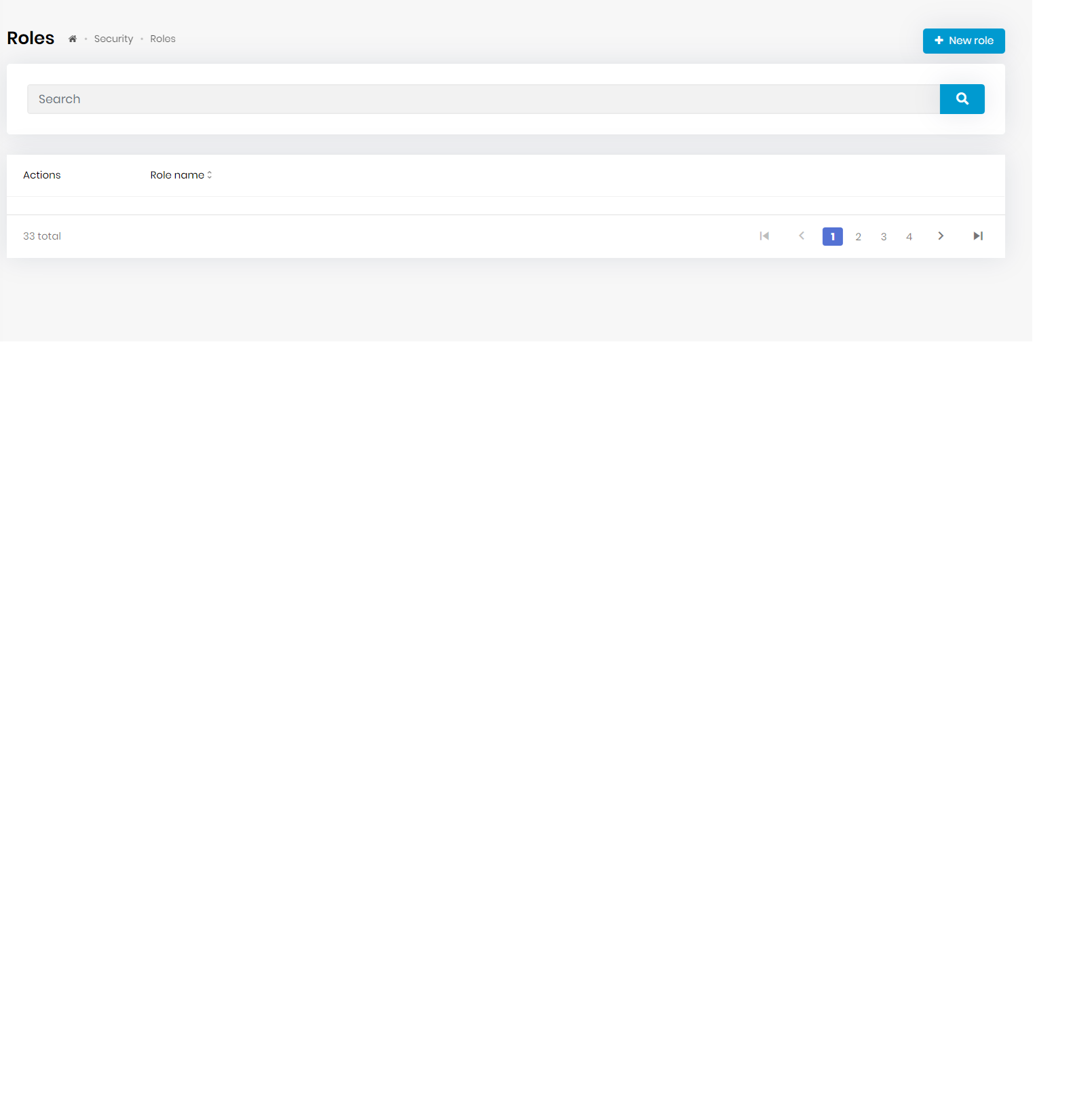
I need to add an API to the list of API in my project ;
abp generate-proxy -t ng ABP CLI 8.3.0 "@abp/ng.schematics" version is lower than ABP Cli version. Unknown option: '--url' Unknown option: '__default' Unknown option: '--entry-point' Unknown option: '__default' Unknown option: '--service-type' Unknown option: 'application'
abp generate-proxy -t ng -m identity -u https://localhost:44305 ABP CLI 8.3.0 "@abp/ng.schematics" version is lower than ABP Cli version. Unknown option: '--url' Unknown option: 'https://localhost:44305' Unknown option: '--entry-point' Unknown option: '__default' Unknown option: '--service-type' Unknown option: 'application'
Please advice
I am having Two Factor Authentication - Optional Some of my users have two factor authentication enable and they enter there user id - which is preconfigured in db
So for user who do **not **have two factor authentication enable - they enter there user id and password and then again they are redirected and asked for credentials.
Please advise for this issue.