And I tried the production environment, the problem disappeared
do you have still this issue at the moment?
I think this may be a problem with the directory separator between different operating systems (/?\)
I found the problem. I configured real environment variables in docker-compose, ConnectionStrings, and missing s, which resulted in the appsetting configuration not being replaced.
I know, this is because the development environment has executed the following code
if (hostingEnvironment.IsDevelopment())
            {
                Configure<AbpVirtualFileSystemOptions>(options =>
                {
                    options.FileSets.ReplaceEmbeddedByPhysical<CoFarmDomainSharedModule>(Path.Combine(hostingEnvironment.ContentRootPath, string.Format("..{0}Yiki.CoFarm.Domain.Shared", Path.DirectorySeparatorChar)));
                    options.FileSets.ReplaceEmbeddedByPhysical<CoFarmDomainModule>(Path.Combine(hostingEnvironment.ContentRootPath, string.Format("..{0}Yiki.CoFarm.Domain", Path.DirectorySeparatorChar)));
                });
            }
But there is no problem with the operation Yiki.CoFarm.IdentityServer and Yiki.CoFarm.Domain.Shared path of COPY in my dockerfile, And I tried the production environment, the problem disappeared
I don’t think it’s a problem, the packaged images are all passed. My Dockerfile
FROM mcr.microsoft.com/dotnet/aspnet:5.0 AS base
WORKDIR /app
EXPOSE 8080

FROM mcr.microsoft.com/dotnet/sdk:5.0 AS build
WORKDIR /src
COPY ["aspnet-core/src/Yiki.CoFarm.IdentityServer/Yiki.CoFarm.IdentityServer.csproj", "aspnet-core/src/Yiki.CoFarm.IdentityServer/"]
COPY ["aspnet-core/src/Yiki.CoFarm.EntityFrameworkCore.DbMigrations/Yiki.CoFarm.EntityFrameworkCore.DbMigrations.csproj", "aspnet-core/src/Yiki.CoFarm.EntityFrameworkCore.DbMigrations/"]
COPY ["aspnet-core/src/Yiki.CoFarm.EntityFrameworkCore/Yiki.CoFarm.EntityFrameworkCore.csproj", "aspnet-core/src/Yiki.CoFarm.EntityFrameworkCore/"]
COPY ["aspnet-core/modules/Yiki.CoFarm.Core/src/Yiki.CoFarm.Core.EntityFrameworkCore/Yiki.CoFarm.Core.EntityFrameworkCore.csproj", "aspnet-core/modules/Yiki.CoFarm.Core/src/Yiki.CoFarm.Core.EntityFrameworkCore/"]
COPY ["aspnet-core/modules/Yiki.CoFarm.Core/src/Yiki.CoFarm.Core.Domain/Yiki.CoFarm.Core.Domain.csproj", "aspnet-core/modules/Yiki.CoFarm.Core/src/Yiki.CoFarm.Core.Domain/"]
COPY ["aspnet-core/modules/Yiki.CoFarm.Core/src/Yiki.CoFarm.Core.Domain.Shared/Yiki.CoFarm.Core.Domain.Shared.csproj", "aspnet-core/modules/Yiki.CoFarm.Core/src/Yiki.CoFarm.Core.Domain.Shared/"]
COPY ["aspnet-core/src/Yiki.CoFarm.Domain/Yiki.CoFarm.Domain.csproj", "aspnet-core/src/Yiki.CoFarm.Domain/"]
COPY ["aspnet-core/src/Yiki.CoFarm.Domain.Shared/Yiki.CoFarm.Domain.Shared.csproj", "aspnet-core/src/Yiki.CoFarm.Domain.Shared/"]
COPY ["aspnet-core/NuGet.Config", "aspnet-core/"]
RUN dotnet restore "aspnet-core/src/Yiki.CoFarm.IdentityServer/Yiki.CoFarm.IdentityServer.csproj"
COPY . .
WORKDIR "/src/aspnet-core/src/Yiki.CoFarm.IdentityServer"
RUN dotnet build "Yiki.CoFarm.IdentityServer.csproj" -c Release -o /app/build

FROM build AS publish
RUN dotnet publish "Yiki.CoFarm.IdentityServer.csproj" -c Release -o /app/publish

FROM base AS final
WORKDIR /app
COPY --from=publish /app/publish .
ENTRYPOINT ["dotnet", "Yiki.CoFarm.IdentityServer.dll"]
but annother error
2021-03-22 12:58:49.214 +00:00 [ERR] An error occurred using the connection to database 'CoFarm' on server 'tcp://localhost:5432'.
2021-03-22 12:58:49.227 +00:00 [ERR] An exception occurred while iterating over the results of a query for context type 'Volo.Abp.BackgroundJobs.EntityFrameworkCore.BackgroundJobsDbContext'.
System.InvalidOperationException: An exception has been raised that is likely due to a transient failure.
 ---> Npgsql.NpgsqlException (0x80004005): Exception while connecting
 ---> System.Net.Sockets.SocketException (99): Cannot assign requested address
 ......
add this
ports:
      - 6379
occur error
StackExchange.Redis.RedisConnectionException: It was not possible to connect to the redis server(s). UnableToConnect on 127.0.0.1:6379/Interactive, Initializing/NotStarted, last: NONE, origin: BeginConnectAsync, outstanding: 0, last-read: 0s ago, last-write: 0s ago, keep-alive: 60s, state: Connecting, mgr: 10 of 10 available, last-heartbeat: never, global: 0s ago, v: 2.0.593.37019
It seems use appsetting.json config
I use environment-> Redis:Configuration=basketdata it worked!
I already dependon, why can't it find it?
This logs look like redis can't found
   at StackExchange.Redis.ConnectionMultiplexer.Connect(String configuration, TextWriter log) in C:\projects\stackexchange-redis\src\StackExchange.Redis\ConnectionMultiplexer.cs:line 903
   at Yiki.CoFarm.CoFarmIdentityServerModule.ConfigureServices(ServiceConfigurationContext context) in /src/aspnet-core/src/Yiki.CoFarm.IdentityServer/CoFarmIdentityServerModule.cs:line 113
   at Volo.Abp.AbpApplicationBase.ConfigureServices()
   --- End of inner exception stack trace ---
   at Volo.Abp.AbpApplicationBase.ConfigureServices()
   at Volo.Abp.AbpApplicationBase..ctor(Type startupModuleType, IServiceCollection services, Action`1 optionsAction)
   at Volo.Abp.AbpApplicationWithExternalServiceProvider..ctor(Type startupModuleType, IServiceCollection services, Action`1 optionsAction)
   at Volo.Abp.AbpApplicationFactory.Create(Type startupModuleType, IServiceCollection services, Action`1 optionsAction)
   at Volo.Abp.AbpApplicationFactory.Create[TStartupModule](IServiceCollection services, Action`1 optionsAction)
   at Microsoft.Extensions.DependencyInjection.ServiceCollectionApplicationExtensions.AddApplication[TStartupModule](IServiceCollection services, Action`1 optionsAction)
   at Yiki.CoFarm.Startup.ConfigureServices(IServiceCollection services) in /src/aspnet-core/src/Yiki.CoFarm.IdentityServer/Startup.cs:line 10
   at System.RuntimeMethodHandle.InvokeMethod(Object target, Object[] arguments, Signature sig, Boolean constructor, Boolean wrapExceptions)
   at System.Reflection.RuntimeMethodInfo.Invoke(Object obj, BindingFlags invokeAttr, Binder binder, Object[] parameters, CultureInfo culture)
   at Microsoft.AspNetCore.Hosting.ConfigureServicesBuilder.InvokeCore(Object instance, IServiceCollection services)
   at Microsoft.AspNetCore.Hosting.ConfigureServicesBuilder.<>c__DisplayClass9_0.<Invoke>g__Startup|0(IServiceCollection serviceCollection)
   at Microsoft.AspNetCore.Hosting.ConfigureServicesBuilder.Invoke(Object instance, IServiceCollection services)
   at Microsoft.AspNetCore.Hosting.ConfigureServicesBuilder.<>c__DisplayClass8_0.<Build>b__0(IServiceCollection services)
   at Microsoft.AspNetCore.Hosting.GenericWebHostBuilder.UseStartup(Type startupType, HostBuilderContext context, IServiceCollection services, Object instance)
   at Microsoft.AspNetCore.Hosting.GenericWebHostBuilder.<>c__DisplayClass13_0.<UseStartup>b__0(HostBuilderContext context, IServiceCollection services)
   at Microsoft.Extensions.Hosting.HostBuilder.CreateServiceProvider()
   at Microsoft.Extensions.Hosting.HostBuilder.Build()
   at Yiki.CoFarm.Program.Main(String[] args) in /src/aspnet-core/src/Yiki.CoFarm.IdentityServer/Program.cs:line 31
2021-03-22 06:34:47.175 +00:00 [INF] Starting Yiki.CoFarm.IdentityServer.
2021-03-22 06:34:48.271 +00:00 [FTL] Yiki.CoFarm.IdentityServer terminated unexpectedly!
Volo.Abp.AbpInitializationException: An error occurred during ConfigureServices phase of the module Yiki.CoFarm.CoFarmIdentityServerModule, Yiki.CoFarm.IdentityServer, Version=1.0.0.0, Culture=neutral, PublicKeyToken=null. See the inner exception for details.
 ---> StackExchange.Redis.RedisConnectionException: It was not possible to connect to the redis server(s). UnableToConnect on 127.0.0.1:6379/Interactive, Initializing/NotStarted, last: NONE, origin: BeginConnectAsync, outstanding: 0, last-read: 0s ago, last-write: 0s ago, keep-alive: 60s, state: Connecting, mgr: 10 of 10 available, last-heartbeat: never, global: 0s ago, v: 2.0.593.37019
   at StackExchange.Redis.ConnectionMultiplexer.ConnectImpl(Object configuration, TextWriter log) in C:\projects\stackexchange-redis\src\StackExchange.Redis\ConnectionMultiplexer.cs:line 941
   at StackExchange.Redis.ConnectionMultiplexer.Connect(String configuration, TextWriter log) in C:\projects\stackexchange-redis\src\StackExchange.Redis\ConnectionMultiplexer.cs:line 903
   at Yiki.CoFarm.CoFarmIdentityServerModule.ConfigureServices(ServiceConfigurationContext context) in /src/aspnet-core/src/Yiki.CoFarm.IdentityServer/CoFarmIdentityServerModule.cs:line 113
   at Volo.Abp.AbpApplicationBase.ConfigureServices()
   ......
Thanks, I will try.
The operation in abp suite can be summarized as the following steps:
1.Create an Application template project
2.On the Module page, use the button to create a module, which will automatically add dependencies to the Application Module
3.Open the Module just created in abp suite, add an entity, click the generate button, an error Cannot find Volo.Abp.Commercial.SuiteTemplates.dll #4
This works fine if I add the package
4.After that, the back-end code was generated normally, but the front-end angular did not generate it
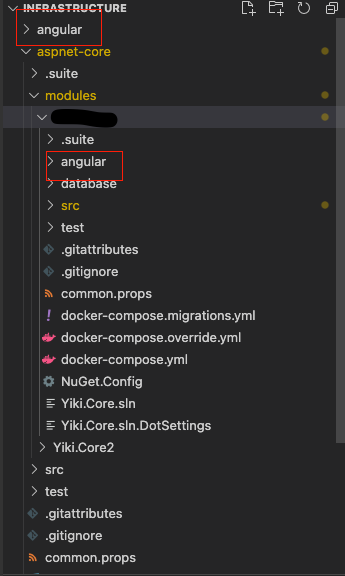 I think the page generated by crud should be under the application module's angle, not under models own angular.
I recommend putting this modules in the outermost directory.
I think the page generated by crud should be under the application module's angle, not under models own angular.
I recommend putting this modules in the outermost directory.
I want to make a module similar to the module you provide, and then pluggable use. Is this method feasible and is there a good method to recommend?









