Hi liangshiwei,
Thanks for the quick reply. If I moved to Integration Service do I still need aa access_token while communication from service to service? When I followed intergration implemntation I gets UnAuthorized exception.
Thanks Krishna
I've implemented microservice to microservice synchronous communication as stated here. The soulution works just fine. I'm able to get data from cross service but every time I hit the endpoint on other service I see a new token is generated and it is causing my OpenIddictTokens just keeps increasing. Can't the once generated token be re-used again for next service call? I see the token is generated with 1 hour of expiration but next service call(Same endpoint) does not consider existing token and generates the new token.
Thanks Krishna
Hi,
Can we please get some resolution on this? We have been blocked for almost a week, waiting on this to get resolved.
Thanks!
hi! yes, i have confirmed that i logged into the CLI:
% abp login-info [15:33:05 INF] You are running the second generation of the ABP CLI. If you're interested in the legacy CLI, see https://abp.io/new-cli [15:33:18 INF] Login info: Name: Surname: Username: sgarad
tried to run the "abp get-source Volo.Abp.LeptonXTheme" command again, and got some new warnings in addition to the same error:
% abp get-source Volo.Abp.LeptonXTheme
[15:34:27 INF] You are running the second generation of the ABP CLI. If you're interested in the legacy CLI, see https://abp.io/new-cli
[15:34:27 INF] Downloading source code of Volo.Abp.LeptonXTheme (Latest)
[15:34:27 INF] Output folder: /Users/lsuh/Projects/temp/abp
[15:34:35 WRN] Failed to get global nuget source: https://nuget.abp.io/<myLicenseKey>/v3/index.json
[15:35:27 ERR] Downloading source code failed for: Volo.Abp.LeptonXTheme
Volo.Abp.Studio.AbpStudioException: Exception of type
'Volo.Abp.Studio.AbpStudioException' was thrown.
at async Task Volo.Abp.Studio.Modules.Installing.SourceCodeDownloader.
DownloadSourceCodeAsync(string moduleName, string targetFolder, string
version, bool includeNightly)
at async Task Volo.Abp.Studio.Cli.Commands.StudioGetSourceCommand.ExecuteAsync(
CommandLineArgs commandLineArgs)
at async Task Volo.Abp.Studio.Cli.StudioCliService.RunInternalAsync(
CommandLineArgs commandLineArgs)
at async Task Volo.Abp.Studio.Cli.StudioCliService.RunAsync(string[] args)
Both my ABP Studio and CLI are at version 0.8.3. Same result.
What exactly is it that throws that exception?
% abp get-source Volo.Abp.LeptonXTheme
[20:05:21 INF] You are running the second generation of the ABP CLI. If you're interested in the legacy CLI, see https://abp.io/new-cli
[20:05:21 INF] Downloading source code of Volo.Abp.LeptonXTheme (Latest)
[20:05:21 INF] Output folder: /Users/lsuh/Projects/temp/abp
[20:06:21 ERR] Downloading source code failed for: Volo.Abp.LeptonXTheme
Volo.Abp.Studio.AbpStudioException: Exception of type
'Volo.Abp.Studio.AbpStudioException' was thrown.
at async Task Volo.Abp.Studio.Modules.Installing.SourceCodeDownloader.
DownloadSourceCodeAsync(string moduleName, string targetFolder, string
version, bool includeNightly)
at async Task Volo.Abp.Studio.Cli.Commands.StudioGetSourceCommand.ExecuteAsync
(CommandLineArgs commandLineArgs)
at async Task Volo.Abp.Studio.Cli.StudioCliService.RunInternalAsync(
CommandLineArgs commandLineArgs)
at async Task Volo.Abp.Studio.Cli.StudioCliService.RunAsync(string[] args)
ABP Framework version: v8.2.x
UI Type: Angular
Database System: EF Core (MySQL)
Auth Server Separated (for Angular): yes
Exception message and full stack trace:
[16:57:31 INF] You are running the second generation of the ABP CLI. If you're interested in the legacy CLI, see https://abp.io/new-cli
[16:57:31 INF] Downloading source code of Volo.Abp.LeptonXTheme (Latest)
[16:57:31 INF] Output folder: /Users/lsuh/Projects/temp/abp
[16:57:49 ERR] Downloading source code failed for: Volo.Abp.LeptonXTheme
Volo.Abp.Studio.AbpStudioException: Exception of type
'Volo.Abp.Studio.AbpStudioException' was thrown.
at async Task Volo.Abp.Studio.Modules.Installing.SourceCodeDownloader.
DownloadSourceCodeAsync(string moduleName, string targetFolder, string
version, bool includeNightly)
at async Task Volo.Abp.Studio.Cli.Commands.StudioGetSourceCommand.ExecuteAsync(
CommandLineArgs commandLineArgs)
at async Task Volo.Abp.Studio.Cli.StudioCliService.RunInternalAsync(
CommandLineArgs commandLineArgs)
at async Task Volo.Abp.Studio.Cli.StudioCliService.RunAsync(string[] args)
Steps to reproduce the issue: Run the following command: abp get-source Volo.Abp.LeptonXTheme
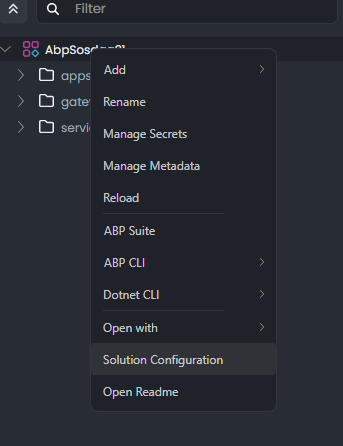
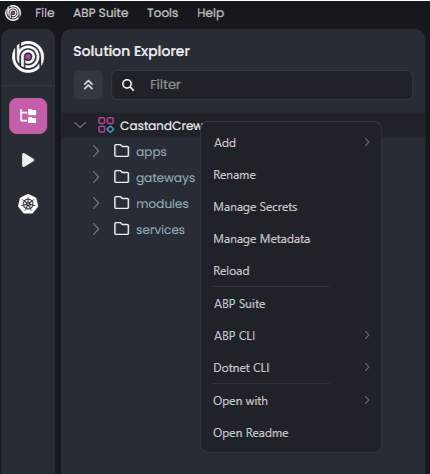
Can you share the
Solution Configuration? I will try to reproduce the problem.
Hi,
I don't see an option for configuration. I'm using enterprise edition.
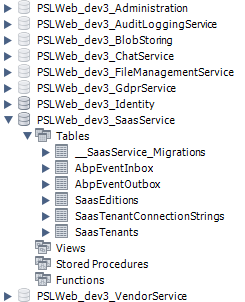
An error occurred using the connection to database 'PSLWeb_dev3_SaasService' on server 'cm1giqldc35kxj7.caxfhp14t2hx.us-west-2.rds.amazonaws.com'. fail: Volo.Abp.RabbitMQ.RabbitMqMessageConsumer[0]
Hi,
We see all the databases have been migrated properly but still AbpPermissionGroups and AbpPermissions table are empty.. Is there any order in which services needs to starts?
Hi @sgarad
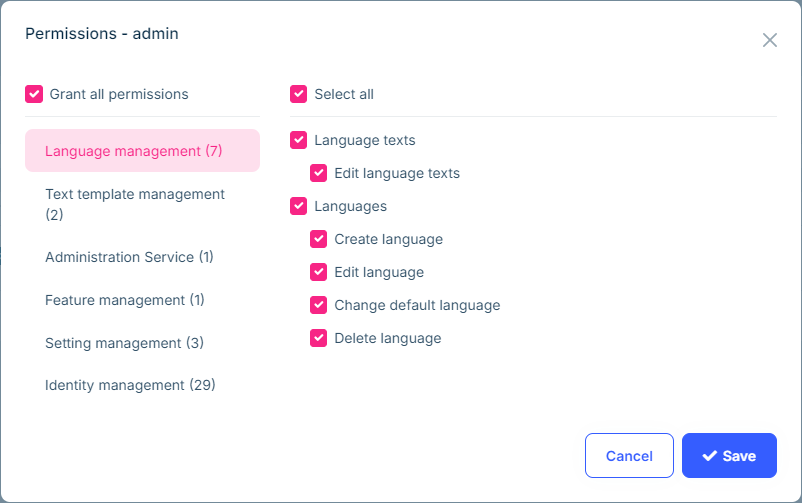
Does the problem persist after you give the missing permissions to
adminonIdentity Management>Rolespage? or are not they present inpermissionswindow?
Hi,
Those permissions are not available in permissions window. Those permissions groups are not created. I've attached the screenshot above in original post.
Thanks Krishna
hi
Have you gotten any error logs in your microservices?
Hi,
This is the new database so initially I got Database does not exists exceptions but once the migrations are applied I started getting below error where I do not have any tenants created yet.
9/3/2024 5:00:30 PM [Information] Found 1 events in the outbox.
9/3/2024 5:00:31 PM [Error] Could not perform tenant created event. Canceling the operation. TenantId = 3a148325-10a8-1caa-e17d-3b436fa27506, TenantName = Tenancy_Test.
9/3/2024 5:00:31 PM [Error] System.NullReferenceException: Object reference not set to an instance of an object.
at Volo.Abp.EntityFrameworkCore.Migrations.EfCoreDatabaseMigrationEventHandlerBase1.MigrateDatabaseSchemaAsync(Nullable1 tenantId)
at Volo.Abp.EntityFrameworkCore.Migrations.EfCoreDatabaseMigrationEventHandlerBase`1.HandleEventAsync(TenantCreatedEto eventData)