Thank you again for getting back and giving more details. The problem is probably related to the custom style parameter as I mentioned before. Do you provide the custom style css files in your styles.scss file as it is explained here?
You need to import your style like this @import 'your-custom-style.css'; .
Thank you for sharing details about your problem. It looks like the problem occurs for the customStyle input here:
  ThemeLeptonModule.forRoot({
    customStyle: true,
  }),
The issue might be related to a style mismatch. Could you also provide how you managed this custom style and whether this style is loaded properly?
This trick is supposed to replace the empty layout and it does so. However, it is a forced solution as you say. So, if you could share how you provide the lepton theme in your app.module.ts or app.config.ts, I would be able to assist based on this.
Hello again,
Thank you for providing extra details. I am suspecting that the abp-application-layout is not initialized correctly. Do you see any error thrown somewhere like this
export function injectStyle(injector: Injector) {
  const rendererFactory = injector.get(RendererFactory2);
  const domInsertion = injector.get(DomInsertionService);
  const _document = injector.get(DOCUMENT);

  rendererFactory
    .createRenderer(_document.body, null)
    .addClass(_document.body, 'abp-application-layout');

  const appStyles: HTMLElement = _document.querySelector('link[rel="stylesheet"][href*="styles"]');
  let content: StyleContentStrategy;
  if (appStyles) {
    const domStrategy = DOM_STRATEGY.BeforeElement(appStyles);
    content = new StyleContentStrategy(styles, domStrategy, undefined, {
      id: LEPTON_STYLE_ELEMENT_ID,
    });
  } else {
    content = CONTENT_STRATEGY.AppendStyleToHead(styles, { id: LEPTON_STYLE_ELEMENT_ID });
  }

  domInsertion.insertContent(content);
}
Hello,
Thank you for explaining your problem by giving details. Since you have migrated from 8.3.4 to 9.3.4 , I need to remind you that we have made some set of adjustments on our side. The most important one is the standalone migration.
You can check details from here
If you have also migrated your application to the new builder system, this could make a difference.
Thant is to say, the module and the token you have shared seem functional and not problematic. However, that would be the best if you could share
If you prefer, you could also share a minimal reproducible example via e-mail. Here is my address: sumeyye.kurtulus@volosoft.com
Thank you for your cooperation.
Hello again,
Thank you for giving extra details on your problem. It appears to be a builder registration mismatch problem and we will be releasing a fix for the next releases https://github.com/abpframework/abp/releases
You can change the localization registration for the time being until we publish the fix.
// app.config.ts
import { registerLocaleForEsBuild } from '@abp/ng.core/locale';
export const appConfig: ApplicationConfig = {
    provideAbpCore(
      withOptions({
        environment,
        registerLocaleFn: registerLocaleForEsBuild(),
      })
    ),
  ],
};
You can let us know if you need further assistance. Thank you for your cooperation.
Hello,
Thank you for providing extra details about your problem. I have tried the same approach on my side. However, I could not produce the same issue on my end. Here is how I have tried logging in as a tenant:
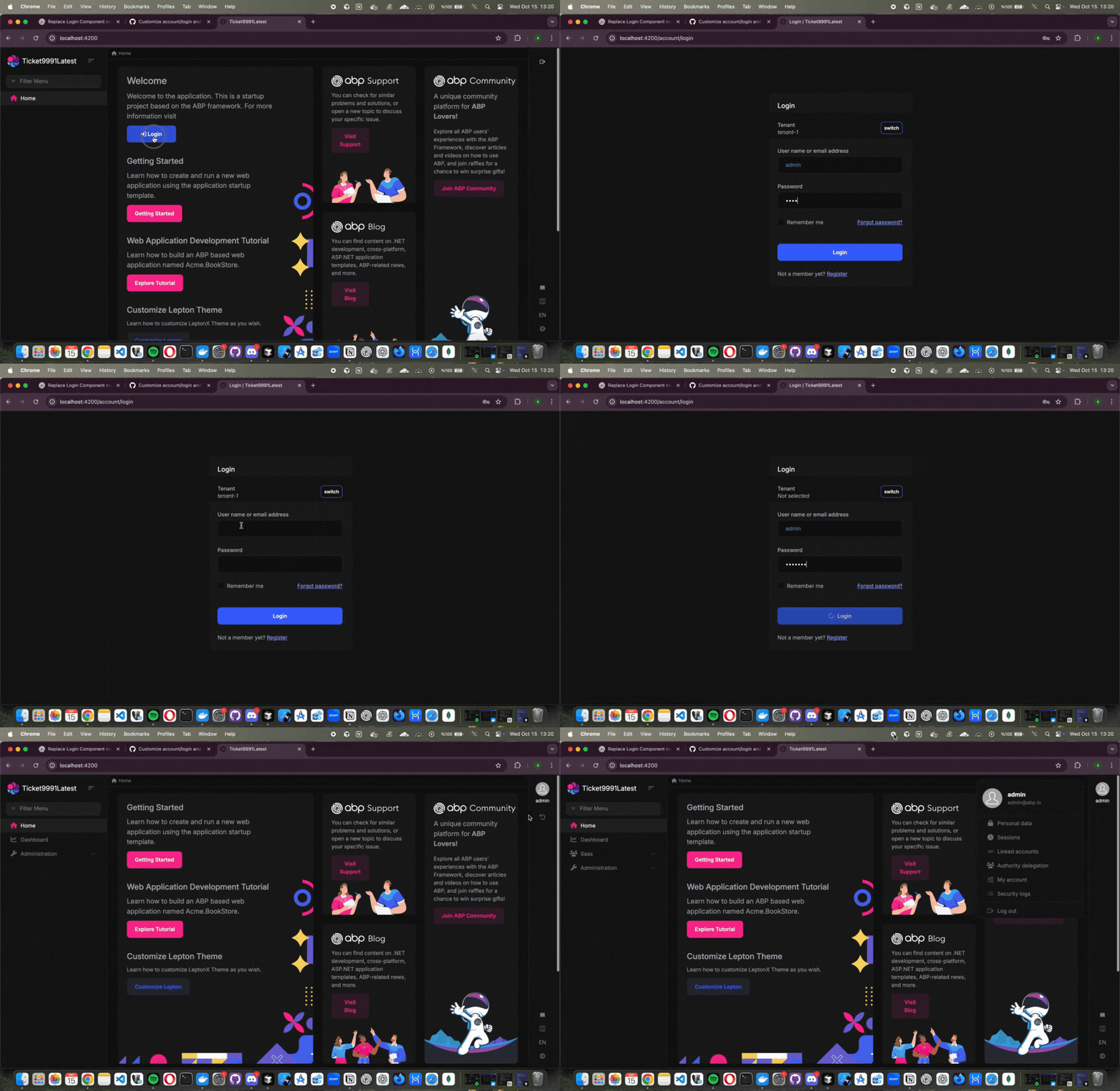
If you think that I have made a mistake while trying to produce the problem, you can guide me. You can also send a minimal, reproducible example to my e-mail address: sumeyye.kurtulus@volosoft.com
Thank you for your cooperation.
Hello again, Thank you for providing extra details about this problem. However, I could not produce the same problem on my end. That would be the best if you could send the project through e-mail. Here is my address: sumeyye.kurtulus@volosoft.com
Hello,
May I ask whether you have been using the standalone or module-based structure? We will also be updating the samples and tutorials.
You can let us know if you need further assistance. Thank you for your cooperation.
Hello, As you may notice from the template, the new Expo version has been applied, and the overall structure has been updated accordingly. We have also addressed the issues you mentioned. I recommend reviewing the latest documentation, which explains the updated structure in detail: 👉 https://abp.io/docs/10.0/framework/ui/react-native?Architecture=Tiered
If you encounter any other issues, I will be happy to assist further. Thank you for your cooperation.









