You're absolutely right to raise this concern. The current setup limits flexibility at some point, and we recognize the need for better control over these options. We will be including the enhancements in the upcoming releases. We appreciate your feedback—it's valuable in shaping a more practical and adaptable LeptonX experience. Thanks for your cooperation!
Hello, thank you for bringing this up!
This behavior is intentional, but if you would like the login button to appear in the mobile navbar, you can use component replacement with eThemeLeptonXComponents.MobileNavbarProfile as a workaround. You can find documentation here: https://abp.io/docs/latest/framework/ui/angular/component-replacement
We’re also open to revisiting the menu structure in future updates. Let me know if you need any help implementing this!
The issue is resolved within the latest release. Can you confirm that your problem is also solved?
Thank you for providing extra details. This problem is solved and related release will be available today. I can suggest you to upgrade to 9.1 until then. I am also refunding your ticket.
Hello, could you please share your package.json if your problem persists?
No, there will be no new item added since I suggested a patch for the parent route. If you can provide how you have implemented the solution, I can assist you further.
Hello, the new route will not be recognized by the navigation configuration if you did not add it to the routes. Because of this, the navigation bar item is not highlighted.
I can suggest you to patch the navigation item according to the navigated details page manually for the time being as explained here: https://abp.io/docs/latest/framework/ui/angular/modifying-the-menu#how-to-patch-or-remove-a-navigation-element
This will require further configuration based on your requirements, but here is a small workaround example:
import { RoutesService } from '@abp/ng.core';
import { Component, inject } from '@angular/core';

@Component({
  selector: 'app-root',
  template: `
    ...
  `,
})
export class AppComponent {
  private routesService = inject(RoutesService);
  constructor() {
    this.routesService.patch('::Menu:Dashboard', {
      path: '/dashboard/test',
    });
  }
}
import { NgModule } from '@angular/core';
import { RouterModule, Routes } from '@angular/router';
import { DashboardComponent } from './dashboard.component';
import { DashboardTestComponent } from '../dashboard-test/dashboard-test.component';

const routes: Routes = [
  {
    path: '',
    component: DashboardComponent,
    children: [{ path: 'test', component: DashboardTestComponent }],
  },
];

@NgModule({
  imports: [RouterModule.forChild(routes)],
  exports: [RouterModule],
})
export class DashboardRoutingModule {}
You're very welcome! I'm happy to assist and look forward to hearing how it goes. Please don't hesitate to reach out if you need any further support.
Yes, exactly. It depends on how you want to implement the override. You can use the component replacement along with the NavbarComponent which may be shorter and easier.
You can also give a path reference in your tsconfig.json as in the screenshot.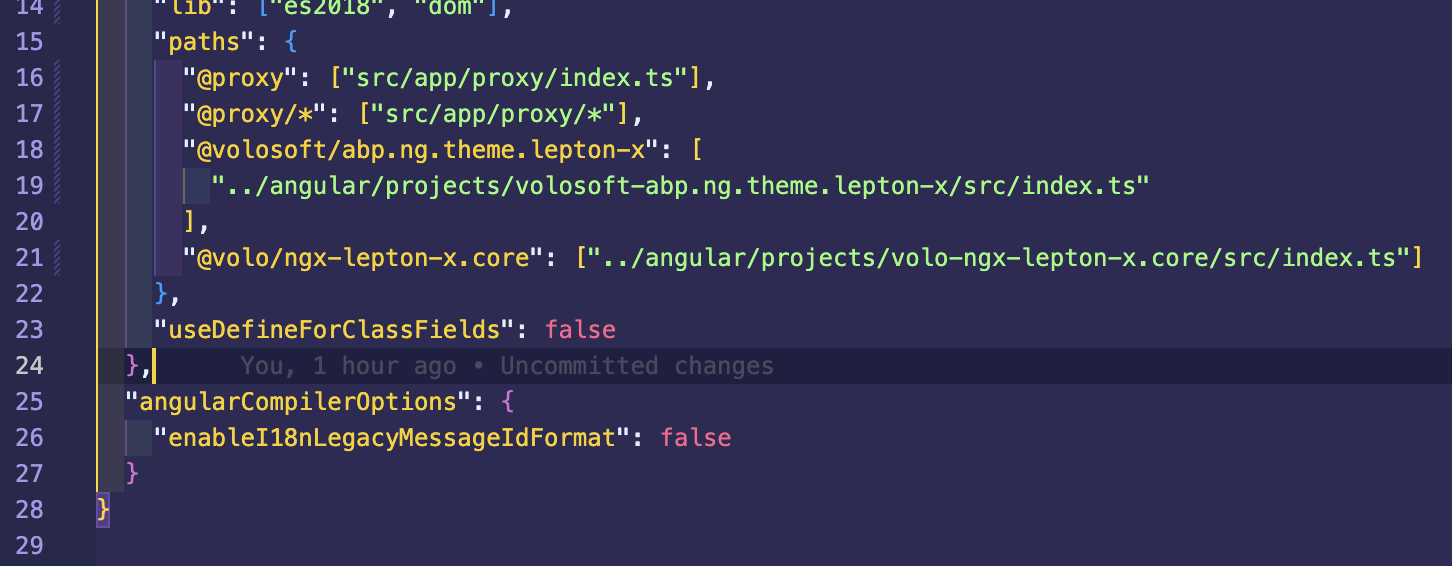
Thank you for your clarification. You can use eThemeLeptonXComponents.Navbar key instead of Toolbar and Settings. If you override this component, you can also add your footer to the sidebar.
Can you perhaps just give me a direction to look for the sidebar or to customize this? I do not want to lose the sidebar which is pre-configured
If you do not want to override the whole navbar and create from scratch, you can check the NavbarComponent inside @volo/ngx-lepton-x.core package.
You can integrate the source code to your project by using this command abp add-package @volo/ngx-lepton-x.core --with-source-code.









