






I’m a bit unsure why this phenomenon has occurred.
It’s always possible to authenticate via the auth server using https://auth.myproject.com
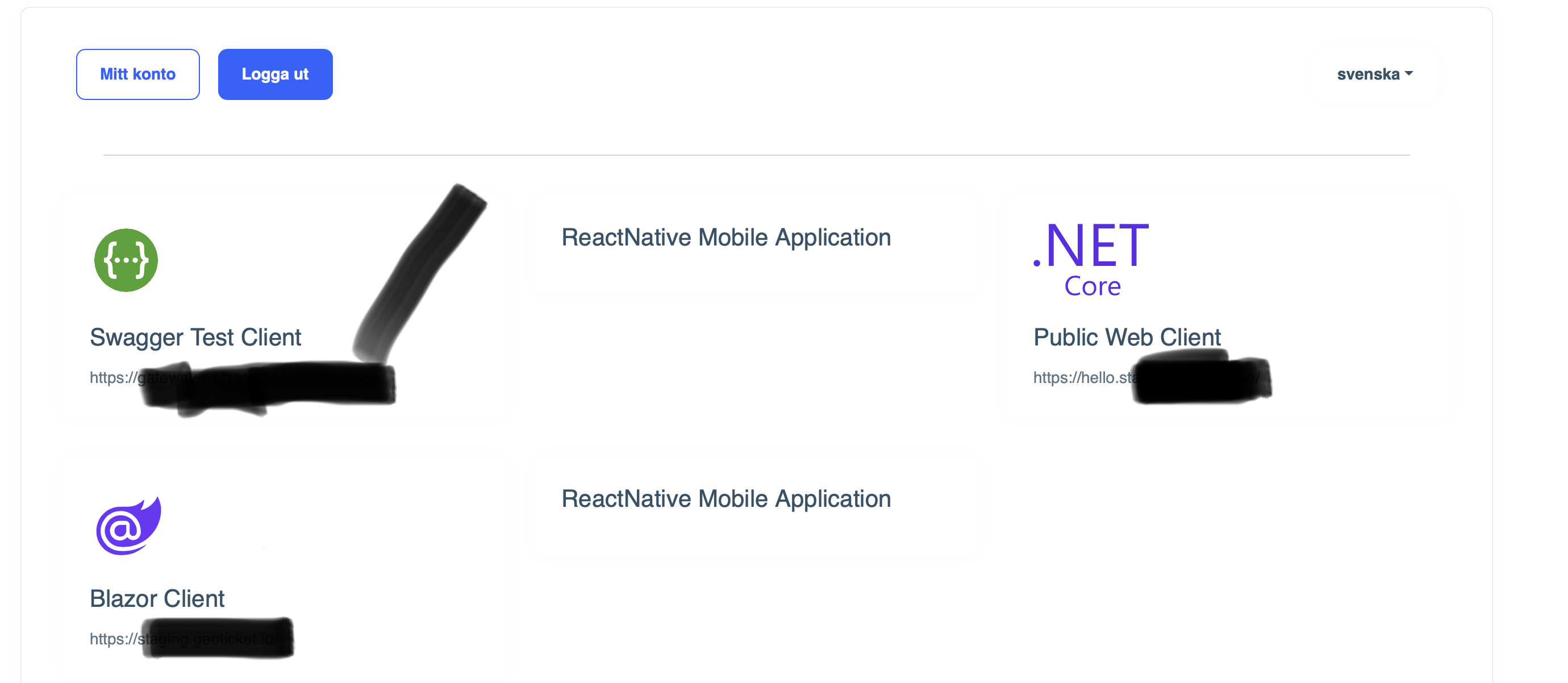
However, when trying to log in through the Blazor app or React Native, it doesn’t work — it usually times out after 100 seconds. "An error occurred during the ABP remote HTTP request. (net_http_request_timedout, 100) See the inner exception for details."
Got this log from myproject-administration pod:
[20:59:27 INF] Request finished HTTP/1.1 GET http://myproject-administration:80/metrics - 200 null application/openmetrics-text; version=1.0.0; charset=utf-8 8.3176ms
[20:59:31 WRN] Failed to refresh remote claims for user: 3a1be950-5cd9-cf87-11ea-182bd6c62a4b
System.Threading.Tasks.TaskCanceledException: The request was canceled due to the configured HttpClient.Timeout of 100 seconds elapsing.
---> System.TimeoutException: A task was canceled.
---> System.Threading.Tasks.TaskCanceledException: A task was canceled.
at System.Threading.Tasks.TaskCompletionSourceWithCancellation`1.WaitWithCancellationAsync(CancellationToken cancellationToken)
at System.Net.Http.HttpConnectionWaiter`1.WaitForConnectionWithTelemetryAsync(HttpRequestMessage request, HttpConnectionPool pool, Boolean async, CancellationToken requestCancellationToken)
at System.Net.Http.HttpConnectionPool.SendWithVersionDetectionAndRetryAsync(HttpRequestMessage request, Boolean async, Boolean doRequestAuth, CancellationToken cancellationToken)
at System.Net.Http.Metrics.MetricsHandler.SendAsyncWithMetrics(HttpRequestMessage request, Boolean async, CancellationToken cancellationToken)
at System.Net.Http.DiagnosticsHandler.SendAsyncCore(HttpRequestMessage request, Boolean async, CancellationToken cancellationToken)
at System.Net.Http.RedirectHandler.SendAsync(HttpRequestMessage request, Boolean async, CancellationToken cancellationToken)
at Microsoft.Extensions.Http.Logging.LoggingHttpMessageHandler.<SendCoreAsync>g__Core|4_0(HttpRequestMessage request, Boolean useAsync, CancellationToken cancellationToken)
at Microsoft.Extensions.Http.Logging.LoggingScopeHttpMessageHandler.<SendCoreAsync>g__Core|4_0(HttpRequestMessage request, Boolean useAsync, CancellationToken cancellationToken)
at System.Net.Http.HttpClient.<SendAsync>g__Core|83_0(HttpRequestMessage request, HttpCompletionOption completionOption, CancellationTokenSource cts, Boolean disposeCts, CancellationTokenSource pendingRequestsCts, CancellationToken originalCancellationToken)
--- End of inner exception stack trace ---
--- End of inner exception stack trace ---
at System.Net.Http.HttpClient.HandleFailure(Exception e, Boolean telemetryStarted, HttpResponseMessage response, CancellationTokenSource cts, CancellationToken cancellationToken, CancellationTokenSource pendingRequestsCts)
at System.Net.Http.HttpClient.<SendAsync>g__Core|83_0(HttpRequestMessage request, HttpCompletionOption completionOption, CancellationTokenSource cts, Boolean disposeCts, CancellationTokenSource pendingRequestsCts, CancellationToken originalCancellationToken)
at Volo.Abp.AspNetCore.Authentication.JwtBearer.DynamicClaims.WebRemoteDynamicClaimsPrincipalContributorCache.RefreshAsync(Guid userId, Nullable`1 tenantId)
at Volo.Abp.Security.Claims.RemoteDynamicClaimsPrincipalContributorCacheBase`1.GetAsync(Guid userId, Nullable`1 tenantId)
[20:59:31 WRN] Failed to refresh remote claims for user: 3a1be950-5cd9-cf87-11ea-182bd6c62a4b
System.Threading.Tasks.TaskCanceledException: The request was canceled due to the configured HttpClient.Timeout of 100 seconds elapsing.
---> System.TimeoutException: A task was canceled.
---> System.Threading.Tasks.TaskCanceledException: A task was canceled.
at System.Threading.Tasks.TaskCompletionSourceWithCancellation`1.WaitWithCancellationAsync(CancellationToken cancellationToken)
at System.Net.Http.HttpConnectionWaiter`1.WaitForConnectionWithTelemetryAsync(HttpRequestMessage request, HttpConnectionPool pool, Boolean async, CancellationToken requestCancellationToken)
at System.Net.Http.HttpConnectionPool.SendWithVersionDetectionAndRetryAsync(HttpRequestMessage request, Boolean async, Boolean doRequestAuth, CancellationToken cancellationToken)
at System.Net.Http.Metrics.MetricsHandler.SendAsyncWithMetrics(HttpRequestMessage request, Boolean async, CancellationToken cancellationToken)
at System.Net.Http.DiagnosticsHandler.SendAsyncCore(HttpRequestMessage request, Boolean async, CancellationToken cancellationToken)
at System.Net.Http.RedirectHandler.SendAsync(HttpRequestMessage request, Boolean async, CancellationToken cancellationToken)
at Microsoft.Extensions.Http.Logging.LoggingHttpMessageHandler.<SendCoreAsync>g__Core|4_0(HttpRequestMessage request, Boolean useAsync, CancellationToken cancellationToken)
at Microsoft.Extensions.Http.Logging.LoggingScopeHttpMessageHandler.<SendCoreAsync>g__Core|4_0(HttpRequestMessage request, Boolean useAsync, CancellationToken cancellationToken)
at System.Net.Http.HttpClient.<SendAsync>g__Core|83_0(HttpRequestMessage request, HttpCompletionOption completionOption, CancellationTokenSource cts, Boolean disposeCts, CancellationTokenSource pendingRequestsCts, CancellationToken originalCancellationToken)
--- End of inner exception stack trace ---
--- End of inner exception stack trace ---
at System.Net.Http.HttpClient.HandleFailure(Exception e, Boolean telemetryStarted, HttpResponseMessage response, CancellationTokenSource cts, CancellationToken cancellationToken, CancellationTokenSource pendingRequestsCts)
at System.Net.Http.HttpClient.<SendAsync>g__Core|83_0(HttpRequestMessage request, HttpCompletionOption completionOption, CancellationTokenSource cts, Boolean disposeCts, CancellationTokenSource pendingRequestsCts, CancellationToken originalCancellationToken)
at Volo.Abp.AspNetCore.Authentication.JwtBearer.DynamicClaims.WebRemoteDynamicClaimsPrincipalContributorCache.RefreshAsync(Guid userId, Nullable`1 tenantId)
at Volo.Abp.Security.Claims.RemoteDynamicClaimsPrincipalContributorCacheBase`1.GetAsync(Guid userId, Nullable`1 tenantId)
at Volo.Abp.Security.Claims.RemoteDynamicClaimsPrincipalContributorBase`2.ContributeAsync(AbpClaimsPrincipalContributorContext context)
Some known issue?
Thanks for great support!
5 Answer(s)
-
0
- Solution The timeout and “Failed to refresh remote claims” logs come from ABP’s Dynamic Claims feature. In UI/microservice apps, ABP uses WebRemoteDynamicClaimsPrincipalContributor to fetch/update claims from the Auth Server via HTTP. If that internal HTTP call can’t reach the Auth Server (wrong URL, blocked by network/proxy, DNS, or service name mismatch), it retries until HttpClient’s default 100s timeout and you see net_http_request_timedout.
Fix it by verifying and applying the steps below:
Confirm the RemoteRefreshUrl and BaseUrl
- The UI (Blazor WASM host API) and each microservice must be able to reach the Auth Server internally.
- Ensure AbpClaimsPrincipalFactoryOptions.RemoteRefreshUrl points to the Auth Server endpoint and is reachable.
- Ensure RemoteServices:Default (or named) BaseUrl for the Auth Server is correct (schema/host/port) and resolvable from inside your cluster/pods.
- If you are on Kubernetes and using service names (e.g., http://authserver), verify the service DNS and the namespace. Cross-namespace calls may require FQDN like http://authserver.identity.svc.cluster.local.
Put MultiTenancy and Authentication in correct middleware order (server apps)
- ABP resolves tenant and then uses auth – wrong order can break tenant-aware remote claim refresh.
- In each server/microservice: app.UseRouting(); app.UseCors(); app.UseAuthentication(); app.UseMultiTenancy(); app.UseAuthorization(); app.UseEndpoints(...);
Check proxy/gateway and CORS
- If you use an API Gateway/Ingress, allow the internal remote-claims call route to pass through. Ensure no auth challenge or rewrite blocks the call.
- If the remote URL is cross-origin (for SPA), CORS must allow it. For server-to-server (internal) calls, CORS isn’t involved, but the gateway must route correctly.
Kubernetes/NGINX specifics
- Verify readiness/liveness and that the Auth Server isn’t restarting during refresh.
- If using NGINX/Ingress, confirm service timeouts aren’t lower than 100s and that HTTP/2 or keep-alive settings aren’t prematurely closing idle connections.
Increase/override the distributed HTTP client timeout (optional)
- ABP remote claims uses an HttpClient under the hood. You can increase timeout to mitigate transient delays:
Configure<AbpHttpClientBuilderOptions>(options =>
  {
      options.ProxyClientBuildActions.Add((remoteServiceName, client) =>
      {
          if (remoteServiceName == "Default" || remoteServiceName == "AuthServer")
          {
              client.Timeout = TimeSpan.FromSeconds(300);
          }
      });
  });
This should not replace fixing connectivity, but helps if your auth service occasionally takes longer.
- Temporarily disable remote dynamic claims (to validate root cause)
- If you disable RemoteDynamicClaims and the timeout disappears, it confirms the issue is the remote claims HTTP reachability.
Configure<AbpClaimsPrincipalFactoryOptions>(opts =>
  {
      opts.IsDynamicClaimsEnabled = false;
  });
Alternatively, provide your own IAbpDynamicClaimsPrincipalContributor that doesn’t call remote. Only use as a diagnostic step.
Blazor WASM specifics
- The WASM app runs in the browser; remote claims fetching happens on the host (server API) that serves as a backend for WASM. Ensure that host can reach the Auth Server using the configured internal URL (not the public browser URL if it’s not routable inside the cluster).
- Ensure OpenIddict/OIDC settings for the WASM client have correct redirect URIs, post-logout URIs, and that the Authority is the public URL for the browser, while the server-to-server BaseUrl is the internal reachable URL for remote claims.
React Native specifics
- Use the public Authority in the mobile app for OIDC.
- The backend (APIs) still needs internal reachability to the Auth Server for remote claims as above.
If the above is correctly configured and you still see refresh timeouts:
- Verify DNS resolution from the failing pod: kubectl exec into the administration pod and curl the Auth Server RemoteRefreshUrl (or its base) to confirm it connects quickly.
- Check Auth Server logs for the corresponding requests. If none are logged, traffic isn’t reaching it (routing or DNS).
- Ensure there is no circular redirect on the remote refresh endpoint (infinite 302s can stall).
- Sources
- ABP Dynamic Claims overview (explains WebRemoteDynamicClaimsPrincipalContributor and RemoteRefreshUrl):
- https://abp.io/docs/latest/framework/fundamentals/dynamic-claims
This response was generated by AI. If it didn’t solve your problem, feel free to post a new answer — our support team will jump in to help you soon.
Markdown supported.Copy, paste, or drag & drop images and files (max 100 MB per file, 100 MB total per post) -
0
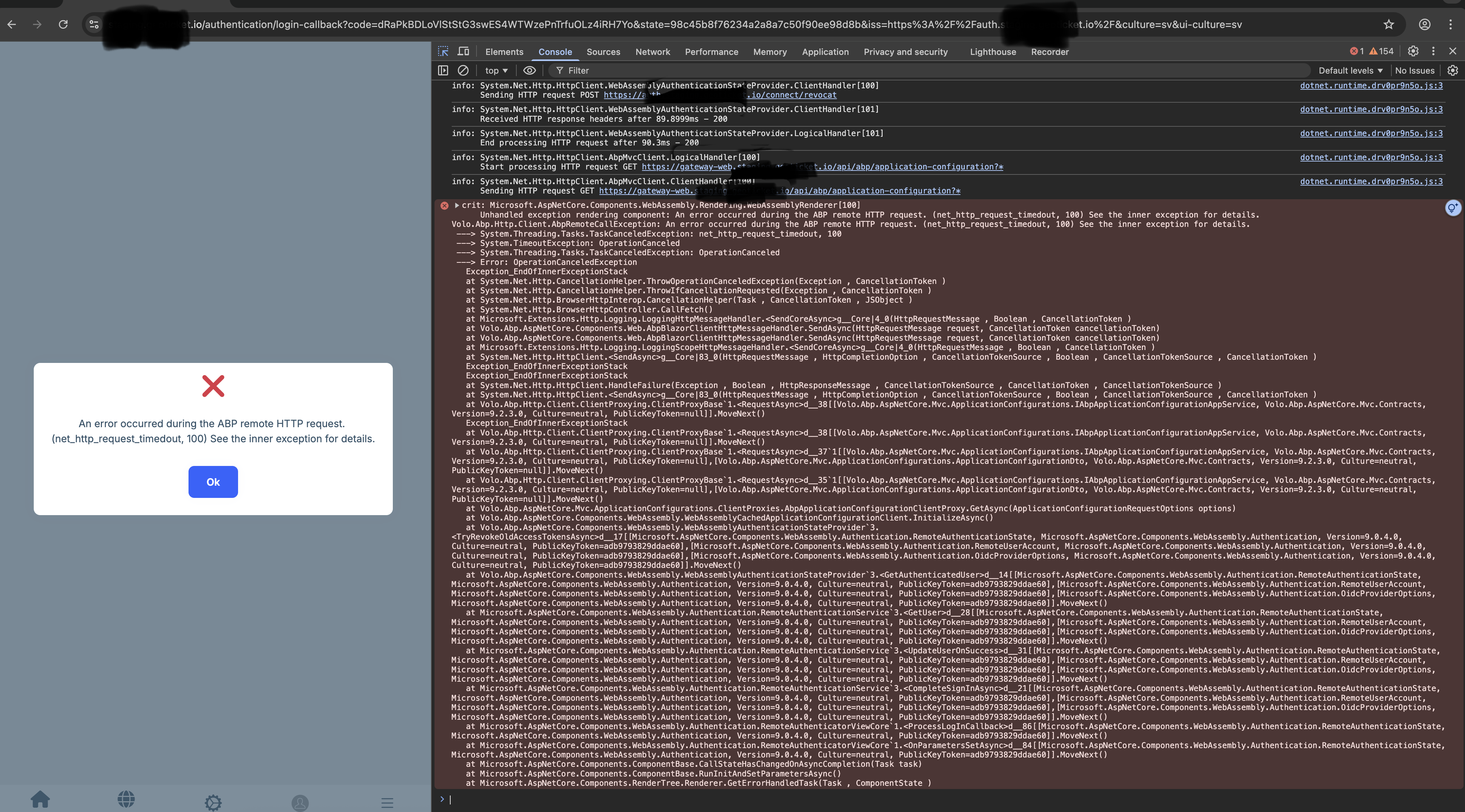
The browser hangs during this URL:
https://myproject.io/authentication/login-callback?code=dRaPkBDLoVlStStG3swES4WTWzePnTrfuOLz4iRH7Yo&state=98c45b8f76234a2a8a7c50f90ee98d8b&iss=https%3A%2F%2Fauth.myproject.io%2F&culture=sv&ui-culture=sv
 Markdown supported.Copy, paste, or drag & drop images and files (max 100 MB per file, 100 MB total per post)
 -
0
hi
Can you try setting
RemoteRefreshUrlfrom https to http in themyproject-administrationproject that is deployed to the Kubernetes environment?PostConfigure<AbpClaimsPrincipalFactoryOptions>(options => { if (!string.IsNullOrEmpty(options.RemoteRefreshUrl)) { options.RemoteRefreshUrl = options.RemoteRefreshUrl.Replace("https://", "http://", StringComparison.OrdinalIgnoreCase); } });
The default value of
RemoteRefreshUrlis the same asAuthServer:Authority. What is its value in your environment?Thanks.
Markdown supported.Copy, paste, or drag & drop images and files (max 100 MB per file, 100 MB total per post) -
0
Thanks,
Sorry for late reply. Don’t know what the problem is. However, I was restoring the database back in time and then it worked.
Markdown supported.Copy, paste, or drag & drop images and files (max 100 MB per file, 100 MB total per post)



