






Hi,
Question 1: Is there a way to display the list of Identity password error messages on separate lines instead of separating them with commas in the Auth Server MVC?
Current Outcome:
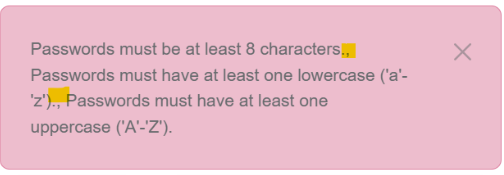
Expected Outcome:
- Passwords must be at least 8 characters.
- Passwords must have at least one lowercase ('a'-'z').
- Passwords must have at least one uppercase('A'-'Z').
Question 2: How can i implement custom Identity Error and display Identity password error messages in MVC UI. For example:
- Passwords must be at least 8 characters.
- Passwords must have at least one lowercase ('a'-'z').
- Passwords must have at least one uppercase('A'-'Z').
- My custom password validation error message.
Thanks.
4 Answer(s)
-
0
hi
1
You can override the
GetLocalizeExceptionMessagemethod ofAccountPageModelIf the exception is
AbpIdentityResultException, use your custom code to get the error message list to an array.https://github.com/abpframework/abp/blob/dev/modules/identity/src/Volo.Abp.Identity.Domain/Microsoft/AspNetCore/Identity/AbpIdentityResultExtensions.cs#L112-L134
2
Add your custom
IdentityPasswordValidatorpublic override void PreConfigureServices(ServiceConfigurationContext context) { PreConfigure<IdentityBuilder>(builder => { builder .AddUserValidator<MaxUserCountValidator>() .AddPasswordValidator<YourAbpIdentityPasswordValidator>(); }); } return new IdentityError { Code = Your_Code, Description = Your_Description };Markdown supported.Copy, paste, or drag & drop images and files (max 100 MB per file, 100 MB total per post) -
0
- Solution
- Show password errors on separate lines (Auth Server MVC)
- Create a custom Account page model by overriding AccountPageModel.GetLocalizedExceptionMessage to split Identity password errors and join them with newline characters.
- Sample implementation:
using System.Linq;
  using System.Text;
  using Microsoft.AspNetCore.Identity;
  using Volo.Abp.Account.Web.Pages.Account;
  using Volo.Abp;
  using Volo.Abp.ExceptionHandling;

  namespace MyCompany.MyProject.Web.Pages.Account
  {
      // Works for Login/Register/Manage pages that inherit AccountPageModel
      public class MyAccountPageModel : AccountPageModel
      {
          protected override string GetLocalizedExceptionMessage(Exception exception)
          {
              // handle ABP-wrapped Identity errors
              if (exception is AbpIdentityResultException abpIdentityEx)
              {
                  // Collect each error description and format as separate lines
                  var lines = abpIdentityEx
                      .IdentityResult
                      .Errors
                      .Select(e => L[e.Description].Value) // localize each description
                      .ToArray();

                  if (lines.Length > 0)
                  {
                      return string.Join(Environment.NewLine, lines);
                  }
              }

              // fallback to the default implementation
              return base.GetLocalizedExceptionMessage(exception);
          }
      }
  }
Then place Razor pages (e.g., Register.cshtml, Login.cshtml, ChangePassword.cshtml) under Pages/Account in your HttpApi.Host and set their @model to your derived PageModel (e.g., CustomRegisterModel : RegisterModel) which in turn can use the above override via a shared base.
ABP already converts IdentityResult to AbpIdentityResultException; you only need to detect it and build your own message list. AbpIdentityResultExtensions exposes helpers to format errors if you prefer to reuse.
Add a custom password validator and return your own error messages
- Implement a custom IPasswordValidator<IdentityUser> (or derive from PasswordValidator<IdentityUser>) and return IdentityError items for your custom rules. Add it via PreConfigure to IdentityBuilder so it runs with the built-in validators.
using System.Threading.Tasks; using Microsoft.AspNetCore.Identity; using Volo.Abp.DependencyInjection; using Volo.Abp.Identity; public class MyPasswordValidator : IPasswordValidator<IdentityUser>, ITransientDependency { public Task<IdentityResult> ValidateAsync(UserManager<IdentityUser> manager, IdentityUser user, string password) { var errors = new List<IdentityError>(); // Example: built-in checks are already configured by IdentityOptions. // Add your own custom rule: if (password?.Contains("my-disallowed-fragment", StringComparison.OrdinalIgnoreCase) == true) { errors.Add(new IdentityError { Code = "MyCustomPasswordRule", Description = "My custom password validation error message." }); } return Task.FromResult(errors.Count == 0 ? IdentityResult.Success : IdentityResult.Failed(errors.ToArray())); } }- Register your validator:
using Microsoft.AspNetCore.Identity;
  using Microsoft.Extensions.DependencyInjection;
  using Volo.Abp.Identity;
  using Volo.Abp.Modularity;

  [DependsOn(typeof(AbpIdentityApplicationModule))]
  public class MyProjectIdentityModule : AbpModule
  {
      public override void PreConfigureServices(ServiceConfigurationContext context)
      {
          PreConfigure<IdentityBuilder>(builder =>
          {
              builder.AddPasswordValidator<MyPasswordValidator>();
              // you can also add user validators: .AddUserValidator<YourUserValidator>()
          });
      }
  }
Localization: you can localize your custom error’s Description with the ABP localization system (e.g., L["MyCustomPasswordRuleMessage"]) before returning it, or return a code and map it to a localized string in your overridden GetLocalizedExceptionMessage.
Notes on sources/extension points
- ABP wraps IdentityResult errors into AbpIdentityResultException; you access the underlying IdentityResult.Errors to construct any UI you like (each error on a new line, bullet list, etc.).
- If you want to keep the default toast but render multi-line text, ensure the UI uses the returned message from GetLocalizedExceptionMessage and preserves line breaks (e.g., white-space CSS or replacing “\n” with <br /> in Razor if needed).
- Sources
- ABP IdentityResult helpers used by AbpIdentityResultException:
- https://github.com/abpframework/abp/blob/dev/modules/identity/src/Volo.Abp.Identity.Domain/Microsoft/AspNetCore/Identity/AbpIdentityResultExtensions.cs#L112-L134
- ABP Module system for PreConfigure/DependsOn:
- https://abp.io/docs/latest/framework/architecture/modularity/basics
- Customizing Account (login) pages and PageModels:
- https://abp.io/community/articles/9a40f3cd
This response was generated by AI. If it didn’t solve your problem, feel free to post a new answer — our support team will jump in to help you soon.
Markdown supported.Copy, paste, or drag & drop images and files (max 100 MB per file, 100 MB total per post) -
0
Hi,
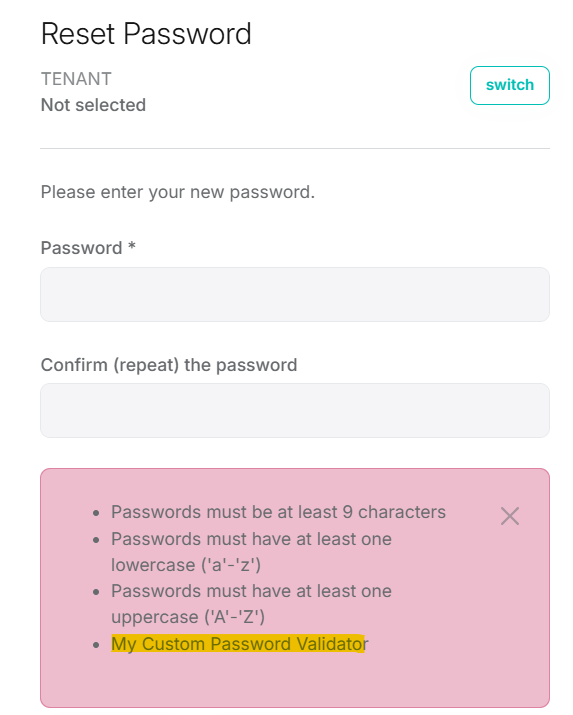
Managed to solve it by overriding components/functions below:
- Override
GetLocalizeExceptionMessageto use new line as separator. - Override PageAlert to loop through list of Identity password error message and display the password using html li element
- Implement & register custom Password Validator
IPasswordValidator<Volo.Abp.Identity.IdentityUser>
Thanks.
Markdown supported.Copy, paste, or drag & drop images and files (max 100 MB per file, 100 MB total per post) - Override



