






I have a self-written API in the AppService of the KSVR service:
http://localhost:44303/api/ksvr/vehicle-owners/lookup/autocomplete?keyword=29.
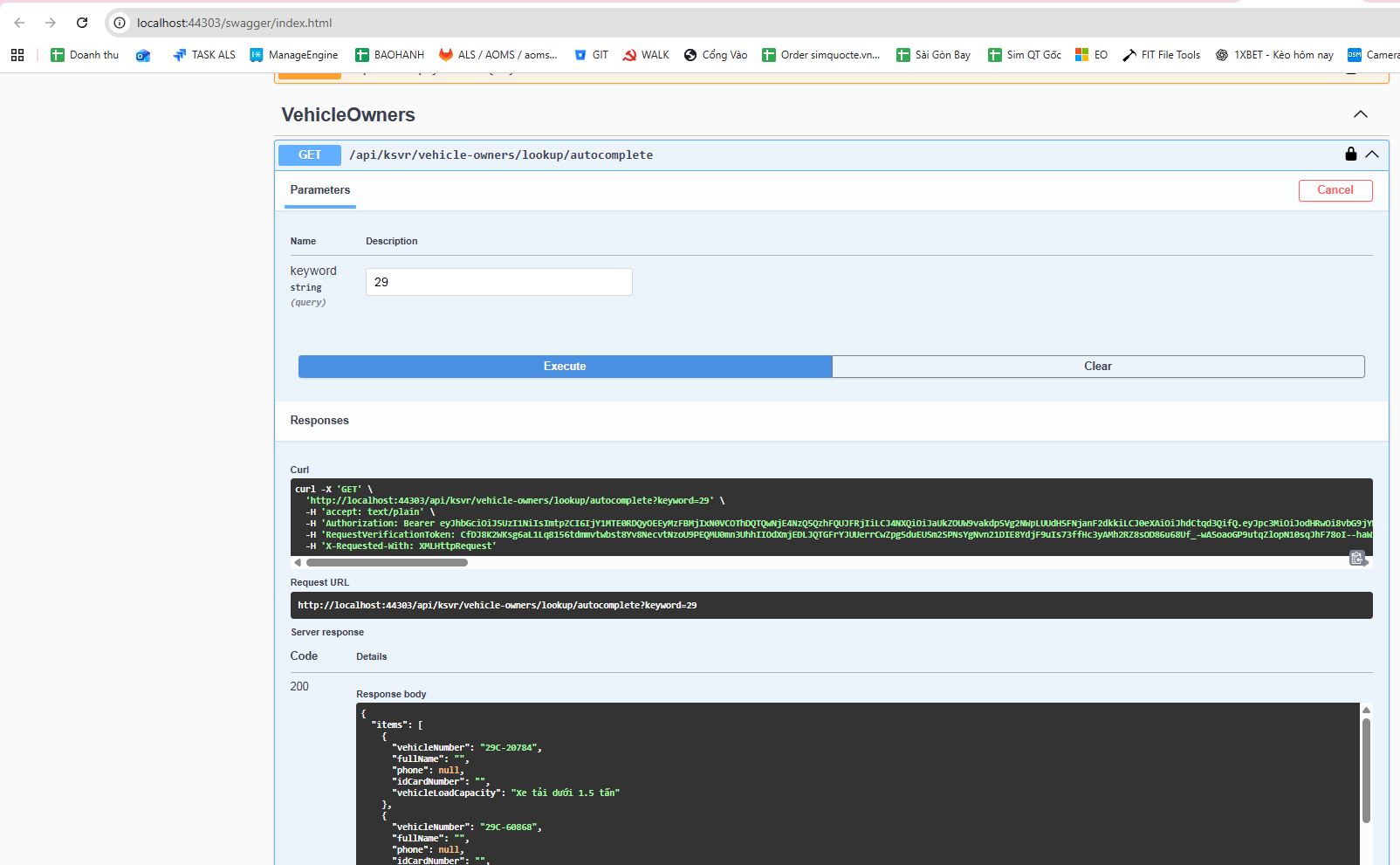 It works fine when tested in Swagger, but when calling it from the web, it returns Not Found.
Meanwhile, another API: http://localhost:44303/api/ksvr/vehicle-owners/1 also works fine in Swagger, and it works fine when called from the web as well.
This is my AppService code file.
using Microsoft.AspNetCore.Authorization;
using Microsoft.AspNetCore.Mvc;
using Microsoft.EntityFrameworkCore;
using System.Collections.Generic;
using System.Linq;
using System.Threading.Tasks;
using Volo.Abp;
using Volo.Abp.Application.Dtos;
using Volo.Abp.Application.Services;
using WebCMS.KSVR.Data.KSVRVehicleOwner;
using WebCMS.KSVR.Entities.KSVRVehicleOwner;
using WebCMS.KSVR.Permissions;
using WebCMS.KSVR.Services.Dtos.KSVRVehicleOwner;
using WebCMS.KSVR.Services.Dtos.Shared;

namespace WebCMS.KSVR.Services.KSVRVehicleOwner;

[Authorize(KSVRPermissions.VehicleOwners.Default)]
[Route("api/ksvr/vehicle-owners")]
public abstract class VehicleOwnersAppServiceBase : ApplicationService
{
    protected readonly IVehicleOwnerRepository _vehicleOwnerRepository;
    protected readonly VehicleOwnerManager _vehicleOwnerManager;

    protected VehicleOwnersAppServiceBase(
        IVehicleOwnerRepository vehicleOwnerRepository,
        VehicleOwnerManager vehicleOwnerManager)
    {
        _vehicleOwnerRepository = vehicleOwnerRepository;
        _vehicleOwnerManager = vehicleOwnerManager;
    }

    // ==============================
    // LOOKUP – PHẢI ĐỂ TRƯỚC {id:int}
    // ==============================

    // GET /api/ksvr/vehicle-owners/lookup/autocomplete?keyword=29
    [HttpGet("lookup/autocomplete")]
    public virtual async Task<ListResultDto<VehicleAutocompleteDto>> AutocompleteAsync(
        [FromQuery] string keyword)
    {
        var query = await _vehicleOwnerRepository.GetQueryableAsync();

        query = query.WhereIf(
            !keyword.IsNullOrWhiteSpace(),
            x => x.VehicleRegNumber.Contains(keyword)
        );

        var items = await query
            .OrderBy(x => x.VehicleRegNumber)
            .Take(100)
            .Select(x => new VehicleAutocompleteDto
            {
                VehicleNumber = x.VehicleRegNumber,
                FullName = x.FullName,
                Phone = x.Phone,
                IdCardNumber = x.IDCardNumber,
                VehicleLoadCapacity = x.VehicleLoadCapacity
            })
            .ToListAsync();

        return new ListResultDto<VehicleAutocompleteDto>(items);
    }

    // ==============================
    // LIST
    // ==============================

    // GET /api/ksvr/vehicle-owners
    [HttpGet]
    public virtual async Task<PagedResultDto<VehicleOwnerDto>> GetListAsync(
        GetVehicleOwnersInput input)
    {
        var totalCount = await _vehicleOwnerRepository.GetCountAsync(
            input.FilterText,
            input.FullName,
            input.IDCardNumber,
            input.Phone,
            input.Address,
            input.Company,
            input.VehicleRegNumber,
            input.Rermarks,
            input.VehicleLoadCapacityIsnMin,
            input.VehicleLoadCapacityIsnMax,
            input.VehicleLoadCapacity,
            input.IsWarning,
            input.TicketTypeMin,
            input.TicketTypeMax
        );

        var items = await _vehicleOwnerRepository.GetListAsync(
            input.FilterText,
            input.FullName,
            input.IDCardNumber,
            input.Phone,
            input.Address,
            input.Company,
            input.VehicleRegNumber,
            input.Rermarks,
            input.VehicleLoadCapacityIsnMin,
            input.VehicleLoadCapacityIsnMax,
            input.VehicleLoadCapacity,
            input.IsWarning,
            input.TicketTypeMin,
            input.TicketTypeMax,
            input.Sorting,
            input.MaxResultCount,
            input.SkipCount
        );

        return new PagedResultDto<VehicleOwnerDto>
        {
            TotalCount = totalCount,
            Items = ObjectMapper.Map<List<VehicleOwner>, List<VehicleOwnerDto>>(items)
        };
    }

    // ==============================
    // GET BY ID
    // ==============================

    // GET /api/ksvr/vehicle-owners/{id}
    [HttpGet("{id:int}")]
    public virtual async Task<VehicleOwnerDto> GetAsync(int id)
    {
        var entity = await _vehicleOwnerRepository.GetAsync(id);
        return ObjectMapper.Map<VehicleOwner, VehicleOwnerDto>(entity);
    }

    // ==============================
    // CREATE
    // ==============================

    // POST /api/ksvr/vehicle-owners
    [Authorize(KSVRPermissions.VehicleOwners.Create)]
    [HttpPost]
    public virtual async Task<VehicleOwnerDto> CreateAsync(
        VehicleOwnerCreateDto input)
    {
        var vehicleOwner = await _vehicleOwnerManager.CreateAsync(
            input.FullName,
            input.IDCardNumber,
            input.Phone,
            input.Address,Please help me resolve this issue.
            input.Company,
            input.VehicleRegNumber,
            input.Rermarks,
            input.VehicleLoadCapacityIsn,
            input.VehicleLoadCapacity,
            input.IsWarning,
            input.TicketType
        );

        return ObjectMapper.Map<VehicleOwner, VehicleOwnerDto>(vehicleOwner);
    }

    // ==============================
    // UPDATE
    // ==============================

    // PUT /api/ksvr/vehicle-owners/{id}
    [Authorize(KSVRPermissions.VehicleOwners.Edit)]
    [HttpPut("{id:int}")]
    public virtual async Task<VehicleOwnerDto> UpdateAsync(
        int id,
        VehicleOwnerUpdateDto input)
    {
        var vehicleOwner = await _vehicleOwnerManager.UpdateAsync(
            id,
            input.FullName,
            input.IDCardNumber,
            input.Phone,
            input.Address,
            input.Company,
            input.VehicleRegNumber,
            input.Rermarks,
            input.VehicleLoadCapacityIsn,
            input.VehicleLoadCapacity,
            input.IsWarning,
            input.TicketType
        );

        return ObjectMapper.Map<VehicleOwner, VehicleOwnerDto>(vehicleOwner);
    }

    // ==============================
    // DELETE
    // ==============================

    // DELETE /api/ksvr/vehicle-owners/{id}
    [Authorize(KSVRPermissions.VehicleOwners.Delete)]
    [HttpDelete("{id:int}")]
    public virtual async Task DeleteAsync(int id)
    {
        await _vehicleOwnerRepository.DeleteAsync(id);
    }
}
here is js code
abp.ajax({ url: abp.appPath + 'api/ksvr/vehicle-owners/lookup/autocomplete', type: 'GET', data: { keyword: params.data.q } }).then(success).catch(failure);
Please help me resolve this issue.
8 Answer(s)
-
0
- Solution The behavior you see almost always comes from how ABP’s Http API pipeline applies:
- Authorization
- Anti-forgery
- Conventional vs attribute routing
- Frontend helper headers (X-Requested-With, Abp-Tenant, etc.)
Swagger succeeds because it automatically sends the required headers (Authorization, X-Requested-With, RequestVerificationToken, etc.). Your browser/web client likely does not. That often results in a 404 Not Found (ABP hides some auth-related responses to avoid information leakage) unless you send the expected headers/tokens.
Checklist to fix the Not Found when calling from Web:
Ensure you send Authorization like Swagger does
- Send a valid Bearer token: Authorization: Bearer <access_token>
Include the ABP Ajax header to avoid anti-forgery validation (GET is safe, but ABP expects the Ajax header in many UI scenarios)
- X-Requested-With: XMLHttpRequest
If you enabled Anti-Forgery (default for MVC/Razor), either:
- Send the RequestVerificationToken header (value from the hidden input/__RequestVerificationToken cookie) like Swagger does, or
- Mark the endpoint to ignore antiforgery: [IgnoreAntiforgeryToken] [HttpGet("lookup/autocomplete")] public virtual Task<ListResultDto<VehicleAutocompleteDto>> AutocompleteAsync([FromQuery] string keyword) { ... }
Confirm your frontend is calling the exact same URL and method
- GET http://localhost:44303/api/ksvr/vehicle-owners/lookup/autocomplete?keyword=29
- If you have a reverse proxy/base path, ensure no extra prefix is added.
If your app is multi-tenant and the request needs tenant context
- Send Abp-TenantId or Abp-Tenant (tenant name) header if required by your app.
- Example: Abp-TenantId: <guid> or Abp-Tenant: <tenant-name>
Ensure route precedence is not overridden
- You already placed [HttpGet("lookup/autocomplete")] before [HttpGet("{id:int}")], which is correct. If you have any global conventions modifying routes (like adding {__tenant}), confirm the final route matches what you call.
Test quickly with curl or Postman using the same headers Swagger shows
- From Swagger “curl” box, copy all headers used there and try the same request outside Swagger. If it works, then add those headers to your web client.
Example: minimal safe controller annotations if you don’t want anti-forgery for GET
[Authorize(KSVRPermissions.VehicleOwners.Default)]
  [Route("api/ksvr/vehicle-owners")]
  public class VehicleOwnersAppService : ApplicationService
  {
      [IgnoreAntiforgeryToken] // optional if you face CSRF checks in your UI pipeline
      [HttpGet("lookup/autocomplete")]
      public virtual async Task<ListResultDto<VehicleAutocompleteDto>> AutocompleteAsync([FromQuery] string keyword)
      {
          ...
      }
  }
And sample JS fetch with the required headers:
const res = await fetch('http://localhost:44303/api/ksvr/vehicle-owners/lookup/autocomplete?keyword=29', {
    method: 'GET',
    headers: {
      'Authorization': `Bearer ${accessToken}`,
      'X-Requested-With': 'XMLHttpRequest'
      // 'RequestVerificationToken': csrfToken // if needed in your setup
      // 'Abp-Tenant': tenantName // if multi-tenant by name
    },
    credentials: 'include'
  });
Why your other API works while autocomplete doesn’t
- The “by id” route might be hit from a tool that automatically includes Authorization (or your web call includes the token there), or your browser cached a token/cookie. The lookup route likely misses one of the headers above, causing ABP to return 404.
- Sources
- https://docs.abp.io/en/abp/latest/API/Auto-API-Controllers
This response was generated by AI. If it didn’t solve your problem, feel free to post a new answer — our support team will jump in to help you soon.
Markdown supported.Copy, paste, or drag & drop images and files (max 100 MB per file, 100 MB total per post) -
0
Maliming, please help me !!!!!!!!
Markdown supported.Copy, paste, or drag & drop images and files (max 100 MB per file, 100 MB total per post) -
0
hi
It works fine when tested in Swagger, but when calling it from the web, it returns Not Found. also works fine in Swagger, and it works fine when called from the web as well.
How did you call it from your web?
Can you share the call codes for the
works and not workingcases?Thanks.
Markdown supported.Copy, paste, or drag & drop images and files (max 100 MB per file, 100 MB total per post) -
0
[maliming] said: hi
It works fine when tested in Swagger, but when calling it from the web, it returns Not Found. also works fine in Swagger, and it works fine when called from the web as well.
How did you call it from your web?
Can you share the call codes for the
works and not workingcases?Thanks.
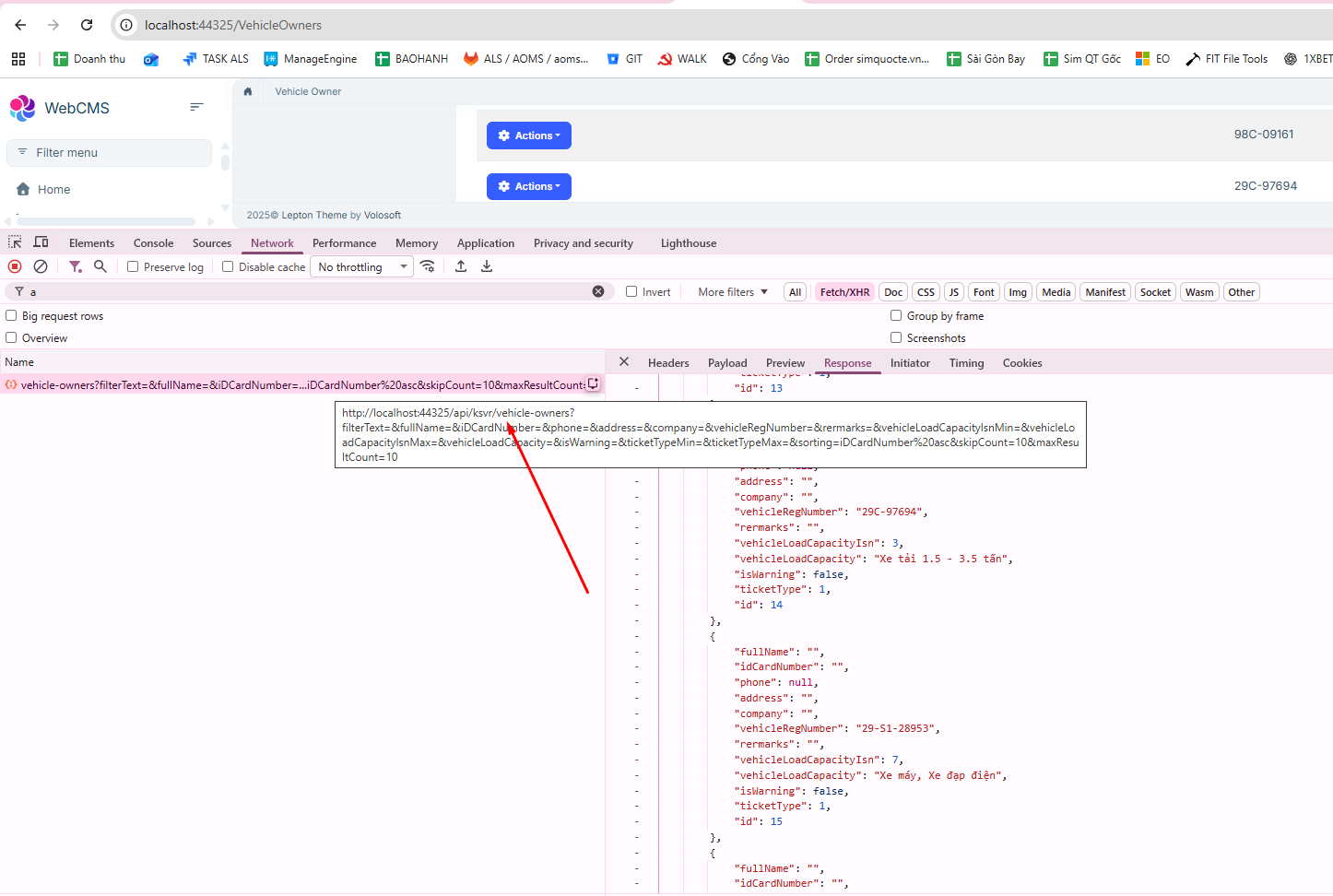
The APIs generated when I create CRUD using ABP Suite work normally when running on the web, as shown in the image.
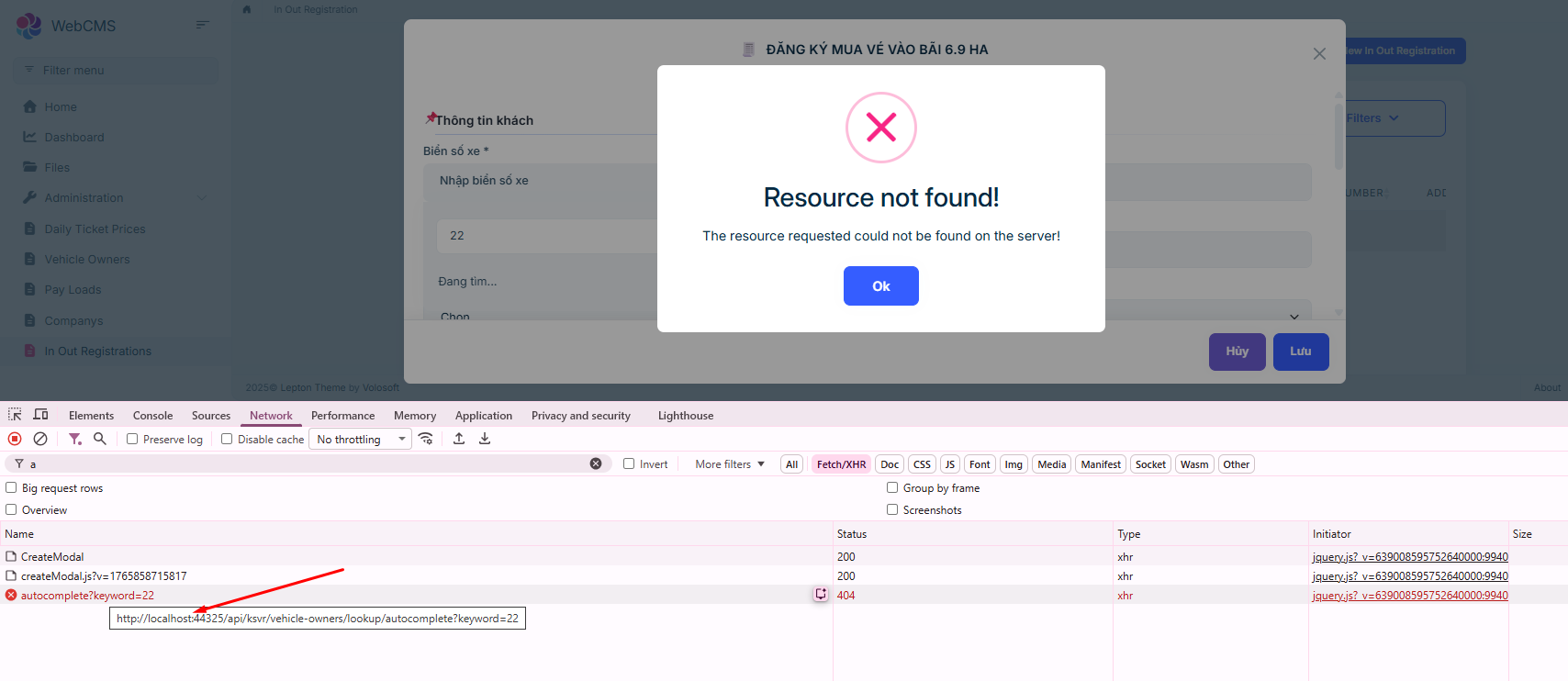
 However, the API that I manually added to the AppService returns Not Found when called from the web.
 Markdown supported.Copy, paste, or drag & drop images and files (max 100 MB per file, 100 MB total per post)
 -
0
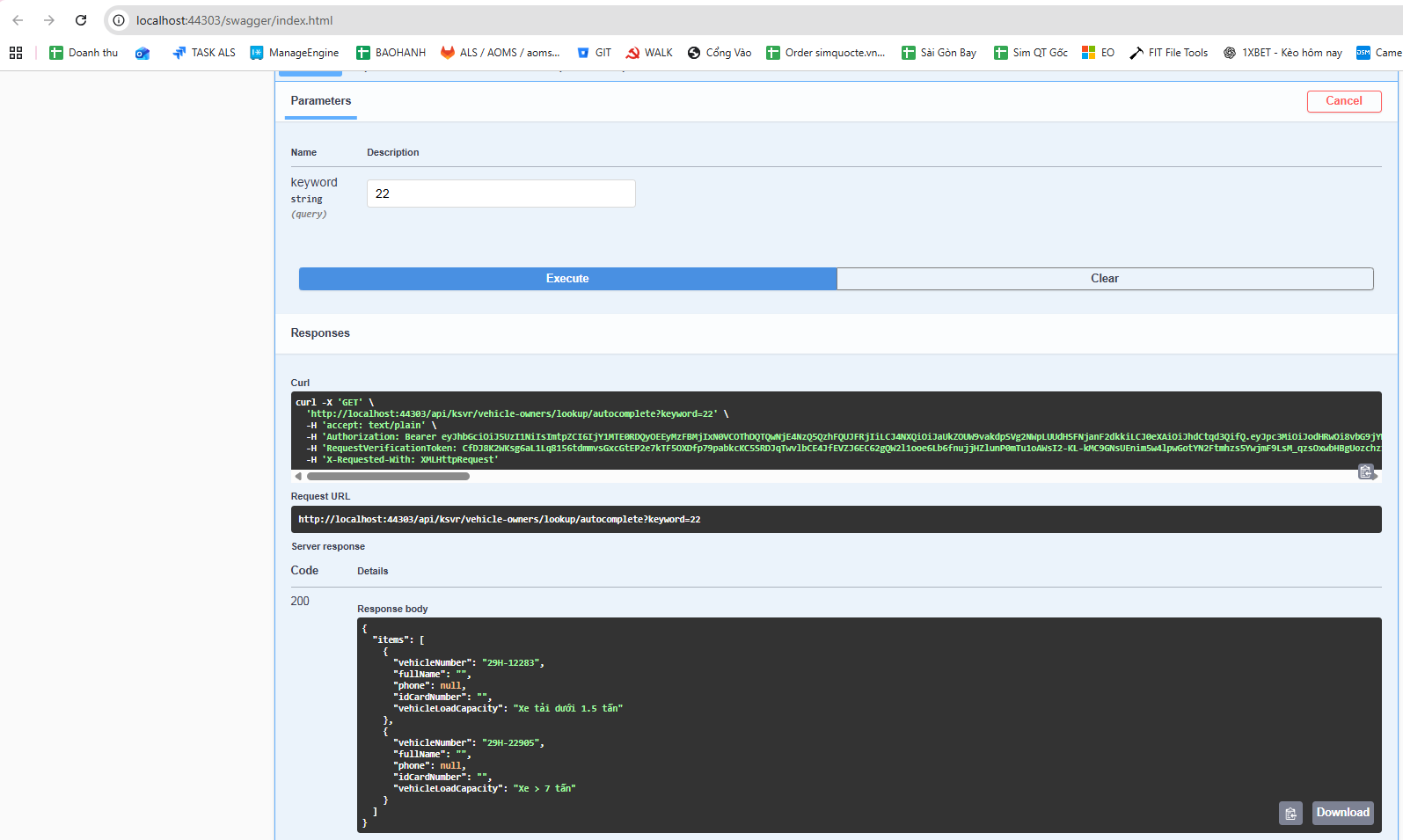
It works fine when running in Swagger in the KSVR service.
 Markdown supported.Copy, paste, or drag & drop images and files (max 100 MB per file, 100 MB total per post)
 -
0
[maliming] said: Please check the logs in http://localhost:44325/ gateway website.
I have resolved the issue. Thank you.
Markdown supported.Copy, paste, or drag & drop images and files (max 100 MB per file, 100 MB total per post)



