






- Template: app
- Created ABP Studio Version: 0.9.12
- Current ABP Studio Version: 0.9.26
- Tiered: Yes
- Multi-Tenancy: Yes
- UI Framework: angular
- Theme: leptonx
- Theme Style: system
- Progressive Web App: No
- Database Provider: ef
- Database Management System: postgresql
- Separate Tenant Schema: Yes
- Mobile Framework: none
- Public Website: Yes
- Include Tests: Yes
- Optional Modules:
- GDPR
- FileManagement
- TextTemplateManagement
- LanguageManagement
- AuditLogging
- SaaS
- OpenIddictAdmin
We are trying to add a login hint to the login page on the Auth Server (MVC), and thought that's an easy task, but for some reason can't get it to work :(
We are overriding the Login.cs page by having a OurProductLogin.cshtml.cs file in /Pages/Account (as well as the _ViewImports.cshtml)
Content of OurProductLogin.cshtml.cs:
using System.Threading.Tasks;
using company.Product.Saas;
using Microsoft.AspNetCore.Authentication;
using Microsoft.AspNetCore.Identity;
using Microsoft.AspNetCore.Mvc;
using Microsoft.Extensions.Options;
using Owl.reCAPTCHA;
using Volo.Abp.Account.ExternalProviders;
using Volo.Abp.Account.Public.Web;
using Volo.Abp.Account.Public.Web.Pages.Account;
using Volo.Abp.Account.Security.Recaptcha;
using Volo.Abp.Auditing;
using Volo.Abp.DependencyInjection;
using Volo.Abp.Security.Claims;
using Volo.Abp.Uow;

namespace company.Product.Pages.Account;

[DisableAuditing]
[Dependency(ReplaceServices = true)]
[ExposeServices(typeof(LoginModel))]
public class OurProductLoginModel: LoginModel
{
    [BindProperty(SupportsGet = true)]
    public string? test { get; set; }

    public OurProductLoginModel(
        IAuthenticationSchemeProvider schemeProvider,
        IOptions<AbpAccountOptions> accountOptions,
        IAbpRecaptchaValidatorFactory recaptchaValidatorFactory,
        IAccountExternalProviderAppService accountExternalProviderAppService,
        ICurrentPrincipalAccessor currentPrincipalAccessor,
        IOptions<IdentityOptions> identityOptions,
        IOptionsSnapshot<reCAPTCHAOptions> reCaptchaOptions) : base(schemeProvider, accountOptions, recaptchaValidatorFactory, accountExternalProviderAppService, currentPrincipalAccessor, identityOptions, reCaptchaOptions)
    {
    }

    public override async Task<IActionResult> OnGetAsync()
    {
        var result = await base.OnGetAsync();

        if (!string.IsNullOrEmpty(test))
        {
            LoginInput.UserNameOrEmailAddress = test;
        }

        return result;
    }
}
As you can see, this seems as simple as it can get :)
However, when using a Browser GET request to /Account/Login?test=test@test.com, the Username field is not pre-filled as we'd expect.
What are we doing wrong?
(Note: We have also tried this permutation of the OnGetAsync() function, without relying on the base.OnGetAsync()):
public override async Task<IActionResult> OnGetAsync()
{
    LoginInput = new LoginInputModel();
    if (!string.IsNullOrEmpty(test))
    {
        LoginInput.UserNameOrEmailAddress = test;
    }

    var localLoginResult = await CheckLocalLoginAsync();
    if (localLoginResult != null)
    {
        return localLoginResult;
    }

    IsSelfRegistrationEnabled = await SettingProvider.IsTrueAsync(AccountSettingNames.IsSelfRegistrationEnabled);

    UseCaptcha = await UseCaptchaOnLoginAsync();

    IsLinkLogin = await VerifyLinkTokenAsync();
    if (IsLinkLogin)
    {
        if (CurrentUser.IsAuthenticated)
        {
            await IdentitySecurityLogManager.SaveAsync(new IdentitySecurityLogContext
            {
                Identity = IdentitySecurityLogIdentityConsts.Identity,
                Action = IdentitySecurityLogActionConsts.Logout
            });

            await SignInManager.SignOutAsync();

            return Redirect(HttpContext.Request.GetDisplayUrl());
        }
    }

    return Page();
}
Also note: While debugging, the Property test is indeed null in the OnGetAsync() method.
Edit: The more I try to understand this, the more questions I have :)
What's the deal with OpenIddictSupportedLoginModel, do I need to use this? (I can't really find any official documentation about this, so I assume not? If yes -> Documentation definitely needs to be improved).
In there, it seems that it <could> use a LoginHint already, but the base.OnGetAsync() overwrites the LoginInput property and would erase the value again, right?
Thanks Michel
10 Answer(s)
-
0
hi
If you are using OpenIddict, you need to override the
OpenIddictSupportedLoginModel[ExposeServices(typeof(LoginModel), typeof(OpenIddictSupportedLoginModel))] public class MyOpenIddictSupportedLoginModel : OpenIddictSupportedLoginModelI have update the document.
https://github.com/abpframework/abp/pull/22770
Markdown supported.Copy, paste, or drag & drop images and files (max 100 MB per file, 100 MB total per post) -
0
hi
[DisableAuditing] [Dependency(ReplaceServices = true)] [ExposeServices(typeof(LoginModel), typeof(OpenIddictSupportedLoginModel))] public class MyCustomLogin : OpenIddictSupportedLoginModel { public MyCustomLogin(IAuthenticationSchemeProvider schemeProvider, IOptions<AbpAccountOptions> accountOptions, IAbpRecaptchaValidatorFactory recaptchaValidatorFactory, IAccountExternalProviderAppService accountExternalProviderAppService, ICurrentPrincipalAccessor currentPrincipalAccessor, IOptions<IdentityOptions> identityOptions, IOptionsSnapshot<reCAPTCHAOptions> reCaptchaOptions, AbpOpenIddictRequestHelper openIddictRequestHelper) : base(schemeProvider, accountOptions, recaptchaValidatorFactory, accountExternalProviderAppService, currentPrincipalAccessor, identityOptions, reCaptchaOptions, openIddictRequestHelper) { } public override async Task<IActionResult> OnGetAsync() { var result = await base.OnGetAsync(); if (LoginInput.UserNameOrEmailAddress.IsNullOrWhiteSpace()) { LoginInput.UserNameOrEmailAddress = Request.Query["TestUrlParameter"]; } return result; } }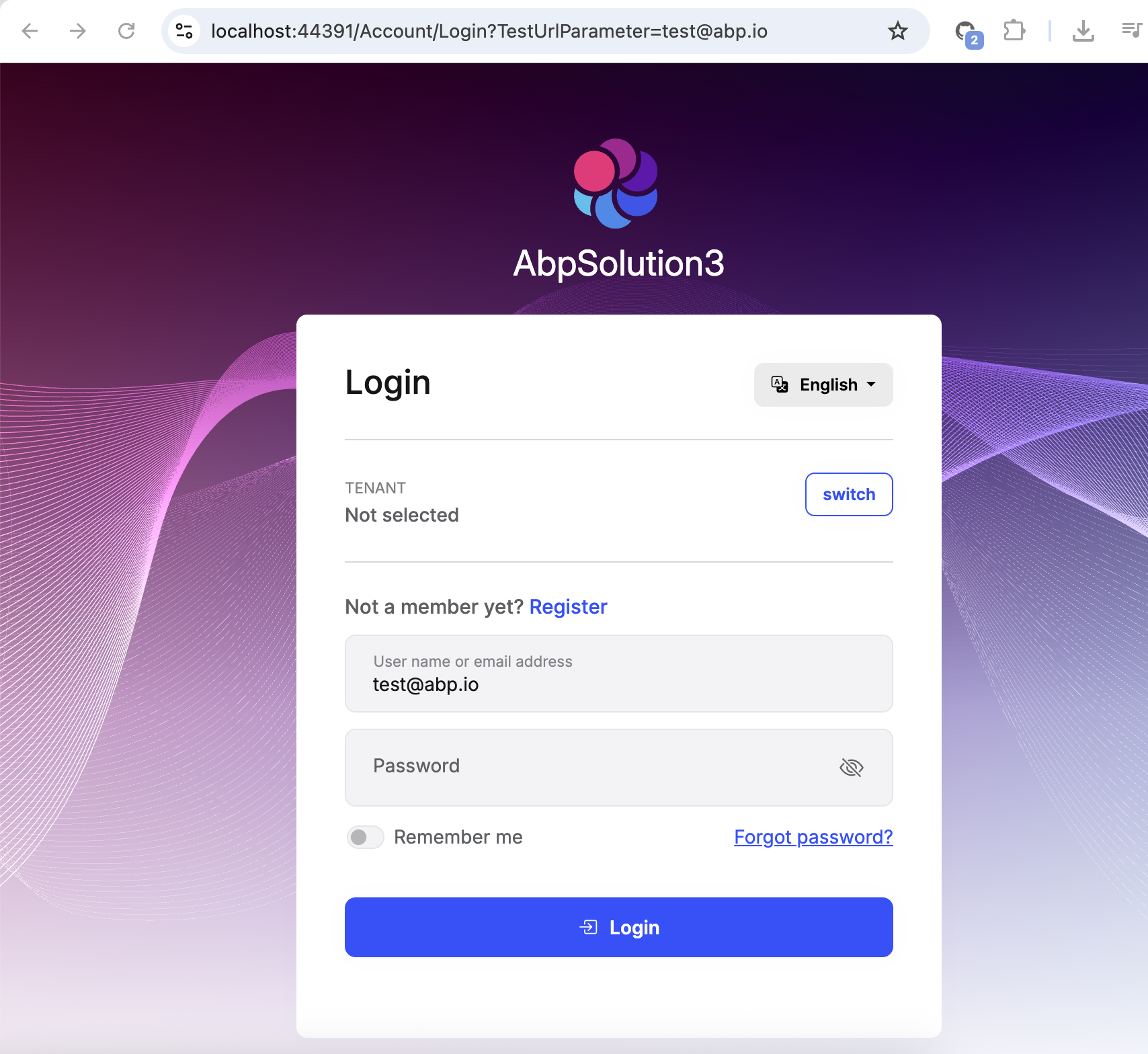 Markdown supported.Copy, paste, or drag & drop images and files (max 100 MB per file, 100 MB total per post)
 -
0
hi
I have also created a PR to fix the overwriting of the Login Hint: https://github.com/abpframework/abp/pull/22887
Thanks. I will check it. : )
Markdown supported.Copy, paste, or drag & drop images and files (max 100 MB per file, 100 MB total per post) -
0
hi
[DisableAuditing]
[Dependency(ReplaceServices = true)]
[ExposeServices(typeof(LoginModel), typeof(OpenIddictSupportedLoginModel))]
public class MyCustomLogin : OpenIddictSupportedLoginModel
{
    public MyCustomLogin(IAuthenticationSchemeProvider schemeProvider, IOptions<AbpAccountOptions> accountOptions, IAbpRecaptchaValidatorFactory recaptchaValidatorFactory, IAccountExternalProviderAppService accountExternalProviderAppService, ICurrentPrincipalAccessor currentPrincipalAccessor, IOptions<IdentityOptions> identityOptions, IOptionsSnapshot<reCAPTCHAOptions> reCaptchaOptions, AbpOpenIddictRequestHelper openIddictRequestHelper) : base(schemeProvider, accountOptions, recaptchaValidatorFactory, accountExternalProviderAppService, currentPrincipalAccessor, identityOptions, reCaptchaOptions, openIddictRequestHelper)
    {
    }

    public override async Task<IActionResult> OnGetAsync()
    {
        var result = await base.OnGetAsync();

        if (LoginInput.UserNameOrEmailAddress.IsNullOrWhiteSpace())
        {
            LoginInput.UserNameOrEmailAddress = Request.Query["TestUrlParameter"];
        }

        return result;
    }
}
Yes, that is a workaround. But the default databinding of ASP.NET Core should also work, shouldn't it?
Markdown supported.Copy, paste, or drag & drop images and files (max 100 MB per file, 100 MB total per post) -
0
hi
I think the ASP.NET Core only checks the
BindPropertyof the baseLoginModelclass.Somehow I was under the impression that this should work, but if it's the expected behavior, then that's fine of course.
Markdown supported.Copy, paste, or drag & drop images and files (max 100 MB per file, 100 MB total per post)


