






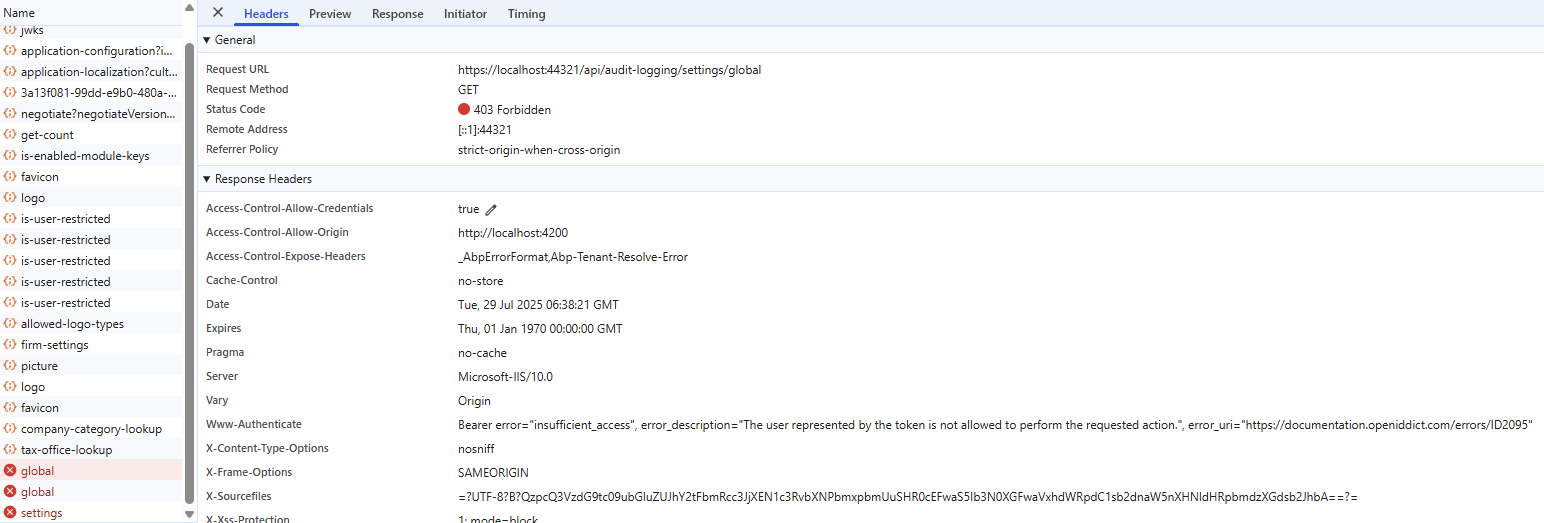
Hello, I am receiving a 403 error when attempting to open Administration -> Settings -> Log Management Page. I have overridden the backend services, but the breakpoint is still not being reached due to the 403 error. Could you please assist me with this issue? Best regards.
[Dependency(ReplaceServices = true)] [ExposeServices(typeof(IAuditLogSettingsAppService))] public class AuditSettingsAppService : AuditLogSettingsAppService, IAuditLogSettingsAppService { public AuditSettingsAppService(ISettingManager settingManager) : base(settingManager) { }
 public override Task<AuditLogSettingsDto> GetAsync()
 {
     return base.GetAsync();
 }

 public override Task<AuditLogGlobalSettingsDto> GetGlobalAsync()
 {
     return base.GetGlobalAsync();
 }
}
2 Answer(s)
-
0
- The 403 Forbidden error when accessing the Log Management (Audit Logging Settings) page in ABP usually means the current user does not have the required permission to access the endpoint (
/api/audit-logging/settings/global). - This is not related to your service override; the request is blocked before your service is called due to authorization.
How to resolve:
Check Permissions:
- Ensure the user/role has the
AuditLogging.Settingsor similar permission. In ABP, access to settings pages is controlled by permissions. - Go to Administration → Identity Management → Roles, select the relevant role (e.g., admin), and ensure the permission for Audit Logging Settings is granted.
- Ensure the user/role has the
Multi-Tenancy:
- If you are using a tiered setup, make sure you are logged in as the correct tenant or host. Some settings are only available to the host.
Token/Claims:
- The error message
insufficient_accessindicates the access token does not have the required claims. Make sure you are logged in with a user that has the correct permissions and that the token is refreshed after permission changes.
- The error message
Custom Permissions:
- If you have customized permissions or overridden the default permission provider, ensure the permission name matches what the UI expects.
Restart & Cache:
- After changing permissions, log out and log in again, and clear any distributed cache (e.g., Redis) if used.
Reference Implementation:
- Official ABP Audit Logging documentation:
- https://abp.io/docs/latest/audit-logging
Summary:
Grant the required permission to the user/role for accessing Audit Logging Settings. The 403 error is an authorization issue, not a service override problem.
This response was generated by AI. If it didn’t solve your problem, feel free to post a new answer — our support team will jump in to help you soon.
Markdown supported.Copy, paste, or drag & drop images and files (max 100 MB per file, 100 MB total per post) - The 403 Forbidden error when accessing the Log Management (Audit Logging Settings) page in ABP usually means the current user does not have the required permission to access the endpoint (
-
0
hi
Please share the debug logs(
logs.txt) of http error 403.https://abp.io/support/questions/8622/How-to-enable-Debug-logs-for-troubleshoot-problems
liming.ma@volosoft.com
Thanks
Markdown supported.Copy, paste, or drag & drop images and files (max 100 MB per file, 100 MB total per post)



